Lenovo IdeaPad Slim 3i Gen 11 17.3" 2024, Core 7 350, 16GB, 512GB SSD, Luna Grey
The 17.3-inch 1920x1080 IPS display with 300 nits and 72% NTSC color coverage makes this a solid choice for long study sessions, paired with a 6-core Intel Core 7 350 processor and 16GB DDR5 RAM. The 60Wh battery and Wi-Fi 6 support keep it portable and connected for daily use, while the backlit keyboard adds convenience for late-night work. Best for students who need a large-screen laptop for note-taking, research, and everyday tasks, though it is not suited for gaming.

No current retailer price
Snapshot
The 30-Second Version
The IdeaPad Slim 3i Gen 11 is a big-screen budget laptop that's honest about its limits. You get a 17.3-inch IPS display, a six-core Core 7 350 and 16GB of DDR5 for EUR 849 at Lenovo, though other listings run as high as EUR 1,223. Gaming is off the table with a 9.1/100 score, and it's one of the least portable machines in our data. Great desk-bound student laptop, wrong choice for anything else.
Pros & Cons
Pros
- Big 17.3-inch IPS panel gives you room for side-by-side windows 82nd
- 16GB of DDR5 as standard, solidly mid-pack for this category 78th
- Affordability ranks well above average, EUR 849 at Lenovo
- Reliability rating is strong in our scoring model
- Backlit keyboard and Wi-Fi 6 included
Cons
- Gaming score of 9.1/100, integrated GPU near the bottom of our rankings
- Port selection lags behind most laptops we track
- 17.3-inch chassis ranks among the least compact in the category
- 60Hz, 300-nit panel is only average for the class
- 512GB SSD is mid-pack and fills quickly with media
The proof
Performance
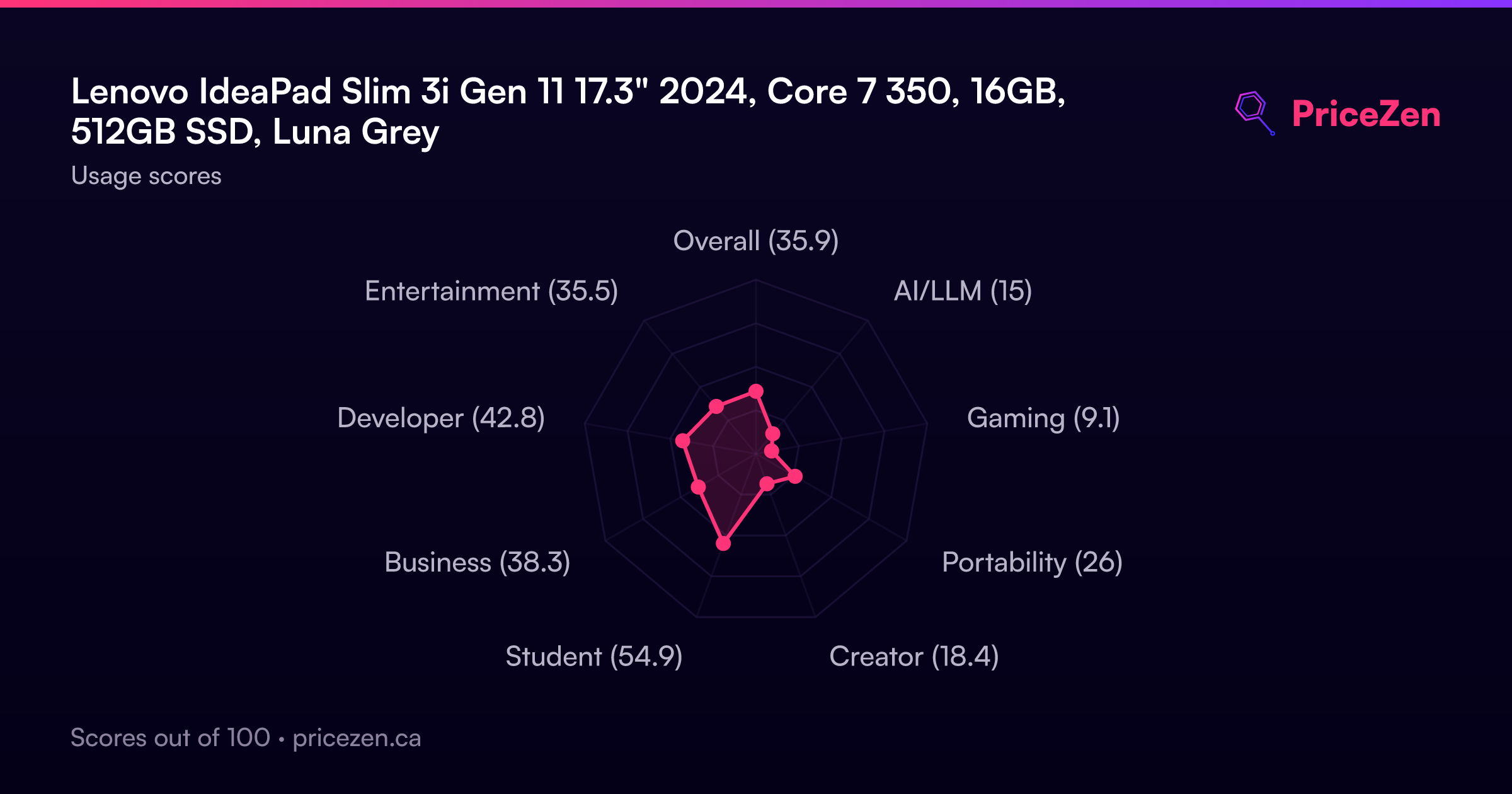
The Core 7 350 scores right around the middle of the pack in our CPU rankings, and that's genuinely fine for the job this laptop is chasing. Six cores at 3.6GHz with 16GB of DDR5 behind them means word processing, browser-heavy research, video calls, streaming and light photo work all sit comfortably inside its comfort zone. Where it stops being comfortable is sustained heavy lifting: long compiles, big data crunching, video exports. That's why our developer fit score sits at 42.8 out of 100 and business at 38.3. Not broken, just not built for it. Storage is similarly average, and 512GB is enough for documents and apps but will fill up fast if you start hoarding video files or game installs.
Graphics is where the floor drops out. Intel's integrated GPU ranks in the 7th percentile against everything else we track in this category, and our gaming score is 9.1 out of 100, the weakest area of this laptop by a wide margin. Practically speaking: browser games and older indie titles, sure. Anything modern with real 3D demands, no. And pushing pixels at 1920x1080 on a 17.3-inch panel doesn't help, because there's simply more screen to fill. The display itself is a mixed bag too. 300 nits and 72% NTSC coverage are workable indoors, and IPS means decent viewing angles, but 60Hz and a middling overall screen ranking mean this is a functional panel, not a lovely one. The 60Wh battery is a reasonable capacity, though a 17.3-inch screen is a lot of backlight to feed, so plan on staying near an outlet during long days.
Specifications
Full Specifications
Processor
| CPU | Intel Core 7 350 |
| Cores | 6 |
| Frequency | 3.6 GHz |
| L3 Cache | 6 MB |
Graphics
| GPU | Integrierte Grafik |
| Type | Integrated |
Memory & Storage
| RAM | 16 GB |
| RAM Generation | DDR5 |
| Storage | 512 GB |
| Storage Type | NVMe SSD |
Display
| Size | 17.3" |
| Resolution | 1920x1080 (Full HD) |
| Panel | IPS |
| Refresh Rate | 60 Hz |
| Brightness | 300 nits |
| Color Gamut | 72% NTSC |
Connectivity
| Wi-Fi | Wi-Fi 6 |
| Bluetooth | Bluetooth 5.3 |
Physical
| Battery | 60 Wh |
| OS | Windows 11 Home |
vs Competition
The obvious cross-shop is the Apple MacBook Air 13.6" M4, and it's almost a philosophical opposite. The Air is the pick if you carry your laptop everywhere; the IdeaPad's compactness ranking sits near the very bottom of our data, so there's no contest on portability. But if your laptop mostly lives on a desk, the 17.3-inch panel here gives you working room the Air's smaller footprint can't match, and the IdeaPad's affordability ranking is a genuine strength. Same question applies to the Samsung Galaxy Book5 Pro 14" NP944XHA-KG3US and the Dell Premium 14.5" LDA14250-7667SLV-PUS: both are smaller-screen machines aimed at people who move around, while this Lenovo is aimed at people who don't.
The HP OmniBook X Flip 14-fk0033dx is worth a look if flexibility matters more to you than sheer screen size, since the IdeaPad here is a straightforward clamshell with an average-ranked display. And the ASUS ROG Flow Z13 GZ302EA is the one to name for anyone tempted by the idea of gaming on this Lenovo. Don't be. With a gaming score of 9.1 out of 100 and a GPU ranking in the bottom tier, the IdeaPad isn't competing in that conversation at all. Our student fit score of 54.8 tells the story: this wins on space and cost, and gives ground on everything involving movement or graphics.
| Spec | Lenovo IdeaPad Slim 3i Gen 11 17.3" | Apple MacBook Pro 14.2" M4 Max | ASUS ROG Zephyrus 14" GA403WW-G14.R95080 | HP OMEN Transcend | Samsung Galaxy Book5 Pro 14" NP944XHA-KG3US | Dell Premium 14.5" LDA14250-7667SLV-PUS |
|---|---|---|---|---|---|---|
| CPU | Intel Core 7 350 | Apple M4 Max | AMD Ryzen AI 9 HX 370 | Intel Core Ultra 9 285H | Intel Core Ultra 7 258V | Intel Core Ultra 7 255H |
| RAM (GB) | 16 | 64 | 32 | 32 | 32 | 32 |
| Storage (GB) | 512 | 4096 | 2048 | 1024 | 1024 | 1024 |
| Screen | 17.3" 1920x1080 | 14.2" 3024x1964 | 14" 2880x1800 | 14" 2880x1800 | 14" 2880x1800 | 14.5" 3200x2000 |
| GPU | Intel Integrierte Grafik | Apple (40-Core) | NVIDIA GeForce RTX 5080 | NVIDIA GeForce RTX 5070 | Intel Arc Graphics 140V | Intel Arc Graphics |
| OS | Windows 11 Home | macOS | Windows 11 Home | Windows 11 Home | Windows 11 Pro | Windows 11 Home |
| Weight (kg) | - | 1.6 | 1.6 | 1.6 | 1.2 | 1.7 |
| Battery (Wh) | 60 | 72 | - | 71 | 63 | 62 |
| Compare | Compare | Compare | Compare | Compare |
| Product | CPU | GPU | RAM | Ports | Screen | Portability | Storage | Reliability | Affordability |
|---|---|---|---|---|---|---|---|---|---|
| Lenovo IdeaPad Slim 3i Gen 11 17.3" | 50.7 | 6.5 | 59.6 | 18.4 | 52.8 | 7 | 50.8 | 82.1 | 78.4 |
| Apple MacBook Pro 14.2" M4 Max Compare | 93.7 | 91.6 | 95.6 | 73.1 | 99.3 | 68.9 | 98.4 | 98.3 | 1.8 |
| ASUS ROG Zephyrus 14" GA403WW-G14.R95080 Compare | 91.2 | 98.3 | 90.8 | 89.1 | 96.4 | 73.7 | 89.7 | 60.7 | 5.8 |
| HP OMEN Transcend Compare | 90.1 | 93.6 | 89.6 | 89.1 | 96.4 | 72.4 | 65.1 | 33.7 | 8.5 |
| Samsung Galaxy Book5 Pro 14" NP944XHA-KG3US Compare | 65.6 | 69.6 | 79.4 | 82.9 | 91.5 | 89.5 | 79.2 | 82.1 | 20.7 |
| Dell Premium 14.5" LDA14250-7667SLV-PUS Compare | 86.9 | 69.6 | 89 | 65.8 | 97.2 | 61.2 | 65.1 | 33.7 | 14 |
Price
Value & Pricing
At EUR 849 from Lenovo, this is a lot of screen per euro, and our affordability ranking backs that up. But the pricing across listings is genuinely messy right now: we're tracking five German listings ranging from EUR 849 to EUR 1,223, a spread of EUR 374 for the same machine. Lenovo's own store is the cheapest at EUR 849. If you're seeing it anywhere near the top of that range, you're paying a premium for nothing. Check before you click buy, because that gap is bigger than most upgrade decisions.
The value case holds as long as you're honest about what you're buying. You're getting a large, competent everyday laptop with enough RAM to age gracefully, at a price that sits comfortably below the premium thin-and-lights it shares a category with. What you're not getting is graphics muscle, port variety or portability, and no amount of discount changes that. Buy it for the screen size and the price, not in hope that it'll grow into something else.
Read more
Overview
Here's the pitch in one line: a big screen for not much money. The IdeaPad Slim 3i Gen 11 puts a 17.3-inch IPS panel in front of you at 1920x1080, backed by an Intel Core 7 350 (six cores, 3.6GHz), 16GB of DDR5 and a 512GB NVMe SSD, all running Windows 11 Home. Lenovo markets it straight at students and everyday use, and honestly, that framing is accurate. This isn't a machine trying to be everything. It's a desk laptop that happens to fold shut.
The interesting part is what Lenovo spent the budget on. Screen real estate and memory, rather than graphics or portability. Our scoring model puts its affordability well above average and its reliability rating strong, which is the combination you want from a laptop you're buying to sit on a desk and grind through coursework for a few years. The 16GB of DDR5 lands solidly mid-pack, which matters more than people think: it's the difference between twenty browser tabs plus a spreadsheet plus a video call, and a machine that starts stuttering by lunchtime.
But let's set expectations early, because the trade-offs here are real and they're not subtle. Integrated graphics put this near the bottom of our GPU rankings, and a 17.3-inch chassis is about as un-portable as laptops get in our data. If you want something to sling in a backpack every morning, this is the wrong shape. If you want a cheap, roomy screen that lives on your kitchen table and handles essays, research tabs and Netflix without complaint, keep reading.
Common Questions
Q: Can it handle any gaming at all?
Only the lightest stuff. The integrated Intel GPU ranks near the bottom of our category data and the gaming score is 9.1 out of 100, so browser games and older indie titles are realistic while modern 3D games aren't. If gaming matters even a little, look at the ASUS ROG Flow Z13 GZ302EA instead.
Q: Is 16GB of RAM and 512GB of storage enough?
For studying, office work and general browsing, yes. The 16GB of DDR5 sits solidly mid-pack in our rankings and gives you plenty of headroom for lots of tabs and apps at once. The 512GB NVMe SSD is about average, so it's fine for documents and software but tight if you keep large video or photo libraries locally.
Q: Is the big screen good quality?
It's big and functional rather than impressive. You get 1920x1080 on an IPS panel with 300 nits and 72% NTSC coverage, which works well indoors, but the 60Hz refresh rate and mid-pack screen ranking mean it's not a standout display. The selling point is the 17.3 inches of working space, not colour accuracy or smoothness.
Q: Where should I buy it to get the best price?
Lenovo's own store is currently cheapest at EUR 849. We're tracking five German listings spanning EUR 849 to EUR 1,223, so the same laptop can cost EUR 374 more depending on where you land. Compare listings before buying, because that spread buys you nothing extra.
Who Should Skip This
Skip this if you carry your laptop daily. A 17.3-inch machine ranks among the least compact in our entire dataset, and the weak port ranking means you'll likely be living with dongles if you dock into monitors and peripherals. Students commuting between lectures and libraries, consultants visiting clients, anyone working from cafes: the Apple MacBook Air 13.6" M4 or Samsung Galaxy Book5 Pro 14" NP944XHA-KG3US are shaped for that life in a way this Lenovo simply isn't.
Also skip it if you need graphical or sustained compute muscle. Game developers, video editors, data folks running heavy jobs, and anyone who wants to play games in the evening will hit the ceiling fast with a 9.1/100 gaming score and a mid-pack CPU. The ASUS ROG Flow Z13 GZ302EA exists for exactly that itch. And if you want a premium display for colour-sensitive work, the 60Hz, 300-nit panel here will disappoint. Look at the Dell Premium 14.5" LDA14250-7667SLV-PUS or HP OmniBook X Flip 14-fk0033dx instead.
Verdict
For a student who works mostly at a desk, this is a sensible buy at EUR 849. The 17.3-inch screen makes reading PDFs next to a document genuinely pleasant, 16GB of DDR5 keeps multitasking smooth, and the strong reliability ranking suggests it'll survive a degree. Our student fit score of 54.8 out of 100 is the highest of its use-case ratings, and that tracks: it's a study machine, not a do-everything machine. Same goes for a home office setup where the laptop rarely leaves the house and the workload is email, spreadsheets and calls.
For anyone else, we'd hesitate. Developers get a 42.8 fit score and business users 38.3, and those numbers reflect a mid-pack CPU paired with limited ports and a chassis that fights you every time you need to take it somewhere. If your day involves docking into multiple peripherals, compiling code, editing video or gaming after hours, spend your money on something built for that instead. This laptop knows what it is. The trick is making sure that's what you need.
Usage Scores
- Overall35.9
- AI/LLM15
- Gaming9.1
- Portability26
- Creator18.4
- Student54.9
- Business38.3
- Developer42.8
- Entertainment35.5