ASUS ZenBook Duo 14" UX8406CA-DS79T 2025, Core Ultra 7 255H, 32GB, 1TB SSD, Gray

Inky OLED blacks at 120 Hz verified Nov 29
68/100 overall score
- CPU
- Intel Core Ultra 7 255H
- RAM
- 32 GB
- Storage
- 1 TB
- Screen
- 14" 2880x1800
- GPU
- Intel Arc Graphics
- OS
- Windows 11 Home
- Weight
- 1.7 kg
- Battery
- 75 Wh
Snapshot
The 30-Second Version
The 96th percentile OLED screen is genuinely stunning, and the Core Ultra 7 255H CPU ranks in the 85th percentile, making this a serious productivity machine. But a 3/5 customer rating from just 4 reviews puts it in the 7th percentile for social proof, with at least one report of a cracked screen. At $1,800 to $1,914, you're paying a premium for the dual-screen gimmick and taking a gamble on durability.
Pros & Cons
Pros
- 96th percentile screen: 2880x1800 OLED at 120Hz with 100% DCI-P3 95th
- 85th percentile CPU: 16-core Core Ultra 7 255H handles heavy multitasking 87th
- 32GB LPDDR5X RAM and 1TB NVMe SSD both rank in the 80th percentile range 80th
- Dual 14-inch touchscreens with detachable keyboard and built-in kickstand 79th
- 75Wh battery rated for up to 16 hours of video playback in laptop mode
Cons
- 7th percentile social proof: 3/5 rating from only 4 reviews
- Gaming score of 21.2/100, the weakest area by far
- Integrated Intel Arc graphics only hit the 65th percentile
- Customer reports of fragile screens cracking within days of use
- No discrete GPU option at this price point
What owners think
The Word on the Street
- Owners who've had the machine for a few months praise the sharp dual touch displays and surprisingly sturdy kickstand in landscape mode.
- A recurring complaint is that the screens are extremely fragile, with at least one buyer reporting a cracked display within days of purchase.
- The detachable keyboard gets credit for being light and flexible, but the overall durability concerns overshadow the productivity benefits for some buyers.
How owner sentiment changed over time
ExclusiveBased on when customers actually wrote their reviews - so you can see whether early praise held up.
6 written reviews, Feb 2026: 2 happy, 2 unhappy, 2 without stars
Each dot is one written review, in the month it was written. Happy = 4-5★, mixed = 3★, unhappy = 1-2★.
The proof
Performance
The Core Ultra 7 255H is the real workhorse here. 16 cores running at 2.0GHz base clock puts it in the 85th percentile of our database, which means it's one of the best laptop CPUs on the market right now. Paired with 32GB of LPDDR5X and a 1TB NVMe SSD, this thing chews through browser tabs, code compiles, and photo edits without breaking a sweat. The RAM and storage both rank in the 80th percentile range, so you're getting a well-rounded performance package for productivity work.
The integrated Intel Arc graphics are where things get more modest. At the 65th percentile, it's solid for an iGPU but nothing to write home about. You'll get smooth performance for video playback, light photo editing, and everyday UI rendering, but don't expect to run modern games at anything beyond low settings. The gaming score of 21.2 out of 100 tells the story: this is not a gaming laptop, and the integrated graphics are the bottleneck. The 75Wh battery is rated for up to 16 hours of video playback in laptop mode, though that drops to 9 hours in dual-screen mode, which makes sense given you're powering two OLED panels.
Specifications
Full Specifications
Processor
| CPU | Intel Core Ultra 7 255H |
| Cores | 16 |
| Frequency | 2.0 GHz |
| L3 Cache | 24 MB |
Graphics
| GPU | Intel Arc Graphics |
| Type | Integrated |
| VRAM Type | Shared |
Memory & Storage
| RAM | 32 GB |
| RAM Generation | LPDDR5X |
| Storage | 1 TB |
| Storage Type | NVMe SSD |
Display
| Size | 14" |
| Resolution | 2880x1800 |
| Panel | OLED |
| Refresh Rate | 120 Hz |
| Brightness | 400 nits |
| Color Gamut | 100% DCI-P3 |
Connectivity
| USB-C Ports | 2 |
| USB Ports | 1 |
| Thunderbolt | Thunderbolt 4 |
| HDMI | HDMI 2.1 TMDS |
| Wi-Fi | Wi-Fi 7 |
| Bluetooth | Bluetooth 5.4 |
Physical
| Weight | 1.7 kg / 3.6 lbs |
| Battery | 75 Wh |
| OS | Windows 11 Home |
vs Competition
Stacked against the competition, the ZenBook Duo occupies a weird middle ground. The Apple MacBook Pro M4 Max absolutely destroys it in raw performance and GPU capability, but you're paying significantly more and losing the dual-screen trick entirely. The Lenovo Legion Pro 7i Gen 10 is the obvious choice if gaming matters at all, since this ZenBook's 21.2 gaming score is a non-starter for that use case. The HP OMEN Transcend 14 and Samsung Galaxy Book5 Pro both offer OLED displays in similar form factors, but neither has the second screen. The MSI Prestige is probably the closest competitor in terms of productivity focus, and it's worth a look if you want similar specs without the dual-screen complexity. What the ZenBook Duo offers that none of these do is genuine dual-screen portability at 1.65kg, and that's either a killer feature or a gimmick depending on your workflow.
| Spec | ASUS ZenBook Duo 14" UX8406CA-DS79T | Apple MacBook Pro 14.2" M4 Pro | Lenovo Legion Pro 7i Gen 10 16" | HP OMEN Transcend | Samsung Galaxy Book5 Pro 14" NP944XHA-KG3US | MSI Raider 16 Max HX |
|---|---|---|---|---|---|---|
| CPU | Intel Core Ultra 7 255H | Apple M4 Pro | Intel Core Ultra 9 275HX | Intel Core Ultra 9 285H | Intel Core Ultra 7 258V | Intel Core Ultra 9 290HX |
| RAM (GB) | 32 | 48 | 32 | 32 | 32 | 32 |
| Storage (GB) | 1024 | 4096 | 1024 | 1024 | 1024 | 1024 |
| Screen | 14" 2880x1800 | 14.2" 3024x1964 | 16" 2560x1600 | 14" 2880x1800 | 14" 2880x1800 | 16" 2560x1600 |
| GPU | Intel Arc Graphics | Apple (16-Core) | NVIDIA GeForce RTX 5070 Ti | NVIDIA GeForce RTX 5070 | Intel Arc Graphics 140V | NVIDIA GeForce RTX 5080 |
| OS | Windows 11 Home | macOS | Windows 11 Home | Windows 11 Home | Windows 11 Pro | Windows 11 Home |
| Weight (kg) | 1.7 | 1.6 | 2.7 | 1.6 | 1.2 | 2.6 |
| Battery (Wh) | 75 | 72 | 99 | 71 | 63 | 100 |
| Compare | Compare | Compare | Compare | Compare |
| Product | CPU | GPU | RAM | Ports | Screen | Portability | Storage | Reliability | Affordability |
|---|---|---|---|---|---|---|---|---|---|
| ASUS ZenBook Duo 14" UX8406CA-DS79T | 87 | 69.6 | 79.5 | 64.4 | 95.3 | 71.9 | 79.3 | 60.6 | 20.9 |
| Apple MacBook Pro 14.2" M4 Pro Compare | 92.4 | 78.9 | 90.6 | 73.8 | 99.1 | 68.9 | 98.4 | 98.2 | 4.7 |
| Lenovo Legion Pro 7i Gen 10 16" Compare | 97.2 | 96.7 | 89 | 97.3 | 95 | 9.5 | 79.3 | 82 | 5.9 |
| HP OMEN Transcend Compare | 90.1 | 93.5 | 89.6 | 89.4 | 96 | 72.3 | 65.4 | 33.7 | 9.1 |
| Samsung Galaxy Book5 Pro 14" NP944XHA-KG3US Compare | 65.8 | 69.6 | 79.5 | 83.5 | 90.3 | 89.4 | 79.3 | 82 | 21.4 |
| MSI Raider 16 Max HX Compare | 99.6 | 98.3 | 86.3 | 98.6 | 91.4 | 10.9 | 79.3 | 60.6 | 7.9 |
Price
Value & Pricing
Pricing is a bit of a moving target here. US listings show a range of $1,800 to $1,914 across two storefronts, which puts this firmly in premium ultrabook territory. For that money you're getting a genuinely unique dual-screen form factor, a best-in-class OLED panel, and a CPU that ranks in the 85th percentile. But you're also getting integrated graphics and a reliability score that sits at a middling 60th percentile. The value proposition hinges entirely on how much you value the second screen. If you're a multitasker who lives in spreadsheets, code editors, and reference documents, the dual-screen setup could justify the premium. If you just want a fast laptop, there are cheaper options with similar specs and better customer feedback.
Read more
Overview
The screen on this thing is the headline. A 14-inch 2880x1800 OLED at 120Hz with 100% DCI-P3 coverage puts it in the 96th percentile of our database. That's best-in-class territory, and it's the main reason you'd buy this over a standard clamshell. The dual-screen setup is the other obvious hook, and when it works, it genuinely changes how you multitask on the go. But there's a catch, and it's a big one: customer feedback is rough. A 3 out of 5 rating from just 4 reviews puts it in the 7th percentile for social proof. One of the worst we've seen for a product this expensive.
Under the hood you get an Intel Core Ultra 7 255H with 16 cores, 32GB of LPDDR5X RAM, and a 1TB NVMe SSD. The CPU lands in the 85th percentile, which is a standout, and the RAM and storage are both strong at the 81st and 80th percentiles. The integrated Intel Arc graphics are fine for everyday work but sit at the 65th percentile, and gaming is this machine's weakest area by a mile at 21.2 out of 100. This is a productivity machine first, and the specs mostly back that up.
Common Questions
Q: Can this laptop handle gaming?
Not really. The integrated Intel Arc graphics sit at the 65th percentile of our database, and the gaming score is just 21.2 out of 100, which is this machine's weakest area by far. You can play older or less demanding titles at low settings, but this is not a gaming laptop. If gaming matters, look at something like the Lenovo Legion Pro 7i Gen 10 instead.
Q: How does the dual-screen setup actually work?
The ZenBook Duo has two 14-inch 2880x1800 OLED touchscreens stacked vertically, with a detachable Bluetooth keyboard and a built-in kickstand. You can use it in laptop mode with the keyboard covering the lower screen, or in dual-screen mode with both displays active. Battery life drops from 16 hours in laptop mode to 9 hours in dual-screen mode, which is expected when powering two OLED panels.
Q: Is the screen as good as the specs suggest?
Yes, the display is the standout feature. At 2880x1800 resolution, 120Hz refresh rate, 400 nits brightness, and 100% DCI-P3 color coverage, it ranks in the 96th percentile of our database. That's best-in-class territory. However, customer feedback suggests the physical durability of the screens may not match their visual quality, with at least one report of cracking within days of use.
Who Should Skip This
If you're a gamer, skip this without a second thought. The 21.2 out of 100 gaming score and integrated graphics at the 65th percentile mean you'll be frustrated with anything beyond casual titles. If you're hard on your hardware or travel rough, the 60th percentile reliability score and customer reports of fragile screens should steer you toward something more durable. And if you don't actually need a second screen, you're paying a premium for a feature you won't use. At $1,800 to $1,914, there are cheaper laptops with similar CPU and RAM performance that don't carry the durability question marks this one does.
Verdict
The ZenBook Duo is a fascinating product with a serious flaw. The 96th percentile screen and 85th percentile CPU make it a legitimate productivity powerhouse, and the dual-screen design is genuinely useful for the right person. But the 7th percentile social proof is a red flag we can't ignore. A 3 out of 5 rating from just 4 reviews, including a report of a cracked screen within days of purchase, suggests durability concerns that undermine the whole value proposition. If you're a road warrior who needs dual screens and can baby your hardware, this is a compelling option. If you're rough on your gear or want peace of mind, the reliability score of 60th percentile should give you pause. We'd recommend waiting for more customer feedback to accumulate before dropping $1,800+ on this one.
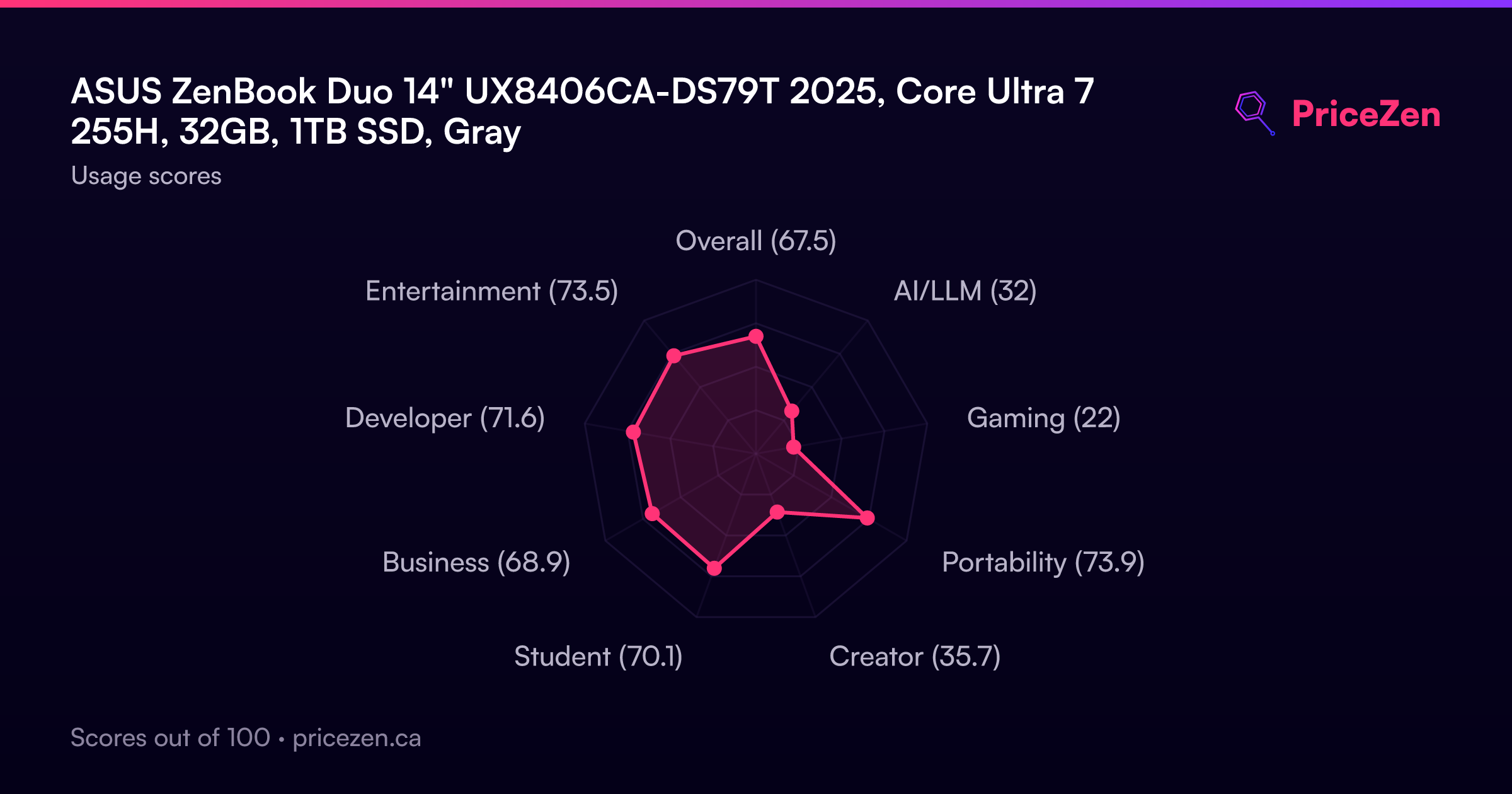
Usage Scores
- Overall67.5
- AI/LLM32
- Gaming22
- Portability73.9
- Creator35.7
- Student70.1
- Business68.9
- Developer71.6
- Entertainment73.5