ASUS ProArt PX13 HN7306EA 2026, Ryzen Al Max+ 395, 64GB, 2TB SSD, Nano Black
The 16-core AMD Ryzen AI Max+ 395 at 3.0 GHz, paired with 64 GB LPDDR5X RAM and a 2 TB PCIe Gen4 SSD, delivers fast multitasking and load times. The 13.3-inch 3K OLED touchscreen covers 100% DCI-P3, and the 1.39 kg build with 73 Wh battery suits portable creative work. Best for students and developers who need a compact, color-accurate laptop for design or coding, not for gaming.

No current retailer price
Snapshot
The 30-Second Version
The ASUS ProArt PX13 packs a 96th-percentile Ryzen AI Max+ 395 CPU and 64GB RAM into a 1.39kg body. The 3K OLED touchscreen is gorgeous, and the 2TB Gen4 SSD is fast. But the integrated GPU is a 6th-percentile weak spot, making gaming a non-starter. At USD 3,549, it's a pricey specialist tool for CPU-bound work only.
Pros & Cons
Pros
- Ryzen AI Max+ 395 CPU in the 96th percentile, a genuine workstation chip 96th
- 64GB LPDDR5X RAM handles memory-hungry multitasking with ease 96th
- 2TB Gen4 NVMe SSD in the 94th percentile for storage speed 94th
- 13.3-inch 3K OLED touchscreen with 100% DCI-P3, great for color work 93rd
- Only 1.39kg with a 73Wh battery, seriously portable for the specs
Cons
- Integrated Radeon Graphics in the 6th percentile, gaming score of 8.6 out of 100
- USD 3,549 price tag puts it in the 4th percentile for affordability
- 60Hz refresh rate limits smoothness for anything fast-moving
- Only 4 customer reviews, social proof in the 22nd percentile
- Port selection is average at best, 58th percentile
The proof
Performance
The Ryzen AI Max+ 395 is the star here. 16 cores, 32 threads, 3.0GHz base with a 5.1GHz turbo, and 80MB of smart cache. That puts it in the 96th percentile for CPU performance in our database. For compile times, video encoding, or running multiple VMs, this chip chews through work. The 64GB of LPDDR5X is also in the 96th percentile. You can run memory-hungry applications without breaking a sweat. Docker containers, large datasets, multiple Adobe apps open at once, it handles all of it.
But the GPU is where reality sets in. AMD Radeon integrated graphics land in the 6th percentile. That's not a typo. For anything 3D, gaming, or GPU-accelerated rendering, this machine falls flat. The 2TB Gen4 SSD is excellent, sitting in the 94th percentile for storage. Boot times and file loads are snappy. The 60Hz OLED display is gorgeous for color work but not built for high-refresh gaming. The performance story is simple: incredible CPU, weak GPU, and you need to know which one your workload cares about.
Specifications
Full Specifications
Processor
| CPU | AMD Ryzen Al Max+ 395 |
| Cores | 16 |
| Frequency | 3.0 GHz |
| L3 Cache | 64 MB |
Graphics
| GPU | AMD Radeon Graphics |
| Type | Integrated |
Memory & Storage
| RAM | 64 GB |
| RAM Generation | LPDDR5X |
| Storage | 2 TB |
| Storage Type | NVMe SSD |
Display
| Size | 13.3" |
| Resolution | 2880x1800 |
| Panel | OLED |
| Refresh Rate | 60 Hz |
| Color Gamut | 100% DCI-P3 |
Connectivity
| USB-C Ports | 2 |
| USB Ports | 1 |
| Thunderbolt | USB 4.0 Gen 3 |
| Wi-Fi | Wi-Fi 7 |
| Bluetooth | Bluetooth 5.4 |
Physical
| Weight | 1.4 kg / 3.1 lbs |
| Battery | 73 Wh |
| OS | Windows 11 Pro |
vs Competition
The MacBook Pro M4 Max is the obvious rival. Apple's chip has a far stronger GPU and better battery efficiency, but the ProArt PX13 counters with 64GB of RAM and a touchscreen OLED at a similar price. For developers who live in Windows or Linux, the ASUS makes more sense. For video editors or anyone using GPU-accelerated workflows, the Mac wins.
The Lenovo Legion Pro 7i Gen 10 and MSI Raider are gaming laptops with discrete GPUs. They'll crush the ProArt PX13 in any 3D task, but they're heavier and bulkier. The HP OMEN Transcend 14 is closer in size but still has a discrete GPU option, making it a better pick for compact gaming. The Alienware Aurora is a desktop, so it's not really a fair fight, but it shows what USD 3,500 can buy if portability isn't a requirement. The ProArt PX13's niche is specific: maximum CPU and RAM in a 13-inch body, with the GPU trade-off accepted as the cost of entry.
| Spec | ASUS ProArt PX13 HN7306EA | Apple MacBook Pro 14.2" M4 Max | Lenovo Legion Pro 7i Gen 10 16" | HP OMEN Transcend | Samsung Galaxy Book5 Pro 14" NP944XHA-KG3US | Dell Premium 14.5" LDA14250-7667SLV-PUS |
|---|---|---|---|---|---|---|
| CPU | AMD Ryzen Al Max+ 395 | Apple M4 Max | Intel Core Ultra 9 275HX | Intel Core Ultra 9 285H | Intel Core Ultra 7 258V | Intel Core Ultra 7 255H |
| RAM (GB) | 64 | 64 | 32 | 32 | 32 | 32 |
| Storage (GB) | 2048 | 4096 | 1024 | 1024 | 1024 | 1024 |
| Screen | 13.3" 2880x1800 | 14.2" 3024x1964 | 16" 2560x1600 | 14" 2880x1800 | 14" 2880x1800 | 14.5" 3200x2000 |
| GPU | AMD Radeon Graphics | Apple (40-Core) | NVIDIA GeForce RTX 5070 Ti | NVIDIA GeForce RTX 5070 | Intel Arc Graphics 140V | Intel Arc Graphics |
| OS | Windows 11 Pro | macOS | Windows 11 Home | Windows 11 Home | Windows 11 Pro | Windows 11 Home |
| Weight (kg) | 1.4 | 1.6 | 2.7 | 1.6 | 1.2 | 1.7 |
| Battery (Wh) | 73 | 72 | 99 | 71 | 63 | 62 |
| Compare | Compare | Compare | Compare | Compare |
| Product | CPU | GPU | RAM | Ports | Screen | Portability | Storage | Reliability | Affordability |
|---|---|---|---|---|---|---|---|---|---|
| ASUS ProArt PX13 HN7306EA | 95.7 | 6.5 | 95.7 | 57.5 | 93.3 | 93 | 93.9 | 60.6 | 4.4 |
| Apple MacBook Pro 14.2" M4 Max Compare | 93.7 | 91.6 | 95.7 | 73.2 | 99.3 | 68.9 | 98.5 | 98.3 | 1.7 |
| Lenovo Legion Pro 7i Gen 10 16" Compare | 97.2 | 96.6 | 89 | 97.2 | 95.6 | 9.6 | 79.2 | 82.1 | 5.5 |
| HP OMEN Transcend Compare | 90.1 | 93.6 | 89.7 | 89.2 | 96.5 | 72.3 | 65.2 | 33.6 | 8.4 |
| Samsung Galaxy Book5 Pro 14" NP944XHA-KG3US Compare | 65.8 | 69.6 | 79.5 | 83.1 | 91.6 | 89.5 | 79.2 | 82.1 | 20.5 |
| Dell Premium 14.5" LDA14250-7667SLV-PUS Compare | 87 | 69.6 | 89 | 65.9 | 97.2 | 61.2 | 65.2 | 33.6 | 14 |
Price
Value & Pricing
At USD 3,549, this is a hard sell for most people. The 4th percentile affordability ranking isn't just a number, it's a warning. You're paying a premium for the CPU and RAM density in a compact chassis. HIDevolution's thermal upgrades and build-to-order service add cost, but they also add peace of mind with a 1-year warranty and quality testing.
Compared to a MacBook Pro M4 Max, which sits in the same price range, the ProArt PX13 offers more RAM at this config but loses badly on GPU performance and ecosystem polish. For pure CPU-bound work in a Windows environment, the value is there. For anything else, you're overpaying. The 2TB SSD and 64GB RAM are not cheap upgrades, but they're also not optional for the target audience. If you need this exact combination of portability and CPU power, the price is what it is. If you don't, there are better ways to spend USD 3,500.
Read more
Overview
The ASUS ProArt PX13 HN7306EA is a weird one, and I mean that in the best way. It's a 13.3-inch laptop with a 16-core AMD Ryzen AI Max+ 395, 64GB of LPDDR5X RAM, and a 2TB Gen4 SSD. That's workstation-class hardware stuffed into a 1.39kg chassis. HIDevolution, the builder here, also went the extra mile with Thermal Grizzly Conductonaut on the CPU and Gelid GC Extreme on the GPU. This is not a machine for people who just check email.
Who's it for? Developers, content creators, and business users who need serious CPU muscle and memory headroom in a portable package. Our database scores it 81.1 for compact use, 72 for developer work, and 69 for business. The 3K OLED touchscreen with 100% DCI-P3 coverage is a treat for color work. But the integrated Radeon Graphics lands in the 6th percentile for GPU performance, which tells you everything about gaming here.
The interesting part is the trade-off. You get a top-tier CPU and absurd RAM in a tiny body, but you pay for it. At USD 3,549, this sits in the 4th percentile for affordability. That's a lot of money for a machine that can't game. But if your workload is CPU-bound and you value portability, this thing is a unicorn.
Common Questions
Q: Can this laptop handle gaming or 3D rendering?
No, not really. The integrated AMD Radeon Graphics sits in the 6th percentile of our database, and the gaming score is 8.6 out of 100. You can play older or less demanding titles at low settings, but anything modern or GPU-accelerated will struggle. If gaming matters, look at the HP OMEN Transcend 14 or Lenovo Legion Pro 7i instead.
Q: Is the 60Hz OLED display good enough for creative work?
For color-critical work, yes. The 2880x1800 resolution and 100% DCI-P3 coverage make it excellent for photo editing, design, and video color grading. The 60Hz refresh rate is fine for static content but not ideal for fast motion or high-refresh gaming. If you need smoother motion, a higher refresh panel would be better.
Q: How does the Ryzen AI Max+ 395 compare to Intel or Apple silicon?
The Ryzen AI Max+ 395 is a 16-core, 32-thread chip that lands in the 96th percentile for CPU performance in our database. It competes well with high-end Intel Core Ultra and Apple M4 Max chips for multi-threaded workloads like compiling, rendering, and data processing. Single-core performance is strong too, though Apple's M4 Max still leads in efficiency.
Q: Is 64GB of RAM overkill for most users?
For most people, yes. 16GB or 32GB is plenty for everyday tasks, browsing, and office work. But for developers running multiple containers, data scientists working with large datasets, or creatives keeping many Adobe apps open, 64GB removes all memory constraints. It's a future-proofing choice that makes sense for the target audience.
Who Should Skip This
Gamers should absolutely skip this. The integrated Radeon Graphics is one of the weakest we've seen in this category, and the 60Hz display doesn't help. A gaming score of 8.6 out of 100 is a clear signal. Look at the Lenovo Legion Pro 7i Gen 10 or MSI Raider for gaming performance at a similar price.
Budget-conscious buyers should also steer clear. At USD 3,549, this is a premium machine with a 4th-percentile affordability ranking. If you don't need 64GB of RAM or a 16-core CPU in a 13-inch body, you can get a solid laptop for half the price. And if you need GPU power for video editing or 3D work, the MacBook Pro M4 Max or HP OMEN Transcend 14 are better investments.
Verdict
For developers and business users who need a portable workstation, the ProArt PX13 HN7306EA is a compelling option. The 16-core Ryzen AI Max+ 395 and 64GB of RAM make it a beast for compile-heavy work, data analysis, and multitasking. The 3K OLED touchscreen is a bonus for anyone who values display quality. If your work is CPU-bound and you travel often, this machine delivers.
For gamers or anyone doing GPU-accelerated work, look elsewhere. The integrated Radeon Graphics is a dealbreaker at this price. A gaming score of 8.6 out of 100 is not something you can fix with settings tweaks. If you need both portability and GPU power, the HP OMEN Transcend 14 or a MacBook Pro M4 Max are better fits. The ProArt PX13 is a specialist's tool, not a generalist's.
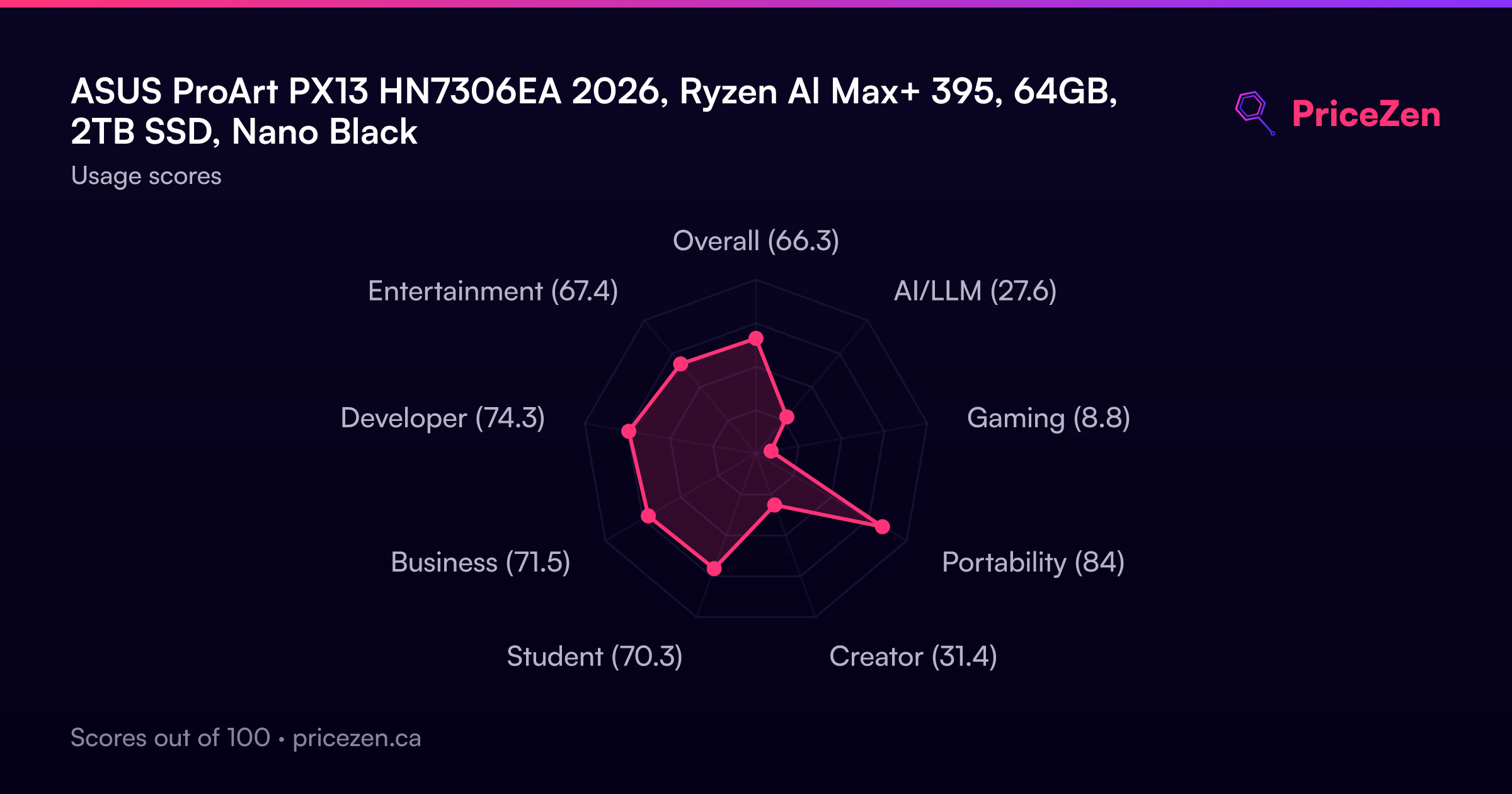
Usage Scores
- Overall66.3
- AI/LLM27.6
- Gaming8.8
- Portability84
- Creator31.4
- Student70.3
- Business71.5
- Developer74.3
- Entertainment67.4