Lenovo ThinkPad T14s Gen 7 2024, Core Ultra 5 325, 16GB, 256GB SSD, Black
The Intel Core Ultra 7 325 processor with 8 cores at 3.4GHz, paired with 16GB LPDDR5X RAM, delivers solid multitasking for business workloads. The 1.06kg chassis and 58Wh battery offer all-day portability, while the 400-nit IPS display and Wi-Fi 7 keep you productive on the go. Best for business professionals who prioritize a lightweight, durable ThinkPad for office tasks and travel.

No current retailer price
Snapshot
The 30-Second Version
At 1.06kg, the ThinkPad T14s Gen 7 is one of the lightest 14-inch laptops we've tested, landing in the 91st percentile for compactness. The port selection is excellent with Thunderbolt and Wi-Fi 7, but the 256GB SSD is a real limitation at the 24th percentile. It's a great travel companion for business users, just don't expect to game on it.
Pros & Cons
Pros
- 1.06kg weight puts it in the 91st percentile for compactness 91st
- 400-nit display is bright enough for outdoor work 82nd
- Thunderbolt plus three USB-C ports is excellent connectivity 80th
- Wi-Fi 7 support future-proofs your network connection 72nd
- 58Wh battery paired with an efficient Core Ultra chip should last a full workday
Cons
- 256GB SSD is in the 24th percentile for storage, cramped by modern standards
- 45% NTSC color gamut is weak for photo or video work
- 19.2/100 gaming score means integrated graphics only
- 21st percentile for affordability, you pay a premium for the ThinkPad badge
- No dedicated GPU option in this configuration
What owners think
How owner sentiment changed over time
ExclusiveBased on when customers actually wrote their reviews - so you can see whether early praise held up.
8 written reviews, Jul – Nov 2026: 8 happy
Across all 14 store ratings: 4.9★. The chart counts the 8 written reviews.
- Oct – Dec 20263 of 3 happy
All three reviews are positive, praising the laptop's speed, responsiveness, and suitability for office work and travel. No issues were reported.
- Laptop is fast and responsive for work tasks, with no performance issues reported.
- Suitable for office and travel use, being small, light, and powerful.
- Comfortable keyboard noted as a standout feature.
- Jul – Sep 20265 of 5 happy
Buyers praised the laptop's portability, performance, build quality, and integration with Microsoft features, with one noting reliability and driver support. All reviews were positive, with minor mention of Windows 11 bloatware.
- Laptop is lightweight, fast, and well-built, suitable for work and study.
- Portable and versatile, capable of running powerful software with embedded Microsoft features.
- Reliable and durable, with confidence in driver updates and OS support from a large company.
- Performance is snappy but Windows 11 bloatware and RAM-hogging apps are a drawback.
Each dot is one written review, in the month it was written. Happy = 4-5★, mixed = 3★, unhappy = 1-2★. Period summaries are in English.
The proof
Performance
The Intel Core Ultra 325 8-core chip running at 3.4GHz is a solid mid-pack performer, sitting in the 65th percentile for CPU in our database. That's about average for a modern business laptop, which means it'll chew through email, browser tabs, and Office apps without breaking a sweat. The 16GB of LPDDR5X RAM is similarly middle-of-the-road at the 64th percentile, but it's the right amount for the target audience. You won't be running local LLMs or editing 4K video on this thing, but that's not what it's for.
The integrated AMD Intel graphics with 48GB of shared VRAM land in the 56th percentile for GPU, which is fine for driving the 1920x1200 display and light photo work. The 256GB NVMe SSD is the real bottleneck here. At the 24th percentile for storage, it's one of the smaller drives we've seen in this class, and you'll feel it the moment you start syncing cloud files or installing more than a handful of apps. The 400-nit display is a bright spot, literally, and the 60Hz refresh rate is standard for business machines.
Specifications
Full Specifications
Processor
| CPU | Intel Core Ultra 5 325 |
| Cores | 8 |
| Frequency | 3.4 GHz |
| L3 Cache | 12 MB |
Graphics
| GPU | Intel Integrated Graphics |
| Type | Integrated |
| VRAM Type | GDDR6 |
Memory & Storage
| RAM | 16 GB |
| RAM Generation | LPDDR5X |
| Storage | 256 GB |
| Storage Type | NVMe SSD |
Display
| Size | 14" |
| Resolution | 1920x1200 (Full HD) |
| Panel | IPS |
| Refresh Rate | 60 Hz |
| Brightness | 400 nits |
| Color Gamut | 45% NTSC |
Connectivity
| USB-C Ports | 3 |
| USB Ports | 1 |
| Thunderbolt | Thunderbolt 4 |
| HDMI | HDMI 2.1 |
| Wi-Fi | Wi-Fi 7 |
| Bluetooth | Bluetooth 5.4 |
Physical
| Weight | 1.1 kg / 2.3 lbs |
| Battery | 58 Wh |
| OS | Windows 11 |
vs Competition
Stacked against the Apple MacBook Pro M4 Max, the ThinkPad gets crushed on raw performance but wins on weight and portability. The ASUS ROG Zephyrus G14 and HP OMEN Transcend 14 both offer dedicated GPUs and far better gaming scores, but they're heavier and aimed at a different buyer. The MSI Raider and Alienware Aurora are in another universe entirely, desktop replacements that make the T14s look like a sheet of paper. For pure business travel, the ThinkPad's 91st percentile compactness score is the differentiator. For anything involving graphics work or gaming, every competitor here outclasses it.
| Spec | Lenovo ThinkPad T14s Gen 7 | Apple MacBook Pro 14.2" M4 Max | ASUS ROG Zephyrus 14" GA403WW-G14.R95080 | HP OMEN Transcend | Samsung Galaxy Book5 Pro 14" NP944XHA-KG3US | Dell Premium 14.5" LDA14250-7667SLV-PUS |
|---|---|---|---|---|---|---|
| CPU | Intel Core Ultra 5 325 | Apple M4 Max | AMD Ryzen AI 9 HX 370 | Intel Core Ultra 9 285H | Intel Core Ultra 7 258V | Intel Core Ultra 7 255H |
| RAM (GB) | 16 | 64 | 32 | 32 | 32 | 32 |
| Storage (GB) | 256 | 4096 | 2048 | 1024 | 1024 | 1024 |
| Screen | 14" 1920x1200 | 14.2" 3024x1964 | 14" 2880x1800 | 14" 2880x1800 | 14" 2880x1800 | 14.5" 3200x2000 |
| GPU | AMD Intel Integrated Graphics | Apple (40-Core) | NVIDIA GeForce RTX 5080 | NVIDIA GeForce RTX 5070 | Intel Arc Graphics 140V | Intel Arc Graphics |
| OS | Windows 11 | macOS | Windows 11 Home | Windows 11 Home | Windows 11 Pro | Windows 11 Home |
| Weight (kg) | 1.1 | 1.6 | 1.6 | 1.6 | 1.2 | 1.7 |
| Battery (Wh) | 58 | 72 | - | 71 | 63 | 62 |
| Compare | Compare | Compare | Compare | Compare |
| Product | CPU | GPU | RAM | Ports | Screen | Portability | Storage | Reliability | Social Proof | Affordability |
|---|---|---|---|---|---|---|---|---|---|---|
| Lenovo ThinkPad T14s Gen 7 | 65 | 57 | 63.7 | 80.4 | 71.7 | 90.8 | 24 | 81.9 | 64.8 | 23.9 |
| Apple MacBook Pro 14.2" M4 Max Compare | 93.7 | 91.6 | 95.6 | 73.9 | 99.1 | 68.9 | 98.4 | 98.2 | 72.7 | 1.8 |
| ASUS ROG Zephyrus 14" GA403WW-G14.R95080 Compare | 91.2 | 98.3 | 90.8 | 89.5 | 96 | 73.6 | 89.7 | 60.6 | 95.6 | 5.9 |
| HP OMEN Transcend Compare | 90.1 | 93.5 | 89.7 | 89.5 | 96 | 72.2 | 65.4 | 33.7 | 93.1 | 8.9 |
| Samsung Galaxy Book5 Pro 14" NP944XHA-KG3US Compare | 65.9 | 69.6 | 79.5 | 83.5 | 90.4 | 89.4 | 79.3 | 81.9 | 95.6 | 20.9 |
| Dell Premium 14.5" LDA14250-7667SLV-PUS Compare | 87 | 69.6 | 89 | 66.7 | 96.8 | 61.2 | 65.4 | 33.7 | 95.6 | 14.6 |
Price
Value & Pricing
Pricing is all over the map right now. US listings range from $1,769 to $2,557, a spread of $788 across just two vendors. That's a massive gap for the same machine, and it puts the T14s Gen 7 in the 21st percentile for affordability, meaning it's more expensive than most laptops in our database. The lower end of that range feels fair for a business ultrabook with this build quality and port selection, but the higher end is a tough sell when you're getting a 256GB SSD and integrated graphics. Shop around before you commit, because the difference between the cheapest and most expensive listing is basically the price of a decent monitor.
Read more
Overview
The Lenovo ThinkPad T14s Gen 7 is a featherweight business machine that nails the fundamentals. At 1.06kg, it lands in the 91st percentile for compactness in our database, which puts it among the absolute lightest 14-inch laptops we've tested. The 58Wh battery and Intel Core Ultra 325 8-core chip are a sensible pairing for all-day office work, and the port selection is genuinely useful: Thunderbolt, three USB-C ports, one USB-A, and HDMI 2.1. That's more connectivity than most thin-and-lights bother with these days.
But the spec sheet has some rough edges. The 256GB SSD is a head-scratcher in 2025, landing in the 24th percentile for storage, which means it lags behind most laptops in our database. The 45% NTSC display is fine for spreadsheets but won't win any color accuracy awards. And while the integrated graphics are adequate for business tasks, the 19.2/100 gaming score tells you everything you need to know about after-hours play.
Common Questions
Q: Is the 256GB SSD enough storage?
It's tight. At the 24th percentile for storage in our database, the 256GB NVMe SSD is one of the smaller drives we've seen in this class. Windows 11 alone eats a chunk of that, and you'll likely need cloud storage or an external drive for anything beyond basic documents and apps.
Q: Can this laptop handle gaming?
Not really. The integrated graphics score 19.2 out of 100 for gaming, which is one of the weakest results in our database. Casual browser games and very light indie titles will run, but anything 3D or modern will struggle.
Q: How does the display compare to other business laptops?
The 14-inch 1920x1200 IPS panel with 400 nits brightness is solid for office work and sits in the 74th percentile for screens overall. The 45% NTSC color gamut is the weak point, so colors will look muted compared to laptops with higher gamut coverage. Fine for documents, not great for photo editing.
Who Should Skip This
Skip this if you need local storage. The 256GB SSD at the 24th percentile is a dealbreaker for anyone who works with large files, keeps a big media library, or installs heavy software. Creative professionals should also look elsewhere, the 45% NTSC display and integrated graphics won't cut it for color-critical work. And if you're hoping to squeeze in some gaming after hours, the 19.2/100 gaming score is a clear signal to buy something with a dedicated GPU instead.
Verdict
The ThinkPad T14s Gen 7 is a purpose-built business tool that excels at being light, connected, and dependable. The 91st percentile compactness score and excellent port selection make it a genuine standout for frequent travelers. But the 256GB SSD and 45% NTSC display are compromises that sting at this price point. If you live in spreadsheets and spend more time in airports than at a desk, this is a strong pick. If you need storage headroom or any kind of graphics capability, look elsewhere.
Usage Scores
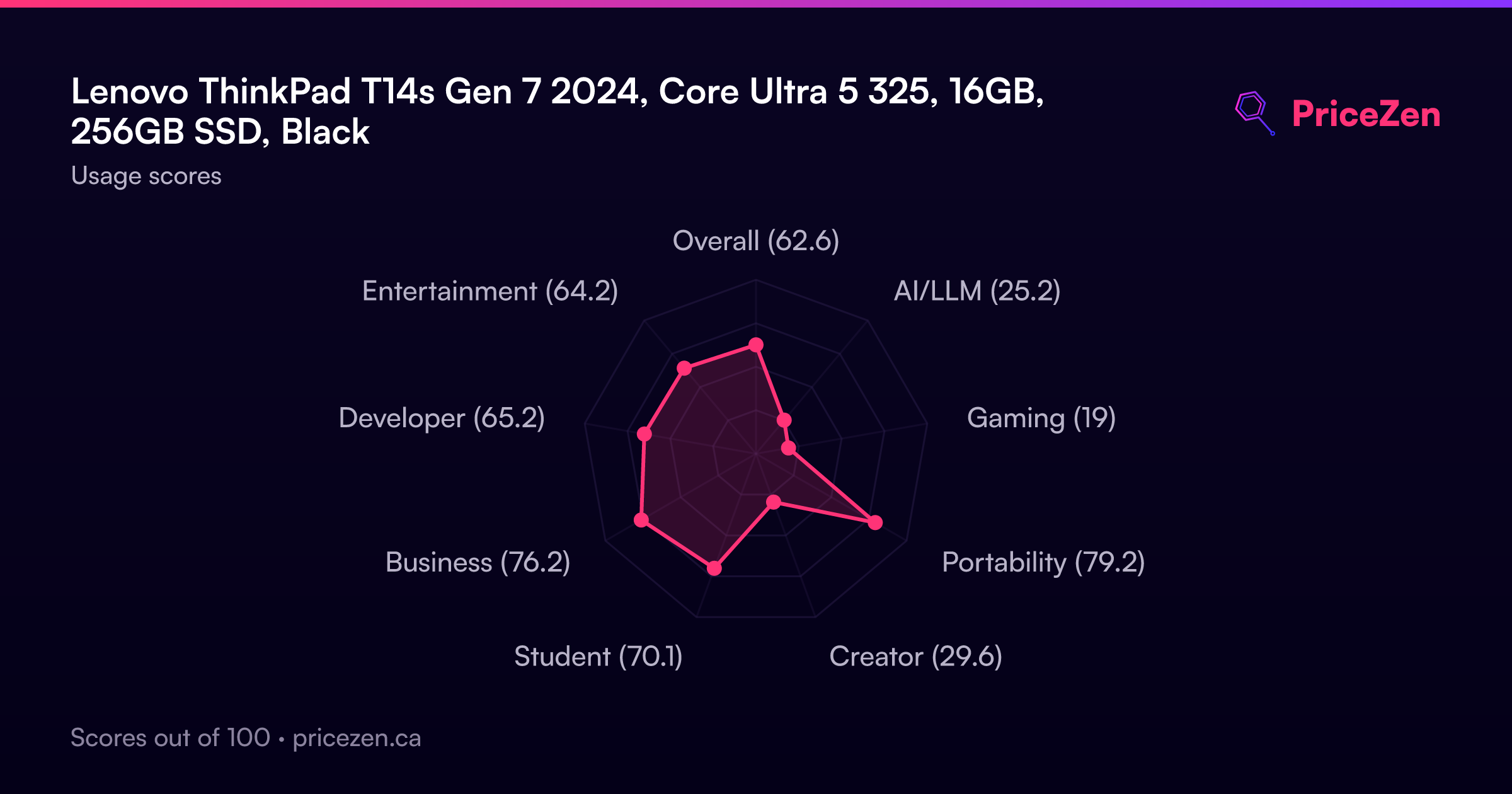
- Overall62.6
- AI/LLM25.2
- Gaming19
- Portability79.2
- Creator29.6
- Student70.1
- Business76.2
- Developer65.2
- Entertainment64.2