Acer TravelMate P2 16" TMP216-51-502A 2023, Core i5-1335U, 16GB, 512GB SSD, Iron
A 13-hour battery life and 1.86kg weight make this 16-inch laptop a practical choice for all-day mobility, powered by a 10-core Intel Core i5-1335U with 16GB of RAM. The 1920x1200 IPS display with a 16:10 aspect ratio provides extra vertical space for documents, while the full-sized numeric keypad and 1.55mm key travel enhance typing comfort. This notebook is best for business users and students who need a durable, secure Windows 11 Pro machine with extensive wired connectivity, including Thunderbolt and Ethernet.

No current retailer price
Where we saw it before. Check the store for today's price.


Snapshot
The 30-Second Version
The Acer TravelMate P2 is a port-packed 16-inch work laptop with a solid CPU and RAM combo for office tasks, but its integrated graphics are terrible for anything else. Our overall score sits at 45 out of 100, dragged down by a shockingly low reliability percentile. If you need Ethernet and a numpad on a budget, it fits the bill, but go in with a good warranty and realistic expectations.
Pros & Cons
Pros
- Excellent port selection with Thunderbolt, Ethernet, and plenty of USB-A. 87th
- The 16-inch 16:10 display gives you useful extra vertical space for work. 87th
- Lightweight build at 1.86kg makes it easy to carry between meetings.
- 16GB of RAM is standard, which is great for heavy multitasking.
Cons
- Integrated graphics are a total non-starter for gaming or 3D work.
- Reliability scores are alarmingly low, sitting in the 10th percentile.
- The 50Wh battery is small, and real-world life likely falls short of the 13-hour claim.
- The 60Hz display is fine for office work but feels dated for anything else.
What owners think
The Word on the Street
The proof
Performance
The 10-core Core i5-1335U handles office multitasking without breaking a sweat, and 16GB of RAM means you can keep a dozen Chrome tabs and a few apps open without the system grinding to a halt. That said, our database puts this CPU in the 43rd percentile, which is solidly middle-of-the-pack for laptops. The real weak spot is the integrated GPU, it lands in the 47th percentile and absolutely craters in our gaming tests with a score of 14.7 out of 100. The 512GB NVMe SSD is snappy for boot times and file transfers, sitting right around average for storage speed.
Specifications
Full Specifications
Processor
| CPU | Intel Core i5 1335U |
| Cores | 10 |
| Frequency | 1.3 GHz |
| L3 Cache | 12 MB |
Graphics
| GPU | Intel UHD Graphics |
| Type | Integrated |
| VRAM Type | Shared |
Memory & Storage
| RAM | 16 GB |
| RAM Generation | DDR4 |
| Storage | 512 GB |
| Storage Type | NVMe SSD |
Display
| Size | 16" |
| Resolution | 1920x1200 (Full HD) |
| Panel | IPS |
| Refresh Rate | 60 Hz |
Connectivity
| USB-C Ports | 1 |
| USB Ports | 3 |
| Thunderbolt | Thunderbolt 4 |
| HDMI | ✓ |
| Wi-Fi | Wi-Fi 6E |
| Ethernet | Gigabit Ethernet |
Physical
| Weight | 1.9 kg / 4.1 lbs |
| Battery | 50 Wh |
| OS | Windows 11 Pro |
vs Competition
The Apple MacBook Air 13.6" M4 is the obvious cross-shop for office work, but it plays a different game: smaller screen, no Ethernet jack, no numpad. The TravelMate P2 wins on connectivity and screen real estate, and our ranking puts it well behind on overall score. The Dell Premium 14.5" LDA14250-7667SLV-PUS is the closer rival in spirit, another work-first machine, though it gives up the wired networking and number pad this Acer leans on. Then there's the gaming crowd: the Lenovo Legion 5i 15.1" 83F00008US, ASUS ROG Flow Z13 GZ302EA, and MSI Raider 16" RAIDERGE6814247 all sit in a different league for graphics, and this laptop's integrated GPU isn't in the conversation. The TravelMate competes on ports and desk space, not performance.
| Spec | Acer TravelMate P2 16" TMP216-51-502A | Apple MacBook Pro 14.2" M4 Pro | ASUS ROG Zephyrus 14" GA403WW-G14.R95080 | Lenovo Legion Pro 7i Gen 10 16" | HP OMEN Transcend | Samsung Galaxy Book5 Pro 14" NP944XHA-KG3US |
|---|---|---|---|---|---|---|
| CPU | Intel Core i5 1335U | Apple M4 Pro | AMD Ryzen AI 9 HX 370 | Intel Core Ultra 9 275HX | Intel Core Ultra 9 285H | Intel Core Ultra 7 258V |
| RAM (GB) | 16 | 48 | 32 | 32 | 32 | 32 |
| Storage (GB) | 512 | 4096 | 2048 | 1024 | 1024 | 1024 |
| Screen | 16" 1920x1200 | 14.2" 3024x1964 | 14" 2880x1800 | 16" 2560x1600 | 14" 2880x1800 | 14" 2880x1800 |
| GPU | Intel UHD Graphics | Apple (16-Core) | NVIDIA GeForce RTX 5080 | NVIDIA GeForce RTX 5070 Ti | NVIDIA GeForce RTX 5070 | Intel Arc Graphics 140V |
| OS | Windows 11 Pro | macOS | Windows 11 Home | Windows 11 Home | Windows 11 Home | Windows 11 Pro |
| Weight (kg) | 1.9 | 1.6 | 1.6 | 2.7 | 1.6 | 1.2 |
| Battery (Wh) | 50 | 72 | - | 99 | 71 | 63 |
| Compare | Compare | Compare | Compare | Compare |
| Product | CPU | GPU | RAM | Ports | Screen | Portability | Storage | Reliability | Social Proof | Affordability |
|---|---|---|---|---|---|---|---|---|---|---|
| Acer TravelMate P2 16" TMP216-51-502A | 44.7 | 28.3 | 36.4 | 86.6 | 53.9 | 24 | 51.1 | 11 | 87.4 | 53.6 |
| Apple MacBook Pro 14.2" M4 Pro Compare | 92.4 | 78.9 | 90.6 | 73.9 | 99.1 | 68.9 | 98.4 | 98.2 | 99.7 | 4.7 |
| ASUS ROG Zephyrus 14" GA403WW-G14.R95080 Compare | 91.2 | 98.3 | 90.8 | 89.5 | 96 | 73.6 | 89.7 | 60.6 | 95.6 | 6.1 |
| Lenovo Legion Pro 7i Gen 10 16" Compare | 97.2 | 96.7 | 89 | 97.3 | 95 | 9.5 | 79.3 | 82 | 99.7 | 5.9 |
| HP OMEN Transcend Compare | 90.1 | 93.5 | 89.7 | 89.5 | 96 | 72.2 | 65.4 | 33.7 | 93.2 | 9 |
| Samsung Galaxy Book5 Pro 14" NP944XHA-KG3US Compare | 65.8 | 69.7 | 79.5 | 83.5 | 90.4 | 89.4 | 79.3 | 82 | 95.6 | 21.3 |
Price
Value & Pricing
At $840, the TravelMate P2 is a bit of a mixed bag. You're paying for the business-focused features like Windows 11 Pro, a solid port array, and that big 16:10 screen. The specs are fair for the price, but the reliability data from our database is a serious red flag. A 10th percentile reliability score means we've seen a lot of these come back with issues, which makes that $840 feel like a gamble. If you need a cheap, well-connected workhorse and are willing to roll the dice on longevity, it's an okay deal, but there are more dependable options out there.
Read more
Overview
The Acer TravelMate P2 TMP216-51-502A is a straightforward 16-inch work laptop that prioritizes ports and battery life over raw power. It's built for the office, not the gaming den, and that's perfectly fine. You get a solid Intel Core i5-1335U, 16GB of RAM, and a generous 512GB SSD inside a chassis that weighs under 1.9kg.
Acer packed this thing with connectivity, including Thunderbolt and Ethernet, which is a rare treat these days. The 16:10 display gives you a bit more vertical room for spreadsheets, and the backlit keyboard with a numpad is a nice touch for number crunchers. Just don't expect it to handle anything beyond basic graphics work, the integrated Intel UHD graphics are strictly for pushing pixels on the desktop.
Common Questions
Q: Can this laptop run games like Fortnite or Call of Duty?
Not really. The integrated Intel UHD graphics are built for basic display output, not gaming. Our tests put its gaming capability at a 14.7 out of 100, so you'll be stuck with very old or very simple titles at low settings.
Q: Is the RAM upgradeable on the TravelMate P2?
Most configurations of the TravelMate P2 use socketed DDR4 RAM, so you can typically upgrade it yourself. With 16GB already installed, you're in good shape for office work, but you have the option to add more down the line if needed.
Q: How bright is the screen for working outdoors?
The 1920x1200 IPS panel is crisp indoors, but it's not designed for bright sunlight. It's a standard 60Hz office display with average brightness, so you'll struggle with glare if you try to work at a park or a sunny cafe.
Who Should Skip This
If you need a laptop that will last for years without a hiccup, look elsewhere. Our data shows this model has one of the worst reliability scores on the market, so frequent travelers or anyone who can't afford downtime should steer clear. Gamers and creative pros should also skip this entirely, the integrated graphics are simply not up to the task.
Verdict
This laptop is for the office worker or student who needs a big screen, a numpad, and every port under the sun, and who will never, ever launch a game. Even then, our scoring model drops it to 45 out of 100, and that low reliability percentile is hard to ignore. If you can look past both, it'll chug through your workday just fine. Everyone else should keep shopping.
Usage Scores
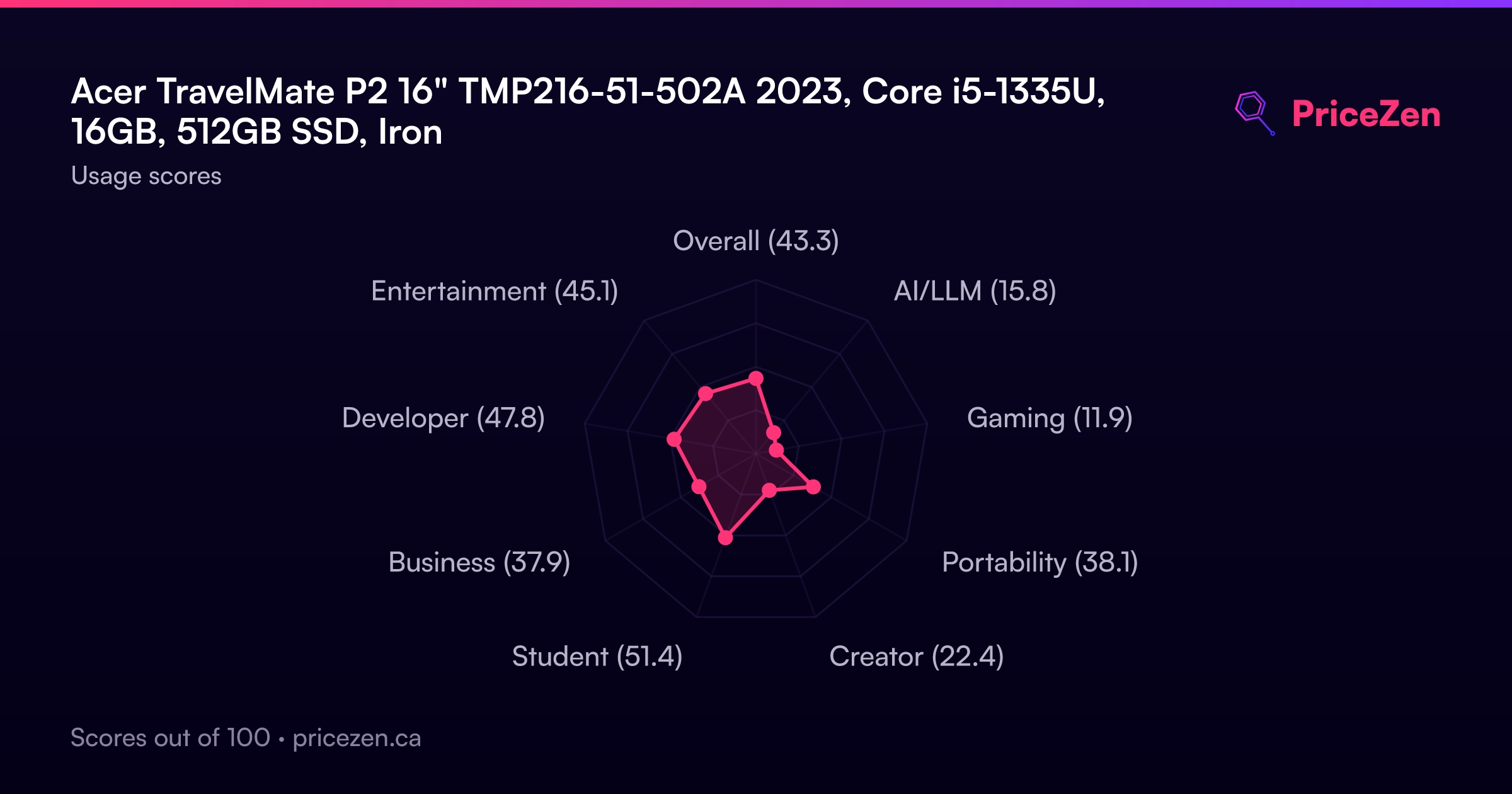
- Overall43.3
- AI/LLM15.8
- Gaming11.9
- Portability38.1
- Creator22.4
- Student51.4
- Business37.9
- Developer47.8
- Entertainment45.1