Lenovo V15 G4 83CCA06W 2025, Core i7-13620H, 24GB, 512GB SSD, Grey
The 10-core Intel Core i7-13620H processor and 24GB of DDR4 RAM provide strong multitasking capability for a business-focused notebook. Its 15.6-inch anti-glare Full HD display and full-sized Ethernet port offer practical, no-frills utility for desk-bound workflows. This laptop is best for office administrators and data analysts who need reliable processing power for spreadsheets and applications, not graphics rendering.

No current retailer price
Snapshot
The 30-Second Version
The Lenovo V15 G4 packs a 10-core i7-13620H and 24GB of RAM into a $680 business laptop, which is a lot of CPU for the money. The trade-offs are a small 38Wh battery, integrated graphics, and an average 1080p display. It's a great desk-bound workhorse for office and development tasks, but not a gaming machine or an all-day unplugged companion.
Pros & Cons
Pros
- Core i7-13620H delivers well above average CPU performance for a business laptop 82nd
- 24GB of RAM is more than typical at this price point 75th
- Windows 11 Pro out of the box, no upgrade needed
- Ethernet port and Wi-Fi 6 for reliable connectivity
- Lightweight at 1.66kg for a 15.6 inch machine
Cons
- Integrated Intel UHD Graphics can't handle gaming or GPU-heavy work
- 38Wh battery is small, expect short unplugged sessions
- 512GB SSD fills up fast
- Display is average at best, no brightness or color standout
- Only one USB-C port, and it's not Thunderbolt
The proof
Performance
The Core i7-13620H is the star here. Ten cores, sixteen threads, boost up to 4.90GHz. In our database, the CPU lands in the 72nd percentile for laptops, which is well above average for a machine in this class. You'll notice it when launching apps, compiling code, or running heavy Excel workbooks. The 24GB of RAM helps too, sitting in the 57th percentile. Not a standout, but more than enough for multitasking without constant swapping.
The integrated Intel UHD Graphics is the bottleneck. It sits in the 37th percentile, which is mediocre for a laptop GPU. That's fine for video playback, office work, and light photo editing, but don't expect to run modern games or do any serious GPU-accelerated work. The 512GB SSD also lands in the 37th percentile, which is on the smaller side. Boot times and app launches will be snappy, but you'll fill it faster than you think. The display is a 15.6 inch 1080p IPS panel at the 41st percentile, so it's about average. Fine for documents and web browsing, but not a screen you'll rave about.
Specifications
Full Specifications
Processor
| CPU | Intel Core i7 13620H |
| Cores | 10 |
| Frequency | 2.4 GHz |
| L3 Cache | 24 MB |
Graphics
| GPU | Intel UHD Graphics |
| Type | Integrated |
| VRAM Type | Shared |
Memory & Storage
| RAM | 24 GB |
| RAM Generation | DDR4 |
| Storage | 512 GB |
| Storage Type | SSD |
Display
| Size | 15.6" |
| Resolution | 1920x1080 (Full HD) |
| Panel | IPS |
Connectivity
| USB-C Ports | 1 |
| USB Ports | 2 |
| HDMI | 1 x HDMI |
| Wi-Fi | Wi-Fi 6 |
| Bluetooth | 5.2 |
| Ethernet | Gigabit Ethernet |
Physical
| Weight | 1.7 kg / 3.7 lbs |
| Battery | 38 Wh |
| OS | Windows 11 Pro |
vs Competition
Stacked against the Apple MacBook Pro M5, the Lenovo loses on battery life, display quality, and GPU performance. The M5's efficiency cores and unified memory make it a better all-rounder, but it costs several times more. The Microsoft Surface Laptop 7th Edition has a better screen and build quality, plus much longer battery life, but again, the price gap is enormous. If you're cross-shopping these, you're not really in the same market.
The more realistic comparison is the HP OmniBook X Flip 14 and the ASUS ProArt PX13. Both are more expensive but offer better displays, longer battery life, and more modern designs. The ASUS ProArt PX13 in particular has a discrete GPU option, which makes it a better choice for creative work. The MSI Creator A13V is another step up, aimed at content creators. The Lenovo's advantage is pure CPU value. You're getting an i7-13620H for a fraction of what those machines cost. If your work is CPU-bound and you don't care about the screen or battery, the Lenovo makes a strong case.
| Spec | Lenovo V15 G4 83CCA06W | Apple MacBook Pro 14.2" M4 Max | ASUS ROG Zephyrus 14" GA403WW-G14.R95080 | HP OMEN Transcend | Samsung Galaxy Book5 Pro 14" NP944XHA-KG3US | Dell Premium 14.5" LDA14250-7667SLV-PUS |
|---|---|---|---|---|---|---|
| CPU | Intel Core i7 13620H | Apple M4 Max | AMD Ryzen AI 9 HX 370 | Intel Core Ultra 9 285H | Intel Core Ultra 7 258V | Intel Core Ultra 7 255H |
| RAM (GB) | 24 | 64 | 32 | 32 | 32 | 32 |
| Storage (GB) | 512 | 4096 | 2048 | 1024 | 1024 | 1024 |
| Screen | 15.6" 1920x1080 | 14.2" 3024x1964 | 14" 2880x1800 | 14" 2880x1800 | 14" 2880x1800 | 14.5" 3200x2000 |
| GPU | Intel UHD Graphics | Apple (40-Core) | NVIDIA GeForce RTX 5080 | NVIDIA GeForce RTX 5070 | Intel Arc Graphics 140V | Intel Arc Graphics |
| OS | Windows 11 Pro | macOS | Windows 11 Home | Windows 11 Home | Windows 11 Pro | Windows 11 Home |
| Weight (kg) | 1.7 | 1.6 | 1.6 | 1.6 | 1.2 | 1.7 |
| Battery (Wh) | 38 | 72 | - | 71 | 63 | 62 |
| Compare | Compare | Compare | Compare | Compare |
| Product | CPU | GPU | RAM | Ports | Screen | Portability | Storage | Reliability | Affordability |
|---|---|---|---|---|---|---|---|---|---|
| Lenovo V15 G4 83CCA06W | 74.9 | 28.2 | 56.4 | 48.2 | 39 | 50 | 35.9 | 81.8 | 63.1 |
| Apple MacBook Pro 14.2" M4 Max Compare | 93.7 | 91.7 | 95.7 | 73.3 | 99.3 | 68.9 | 98.5 | 98.1 | 1.7 |
| ASUS ROG Zephyrus 14" GA403WW-G14.R95080 Compare | 91.3 | 98.4 | 90.9 | 89.3 | 96.5 | 73.6 | 89.8 | 60.4 | 5.6 |
| HP OMEN Transcend Compare | 90.2 | 93.6 | 89.8 | 89.3 | 96.5 | 72.3 | 65.3 | 33.5 | 8.3 |
| Samsung Galaxy Book5 Pro 14" NP944XHA-KG3US Compare | 65.9 | 69.7 | 79.6 | 83.2 | 91.6 | 89.4 | 79.4 | 81.8 | 20.1 |
| Dell Premium 14.5" LDA14250-7667SLV-PUS Compare | 87.1 | 69.7 | 89.1 | 66 | 97.2 | 61.1 | 65.3 | 33.5 | 13.9 |
Price
Value & Pricing
At $680 USD, this is a tricky value proposition. The CPU alone is worth the price of admission if you need raw processing power for business or development work. You're getting a 10-core i7, 24GB of RAM, and Windows 11 Pro for under $700. That's hard to beat on paper. But the compromises are real. The small battery, average screen, and integrated graphics mean you're paying for CPU headroom you may not fully use if your workload is mostly web-based.
Compare that to the competition. The Apple MacBook Pro M5 and Microsoft Surface Laptop 7th Edition are in a completely different price bracket, so they're not direct rivals. The HP OmniBook X Flip and ASUS ProArt PX13 are also premium machines. In the budget business space, this Lenovo is competing more with refurbished ThinkPads and entry-level Dells. Against those, the i7-13620H is a genuine differentiator. You're getting near-workstation CPU performance at a budget price, just with budget everything else.
Read more
Overview
The Lenovo V15 G4 is one of those laptops that looks unremarkable on paper until you spot the processor. A 13th gen Core i7-13620H in a budget business chassis is not a common pairing. That chip normally lives in gaming laptops and mobile workstations, not a 1.66kg office machine with integrated graphics. Lenovo basically stuffed a small workstation engine into a commuter car. The result is a machine that crushes everyday productivity but has some obvious compromises elsewhere.
This is a business laptop through and through. Windows 11 Pro, Ethernet, Wi-Fi 6, and a 15.6 inch Full HD IPS panel. The 24GB of DDR4 is an unusual amount, more than the typical 16GB you see at this price point, and that matters if you run a lot of browser tabs, spreadsheets, or virtual machines. The 512GB SSD is adequate but not generous. You'll want to keep an eye on it if you store a lot of local files.
Who is this for? Office workers, students who need Windows, and anyone who wants strong CPU performance without paying for a discrete GPU they'll never use. The integrated Intel UHD Graphics means gaming is basically off the table, and the 38Wh battery is small for a 15.6 inch laptop. But if your day is spreadsheets, documents, web apps, and the occasional light photo edit, this thing will feel surprisingly quick.
Common Questions
Q: Can this laptop run modern games?
No, not really. The integrated Intel UHD Graphics sits in the 37th percentile for laptop GPUs, which is mediocre. You can play older titles, indie games, and browser-based games, but anything from the last few years will struggle even at low settings. The CPU is capable, but the GPU is the hard limit here.
Q: How long does the battery actually last?
The 38Wh battery is small for a 15.6 inch laptop, especially one with a power-hungry H-series processor. Expect around 4 to 5 hours of light use, less if you're pushing the CPU. This is a laptop that wants to be near an outlet. If battery life is a priority, look for something with a 60Wh or larger battery.
Q: Is the RAM upgradeable?
The V15 G4 comes with 24GB of DDR4, which is already more than most laptops in this price range. Lenovo's V series typically uses standard SODIMM slots rather than soldered memory, so there's a good chance you can upgrade further. But 24GB is plenty for the vast majority of business and development tasks, so most buyers won't need to touch it.
Q: Does the USB-C port support charging or video output?
The laptop has one USB-C port alongside two USB-A ports and HDMI. The USB-C port is not Thunderbolt, so don't expect external GPU support or high-speed docking. It should handle basic data transfer and possibly charging, but for video output you'll want to use the HDMI port. The port selection overall is about average for this class of machine.
Who Should Skip This
If you need to work unplugged for a full day, skip this. The 38Wh battery is one of the weakest points of this machine, and the i7-13620H is not an efficient chip. You'll be tethered to a wall outlet more often than you'd like. Look at something like the Microsoft Surface Laptop 7th Edition or an HP OmniBook if battery life matters.
Gamers and creative professionals should also look elsewhere. The integrated Intel UHD Graphics can't handle modern games or GPU-accelerated workloads like video editing or 3D rendering. If you need any kind of graphical horsepower, the ASUS ProArt PX13 or MSI Creator A13V are better fits, though they cost significantly more. And if you care about screen quality, this display is average at best. Photographers and designers will want a better panel.
Verdict
For office productivity, this laptop is a sleeper hit. The i7-13620H will chew through spreadsheets, documents, and web apps without breaking a sweat. The 24GB of RAM means you can keep dozens of tabs open and run multiple applications side by side. Windows 11 Pro is a nice touch for business users who need domain join or BitLocker. If you're buying this for a desk job, you'll be happy.
For students, it's a mixed bag. The CPU is overkill for note-taking and research, but the small battery means you'll be hunting for outlets between classes. The 1.66kg weight is manageable in a backpack, but the 15.6 inch footprint is bulky for lecture hall desks. If you're a student who mostly works plugged in at a desk, it's fine. If you need all-day battery life, look elsewhere.
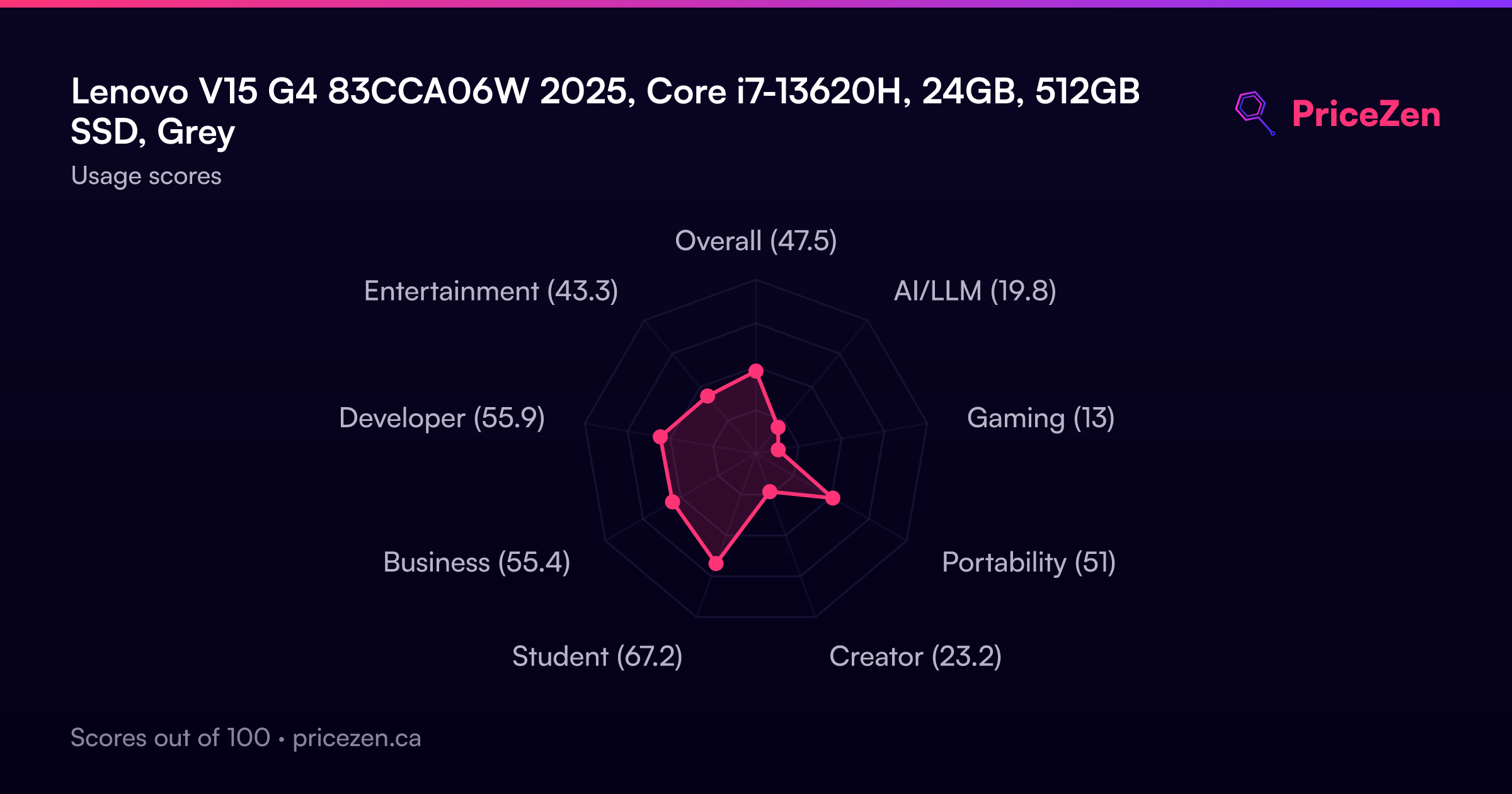
Usage Scores
- Overall47.5
- AI/LLM19.8
- Gaming13
- Portability51
- Creator23.2
- Student67.2
- Business55.4
- Developer55.9
- Entertainment43.3