Lenovo ThinkPad X1 Carbon 14" 21KC0046US 2025, Core Ultra 155U, 32GB, 512GB SSD, Black
The Intel Core Ultra 7 155U processor and 32GB RAM deliver solid multitasking for business workloads, while the 14-inch 120Hz IPS display with 100% sRGB covers accurate color work. The 512GB Gen4 PCIe SSD and Thunderbolt connectivity add fast storage and docking flexibility, and the 1.81kg carbon-fiber build keeps it portable. Best for business professionals and developers who need a durable, color-accurate ultrabook for office productivity and light coding, not for gaming.

No current retailer price











Snapshot
The 30-Second Version
The ThinkPad X1 Carbon Gen 12 is a well-built, lightweight business laptop with standout 32GB of RAM and a smooth 120Hz display. The Core Ultra 155U is efficient but only average in raw speed, and integrated graphics mean gaming is off the table. Pricing is steep, especially in Europe where listings vary by EUR 1,818. Buy it for work, not for play.
Pros & Cons
Pros
- 32GB of RAM is well above average and great for heavy multitasking 100th
- 120Hz IPS display with 100% sRGB coverage looks smooth and accurate 83rd
- Excellent port selection with Thunderbolt, USB-C, USB-A, and HDMI 82nd
- Lightweight 1.81kg build is easy to carry all day 72nd
- ThinkPad reliability and build quality are consistently strong
Cons
- Integrated graphics make gaming essentially a non-starter
- CPU performance is only average for the price
- 512GB storage is middling and fills up fast
- Pricing is rough, landing in the 14th percentile for affordability
- Battery life is unknown, which is a red flag for a business laptop
The proof
Performance
The Core Ultra 155U is a 12-core, 1.7GHz base clock chip built for efficiency. In our database, it lands in the 54th percentile for CPU performance among all laptops. That's about average, which sounds underwhelming until you remember what this machine is for. It's not built to render 4K video or compile massive codebases. It's built to open Outlook instantly, keep 30 Chrome tabs alive, and not sound like a jet engine during a Zoom call. For that job, it's more than enough.
The 32GB of 6400MHz RAM is the real performance story. That's a strong amount of memory, well above average, and it future-proofs this machine for years of OS updates and increasingly bloated business software. The 512GB Gen4 SSD is solid but unremarkable, sitting right around the middle of the pack. It's fast enough that you won't notice it, which is exactly what you want from storage. The 120Hz display makes the whole system feel snappier than the CPU benchmark would suggest. Day-to-day responsiveness is more about memory and refresh rate than raw core count, and this config nails both.
Specifications
Full Specifications
Processor
| CPU | Intel Core Ultra 7 155U |
| Cores | 12 |
| Frequency | 1.7 GHz |
| L3 Cache | 12 MB |
Graphics
| GPU | Integrated Intel Graphics |
| Type | Integrated |
| VRAM Type | GDDR6 |
Memory & Storage
| RAM | 32 GB |
| Storage | 512 GB |
| Storage Type | NVMe SSD |
Display
| Size | 14" |
| Resolution | 7680x4320 |
| Panel | IPS |
| Refresh Rate | 120 Hz |
| Color Gamut | 100% sRGB |
Connectivity
| USB-C Ports | 2 |
| USB Ports | 2 |
| Thunderbolt | Thunderbolt 4 |
| HDMI | ✓ |
| Wi-Fi | Wi-Fi 6E |
| Bluetooth | 5.3 |
Physical
| Weight | 1.8 kg / 4.0 lbs |
| OS | Windows 11 Pro |
vs Competition
The obvious comparison is the Apple MacBook Pro M4 Max. That machine is in a completely different performance universe, with a CPU and GPU that would embarrass the 155U. But it's also heavier, more expensive, and runs macOS. If you need Windows and you need a ThinkPad keyboard, the MacBook isn't really a competitor. It's a different tool for a different job.
Closer to home, the ASUS ROG Zephyrus G14 and HP OMEN Transcend 14 both offer discrete GPUs and far better gaming performance in a similar size class. The trade-off is build quality and business features. The Zephyrus is a gaming laptop that can do work. The X1 Carbon is a work laptop that can't really game. The MSI Raider is bigger and heavier, aimed at a different buyer entirely. The Dell Premium is the most direct competitor, and it's a coin flip on keyboard feel and support. If you want a thin Windows laptop with a real GPU, the Zephyrus or OMEN are better picks. If you want the best typing experience and corporate reliability, the ThinkPad wins.
| Spec | Lenovo ThinkPad X1 Carbon 14" 21KC0046US | Apple MacBook Pro 14.2" M4 Max | ASUS ROG Zephyrus 14" GA403WW-G14.R95080 | HP OMEN Transcend | Samsung Galaxy Book5 Pro 14" NP944XHA-KG3US | Dell Premium 14.5" LDA14250-7667SLV-PUS |
|---|---|---|---|---|---|---|
| CPU | Intel Core Ultra 7 155U | Apple M4 Max | AMD Ryzen AI 9 HX 370 | Intel Core Ultra 9 285H | Intel Core Ultra 7 258V | Intel Core Ultra 7 255H |
| RAM (GB) | 32 | 64 | 32 | 32 | 32 | 32 |
| Storage (GB) | 512 | 4096 | 2048 | 1024 | 1024 | 1024 |
| Screen | 14" 7680x4320 | 14.2" 3024x1964 | 14" 2880x1800 | 14" 2880x1800 | 14" 2880x1800 | 14.5" 3200x2000 |
| GPU | AMD Integrated Intel Graphics | Apple (40-Core) | NVIDIA GeForce RTX 5080 | NVIDIA GeForce RTX 5070 | Intel Arc Graphics 140V | Intel Arc Graphics |
| OS | Windows 11 Pro | macOS | Windows 11 Home | Windows 11 Home | Windows 11 Pro | Windows 11 Home |
| Weight (kg) | 1.8 | 1.6 | 1.6 | 1.6 | 1.2 | 1.7 |
| Battery (Wh) | - | 72 | - | 71 | 63 | 62 |
| Compare | Compare | Compare | Compare | Compare |
| Product | CPU | GPU | RAM | Ports | Screen | Portability | Storage | Reliability | Affordability |
|---|---|---|---|---|---|---|---|---|---|
| Lenovo ThinkPad X1 Carbon 14" 21KC0046US | 53.1 | 69.6 | 82.9 | 71.7 | 100 | 69.3 | 51 | 81.9 | 14 |
| Apple MacBook Pro 14.2" M4 Max Compare | 93.7 | 91.5 | 95.6 | 73.9 | 99.1 | 68.8 | 98.4 | 98.2 | 1.8 |
| ASUS ROG Zephyrus 14" GA403WW-G14.R95080 Compare | 91.2 | 98.3 | 90.8 | 89.4 | 96 | 73.6 | 89.7 | 60.6 | 6 |
| HP OMEN Transcend Compare | 90.1 | 93.5 | 89.6 | 89.4 | 96 | 72.2 | 65.3 | 33.7 | 8.9 |
| Samsung Galaxy Book5 Pro 14" NP944XHA-KG3US Compare | 65.8 | 69.6 | 79.5 | 83.5 | 90.4 | 89.4 | 79.3 | 81.9 | 21 |
| Dell Premium 14.5" LDA14250-7667SLV-PUS Compare | 87 | 69.6 | 89 | 66.7 | 96.8 | 61.2 | 65.3 | 33.7 | 14.6 |
Price
Value & Pricing
Here's where things get uncomfortable. This config lists at USD 2,398 in the US, CAD 3,199 in Canada, and GBP 2,588 in the UK. In Europe, the spread is wild. EUR prices range from EUR 2,789 all the way up to EUR 4,607 across four listings. That's a EUR 1,818 difference for what appears to be the same machine. If you're in Europe, shop around. The lowest EUR listing is the only sane option, and even that is a lot of money.
For USD 2,398, you're getting a well-built business laptop with great RAM and a nice screen, but an average CPU and integrated graphics. The affordability percentile of 14 tells the story. This is not a value play. You're paying the ThinkPad tax for build quality, keyboard feel, and corporate IT compatibility. That's a real thing, and for many businesses it's worth it. But for an individual buyer, it's hard to ignore that you can get a lot more raw performance for the same money elsewhere.
Price history
Read more
Overview
The ThinkPad X1 Carbon has been the default answer for road warriors and corner-office types for over a decade now, and the Gen 12 keeps that streak alive. This particular config, the 21KC0046US, pairs an Intel Core Ultra 155U with 32GB of RAM and a 512GB Gen4 SSD. It's a business laptop first, and it doesn't pretend otherwise. The 14-inch IPS panel runs at 120Hz and covers 100% of sRGB, which is a nice touch for a machine that will mostly live in spreadsheets and video calls.
Who is this for? If you live in Outlook, Teams, and a dozen browser tabs, this is your machine. The 32GB of RAM is the real star here. It sits in the 83rd percentile for memory among all laptops in our database, which means you can run a VM, a few Electron apps, and still have headroom. The Core Ultra 155U is a 12-core chip, but it's the low-power U-series, not the H-series you'd find in a creator laptop. That's a deliberate trade-off for battery life and thermals, not raw speed.
What makes this interesting is the balance. Lenovo didn't chase benchmark glory here. They built a 1.81kg machine with Thunderbolt, two USB-C, two USB-A, HDMI, and Wi-Fi 6E. That port selection is above average for a modern thin-and-light. The 120Hz screen is a quiet flex. It won't make your PowerPoints better, but scrolling feels smoother and it's easier on the eyes during long days. The price, though, is a different story. We'll get to that.
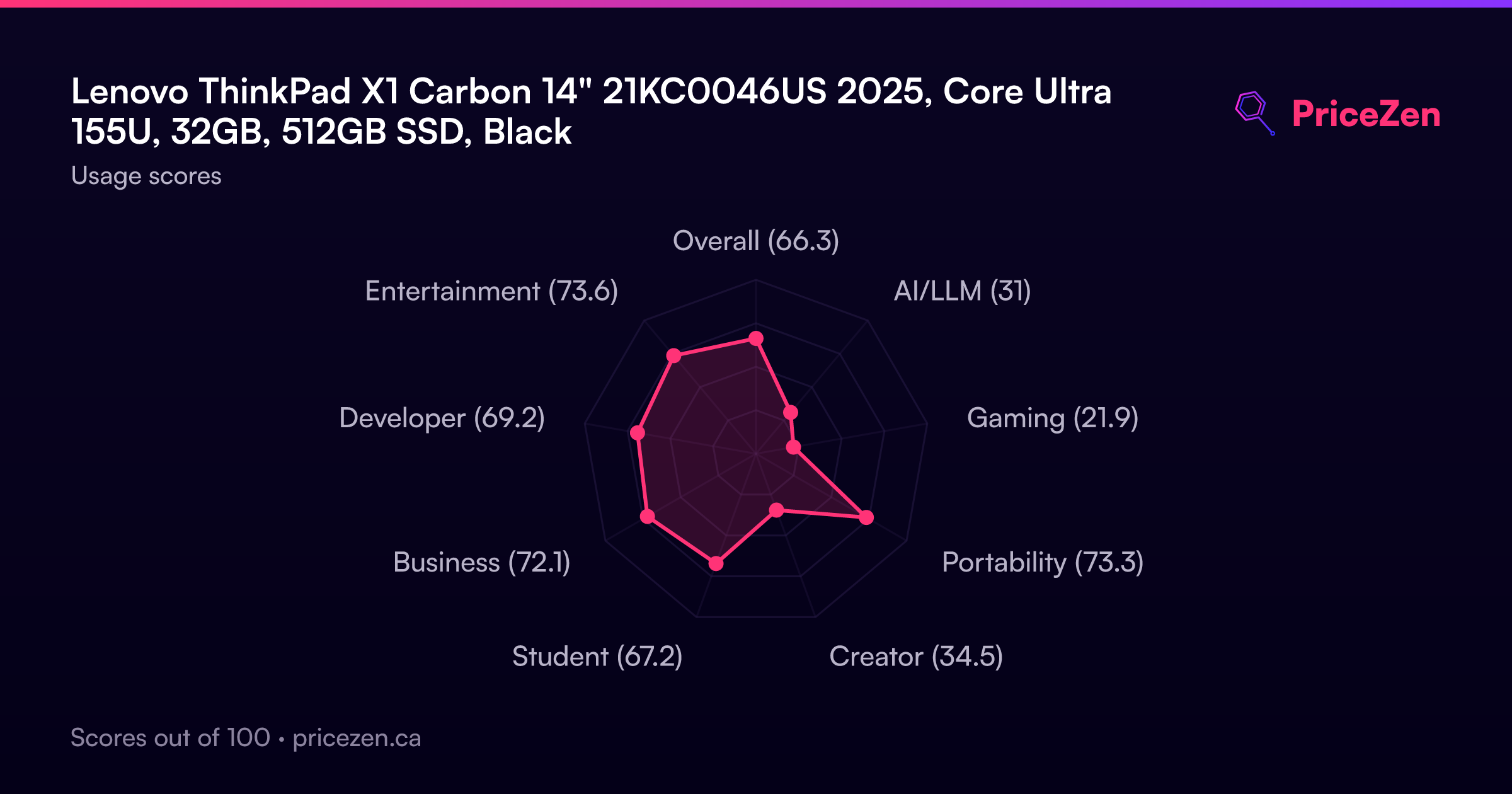
But let's be clear about what this is not. It is not a gaming laptop. The integrated Intel Graphics lands in the 69th percentile for GPU, which sounds okay until you realize that's a percentile against all laptops, including budget Chromebooks. The gaming score of 20.6 out of 100 is the weakest area by a mile. If you want to play anything beyond indie titles or very old games, look elsewhere.
Common Questions
Q: Can this laptop handle gaming?
Not really. The integrated Intel Graphics are fine for basic display output and light photo editing, but the gaming score of 20.6 out of 100 is the weakest area of this machine. You can play older titles and indie games at low settings, but anything modern will struggle. If gaming matters, look at the ASUS ROG Zephyrus G14 or HP OMEN Transcend 14 instead.
Q: Is 512GB of storage enough?
It depends on your workflow. For documents, email, and business apps, 512GB is workable but not generous. It sits right around the middle of the pack in our database. If you store a lot of media, run VMs, or keep large datasets locally, you'll fill it up faster than you'd like. The good news is it's a standard M.2 2280 PCIe Gen4 drive, so upgrading is possible.
Q: How does the Core Ultra 155U compare to other laptop CPUs?
The 155U is a 12-core low-power chip designed for efficiency rather than peak performance. It lands in the 54th percentile for CPU performance among all laptops in our database, which is about average. It's more than capable for office work, web browsing, and video calls, but it won't keep up with H-series chips or Apple's M-series silicon in demanding tasks.
Q: Is the ThinkPad X1 Carbon worth the price?
That depends on who's paying. For businesses, the build quality, keyboard, and reliability make it a safe choice, and the 32GB of RAM is a real asset. For individuals, the value proposition is tougher. It ranks in the 14th percentile for affordability, and you can find laptops with discrete GPUs and faster CPUs for the same money. If you value the ThinkPad experience above raw specs, it's worth it. If not, shop around.
Who Should Skip This
If you want to play games, skip this. The integrated graphics and 20.6 gaming score mean you'll be frustrated with anything beyond casual titles. Look at the ASUS ROG Zephyrus G14 or HP OMEN Transcend 14 instead. They cost about the same and include real GPUs.
If you do heavy creative work, video editing, 3D rendering, or large code compiles, the average CPU and lack of discrete graphics will slow you down. A MacBook Pro M4 Max or a Windows laptop with an H-series chip and dedicated GPU will serve you far better. And if you're on a tight budget, the 14th percentile affordability ranking should be a warning. There are plenty of solid business laptops for hundreds less that will handle email and spreadsheets just fine.
Verdict
For the road warrior who lives in email, documents, and video calls, the X1 Carbon Gen 12 is a known quantity. It's reliable, light, and the 32GB of RAM means you won't be closing tabs to keep things running. The 120Hz screen is a genuine quality-of-life upgrade. If your company is buying it for you, take it and don't look back.
For an individual spending their own money, the calculus is harder. The price is high for what you get on paper. The CPU is average, the storage is modest, and the integrated graphics rule out any serious gaming or GPU-accelerated work. If you need Windows and a great keyboard, this is a solid choice. If you want performance per dollar, there are better options. If you want to game at all, this is the wrong machine.
Usage Scores
- Overall66.3
- AI/LLM31
- Gaming21.9
- Portability73.3
- Creator34.5
- Student67.2
- Business72.1
- Developer69.2
- Entertainment73.6