HP Chromebook 14a-nk0008ca, Intel N150, 8GB, 128GB SSD, Sky Blue
The Intel N150 processor and 8GB LPDDR5 RAM handle everyday multitasking smoothly, while the 14-inch 1920x1200 antiglare display keeps text crisp and comfortable for long sessions. The 128GB SSD provides ample local storage for files and apps, and the backlit keyboard adds convenience for low-light use. This Chromebook suits students and compact-laptop buyers who prioritize security, portability, and basic productivity over gaming or heavy entertainment.

No current retailer price
Snapshot
The 30-Second Version
A comfortable Chromebook for basic tasks with a nice screen and backlit keys. The Intel N150 is a slug, but ChromeOS hides it well enough for everyday use.
Pros & Cons
Pros
- Crisp 14-inch 1920x1200 antiglare display 66th
- Backlit keyboard at this price is a nice touch
- 8GB RAM keeps ChromeOS from stuttering
- Lightweight and easy to carry
Cons
- Intel N150 is one of the slowest CPUs we've tracked
- 128GB storage fills up fast if you go offline
- Port selection is a weak spot, 10th percentile
- No fingerprint or facial recognition
What owners think
The Word on the Street
How owner sentiment changed over time
ExclusiveBased on when customers actually wrote their reviews - so you can see whether early praise held up.
6 written reviews, May – Jul 2026: 4 happy, 2 unhappy
Across all 13 store ratings: 4.5★. Most owners rate without writing a review. The chart counts the 6 written reviews.
Each dot is one written review, in the month it was written. Happy = 4-5★, mixed = 3★, unhappy = 1-2★.
The proof
Performance
The Intel N150 is a 4-core chip that sits in the 17th percentile for CPUs in our database, which is a polite way of saying it's slow. But here's the surprise: for ChromeOS, it's actually fine. Web pages load, apps open, and 8GB of LPDDR5 keeps a dozen tabs from choking. The 128GB SSD is small, landing in the 7th percentile for storage, but ChromeOS leans on cloud storage anyway. Just don't try to edit video or run Linux apps with any enthusiasm.
Specifications
Full Specifications
Processor
| CPU | Intel Processor N150 |
| Cores | 4 |
| Frequency | 800 MHz |
| L3 Cache | 6 MB |
Graphics
| GPU | Intel Graphics |
| Type | Integrated |
Memory & Storage
| RAM | 8 GB |
| RAM Generation | LPDDR5 |
| Storage | 128 GB |
| Storage Type | SSD |
Display
| Size | 14" |
| Resolution | 1920x1200 (Full HD) |
Connectivity
| Bluetooth | Yes 5.4 |
Physical
| OS | ChromeOS |
vs Competition
The obvious comparison is the Lenovo Legion 5i or ASUS ROG Zephyrus, but those are gaming laptops in a different league entirely. Against other Chromebooks, this HP holds its own on screen quality and build, but the Intel N150 puts it behind anything with a Core i3 or Ryzen 3. The MacBook Pro M5 is a joke of a comparison, but it shows how far this thing is from real performance. For the same money, a used ThinkPad or a newer Acer Chromebook with a better chip would be smarter.
| Spec | HP Chromebook 14a-nk0008ca | Apple MacBook Air 13.6" M4 | Lenovo Legion 5i 15.1" 83F00008US | Samsung Galaxy Book5 Pro 14" NP944XHA-KG3US | ASUS Zenbook 14" UX3405CA-U9321TB | Dell Premium 14.5" LDA14250-7667SLV-PUS |
|---|---|---|---|---|---|---|
| CPU | Intel Processor N150 | Apple M4 | Intel Core Ultra 7 255HX | Intel Core Ultra 7 258V | Intel Core Ultra 9 285H | Intel Core Ultra 7 255H |
| RAM (GB) | 8 | 24 | 32 | 32 | 32 | 32 |
| Storage (GB) | 128 | 1024 | 1024 | 1024 | 1024 | 1024 |
| Screen | 14" 1920x1200 | 13.6" 2560x1664 | 15.1" 2560x1600 | 14" 2880x1800 | 14" 1920x1200 | 14.5" 3200x2000 |
| GPU | Intel Graphics | Apple (10-Core) | NVIDIA GeForce RTX 5060 | Intel Arc Graphics 140V | Intel Arc Graphics | Intel Arc Graphics |
| OS | ChromeOS | macOS | Windows 11 Home | Windows 11 Pro | Windows 11 Home | Windows 11 Home |
| Weight (kg) | - | 1.2 | 2 | 1.2 | 1.3 | 1.7 |
| Battery (Wh) | - | 54 | 80 | 63 | 75 | 62 |
| Compare | Compare | Compare | Compare | Compare |
| Product | CPU | GPU | RAM | Ports | Screen | Portability | Storage | Reliability | Social Proof | Affordability |
|---|---|---|---|---|---|---|---|---|---|---|
| HP Chromebook 14a-nk0008ca | 17.2 | 28.1 | 20.5 | 9.7 | 46.9 | 66 | 7.3 | 33.6 | 49.3 | 62.5 |
| Apple MacBook Air 13.6" M4 Compare | 75.9 | 75.7 | 64.9 | 50.9 | 87.1 | 91.4 | 79.2 | 98.3 | 98.7 | 24.6 |
| Lenovo Legion 5i 15.1" 83F00008US Compare | 94.4 | 88.4 | 86.3 | 97.2 | 94.3 | 56.5 | 79.2 | 82.1 | 76.7 | 26.8 |
| Samsung Galaxy Book5 Pro 14" NP944XHA-KG3US Compare | 65.8 | 69.6 | 79.4 | 83.1 | 91.6 | 89.5 | 79.2 | 82.1 | 96.5 | 20.5 |
| ASUS Zenbook 14" UX3405CA-U9321TB Compare | 90.1 | 69.6 | 89.7 | 57.5 | 82.4 | 87 | 65.2 | 60.6 | 96.5 | 16.1 |
| Dell Premium 14.5" LDA14250-7667SLV-PUS Compare | 87 | 69.6 | 89 | 65.9 | 97.2 | 61.2 | 65.2 | 33.6 | 96.5 | 14 |
Price
Value & Pricing
At CAD 730, this Chromebook is not a steal. You can find Windows laptops with better CPUs and more storage for similar money, but they won't have ChromeOS's simplicity or this screen. If you want a no-fuss machine for school or casual browsing, it's acceptable. If you want value per dollar, look elsewhere.
Price history
Read more
Overview
The HP Chromebook 14a-nk0008ca is a budget Chromebook that gets the basics right and not much else. The one thing to know: it's a fine machine for web browsing, Google Docs, and Netflix, but the Intel N150 chip and 8GB of RAM mean you shouldn't expect any heavy lifting. At CAD 730, you're paying for simplicity and a decent screen, not performance.
Common Questions
Q: Can this Chromebook run Windows or Linux apps?
It can run Linux apps through ChromeOS's built-in support, but the N150 chip will make anything beyond light coding or text editing feel sluggish. Windows is not an option.
Q: Is 128GB of storage enough?
For most people, yes, because ChromeOS pushes you toward Google Drive. But if you download a lot of movies, music, or Android apps, you'll hit the wall fast. A microSD card helps.
Q: How is the battery life?
HP doesn't publish an official number, and we haven't tested it, but Chromebooks with this class of CPU typically last 8-10 hours of light use. Don't expect all-day video streaming.
Who Should Skip This
If you're looking for a laptop that can handle photo editing, coding, or even moderate multitasking, this isn't it. Go get a used ThinkPad with a Ryzen 5 or a newer Acer Chromebook with a Core i3 instead. You'll thank yourself in six months.
Verdict
Buy this if you want a simple, secure laptop for schoolwork, streaming, and light browsing, and you don't mind the slow CPU. Skip it if you need to run demanding apps, store lots of files locally, or want a machine that won't feel dated in two years. It's a decent Chromebook, but not a great one.
Usage Scores
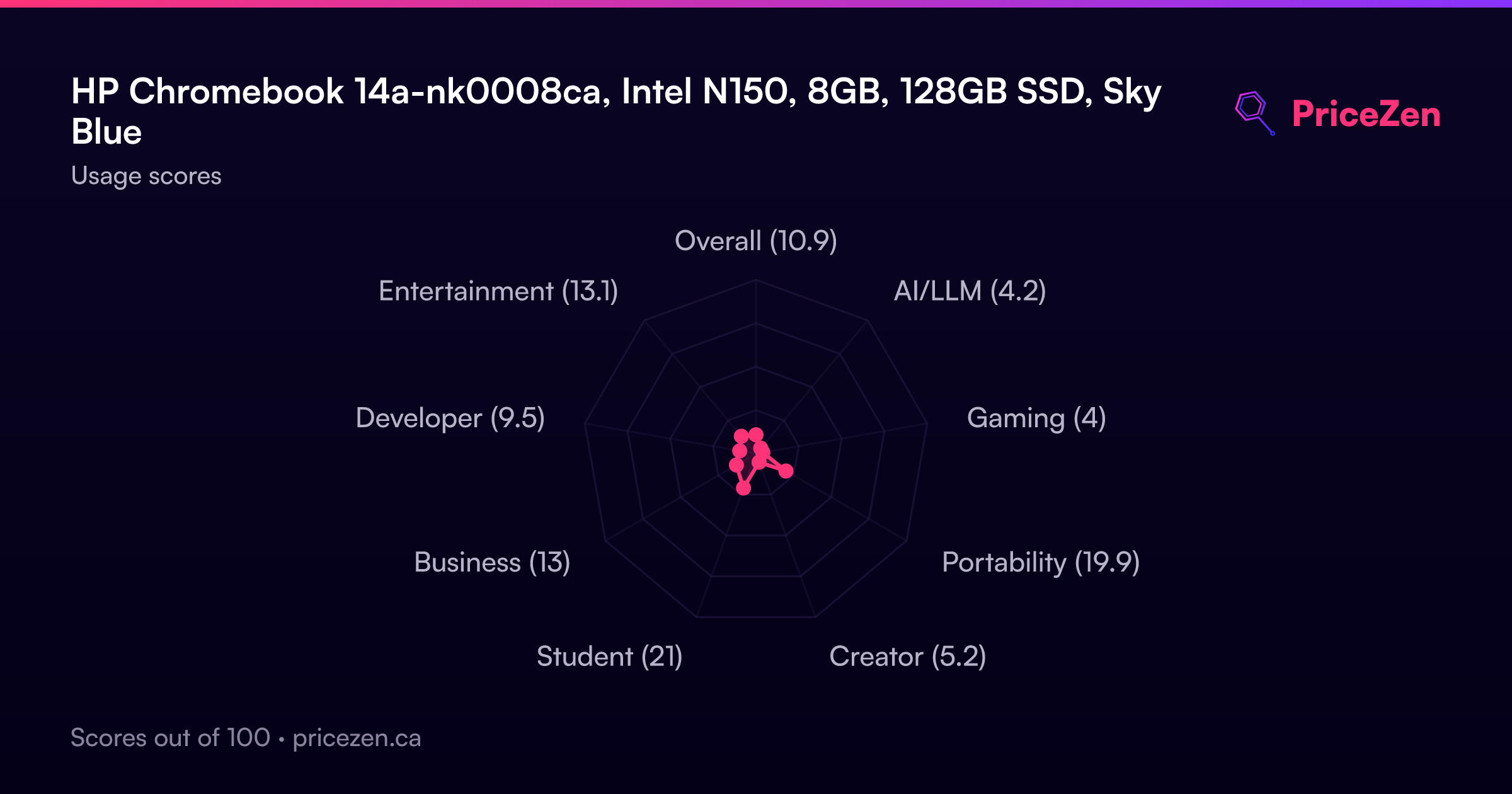
- Overall11
- AI/LLM4.2
- Gaming4
- Portability19.9
- Creator5.3
- Student21
- Business13.1
- Developer9.5
- Entertainment13.4