Lenovo P Series P14s Gen 5 2024, Core Ultra 7 155H, 32GB, 1TB SSD, RTX 500 Ada Generation, Black
The Intel Core Ultra 7 155H and RTX 500 Ada GPU deliver workstation-class performance in a 1.61kg chassis with a 14.5-inch 120Hz 100% DCI-P3 display. Its 32GB of DDR5 RAM and 75Wh battery support sustained productivity without frequent recharging. This is best for mobile CAD designers and 3D modelers who need ISV-certified graphics in a portable form factor.

No current retailer price
Snapshot
The 30-Second Version
The Lenovo ThinkPad P14s Gen 5 is a 14.5-inch mobile workstation with a gorgeous 3K 120Hz display, 32GB of RAM, and an RTX 500 Ada GPU. It's a great pick for professionals who need ISV-certified hardware in a portable package, but it's out of stock everywhere we track right now. Just don't expect it to handle heavy AI workloads or large 3D scenes with only 4GB of VRAM.
Pros & Cons
Pros
- Gorgeous 3K 120Hz display with full DCI-P3 coverage 94th
- 32GB of RAM is plenty for heavy multitasking 89th
- Thin and light for a workstation at 1.61kg 86th
- Excellent port selection including Ethernet and HDMI 2.1 82nd
- ThinkPad build quality and keyboard are top notch
Cons
- 4GB VRAM on the GPU is limiting for large projects
- AI and LLM workloads score poorly at 41.9/100
- Out of stock at every store we track, with no live price to judge value against
- Compactness is only about average, a bit chunky for 14.5 inches
- Battery life will suffer under sustained GPU load
The proof
Performance
The Core Ultra 7 155H lands in the 76th percentile for CPU performance in our database. That's solid, not spectacular. For compiling code, running simulations, or multitasking across heavy spreadsheets, it'll chew through work without much drama. The 32GB of DDR5 RAM sits at the 87th percentile, which means you won't be closing browser tabs to free up memory anytime soon.
The RTX 500 Ada with 4GB of VRAM is the interesting bit. It's in the 74th percentile for GPU performance, which puts it above average but nowhere near the top. For professional workloads like SolidWorks, Revit, or Blender viewport work, the Ada architecture gives you certified drivers and decent acceleration. But that 4GB VRAM buffer is tight for larger scenes or modern games at high texture settings. The 1TB SSD is in the 80th percentile, so storage speed and capacity are both fine for a machine this size.
Specifications
Full Specifications
Processor
| CPU | Intel Core Ultra 7 155H |
| Cores | 16 |
| Frequency | 1.4 GHz |
| L3 Cache | 24 MB |
Graphics
| GPU | NVIDIA RTX 500 Ada Generation Laptop GPU 4GB GDDR6 |
| Type | Discrete |
| VRAM | 4 GB |
| VRAM Type | GDDR6 |
Memory & Storage
| RAM | 32 GB |
| RAM Generation | DDR5 |
| Storage | 1 TB |
| Storage Type | NVMe SSD |
Display
| Size | 14.5" |
| Resolution | 3072x1920 |
| Panel | IPS |
| Refresh Rate | 120 Hz |
| Brightness | 430 nits |
| Color Gamut | 100% DCI-P3 |
Connectivity
| USB-C Ports | 2 |
| USB Ports | 2 |
| Thunderbolt | Thunderbolt 4 |
| HDMI | HDMI 2.1 |
| Wi-Fi | Wi-Fi 6E |
| Bluetooth | Bluetooth 5.3 |
| Ethernet | RJ45 |
Physical
| Weight | 1.6 kg / 3.5 lbs |
| Battery | 75 Wh |
| OS | Windows 11 Pro |
vs Competition
The Apple MacBook Pro 14.2" M4 Max is the obvious elephant in the room. Our ranking puts it well ahead of the P14s on GPU performance and AI workloads, where the ThinkPad's 4GB of VRAM and 41.9/100 AI score hold it back. If you need maximum compute and macOS works for your software, the MacBook is the stronger machine. But if you need Windows, ISV certifications, or a 3K 120Hz panel with full DCI-P3 coverage in a 1.61kg chassis, the ThinkPad makes a strong case.
The Samsung Galaxy Book5 Pro 14" NP944XHA-KG3US is the thin and light alternative for people whose work is mostly documents, browsers, and calls rather than CAD. It sits close to the P14s in our category ranking, but the ThinkPad's professional GPU with certified drivers and its 32GB of RAM are what separate a portable laptop from a portable workstation.
The Dell Premium 14.5" LDA14250-7667SLV-PUS matches the ThinkPad on screen size and is the closest thing here to a straight swap. How does the P14s compare? It comes down to the parts you can't upgrade later: the top 5% 3072x1920 120Hz panel, the RTX 500 Ada with ISV certification, and the ThinkPad keyboard. If those matter to your workflow, the P14s is the one, assuming you can actually get hold of it.
| Spec | Lenovo P Series P14s Gen 5 | Apple MacBook Pro 14.2" M4 Max | ASUS ROG Zephyrus 14" GA403WW-G14.R95080 | HP OMEN Transcend | Samsung Galaxy Book5 Pro 14" NP944XHA-KG3US | Dell Premium 14.5" LDA14250-7667SLV-PUS |
|---|---|---|---|---|---|---|
| CPU | Intel Core Ultra 7 155H | Apple M4 Max | AMD Ryzen AI 9 HX 370 | Intel Core Ultra 9 285H | Intel Core Ultra 7 258V | Intel Core Ultra 7 255H |
| RAM (GB) | 32 | 64 | 32 | 32 | 32 | 32 |
| Storage (GB) | 1024 | 4096 | 2048 | 1024 | 1024 | 1024 |
| Screen | 14.5" 3072x1920 | 14.2" 3024x1964 | 14" 2880x1800 | 14" 2880x1800 | 14" 2880x1800 | 14.5" 3200x2000 |
| GPU | NVIDIA RTX 500 Ada Generation Laptop GPU 4GB GDDR6 | Apple (40-Core) | NVIDIA GeForce RTX 5080 | NVIDIA GeForce RTX 5070 | Intel Arc Graphics 140V | Intel Arc Graphics |
| OS | Windows 11 Pro | macOS | Windows 11 Home | Windows 11 Home | Windows 11 Pro | Windows 11 Home |
| Weight (kg) | 1.6 | 1.6 | 1.6 | 1.6 | 1.2 | 1.7 |
| Battery (Wh) | 75 | 72 | - | 71 | 63 | 62 |
| Compare | Compare | Compare | Compare | Compare |
| Product | CPU | GPU | RAM | Ports | Screen | Portability | Storage | Reliability | Affordability |
|---|---|---|---|---|---|---|---|---|---|
| Lenovo P Series P14s Gen 5 | 78.1 | 78.7 | 86.3 | 89.4 | 94 | 61.9 | 79.2 | 81.9 | 0 |
| Apple MacBook Pro 14.2" M4 Max Compare | 93.7 | 91.5 | 95.6 | 73.9 | 99.1 | 68.8 | 98.4 | 98.2 | 1.8 |
| ASUS ROG Zephyrus 14" GA403WW-G14.R95080 Compare | 91.2 | 98.3 | 90.8 | 89.4 | 96 | 73.6 | 89.7 | 60.5 | 6 |
| HP OMEN Transcend Compare | 90.1 | 93.5 | 89.6 | 89.4 | 96 | 72.2 | 65.2 | 33.6 | 8.9 |
| Samsung Galaxy Book5 Pro 14" NP944XHA-KG3US Compare | 65.8 | 69.6 | 79.4 | 83.4 | 90.4 | 89.4 | 79.2 | 81.9 | 21 |
| Dell Premium 14.5" LDA14250-7667SLV-PUS Compare | 87 | 69.6 | 89 | 66.7 | 96.8 | 61.2 | 65.2 | 33.6 | 14.6 |
Price
Value & Pricing
Value is the hard part to call right now. We track prices over time, partly through our community browser extension, and the P14s Gen 5 is currently out of stock at every store we follow, so there's no live price to weigh against the spec sheet. On paper it's still a lot of machine: a top 5% display, 32GB of DDR5 that beats most laptops, and a 1TB SSD that's better than average is a combination you don't often see in something this light. The catch is that 4GB of VRAM. If your work involves large 3D models or you want to run local AI models, you'll hit that ceiling fast regardless of what it eventually sells for. For most CAD, coding, and content creation tasks, though, this is a strong package if you can find one. The Samsung Galaxy Book5 Pro 14" NP944XHA-KG3US and the Dell Premium 14.5" LDA14250-7667SLV-PUS are the alternatives sitting alongside it in our ranking, but neither brings the ISV certifications or the ThinkPad keyboard.
Read more
Overview
The Lenovo ThinkPad P14s Gen 5 is a 14.5-inch mobile workstation that tries to pack serious productivity power into a chassis you can actually carry around. At 1.61kg with a 75Wh battery, it's aimed at engineers, designers, and anyone who needs ISV-certified hardware without lugging a desktop replacement. The catch right now is availability: we track its price across stores with our own automated system, and every vendor we follow currently has it out of stock, so there's no live price to quote.
Under the hood you get an Intel Core Ultra 7 155H with 16 cores, 32GB of DDR5 RAM, a 1TB NVMe SSD, and an NVIDIA RTX 500 Ada Generation laptop GPU with 4GB of VRAM. The display is a 3072x1920 IPS panel running at 120Hz with 430 nits of brightness and full DCI-P3 coverage. That's a screen that ranks in the top 5% for this category, which is a big deal if you do color-sensitive work.
People searching for a thin and light workstation laptop often ask whether it can handle both CAD work and some after-hours gaming. The short answer is yes, with caveats. The RTX 500 Ada is a professional GPU first, not a gaming card, but it'll push frames in most titles at medium settings. The 120Hz panel helps there too.
Common Questions
Q: Is the Lenovo ThinkPad P14s Gen 5 good for gaming?
It can handle gaming at medium settings thanks to the RTX 500 Ada GPU and 120Hz display, but it's not a gaming laptop. The 4GB of VRAM will limit you in modern AAA titles at higher settings.
Q: How is the battery life on the ThinkPad P14s Gen 5?
The 75Wh battery is decent for a workstation this size, but expect it to drain faster under sustained GPU load. For light productivity work, you should get through most of a workday.
Q: Does the ThinkPad P14s Gen 5 have a good display for photo editing?
Yes, the 3072x1920 IPS panel with 100% DCI-P3 coverage and 430 nits of brightness is excellent for photo and video editing. It's one of the best screens in this category.
Q: Can the ThinkPad P14s Gen 5 run local AI models?
Not well. The AI and LLM score of 41.9 out of 100 is the weakest area for this laptop, largely due to the 4GB VRAM limit on the RTX 500 Ada GPU.
Who Should Skip This
Skip the P14s Gen 5 if you're a 3D artist working with large scenes, a data scientist running local LLMs, or a gamer who wants high settings at native resolution. The 4GB VRAM is a hard ceiling that will frustrate you. Skip it too if you need a laptop this week, since every store we track has it out of stock. For GPU-heavy work and AI, the Apple MacBook Pro 14.2" M4 Max ranks well ahead of it in our data. For general productivity in a similar footprint, the Samsung Galaxy Book5 Pro 14" NP944XHA-KG3US and the Dell Premium 14.5" LDA14250-7667SLV-PUS are the alternatives we'd look at.
Verdict
Should you buy the Lenovo ThinkPad P14s Gen 5? If you're a professional who needs a portable workstation with a stunning display, excellent keyboard, and enough RAM to never think about memory again, it's still worth chasing. The top 5% screen is a genuine standout feature, and the 32GB of RAM and 1TB SSD round out a spec sheet that holds up well in our ranking.
The problem is finding one. It's out of stock at every store we track right now, so there's no price to judge and nothing to add to a cart today. And if your work involves heavy GPU rendering, large 3D scenes, or you want to run local AI models, look elsewhere anyway. The 4GB VRAM and the 41.9/100 AI score are real limitations. This is a productivity machine first, not a GPU compute monster. For the right user, it's one of the best thin and light workstations around, if you can wait for stock.
Usage Scores
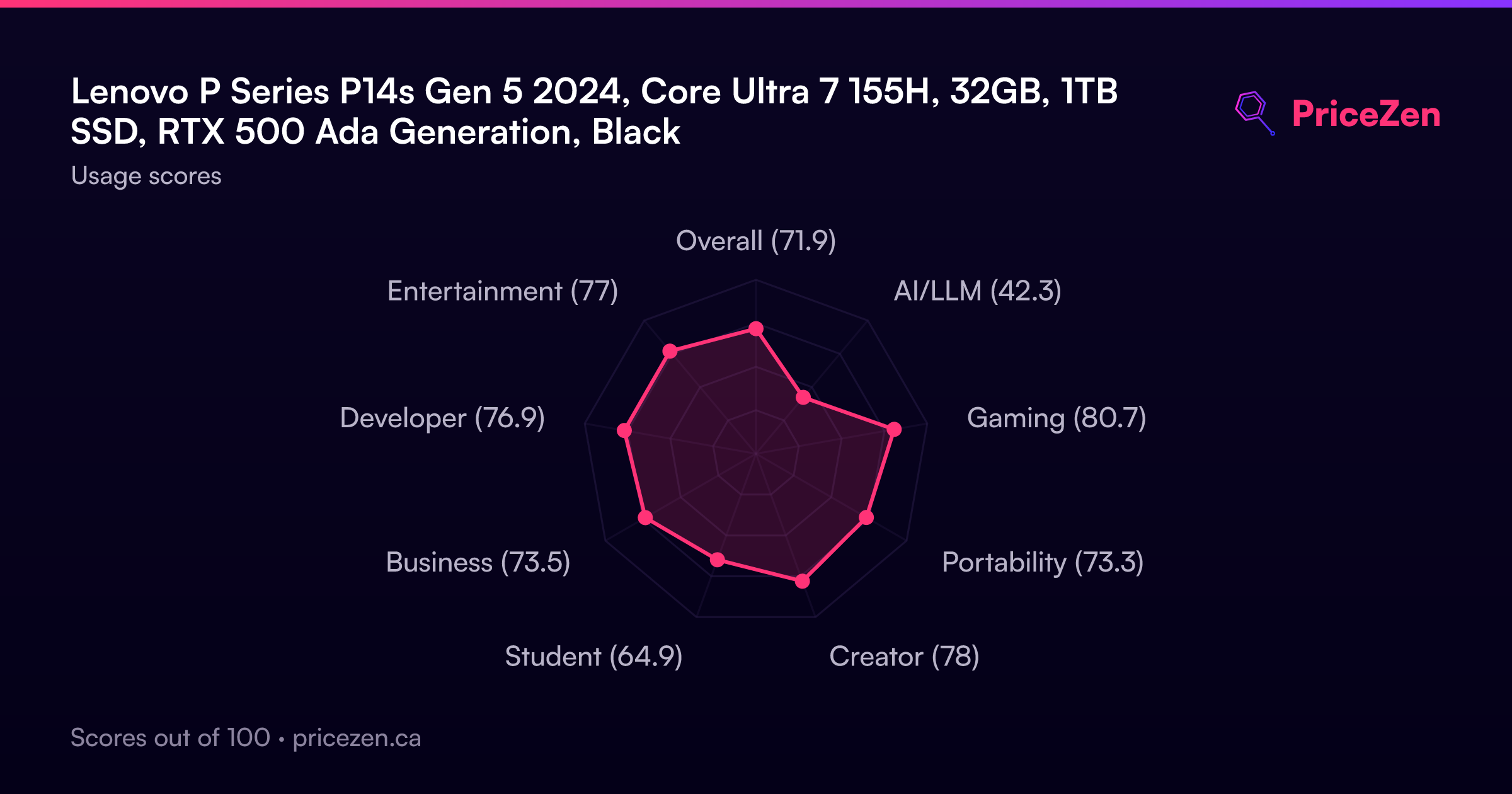
- Overall71.9
- AI/LLM42.3
- Gaming80.7
- Portability73.3
- Creator78
- Student64.9
- Business73.5
- Developer76.9
- Entertainment77