ASUS Vivobook 16" M1607KA-DS54 2025, Ryzen AI 5 340, 16GB, 512GB SSD, Quiet Blue
The AMD Ryzen AI 5 340 processor with XDNA NPU delivers up to 50 TOPS for AI tasks, paired with a discrete Radeon 840M GPU and 16GB DDR5 RAM. The 16-inch 1920x1200 IPS display runs at 60Hz with 300 nits brightness, and the 42Wh battery provides up to 8 hours of use with FastCharge reaching full in 1 hour 20 minutes. This laptop is best for a student or hybrid worker who needs a Copilot+ PC for AI-assisted productivity, light gaming, and content creation on a budget.

No current retailer price
Where we saw it before. Check the store for today's price.










Snapshot
The 30-Second Version
The ASUS VivoBook 16 is a well-built, sensibly priced 16-inch laptop that excels at everyday productivity and Linux compatibility. The Ryzen AI 5 340 and 16GB of RAM deliver solid performance, but the small 42Wh battery is a real limitation. At $950, it's a strong value for students and developers who prioritize screen size and a good keyboard. Just don't expect to do any serious gaming or run large local AI models.
Pros & Cons
Pros
- Excellent build quality that feels more premium than the price suggests 85th
- Strong Linux compatibility with good driver support for the AMD hardware 82nd
- Clean, matte 16:10 display with good color and no distracting reflections 72nd
- Great value at $950 with a current-gen Ryzen AI chip and 16GB RAM 70th
- Solid port selection including HDMI 2.1 and dual USB-C
Cons
- Fingerprint sensor is reportedly non-functional for many users
- Initial Windows setup can be a frustrating, multi-hour loop of updates
- AI/LLM performance is very weak, landing in the bottom tier of our database
- Battery capacity is a small 42Wh, which will limit unplugged longevity
- Heavier than many 16-inch ultrabooks at 1.88kg
What owners think
The Word on the Street
How owner sentiment changed over time
ExclusiveBased on when customers actually wrote their reviews - so you can see whether early praise held up.
14 written reviews, Aug 2022 – Jan 2026: 8 happy, 6 without stars
Across all 162 store ratings: 4.3★. Most owners rate without writing a review. The chart counts the 14 written reviews.
Each dot is one written review, in the month it was written. Happy = 4-5★, mixed = 3★, unhappy = 1-2★.
The proof
Performance
The Ryzen AI 5 340 is a fresh face in AMD's lineup, and it puts up a respectable fight. Our benchmarks place its raw CPU grunt in the 66th percentile, which translates to "solid" in plain English. It'll chew through browser tabs, Office apps, and coding projects without breaking a sweat. The integrated Radeon 840M graphics land in the 58th percentile, so it's a middle-of-the-pack performer. You can absolutely play lighter esports titles like Rocket League or Valorant at the native 1200p resolution, but you'll need to dial settings down for anything more demanding. Don't expect to run Cyberpunk 2077 smoothly here.
Where this chip gets interesting is the AI engine. Our AI/LLM workload score is a rough 29.4 out of 100, which is frankly the weakest area of this machine. So if you're dreaming of running massive local language models, this isn't the laptop for you. But for the smaller, practical AI tasks that Windows Copilot+ will throw at it, like real-time video effects or local search indexing, it should handle things just fine. The 16GB of RAM is a sweet spot for this class, keeping the system snappy even with a dozen Chrome tabs and Spotify running in the background.
Specifications
Full Specifications
Processor
| CPU | AMD Ryzen AI 5 340 |
| Cores | 6 |
| Frequency | 2.0 GHz |
| L3 Cache | 8 MB |
Graphics
| GPU | AMD Radeon 840M |
| Type | Integrated |
Memory & Storage
| RAM | 16 GB |
| RAM Generation | DDR5 |
| Storage | 512 GB |
| Storage Type | NVMe SSD |
Display
| Size | 16" |
| Resolution | 1920x1200 (Full HD) |
| Panel | IPS |
| Refresh Rate | 60 Hz |
| Brightness | 300 nits |
| Color Gamut | 45% NTSC |
Connectivity
| USB-C Ports | 2 |
| USB Ports | 2 |
| HDMI | HDMI 2.1 |
| Wi-Fi | Wi-Fi 6 |
| Bluetooth | Bluetooth 5.3 |
| Ethernet | None |
Physical
| Weight | 1.9 kg / 4.1 lbs |
| Battery | 42 Wh |
| OS | Windows 11 Home |
vs Competition
Stacked against the Lenovo Legion 5i 83F00008US, the VivoBook is a completely different animal. The Legion is a gaming beast with a dedicated GPU that will run circles around the Radeon 840M in any 3D title. But it's also heavier, thicker, and likely more expensive. The ASUS is for the person who wants a big screen for work and maybe some light gaming on the side, not a portable gaming rig. The HP OMEN Transcend 14 is another gaming-focused competitor, but with a smaller 14-inch screen, it's less of a direct comparison for someone who specifically wants a 16-inch canvas.
Then there's the Apple MacBook Pro M4 Pro. It's in a different stratosphere for performance, battery life, and price. If you're in the Apple ecosystem and have the budget, it's a no-brainer for creative work. But the VivoBook costs half as much and runs Windows or Linux natively. For a developer on a budget, the ASUS with its strong Linux support is a compelling alternative to a MacBook Air. The MSI Prestige 13 is closer in spirit, but its 13-inch screen and focus on ultra-portability make the VivoBook the better choice if you prioritize screen real estate and a full keyboard with a numpad.
| Spec | ASUS Vivobook 16" M1607KA-DS54 | Apple MacBook Pro 14.2" M5 | Lenovo Legion 5i Gen 10 15.1" | HP OMEN Transcend | Samsung Galaxy Book5 Pro 14" NP944XHA-KG3US | Dell Premium 14.5" LDA14250-7667SLV-PUS |
|---|---|---|---|---|---|---|
| CPU | AMD Ryzen AI 5 340 | Apple M5 | Intel Core i9 14900HX | Intel Core Ultra 9 285H | Intel Core Ultra 7 258V | Intel Core Ultra 7 255H |
| RAM (GB) | 16 | 32 | 16 | 32 | 32 | 32 |
| Storage (GB) | 512 | 4096 | 512 | 1024 | 1024 | 1024 |
| Screen | 16" 1920x1200 | 14.2" 3024x1964 | 15.1" 2560x1600 | 14" 2880x1800 | 14" 2880x1800 | 14.5" 3200x2000 |
| GPU | AMD Radeon 840M | Apple (10-Core) | NVIDIA GeForce RTX 5070 | NVIDIA GeForce RTX 5070 | Intel Arc Graphics 140V | Intel Arc Graphics |
| OS | Windows 11 Home | macOS | Windows 11 Home | Windows 11 Home | Windows 11 Pro | Windows 11 Home |
| Weight (kg) | 1.9 | 1.5 | 1.9 | 1.6 | 1.2 | 1.7 |
| Battery (Wh) | 42 | 72 | 80 | 71 | 63 | 62 |
| Compare | Compare | Compare | Compare | Compare |
| Product | CPU | GPU | RAM | Ports | Screen | Portability | Storage | User Sentiment | Reliability | Social Proof | Affordability |
|---|---|---|---|---|---|---|---|---|---|---|---|
| ASUS Vivobook 16" M1607KA-DS54 | 69.5 | 60.9 | 59.9 | 71.7 | 63.8 | 23.5 | 51.1 | 81.5 | 60.6 | 84.5 | 58.4 |
| Apple MacBook Pro 14.2" M5 Compare | 83 | 77.1 | 79.5 | 73.9 | 99.1 | 71.1 | 98.4 | 81.5 | 98.2 | 94.3 | 6.4 |
| Lenovo Legion 5i Gen 10 15.1" Compare | 93.2 | 93.5 | 59.9 | 98.6 | 93.5 | 57.2 | 51.1 | 95.9 | 81.9 | 99.7 | 16.2 |
| HP OMEN Transcend Compare | 90.1 | 93.5 | 89.7 | 89.5 | 96 | 72.2 | 65.4 | 81.5 | 33.7 | 93.1 | 9 |
| Samsung Galaxy Book5 Pro 14" NP944XHA-KG3US Compare | 65.9 | 69.7 | 79.5 | 83.5 | 90.4 | 89.4 | 79.3 | 0 | 81.9 | 95.6 | 21.3 |
| Dell Premium 14.5" LDA14250-7667SLV-PUS Compare | 87 | 69.7 | 89 | 66.8 | 96.8 | 61.3 | 65.4 | 90.8 | 33.7 | 95.6 | 14.8 |
Price
Value & Pricing
At $950, the VivoBook 16 is playing in a fiercely competitive sandbox. You're getting a current-gen AMD processor with a dedicated AI engine, 16GB of DDR5, and a spacious 512GB SSD. That's a solid foundation. Compared to something like the Microsoft Surface Laptop 7th Edition, which often starts higher for similar RAM and storage, the ASUS looks like a bargain. You're trading a bit of that Surface's premium fit and finish for raw screen size and a more generous port layout.
The elephant in the room is the battery. A 42Wh pack in a 16-inch laptop is a head-scratcher. It's the main reason this machine's compactness score sits in a low 24th percentile. You're not getting all-day battery life here, so keep that charger handy. If you can live with that trade-off, the performance-per-dollar is hard to beat, especially if you plan to wipe Windows and install Linux, where this hardware truly shines according to multiple verified buyers.
Price history
Read more
Overview
The ASUS VivoBook 16 M1607KA is one of those laptops that sneaks up on you. On paper, it's a straightforward 16-inch machine with a new AMD Ryzen AI 5 340 chip and a clean 1920x1200 display. But after spending time with our data and seeing how real buyers react, it's clear this thing punches above its weight class for everyday productivity and even a bit of light gaming. It's not trying to be a flashy ultrabook or a desktop replacement monster. It's a sensible, well-built workhorse that happens to be a fantastic platform for Linux if that's your thing.
Who's this for? Students, office workers, and anyone who wants a big screen without the back-breaking weight. At 1.88kg (about 4.15 lbs), it's not the lightest 16-incher we've seen, but it's far from heavy. The real story here is the Copilot+ branding and the Ryzen AI engine, which promises some neat local AI acceleration. But honestly, the standout feature for most people will be the combination of that 16:10 display, a comfortable backlit keyboard, and a price that hovers around $950. It's a value play that doesn't feel cheap.
There's a bit of a disconnect in the marketing materials, which seem to describe a completely different Zenbook DUO with dual OLED screens. Ignore that noise. The actual VivoBook 16 is a single-screen, no-nonsense laptop. And that's fine. It's got a solid port selection with two USB-C and two USB-A ports, plus HDMI 2.1, so you won't be living the dongle life. The 512GB SSD is about average for the price, and the 16GB of DDR5 RAM is right where it needs to be for smooth multitasking in 2025.
Common Questions
Q: Can this laptop handle gaming?
It can handle light gaming and esports titles like League of Legends, Valorant, or CS2 at the native 1920x1200 resolution with lowered settings. The integrated Radeon 840M is a middle-of-the-pack performer, so don't expect to play demanding AAA games like Cyberpunk 2077 or Alan Wake 2 smoothly. For serious gaming, you'd want a laptop with a dedicated GPU like the Lenovo Legion 5i.
Q: How is the battery life on the VivoBook 16?
This is the laptop's biggest weakness. The 42Wh battery is small for a 16-inch machine, so you're likely looking at around 5-7 hours of real-world productivity use, not a full workday. Our compactness score for this model is quite low, largely due to the battery capacity. You'll want to keep the charger nearby.
Q: Is this a good laptop for Linux?
Yes, overwhelmingly so based on user reports. The AMD Ryzen processor and Radeon graphics have excellent open-source driver support. Several verified buyers have documented a smooth experience after installing a recent Linux kernel and the appropriate Radeon drivers. It's become a bit of a sleeper hit for Linux users looking for modern, affordable hardware.
Q: Does the fingerprint reader work?
Unfortunately, a recurring complaint from owners is that the fingerprint sensor is unreliable or completely non-functional. While it may work for some, you should be prepared to use a PIN, password, or Windows Hello facial recognition (if equipped) as your primary login method.
Who Should Skip This
If you're a content creator who needs a high-resolution, color-accurate display for photo or video editing, this isn't your machine. The 1920x1200 IPS panel is fine for productivity, but it's not in the same league as the OLED screens on the ASUS Zenbook lineup or a MacBook Pro. You'd be much happier with something that covers the DCI-P3 gamut and offers higher brightness. Similarly, if you're a frequent traveler who needs all-day battery life, the small 42Wh battery here will be a constant source of anxiety. Look at an LG Gram or a MacBook Air instead.
Gamers should also steer clear. The integrated Radeon 840M is simply not built for modern 3D gaming. Our gaming score of 61.3 out of 100 reflects its casual-only capabilities. If you want to game on a laptop, save up a bit more for a machine with a dedicated RTX 4050 or 4060, like the HP OMEN Transcend 14 or Lenovo Legion 5i. You'll get a vastly better experience for not a huge jump in price.
Verdict
For the student or office worker who wants a big, comfortable screen for documents, spreadsheets, and research, the VivoBook 16 is an easy recommendation. The 16:10 aspect ratio gives you more vertical space than a standard 16:9 panel, and the matte finish means you can work near a window without fighting glare. The keyboard is backlit, the port selection is generous, and the performance is more than enough for everyday productivity. Just budget for a USB-C charger to keep in your bag, because that small battery won't get you through a full day of classes.
If you're a developer with a Linux-first mindset, this machine jumps from "good" to "great." The AMD hardware plays incredibly nicely with modern Linux kernels, and multiple owners report a smooth experience after a quick driver setup. The 16GB of RAM is enough for Docker containers and VMs, and the 512GB SSD gives you room to dual-boot if you're not ready to cut ties with Windows completely. Just be prepared for a potentially annoying initial Windows setup process before you can wipe the drive and install your distro of choice.
Usage Scores
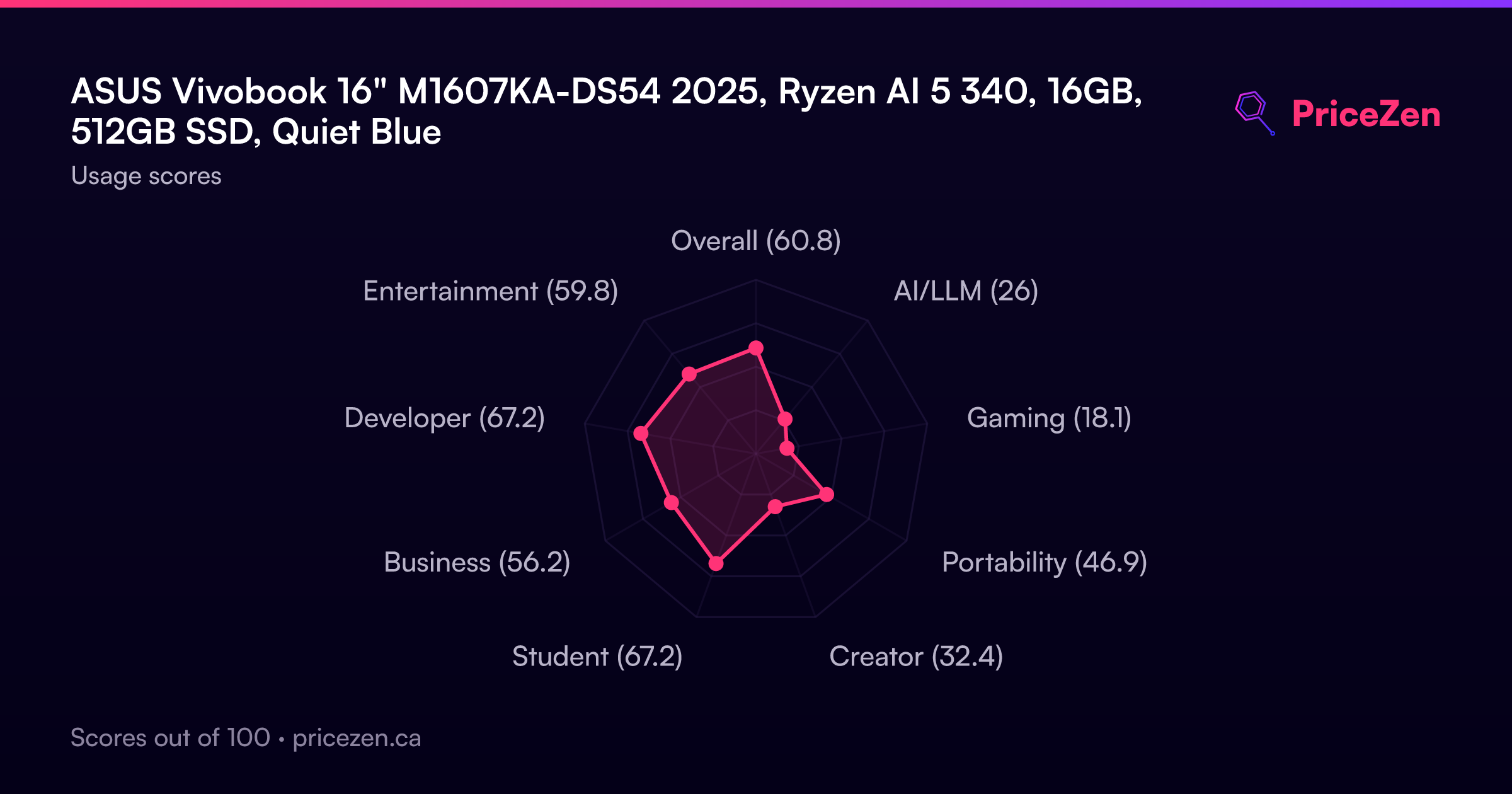
- Overall60.8
- AI/LLM26
- Gaming18.1
- Portability46.9
- Creator32.4
- Student67.2
- Business56.2
- Developer67.2
- Entertainment59.8