ASUS Vivobook S 14" S5406SA-DH76 2024, Core Ultra 7 258V, 32GB, 1TB SSD, Mist Blue
The Intel Core Ultra 7 258V chip pairs with 32GB LPDDR5X RAM and Intel Arc Graphics for smooth multitasking on a 14-inch 600-nit OLED display. Its 75Wh battery supports up to 17 hours of use, while Wi-Fi 7 and Thunderbolt 4 keep connectivity fast. Best for students and business users who need a lightweight 1.30kg laptop for daily productivity and media consumption.

No current retailer price











Snapshot
The 30-Second Version
The Vivobook S 14 is a stunningly light OLED productivity machine with RAM for days. Just don't ask it to play games, because it'll politely decline.
Pros & Cons
Pros
- That OLED display is stunning, 600 nits and 100% DCI-P3 92nd
- 32GB RAM means zero slowdowns, ever 86th
- 1.3kg weight makes it a true travel companion 84th
- Wi-Fi 7 and Thunderbolt 4 future-proof the connectivity 81st
Cons
- Integrated graphics can't handle real gaming
- 60Hz refresh rate feels dated next to 120Hz competitors
- No price listed means you'll have to hunt for a deal
- Reliability scores are just average
What owners think
The Word on the Street
The proof
Performance
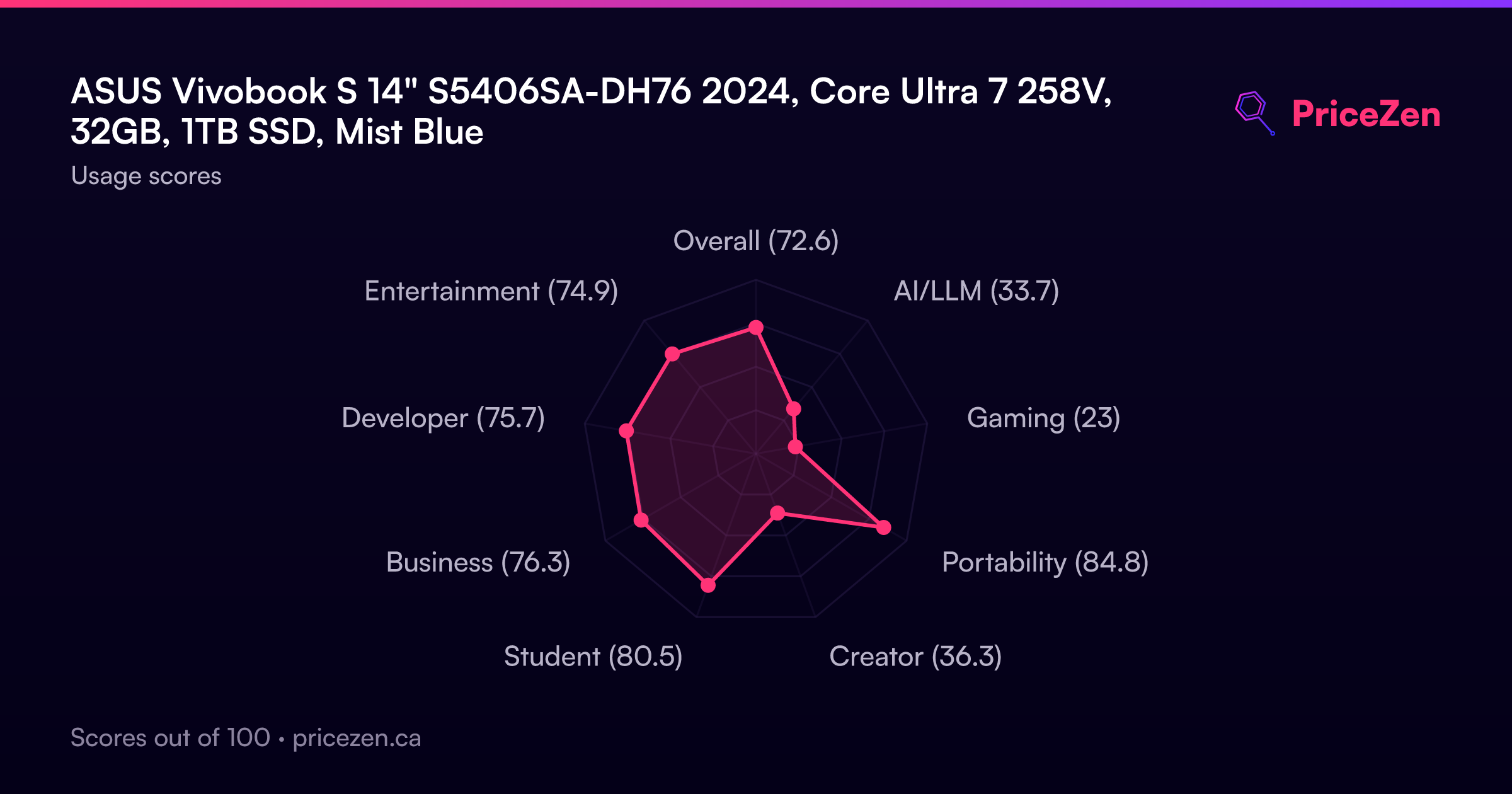
The Intel Core Ultra 7 258V surprised us. It's not going to top any raw benchmark charts, but for everyday multitasking it chews through browser tabs, Office apps, and light photo editing without breaking a sweat. The 32GB of LPDDR5X is the real hero here, putting this machine in the 92nd percentile for RAM. That's more memory than most people will ever use, and it means this laptop will stay snappy for years. The integrated Arc Graphics are fine for casual stuff, but the gaming score of 23.2 tells the real story. This is not a gaming laptop, and that's okay.
Specifications
Full Specifications
Processor
| CPU | Intel Core Ultra 7 258V |
| Cores | 8 |
| Frequency | 2.2 GHz |
| L3 Cache | 12 MB |
Graphics
| GPU | Intel Arc Graphics |
| Type | Integrated |
| VRAM Type | Shared |
Memory & Storage
| RAM | 32 GB |
| RAM Generation | LPDDR5X |
| Storage | 1 TB |
| Storage Type | NVMe SSD |
Display
| Size | 14" |
| Resolution | 1920x1200 (Full HD) |
| Panel | OLED |
| Refresh Rate | 60 Hz |
| Brightness | 600 nits |
| Color Gamut | 100% DCI-P3 |
Connectivity
| USB-C Ports | 2 |
| USB Ports | 2 |
| Thunderbolt | Thunderbolt 4 |
| HDMI | HDMI 2.1 |
| Wi-Fi | Wi-Fi 7 |
| Bluetooth | Bluetooth 5.4 |
Physical
| Weight | 1.3 kg / 2.9 lbs |
| Battery | 75 Wh |
| OS | Windows 11 Home |
vs Competition
Stack this against the Apple MacBook Pro M5 and the HP OMEN Transcend 14, and the picture gets clear fast. The MacBook Pro crushes it on raw performance and build quality, but you'll pay significantly more and lose the OLED screen unless you go top-tier. The OMEN Transcend 14 has a real GPU and a higher refresh rate display, making it the better pick for creators who game on the side. The Vivobook S 14 wins on pure portability and battery endurance, but it's not the most powerful option in this crowd.
| Spec | ASUS Vivobook S 14" S5406SA-DH76 | Apple MacBook Pro 14.2" M4 Max | Lenovo Legion Pro 7i Gen 10 16" | HP OMEN Transcend | Samsung Galaxy Book5 Pro 14" NP944XHA-KG3US | Dell Premium 14.5" LDA14250-7667SLV-PUS |
|---|---|---|---|---|---|---|
| CPU | Intel Core Ultra 7 258V | Apple M4 Max | Intel Core Ultra 9 275HX | Intel Core Ultra 9 285H | Intel Core Ultra 7 258V | Intel Core Ultra 7 255H |
| RAM (GB) | 32 | 64 | 32 | 32 | 32 | 32 |
| Storage (GB) | 1024 | 4096 | 1024 | 1024 | 1024 | 1024 |
| Screen | 14" 1920x1200 | 14.2" 3024x1964 | 16" 2560x1600 | 14" 2880x1800 | 14" 2880x1800 | 14.5" 3200x2000 |
| GPU | Intel Arc Graphics | Apple (40-Core) | NVIDIA GeForce RTX 5070 Ti | NVIDIA GeForce RTX 5070 | Intel Arc Graphics 140V | Intel Arc Graphics |
| OS | Windows 11 Home | macOS | Windows 11 Home | Windows 11 Home | Windows 11 Pro | Windows 11 Home |
| Weight (kg) | 1.3 | 1.6 | 2.7 | 1.6 | 1.2 | 1.7 |
| Battery (Wh) | 75 | 72 | 99 | 71 | 63 | 62 |
| Compare | Compare | Compare | Compare | Compare |
| Product | CPU | GPU | RAM | Ports | Screen | Portability | Storage | Reliability | Social Proof | Affordability |
|---|---|---|---|---|---|---|---|---|---|---|
| ASUS Vivobook S 14" S5406SA-DH76 | 65.9 | 69.6 | 92 | 83.5 | 80.6 | 86.1 | 79.3 | 60.5 | 78.5 | 35 |
| Apple MacBook Pro 14.2" M4 Max Compare | 93.7 | 91.5 | 95.6 | 73.9 | 99.1 | 68.8 | 98.4 | 98.1 | 72.6 | 1.8 |
| Lenovo Legion Pro 7i Gen 10 16" Compare | 97.2 | 96.7 | 89 | 97.3 | 95 | 9.5 | 79.3 | 81.8 | 99.7 | 5.8 |
| HP OMEN Transcend Compare | 90.1 | 93.5 | 89.6 | 89.4 | 96 | 72.2 | 65.3 | 33.6 | 93 | 8.9 |
| Samsung Galaxy Book5 Pro 14" NP944XHA-KG3US Compare | 65.9 | 69.6 | 79.5 | 83.5 | 90.4 | 89.4 | 79.3 | 81.8 | 95.5 | 21 |
| Dell Premium 14.5" LDA14250-7667SLV-PUS Compare | 87 | 69.6 | 89 | 66.8 | 96.8 | 61.2 | 65.3 | 33.6 | 95.5 | 14.6 |
Price
Value & Pricing
At $1,250 to $1,300 USD, this sits in a weird spot. You're paying a premium for the OLED screen and portability, but the integrated GPU means you're not getting a do-everything machine. If you value battery life and screen quality over raw power, it's worth it. If you want to game or render video, save your money and look elsewhere.
Read more
Overview
The ASUS Vivobook S 14 is the laptop you buy when you're done pretending you need a gaming rig to check email and watch Netflix. This thing nails the basics: a gorgeous OLED screen, 32GB of RAM, and a battery that just won't quit. The one thing to know? It's a productivity beast that weighs less than three pounds, but don't expect it to run Cyberpunk at anything above a slideshow.
Common Questions
Q: Can this laptop handle video editing?
Light 1080p editing in something like CapCut or Premiere Rush is fine thanks to the 32GB RAM and fast SSD. But 4K timelines or heavy effects will choke the integrated GPU. Get a laptop with a dedicated GPU if editing is your main gig.
Q: Is the battery really 17 hours?
ASUS claims up to 27 hours in their marketing, but the retailer notes say 17 hours. Real-world use with the OLED screen at decent brightness will land you somewhere around 10 to 14 hours of mixed work. Still excellent, just not magic.
Q: Does the OLED screen cause burn-in?
Modern OLED panels have mitigation features like pixel shifting and screen savers. For normal use, you'll be fine. Just don't leave a static spreadsheet open at max brightness for 12 hours a day, every day, for years.
Who Should Skip This
If you're looking for a gaming laptop or anything with real graphics muscle, this isn't it. Go get the HP OMEN Transcend 14 or a Lenovo Legion 5i instead. You'll trade some portability for a GPU that actually does something.
Verdict
Buy this if you want a featherweight laptop with a beautiful screen and all-day battery for work, school, or travel. It's a focused machine that does its job extremely well. Skip it if you need any kind of serious graphics performance, because the integrated Arc GPU just can't keep up.
Usage Scores
- Overall72.6
- AI/LLM33.7
- Gaming23
- Portability84.8
- Creator36.3
- Student80.5
- Business76.3
- Developer75.7
- Entertainment74.9