AMD Radeon R7 350 4GB GDDR5
Its defining feature is the six native HDMI 1.4a outputs, enabling six independent displays from a single 180mm card powered entirely through the PCIe slot with a 55W TDP. The 4GB of GDDR5 memory and passive cooling design ensure reliable, low-maintenance operation for static digital signage and monitoring walls. This card is best for financial traders, security operators, and advertising display managers who need to drive multi-screen 1080p arrays without external power connectors.












Snapshot
The 30-Second Version
The AMD Radeon R7 350 is a budget multi-monitor graphics card with six native HDMI ports, perfect for productivity setups like trading desks or digital signage. It's completely useless for gaming or any GPU-intensive work, with raster performance in the 2nd percentile of our database. Buy it for the ports, not the power, and be aware of reliability concerns from some users.
Pros & Cons
Pros
- Six native HDMI ports, no adapters needed 87th
- Runs six independent 1080p displays at 60Hz
- Low 55W TDP, powered entirely by the motherboard
- Short 180mm card fits in most cases
- Easy installation for multi-monitor productivity
Cons
- 2nd percentile raster performance, useless for gaming
- User sentiment in the 27th percentile, reliability concerns
- Driver issues reported after installation
- Port clearance problems with thicker 4K cables
- 4GB VRAM is misleading, it's not for 4K workloads
What owners think
The Word on the Street
How owner sentiment changed over time
ExclusiveBased on when customers actually wrote their reviews - so you can see whether early praise held up.
10 written reviews, May 2025 – Feb 2026: 8 happy, 1 mixed, 1 unhappy
Across all 69 store ratings: 4.1★. Most owners rate without writing a review. The chart counts the 10 written reviews.
- Jan – Mar 20262 of 3 happy
Mixed reviews: one user reports flawless multi-monitor performance, while another experienced a failure after 31 days.
- Works well with multiple monitors for productivity tasks.
- Card failed after 31 days, just past return window.
- Easy setup with 4K HDMI cables and driver update.
- No response from seller after reporting defect.
- Oct – Dec 20253 of 4 happy
Buyers in Q4 2025 found the card easy to install and reliable for multi-monitor productivity, though some noted cramped port spacing and tricky monitor arrangement.
- Easy installation and plug-and-play experience for multi-monitor setups.
- Port spacing too tight for some 4K cables, requiring thinner plugs or filing.
- Monitor sequencing setup via Windows was unintuitive and time-consuming.
- One review flagged the brand as potentially unbranded or fake based on online search.
Each dot is one written review, in the month it was written. Happy = 4-5★, mixed = 3★, unhappy = 1-2★. Period summaries are in English.
The proof
Performance
Let's get the ugly numbers out of the way. The R7 350 sits in the 2nd percentile for raster performance and ray tracing in our database. That's dead last territory. If you try to run Cyberpunk 2077 on this thing, it'll laugh at you, then crash. The 800MHz boost clock and 4GB of GDDR5 on a 128-bit bus were modest specs back in 2015, and they haven't aged well. This card is not for gaming, period.
Where it actually performs is in the multi-display department. Six HDMI 1.4a ports mean you can run six independent 1080p displays at 60Hz without any DisplayPort to HDMI adapters cluttering your desk. For productivity workloads like spreadsheet monitoring, trading platforms, or reference material while you work, it's stable and gets the job done. The 55W TDP means it runs cool and quiet, and the PWM fan won't drown out your office. Just don't expect it to push 4K content smoothly across all six panels. The spec sheet mentions 3840x2160 support, but that's for a single monitor, and even then, it's going to be a slideshow for anything beyond static images.
Specifications
Full Specifications
Chipset
| GPU Chipset | Radeon R7 350 |
| Brand | AMD |
| Class | consumer |
| Process | 28 |
Memory
| VRAM | 4 GB |
| Memory Type | GDDR5 |
| Memory Bus | 128 |
Compute
| Base Clock | 800 |
| Boost Clock | 800 |
Power & Cooling
| TDP | 55 |
| Recommended PSU | 300 |
| Power Connectors | None |
Connectivity
| Interface | PCI Express 3.0 x16 |
| HDMI | 6 |
| Max Displays | 6 |
Physical
| Length | 180 |
| Form Factor | Full Height |
| Weight | 0.4 kg / 0.9 lbs |
Features
| DirectX | 12 |
vs Competition
Compared to the MSI Ventus G5060-8V3C or ASUS Dual DUAL-RX9060XT-16G, this R7 350 is a completely different animal. Those cards are modern gaming GPUs with 8GB and 16GB of VRAM respectively, built for high refresh rate 1440p and 4K gaming. They'll absolutely destroy the R7 350 in any benchmark you can name. But here's the thing: neither of them has six HDMI ports. The ASUS Dual has maybe three DisplayPort and one HDMI. If you need six screens, you'd need two of those cards, which doubles your cost and power draw.
The Gigabyte Vision GV-N3080VISION OC-10GD is another competitor that makes the R7 350 look like a relic in terms of raw performance. But again, it's a single-card solution for gaming, not multi-monitor productivity. The Sapphire PULSE 11330-02-20G and XFX Radeon RX 9060 XT SWIFT are in the same boat. They're better at everything except the one thing this card does: driving six HDMI displays from a single slot without external power. If your workflow is 90% Excel and 10% YouTube, the R7 350 does the job. If you want to game on even one of those monitors, buy literally anything else on this list.
| Spec | AMD Radeon R7 350 | ASUS GeForce RTX 5070 PRIME | XFX Radeon RX 9070 XT Mercury | Gigabyte Radeon RX 9070 XT Gaming | ZOTAC GeForce RTX 5070 Solid OC | MSI GeForce RTX 5070 SHADOW |
|---|---|---|---|---|---|---|
| Chipset | Radeon R7 350 | GeForce RTX 5070 | Radeon RX 9070 XT | Radeon RX 9070 XT | GeForce RTX 5070 | GeForce RTX 5070 |
| Vram | 4GB GDDR5 | 12GB GDDR7 | 16GB GDDR6 | 16GB GDDR6 | 12GB GDDR7 | 12GB GDDR7 |
| Boost Clock Mhz | 800 | 2512 | 3100 | 2970 | 2542 | 2542 |
| Tdp W | 55 | 250 | 304 | 304 | 250 | 250 |
| Memory Bus Bits | 128 | 192 | 256 | 256 | 192 | 192 |
| Ray Tracing | - | true | true | true | true | true |
| GPU Class | consumer | consumer | consumer | consumer | consumer | consumer |
| Compare | Compare | Compare | Compare | Compare |
| Product | AI | Rt | Vram | Raster | Feature | Thermal | User Sentiment | Efficiency | Connectivity | Social Proof | Affordability |
|---|---|---|---|---|---|---|---|---|---|---|---|
| AMD Radeon R7 350 | 12.3 | 2.2 | 12.8 | 2.3 | 11 | 6.5 | 27.5 | 2.3 | 64.9 | 53.8 | 86.6 |
| ASUS GeForce RTX 5070 PRIME Compare | 61.8 | 82.9 | 65.5 | 79.3 | 96 | 91.6 | 71.6 | 79.2 | 94.1 | 93.3 | 44.6 |
| XFX Radeon RX 9070 XT Mercury Compare | 89.5 | 84.7 | 75.4 | 75.3 | 96 | 72.3 | 96 | 45.7 | 94.1 | 93.3 | 41.9 |
| Gigabyte Radeon RX 9070 XT Gaming Compare | 89.5 | 77.8 | 73.8 | 75.3 | 96 | 91.6 | 58.1 | 45.7 | 88.8 | 74.8 | 26.7 |
| ZOTAC GeForce RTX 5070 Solid OC Compare | 61.8 | 82.9 | 65.5 | 79.3 | 96 | 91.6 | 85.4 | 79.2 | 94.1 | 83.8 | 38.5 |
| MSI GeForce RTX 5070 SHADOW Compare | 61.8 | 82.9 | 65.5 | 79.3 | 89 | 55.4 | 58.1 | 79.2 | 94.1 | 93.3 | 40.7 |
Price
Value & Pricing
At around $170 USD, this card is a tough sell if you only need two or three monitors. A used GT 1030 or even integrated graphics on a modern CPU can handle dual displays for less money. But if you specifically need six HDMI outputs without spending $400+ on a professional Quadro or FirePro card, the value proposition shifts. The 87th percentile affordability score in our database reflects that niche appeal. You're paying for the port count, not the silicon. Just know that the low user sentiment score (27th percentile) suggests some buyers have run into early failures, so factor in the risk of a return or replacement.
Amazon 1 offer From CA$254
Price history
Read more
Overview
The AMD Radeon R7 350 is a budget graphics card aimed squarely at one thing: running a wall of monitors. This particular Xynsviu variant packs 4GB of GDDR5 and, more importantly, six native HDMI 1.4a ports. You won't find this card in any gaming rig worth its salt, but for a stock trading setup, digital signage, or a productivity workstation, it's a niche tool that solves a very specific problem. Prices float around $170 USD, which tells you this isn't about raw power, it's about display real estate.
People searching for a multi-monitor graphics card usually ask two things: can it run my displays without adapters, and will it fit in my PC? The answer to the first is yes, six independent 1080p displays at 60Hz straight from the card. The second is a bit more nuanced. It's a short 180mm card that pulls all its power from the motherboard, so no extra PCIe power cables are needed. A 300W power supply is the recommendation, which is pretty modest.
But let's be honest about what this is. The R7 350 chip is old, built on a 28nm process with an 800MHz boost clock. It's not going to accelerate your video edits or handle any modern gaming. Our database puts its raster performance in the 2nd percentile, which is a polite way of saying it's one of the worst we've seen for anything graphically intensive. This is a display adapter first, a GPU second.
Common Questions
Q: Is the Radeon R7 350 good for gaming?
No. The R7 350 sits in the 2nd percentile for raster performance in our database, which means it's one of the worst cards we've tested for modern gaming. It's designed for multi-monitor productivity, not playing games.
Q: How many monitors can the R7 350 support?
This Xynsviu variant has six native HDMI 1.4a ports and can run up to six independent displays simultaneously at 1920x1080 and 60Hz. No adapters are required.
Q: Does the R7 350 need external power?
No. The card draws all its power from the PCI Express x16 slot, with a 55W TDP. A 300W power supply is the recommended minimum for your system.
Q: Can the R7 350 run 4K monitors?
Technically it supports a single 4K display at 3840x2160, but performance will be limited to basic desktop use. For six monitors, you're looking at 1080p at 60Hz per display, which is what this card is actually built for.
Who Should Skip This
If you plan to play any games made in the last decade, edit video, or do any 3D rendering, skip this card entirely. The R7 350 is a display adapter, not a graphics card in the modern sense. You'd be far better off with something like the MSI Ventus G5060-8V3C or ASUS Dual DUAL-RX9060XT-16G if you need any actual GPU horsepower. Also skip it if you only need two or three monitors. A cheap used card or even integrated graphics on a modern CPU can handle that without the reliability gamble. And if your livelihood depends on six screens staying on without fail, spend the extra money on a professional multi-display card from a brand with a real warranty and support channel.
Verdict
Should you buy this? If you're building a six-monitor trading station or a digital signage wall on a budget, and you understand that this card will never play a game or render a 3D scene, then yes, it's a functional solution. The six native HDMI ports are the entire reason this product exists, and for that specific use case, it works. Installation is straightforward, and once the drivers are sorted, it's stable for productivity tasks.
But the reliability concerns give us pause. A verified review reporting failure after 31 days is a red flag, and the 27th percentile user sentiment score backs that up. This is a card from an unbranded or rebadged manufacturer, and quality control seems hit or miss. If your income depends on those six screens staying on, you might want to spend more on a card from a reputable brand with a real warranty. For a hobbyist or a low-stakes office setup, it's a gamble that could pay off.
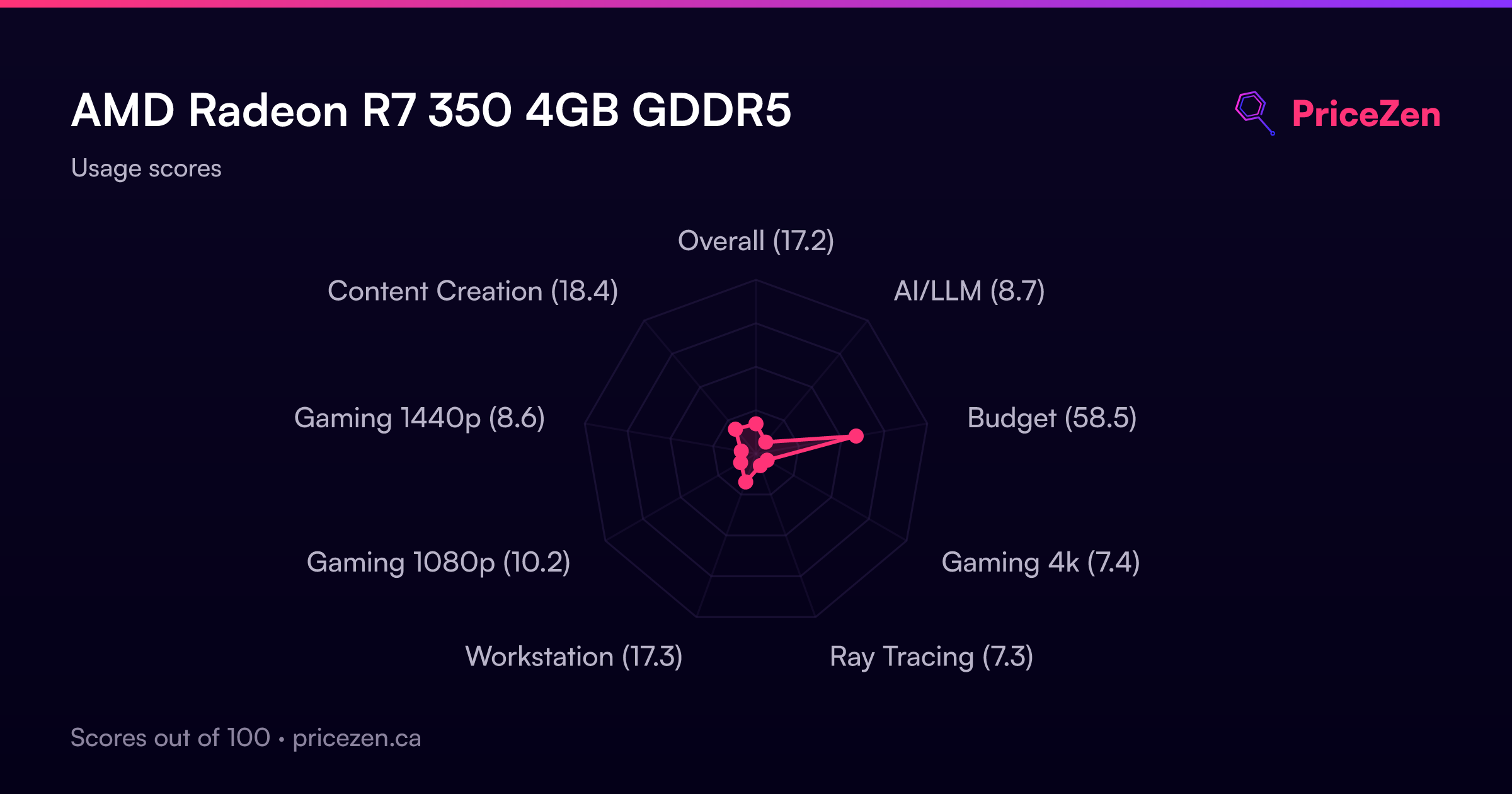
Usage Scores
- Overall17.2
- AI/LLM8.7
- Budget58.5
- Gaming 4k7.4
- Ray Tracing7.3
- Workstation17.3
- Gaming 1080p10.2
- Gaming 1440p8.6
- Content Creation18.4