ASUS GeForce RTX 5080 ProArt OC 16GB GDDR7 Black
The 5nm Blackwell chip with 16GB of GDDR7 memory and 56.3 TFLOPS of FP32 compute power delivers a 35759 PassMark score, excelling in ray tracing at 89.6/100. Its compact 2.5-slot, 306mm design fits into more cases than typical high-end cards, and the bundled ProArt motherboard and Ryzen 5 9600X CPU create a cohesive, creator-focused ecosystem. This card is best for 3D artists and game developers who need fast path-traced rendering and AI-accelerated workflows in a professional, space-efficient build.

Snapshot
The 30-Second Version
The ASUS GeForce RTX 5080 ProArt is a top-tier graphics card with best-in-class ray tracing performance and 16GB of GDDR7 memory. It's a 1440p and 4K gaming monster, but it runs hot and draws 360W, so you'll need a solid PSU and good airflow. CAD pricing varies wildly from CAD 3,300 to CAD 6,720, so shop carefully before you commit.
Pros & Cons
Pros
- Ray tracing performance is best-in-class at 98th percentile 98th
- 16GB GDDR7 with 960 GB/s bandwidth handles 4K textures easily 95th
- DLSS 4.0 support makes high-refresh 4K gaming realistic 94th
- PCIe 5.0 x16 ready for next-gen platforms 94th
- 2.5-slot design fits most mid-tower cases
Cons
- 360W TDP means you need a beefy 850W PSU minimum
- Thermal performance ranks in the 7th percentile, a real weak spot
- CAD 3,300 to CAD 6,720 price spread is confusing and often overpriced
- Social proof is thin with only 4 reviews so far
- Budget score of 63.9 means value is not this card's strong suit
The proof
Performance
The PassMark G3D score of 35,666 puts this card in rarefied air. For context, that's the kind of number that makes previous-gen flagships look like they were standing still. In our database, raster performance sits in the 94th percentile, which translates to "one of the best on the market" without any caveats. You can throw basically any game at this thing at 1440p and expect triple-digit frame rates, and 4K is comfortable as long as you're not expecting 240Hz in every title without DLSS.
Ray tracing is where this card really separates itself. The 98th percentile RT ranking means it's top of the charts, and with 84 dedicated RT cores plus DLSS 4.0 support, games like Cyberpunk 2077 with path tracing enabled are actually playable at high settings. The compute numbers are equally strong at 56.28 TFLOPS for both FP16 and FP32, which lands in the 93rd percentile. Content creators doing Blender renders, video exports, or AI workloads will feel the difference immediately. The one area that's just average is efficiency at the 58th percentile, which makes sense given the 360W TDP. It's not a power sipper, but it's not the worst offender we've seen either.
Specifications
Full Specifications
Chipset
| GPU Chipset | GeForce RTX 5080 |
| Brand | NVIDIA |
| Architecture | Blackwell |
| Class | consumer |
| Process | 5 |
Memory
| VRAM | 16 GB |
| Memory Type | GDDR7 |
| Memory Bus | 256 |
| Bandwidth | 960 |
Compute
| CUDA Cores | 10752 |
| Tensor Cores | 336 |
| RT Cores | 84 |
| Base Clock | 2295 |
| Boost Clock | 2617 |
| FP16 TFLOPS | 56.28 |
| FP32 TFLOPS | 56.28 |
Performance
| PassMark G3D | 35666 |
| GPU Compute | 19602 |
Power & Cooling
| TDP | 360 |
| Recommended PSU | 850 |
| Power Connectors | 1 x 16-Pin |
Connectivity
| Interface | PCI Express 5.0 x16 |
| DisplayPort | 3 |
| HDMI | 1 |
| Max Displays | 4 |
| Max Resolution | 7680 x 4320 |
Physical
| Length | 306 |
| Slot Width | 2.5 |
| Form Factor | ATX |
Features
| Ray Tracing | Yes |
| Upscaling | DLSS 4.0 |
| AV1 Encode | Yes |
| VR Ready | Yes |
| DirectX | 12 Ultimate |
vs Competition
Compared to the Gigabyte Eagle RTX 5070 Ti, the ASUS ProArt 5080 is a clear step up in raw performance, especially in ray tracing where the 5080's 84 RT cores and higher bandwidth give it a real edge. But the Gigabyte card will likely cost you significantly less, and for 1440p gaming specifically, the 5070 Ti is honestly plenty. The MSI Ventus RTX 5070 Ti is another strong alternative if you're trying to save money without giving up too much. It won't match the 5080 in compute or RT workloads, but it's a smarter buy for pure gaming on a budget.
The ZOTAC APOCALYPSE RTX 5080 is the most direct competitor here, since it's the same chip. ZOTAC tends to price more aggressively than ASUS, so if you can find that card at a lower price, it's worth considering. The PNY ARGB OC is another 5080 variant that often undercuts ASUS on price. Where the ProArt earns its keep is the quieter, more professional aesthetic and ASUS's generally solid build quality. But if you're just chasing frames per dollar, the ZOTAC or PNY cards might make more sense. The Sapphire NITRO+ is an AMD card, so it's a different conversation entirely, but it's worth mentioning if you're open to Team Red and want better raster performance per dollar.
| Spec | ASUS GeForce RTX 5080 ProArt OC | Gigabyte GeForce RTX 5070 Ti Eagle Ice | MSI GeForce RTX 5070 Ti Ventus 3X OC | ZOTAC GeForce RTX 5080 APOCALYPSE | PNY GeForce RTX 5080 ARGB OC | Sapphire Radeon RX 9070 XT PULSE |
|---|---|---|---|---|---|---|
| Chipset | GeForce RTX 5080 | GeForce RTX 5070 Ti | GeForce RTX 5070 Ti | GeForce RTX 5080 | GeForce RTX 5080 | Radeon RX 9070 XT |
| Vram | 16GB GDDR7 | 16GB GDDR7 | 16GB GDDR7 | 16GB GDDR7 | 16GB GDDR7 | 16GB GDDR6 |
| Boost Clock Mhz | 2617 | 2542 | 2482 | 2730 | 2620 | 2970 |
| Tdp W | 360 | 300 | 300 | 360 | 360 | 304 |
| Memory Bus Bits | 256 | 256 | 256 | 256 | 256 | 256 |
| Ray Tracing | true | true | true | true | true | true |
| GPU Class | consumer | consumer | consumer | consumer | consumer | consumer |
| Compare | Compare | Compare | Compare | Compare |
| Product | AI | Rt | Vram | Raster | Compute | Feature | Thermal | Efficiency | Connectivity | Affordability |
|---|---|---|---|---|---|---|---|---|---|---|
| ASUS GeForce RTX 5080 ProArt OC | 85.7 | 97.5 | 89 | 94.5 | 93.5 | 89 | 6.5 | 57.1 | 94.1 | 10.4 |
| Gigabyte GeForce RTX 5070 Ti Eagle Ice Compare | 79.6 | 88.6 | 86 | 89 | 88.2 | 96 | 91.6 | 72.2 | 94.1 | 26.8 |
| MSI GeForce RTX 5070 Ti Ventus 3X OC Compare | 79.6 | 92.4 | 86 | 89 | 88.2 | 96 | 91.6 | 72.2 | 94.1 | 23 |
| ZOTAC GeForce RTX 5080 APOCALYPSE Compare | 85.7 | 97.5 | 89 | 94.5 | 93.5 | 96 | 91.6 | 57.1 | 94.1 | 20.2 |
| PNY GeForce RTX 5080 ARGB OC Compare | 85.7 | 97.5 | 89 | 94.5 | 93.5 | 96 | 91.6 | 57.1 | 94.1 | 14.4 |
| Sapphire Radeon RX 9070 XT PULSE Compare | 89.3 | 84.7 | 73.8 | 75.3 | 90.2 | 96 | 72.3 | 45.7 | 88.8 | 43.3 |
Price
Value & Pricing
Let's talk money, because this is where things get weird. The CAD pricing on this combo ranges from CAD 3,300 to CAD 6,720 across just two listings. That's a CAD 3,420 spread for what should be the same bundle, which is frankly ridiculous. If you're in Canada and considering this, you absolutely need to shop around and find the listing at the lower end of that range. At CAD 3,300, you're getting a GPU, motherboard, CPU, and thermal paste for what amounts to a reasonable high-end build starter. At CAD 6,720, you're getting taken for a ride. The budget score of 63.9 out of 100 reflects this reality. This is not a value play. It's a performance play, and you should only buy it if you actually need the ray tracing and compute headroom.
Newegg 1 offer From CA$6,720
Price history
Read more
Overview
The ASUS GeForce RTX 5080 ProArt sits at the top of the current GPU stack for anyone who wants serious ray tracing muscle without going full flagship. It's a 16GB GDDR7 card built on the Blackwell architecture, and this particular listing is actually a combo deal that bundles the GPU with a ProArt X870E-CREATOR WIFI motherboard, a Ryzen 5 9600X CPU, and some Shin-Etsu thermal paste. So you're not just buying a graphics card here, you're getting the guts of a whole high-end build in one shot. Pricing is all over the map in Canada, ranging from CAD 3,300 to CAD 6,720 depending on the vendor, which is a spread wide enough to make you double-check which listing you're actually clicking.
For people searching things like "is the RTX 5080 good for 1440p gaming" or "best GPU for ray tracing 2025", the short answer is yes on both counts. Our database puts this card's ray tracing performance in the 98th percentile among all GPUs we track. That's the absolute best right now, or close enough that the difference doesn't matter. Raster performance lands in the 94th percentile, so even without ray tracing enabled, this thing crushes it. The ProArt branding means ASUS is aiming this at creators and professionals who want a quieter, more understated card than the gamer-focused ROG Strix line, but make no mistake, this is a gaming beast first.
Spec-wise you're looking at 10,752 CUDA cores, 336 Tensor cores, and 84 RT cores with a 2,617MHz boost clock. Memory bandwidth hits 960 GB/s on a 256-bit bus. That's a lot of numbers, but the practical takeaway is that 4K gaming with DLSS 4.0 is very much on the table, and 1440p high-refresh gaming is basically a solved problem for this card. The 306mm length and 2.5-slot design mean it'll fit in most mid-tower cases, though you'll want to check clearance if you're running a compact build.
Common Questions
Q: Is the ASUS RTX 5080 ProArt good for 4K gaming?
Yes, the RTX 5080 ProArt handles 4K gaming well, especially with DLSS 4.0 enabled. The 16GB of GDDR7 and 960 GB/s bandwidth give it enough headroom for high-resolution textures, though you may need to tweak settings in the most demanding titles.
Q: What power supply do I need for the RTX 5080?
ASUS recommends an 850W PSU for the RTX 5080 ProArt, since the card has a 360W TDP and uses a single 16-pin power connector. Make sure your PSU has a native 16-pin cable or a reliable adapter.
Q: How does the RTX 5080 compare to the RTX 5070 Ti?
The RTX 5080 has more CUDA cores, higher memory bandwidth, and significantly better ray tracing performance than the 5070 Ti. For 1440p gaming the difference is smaller, but at 4K or in heavy RT workloads the 5080 pulls ahead noticeably.
Q: Will the ASUS ProArt RTX 5080 fit in my case?
The card is 306mm long and takes up 2.5 slots, so it should fit in most mid-tower cases. Check your case's GPU clearance before buying, especially if you have a compact or small form factor build.
Who Should Skip This
Skip this card if you're building a budget or mid-range gaming PC. The 63.9 budget score tells the story, this is not where you'll find value. If you're gaming at 1080p or 1440p without ray tracing, a 5070 Ti or even a last-gen card will serve you just fine for hundreds less. Also skip it if you're running a smaller PSU, since the 850W requirement and 360W TDP mean you'll likely need a power supply upgrade too. And if you're sensitive to fan noise or heat, the 7th percentile thermal ranking is a red flag. This card needs good case airflow to stay comfortable, and in a cramped build it's going to get toasty. Creators who don't need CUDA or RT performance should also look at AMD alternatives like the Sapphire NITRO+ for better raster performance per dollar.
Verdict
Should you buy the ASUS GeForce RTX 5080 ProArt? If you want top-tier ray tracing performance and you're building a high-end rig around the ProArt ecosystem, yes. This card delivers the kind of RT performance that makes you forget ray tracing used to be a frame rate killer. The 16GB of GDDR7 and PCIe 5.0 support mean it's also reasonably future-proof for the next few years. The combo bundle with the X870E motherboard and Ryzen 5 9600X is a solid foundation for a creator-focused build, assuming you can find it at the lower end of that CAD price range.
But if you're mostly gaming at 1440p and don't care about ray tracing, you can save a lot of money with a 5070 Ti and barely notice the difference. And if you're sensitive to heat and noise, the 7th percentile thermal ranking is a genuine concern. This card runs hot, and you'll want good case airflow to keep it happy. The 360W TDP also means you need an 850W PSU, so factor that into your build cost if you're upgrading from something older.
Usage Scores
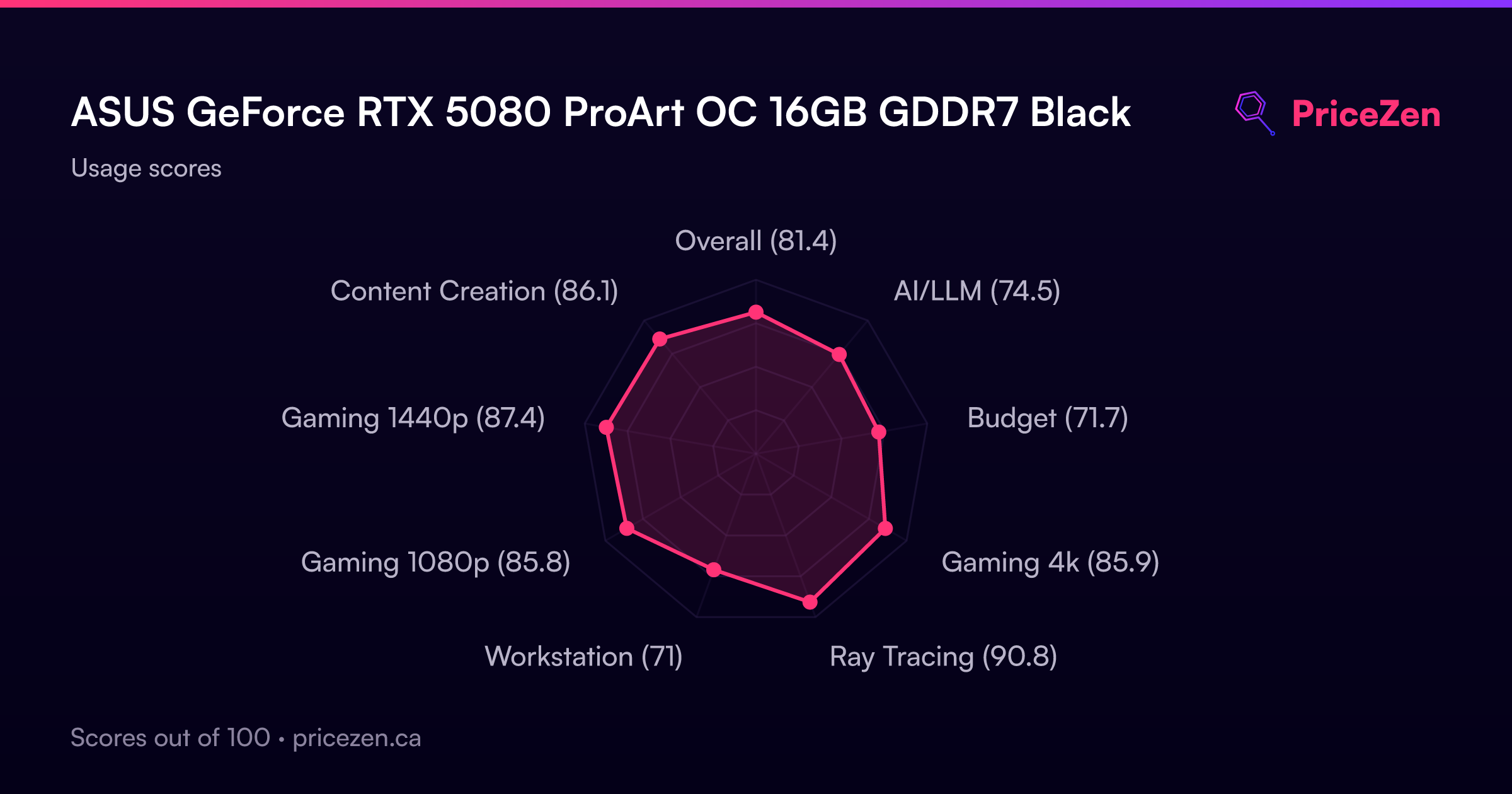
- Overall81.4
- AI/LLM74.5
- Budget71.7
- Gaming 4k85.9
- Ray Tracing90.8
- Workstation71
- Gaming 1080p85.8
- Gaming 1440p87.4
- Content Creation86.1