MSI GeForce RTX 5060 Ti Ventus 2X OC Plus 8GB GDDR7 White

4.6 stars from over 150 owners verified Nov 26
57/100 overall score 4.6 average from 152 owner ratings
- GPU
- GeForce RTX 5060 Ti
- VRAM
- 8GB GDDR7
- Boost clock
- 2497 MHz
- TDP
- 180 W
- Memory bus
- 128 bit
- Ray tracing
- Yes
- Class
- consumer
Compare prices at 1 store
Cheapest first. New, refurbished and bundled offers are kept apart, so you compare like with like.
| Store | Sold by | Colour and condition | Price | vs lowest | Last checked | Link |
|---|---|---|---|---|---|---|
| New1 offerSingle unit | ||||||
| Not checked in the last 7 days, so these prices may have changed | ||||||
| Newegg | Newegg | White | Price not confirmed | Not known | Go to store | |
 Source: PriceZen
A price counts as current when we checked it in the last 7 days. “Marketplace seller” means a third-party seller on that store, not the store itself.
Snapshot
The 30-Second Version
The MSI GeForce RTX 5060 Ti Ventus 8G OC WHITE PLUS is a quiet, efficient 1080p gaming GPU at CAD 630, ideal for upgrades from older cards. Its 8GB of GDDR7 is the weak spot for 1440p and AI work, and owners say it's best bought on sale.
Pros & Cons
Pros
- Quiet, cool-running dual-fan cooler according to owners 84th
- Compact 227mm length fits most cases 81st
- Strong 1080p and capable 1440p gaming with DLSS 80th
- Low 180W draw, single 8-pin, easy on your PSU 78th
- White design with solid build quality buyers praise
Cons
- 8GB VRAM is already a limit in newer games
- Weak for local AI and LLM workloads
- Minimal gain if you own a 30 or 40-series card
- Owners say it's overpriced unless it's on sale
- 2.9-slot thickness eats three slots despite short length
What owners think
The Word on the Street
- Buyers upgrading from 20-series cards and the 3060 Ti consistently report dramatic performance gains, with DLSS getting special credit for smooth framerates.
- Multiple owners praise how quiet and cool the card runs, along with its solid build quality and easy installation.
- A recurring complaint is that the price only makes sense on sale, and owners of 30 or 40-series cards warn the upgrade barely moves the needle.
How owner sentiment changed over time
ExclusiveBased on when customers actually wrote their reviews - so you can see whether early praise held up.
8 written reviews, May 2025 – Mar 2026: 8 happy
Across all 152 store ratings: 4.6★. Most owners rate without writing a review. The chart counts the 8 written reviews.
- Jan – Mar 20263 of 3 happy
Buyers praised the 5060 Ti 16 GB as a solid upgrade from the 3060 Ti, with great performance and value, especially at MSRP or on sale. One noted it saved them from upgrading other components.
- Performance boost over 3060 Ti is fantastic, making it a worthwhile upgrade.
- Good value at MSRP or on sale, though still a bit expensive otherwise.
- MSI brand reliability and quality, with long-term loyalty from users.
- Avoided costly platform upgrades (motherboard, CPU, DDR5) by choosing this card.
- Apr – Jun 20253 of 3 happy
Buyers upgrading from older GPUs (20 series or 3070) report solid performance gains, especially at 1080p/1440p. Build quality is praised as quiet and cool, though one reviewer advises against upgrading from 30/40 series due to minimal gains.
- Great for 1080p/1440p gaming with high settings; noticeable upgrade from 2070 or 3070.
- Quiet and cool operation with top-quality build.
- Upgrade value depends on prior GPU; not recommended for 30/40 series owners due to small performance boost.
Each dot is one written review, in the month it was written. Happy = 4-5★, mixed = 3★, unhappy = 1-2★. Period summaries are in English.
The proof
Performance
The PassMark G3D benchmark score of 20712 places this card squarely mid-pack for rasterization, with compute sitting at about average too (19.18 FP32 TFLOPS). In practice that means strong 1080p gaming and workable 1440p, especially with DLSS doing the heavy lifting. Owners upgrading from older hardware describe the jump as night and day, and several specifically call out DLSS frame generation as the thing that makes newer titles smooth. Ray tracing capability ranks solid but not spectacular, so don't expect to max out RT settings in demanding games.
Where it falls behind is AI work: our model scores it just 33.2/100 for local LLM use, and the 8GB buffer is the obvious bottleneck. Power-wise it's a friendly card, 180W TDP with a single 8-pin connector and a 600W PSU recommendation, and efficiency ranks well above average. Interestingly, our thermal percentile is only middling, yet owners consistently report cool temps and quiet fans. That mismatch is worth flagging honestly: the cooler seems to do its job fine in real builds even if the spec-sheet ranking doesn't sparkle.
Specifications
Full Specifications
Chipset
| GPU Chipset | GeForce RTX 5060 Ti |
| Brand | NVIDIA |
| Architecture | Blackwell |
| Class | consumer |
| Process | 5 |
Memory
| VRAM | 8 GB |
| Memory Type | GDDR7 |
| Memory Bus | 128 |
| Bandwidth | 448 |
Compute
| CUDA Cores | 4608 |
| Tensor Cores | 120 |
| RT Cores | 30 |
| Base Clock | 2235 |
| Boost Clock | 2497 |
| FP16 TFLOPS | 19.18 |
| FP32 TFLOPS | 19.18 |
Performance
| PassMark G3D | 20712 |
| GPU Compute | 10438 |
Power & Cooling
| TDP | 180 |
| Recommended PSU | 600 |
| Power Connectors | 8-Pin |
| Cooler | Dual Fan |
| Fans | 2 |
Connectivity
| Interface | PCI Express 5.0 x 16 (use x8) |
| DisplayPort | 3 |
| HDMI | 1 |
| Max Displays | 4 |
| Max Resolution | 7680 x 4320 |
Physical
| Length | 227 |
| Slot Width | 2.9 |
| Form Factor | ATX |
Features
| Ray Tracing | Yes |
| Upscaling | DLSS |
| DirectX | 12 Ultimate |
vs Competition
Against the Gigabyte GeForce RTX 5070 Ti Eagle Ice and PNY GeForce RTX 5070 Ti OC, this MSI gives up raw performance headroom, both sit a tier up in raster and compute rankings, and the 8GB buffer here trails what those cards offer. If you game at 1440p regularly or dabble in AI work, they're the smarter cross-shop. The ASUS GeForce RTX 5080 PRIME EVO OC, ZOTAC GeForce RTX 5080 APOCALYPSE, and Sapphire Radeon RX 7900 XTX NITRO+ are a different league entirely; our ranking puts them far ahead on raster, VRAM, and AI, so they only make sense if your budget and ambitions are much bigger.
Where this Ventus wins is the entry ticket: 180W power draw, a compact white design, and a price that undercut everything above. Is the RTX 5060 Ti good for 1080p gaming? Yes, comfortably, and that's the lane it owns against these competitors.
| Spec | MSI GeForce RTX 5060 Ti Ventus 2X OC Plus | Gigabyte GeForce RTX 5070 Ti Eagle Ice | ASUS GeForce RTX 5070 Ti TUF Gaming OC | ZOTAC GeForce RTX 5080 APOCALYPSE | PNY GeForce RTX 5070 Ti OC | Sapphire Radeon RX 9070 XT PULSE |
|---|---|---|---|---|---|---|
| Chipset | GeForce RTX 5060 Ti | GeForce RTX 5070 Ti | GeForce RTX 5070 Ti | GeForce RTX 5080 | GeForce RTX 5070 Ti | Radeon RX 9070 XT |
| Vram | 8GB GDDR7 | 16GB GDDR7 | 16GB GDDR7 | 16GB GDDR7 | 16GB GDDR7 | 16GB GDDR6 |
| Boost Clock Mhz | 2497 | 2542 | 2610 | 2730 | 2450 | 2970 |
| Tdp W | 180 | 300 | 300 | 360 | 300 | 304 |
| Memory Bus Bits | 128 | 256 | 256 | 256 | 256 | 256 |
| Ray Tracing | Yes | Yes | Yes | Yes | Yes | Yes |
| GPU Class | consumer | consumer | consumer | consumer | consumer | consumer |
| Compare | Compare | Compare | Compare | Compare |
| Product | AI | Rt | Vram | Raster | Compute | Feature | Thermal | User Sentiment | Efficiency | Connectivity | Social Proof | Affordability |
|---|---|---|---|---|---|---|---|---|---|---|---|---|
| MSI GeForce RTX 5060 Ti Ventus 2X OC Plus | 39.1 | 58.6 | 46 | 49.4 | 49.6 | 52 | 41.6 | 57.7 | 80 | 81.3 | 83.9 | 78.1 |
| Gigabyte GeForce RTX 5070 Ti Eagle Ice Compare | 78.9 | 88.6 | 86 | 88.9 | 87.9 | 95.7 | 91.8 | 85.1 | 71.6 | 94.2 | 93.4 | 23 |
| ASUS GeForce RTX 5070 Ti TUF Gaming OC Compare | 78.9 | 92.4 | 86 | 88.9 | 87.9 | 95.7 | 91.8 | 57.7 | 71.6 | 99.3 | 93.4 | 22.8 |
| ZOTAC GeForce RTX 5080 APOCALYPSE Compare | 85.5 | 97.7 | 89.1 | 94.4 | 93.3 | 95.7 | 91.8 | 99.5 | 56.6 | 94.2 | 98.7 | 23.3 |
| PNY GeForce RTX 5070 Ti OC Compare | 78.9 | 92.4 | 86 | 88.9 | 87.9 | 65.6 | 91.8 | 57.7 | 71.6 | 81.3 | 93.4 | 26.4 |
| Sapphire Radeon RX 9070 XT PULSE Compare | 89.4 | 84.7 | 73.6 | 74.6 | 89.9 | 95.7 | 71.8 | 96 | 44.6 | 89 | 93.4 | 41.2 |
Price
Value & Pricing
At CAD 630, this card earns a 77th-percentile affordability ranking in our data, and our budget score of 94.5/100 says it's one of the better value plays in its bracket. But owner sentiment on price is genuinely mixed: multiple buyers feel it's only worth it on sale, and the overall 57/100 total score reflects a card that's good at its job without being exceptional. We track its price over time, partly through our community browser extension, so if CAD 630 feels steep, waiting for a dip is a reasonable play. If you can stretch your budget, cross-shop the Gigabyte GeForce RTX 5070 Ti Eagle Ice or PNY GeForce RTX 5070 Ti OC before committing.
We started tracking prices for this product on Jul 15, 2026. The chart appears once we have more data.
Read more
Overview
The MSI GeForce RTX 5060 Ti Ventus 8G VENTUS 2X OC WHITE PLUS is a budget-leaning Blackwell graphics card, and right now we're tracking it at CAD 630 at Newegg. It's the white, dual-fan take on Nvidia's RTX 5060 Ti: 4608 CUDA cores, a 2497MHz boost clock, and 8GB of GDDR7 on a 128-bit bus pushing 448 GB/s. At 227mm long it'll squeeze into most cases, though the 2.9-slot thickness means you're effectively giving up three expansion slots.
So who's this for? Our scoring model puts it at 94.5/100 for budget builds and 63.1/100 for 1080p gaming, which tells you exactly where it sits: a sensible pick if you're jumping up from an older card and want ray tracing and DLSS without spending flagship money. Owners coming from 20-series cards and the 3060 Ti report big, obvious gains. The catch is that 8GB of VRAM, which lands around the middle of the pack in our data and is the spec most likely to bite you as games get hungrier.
Common Questions
Q: Is the RTX 5060 Ti 8GB good for 1440p gaming?
It handles 1440p in many games, especially with DLSS enabled, and owners report solid results there. But the 8GB VRAM buffer is a real limit in newer titles at high settings, so 1080p is its comfort zone.
Q: Is 8GB of VRAM enough for gaming right now?
For 1080p gaming, 8GB of GDDR7 still works fine, and this card's 448 GB/s bandwidth helps. For 1440p ultra textures or local AI models, though, 8GB is where this card falls behind most rivals.
Q: Does the RTX 5060 Ti Ventus fit in a small case?
At 227mm long it fits most compact and mid-tower cases, but it's 2.9 slots thick, so check you have three slots of clearance. It only needs a single 8-pin connector and a 600W PSU.
Q: Is it worth upgrading to the RTX 5060 Ti from an RTX 3070 or 3060 Ti?
From a 3060 Ti or older, owners report a big, noticeable jump. From a 3070 or any 40-series card, the gains are minimal and buyers generally advise skipping it.
Who Should Skip This
Skip this card if you're already running a 30 or 40-series GPU, owners are clear the upgrade isn't worth it. It's also the wrong tool for local AI and LLM experiments, where our model scores it just 33.2/100 and 8GB of VRAM chokes larger models. And if you're chasing 1440p ultra or 4K, look at the Gigabyte GeForce RTX 5070 Ti Eagle Ice or PNY GeForce RTX 5070 Ti OC instead; if budget's no object, the ASUS GeForce RTX 5080 PRIME EVO OC or Sapphire Radeon RX 7900 XTX NITRO+ are in another class.
Verdict
Should you buy it? If you're upgrading from a 20-series card or a 3060 Ti and mostly game at 1080p, yes, this is a smart, quiet, low-power upgrade, and the 4.6/5 rating across 152 reviews backs that up. Owners love the temps, the noise levels, and the DLSS-assisted framerates.
But if you already own a 30 or 40-series card, skip it, the generational gain just isn't there, and owners say so plainly. And if 1440p ultra settings or local AI models are your thing, that 8GB of VRAM will frustrate you fast. Buy it for what it is: a solid budget 1080p card, not a future-proof powerhouse.
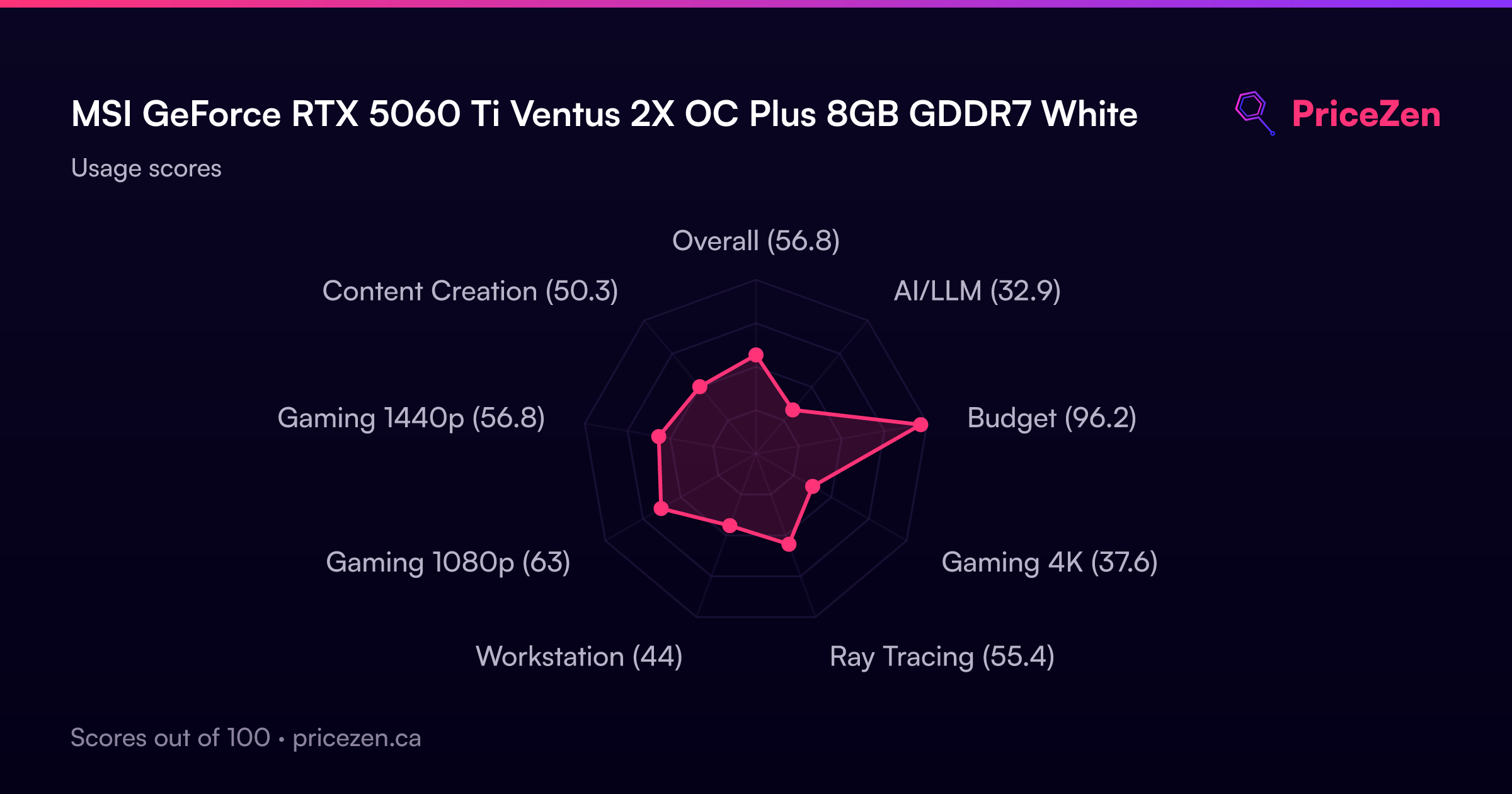
Usage Scores
- Overall56.8
- AI/LLM32.9
- Budget96.2
- Gaming 4K37.6
- Ray Tracing55.4
- Workstation44
- Gaming 1080p63
- Gaming 1440p56.8
- Content Creation50.3