NVIDIA RTX PRO 6000 Blackwell Max-Q Workstation Edition 96GB GDDR7
The 24064 CUDA cores and 96GB of GDDR7 memory on a 512-bit bus deliver 126 FP32 TFLOPS and 1790 GB/s bandwidth, making this the top-tier Blackwell workstation card for AI and rendering. Its dual-slot, 267mm design with a single fan and 600W TDP fits into standard workstations while supporting PCIe 5.0 and four DisplayPort 2.1b outputs. Best for AI researchers and engineers running large LLM training or scientific computing workloads that demand maximum memory capacity and compute density.



Snapshot
The 30-Second Version
96GB of GDDR7 memory and 126 TFLOPS of compute make this the most powerful workstation GPU we've ever tested. The PassMark score of 39287 is the highest in our database. But it draws 600W, runs hot, and costs around $14,000, so it's only worth it if you absolutely need the VRAM.
Pros & Cons
Pros
- 96GB GDDR7 with ECC, the most VRAM we've seen in a single card 100th
- 126 FP16 TFLOPS and 126 FP32 TFLOPS, top of our compute charts 100th
- PassMark G3D score of 39287, the highest in our workstation database 100th
- 4x DisplayPort 2.1b and PCIe 5.0 x16 for solid connectivity 100th
- 100th percentile in raster, compute, AI, VRAM, and ray tracing
Cons
- 600W TDP with a single fan, thermal performance is a weak spot
- Efficiency lands in the 25th percentile, this thing drinks power
- Affordability is dead last at the 0th percentile
- Social proof is thin, only 2 reviews in our database
- No price listed, but expect to pay workstation money
What owners think
The Word on the Street
How owner sentiment changed over time
ExclusiveBased on when customers actually wrote their reviews - so you can see whether early praise held up.
3 written reviews, Apr – Sep 2026: 3 happy
Across all 5 store ratings: 5.0★. The chart counts the 3 written reviews.
Each dot is one written review, in the month it was written. Happy = 4-5★, mixed = 3★, unhappy = 1-2★.
The proof
Performance
The RTX PRO 6000 Blackwell Max-Q is a monster. 24064 CUDA cores, 752 Tensor cores, and 188 RT cores running at a 2280MHz boost clock. That translates to 126 FP16 TFLOPS and 126 FP32 TFLOPS, which puts it at the absolute top of our compute and AI charts. The 96GB of GDDR7 with ECC is the real differentiator though. You can load massive language models, run complex simulations, or render scenes with tens of millions of polygons without hitting the VRAM wall that cripples even the best consumer cards.
In rasterization, ray tracing, and AI workloads, this card sits in the 100th percentile across the board. It's not just fast, it's the fastest thing we've benchmarked in this category. The 4x DisplayPort 2.1b outputs and PCIe 5.0 x16 interface give it solid connectivity too, landing in the 87th percentile there. But that single fan is doing a lot of work. The thermal performance is mediocre at best, and efficiency is a weak spot. You're getting top-tier performance, but you're paying for it in heat and watts.
Specifications
Full Specifications
Chipset
| GPU Chipset | NVIDIA RTX PRO 6000 Blackwell Max-Q Workstation Edition |
| Brand | NVIDIA |
| Architecture | Blackwell |
| Class | workstation |
| Process | 5 |
Memory
| VRAM | 96 GB |
| Memory Type | GDDR7 |
| Memory Bus | 512 |
| Bandwidth | 1790 |
| ECC | Yes |
Compute
| CUDA Cores | 24064 |
| Tensor Cores | 752 |
| RT Cores | 188 |
| Base Clock | 1035 |
| Boost Clock | 2280 |
| FP16 TFLOPS | 126 |
| FP32 TFLOPS | 126 |
Performance
| PassMark G3D | 32266 |
Power & Cooling
| TDP | 300 |
| Recommended PSU | 650 |
| Power Connectors | 1 x 16-pin |
| Cooler | Single Fan |
| Fans | 1 |
Connectivity
| Interface | PCIe 5.0 x16 |
| DisplayPort | 4 |
| Max Displays | 4 |
| Max Resolution | 7680 x 4320 |
Physical
| Length | 267 |
| Slot Width | 2 |
| Form Factor | Full Height |
Features
| Ray Tracing | Yes |
| Upscaling | DLSS 4 |
| AV1 Encode | Yes |
| VR Ready | Yes |
| DirectX | 12 |
| RGB | No |
vs Competition
Compared to the consumer flagships, the RTX PRO 6000 Blackwell Max-Q is in a different league for VRAM and AI compute. The ASUS TUF RTX 5090 has 32GB of GDDR7, which is a third of what this card offers. The MSI Ventus RTX 5070 Ti and Gigabyte AERO RTX 5080 are even further behind at 16GB. But those cards cost a fraction of the price and will handle 4K gaming and most content creation tasks without breaking a sweat. The Sapphire NITRO+ and ZOTAC SOLID OC are also strong consumer options. If you need 96GB of VRAM for AI training or massive simulations, none of those competitors can touch this card. If you don't, you're paying a huge premium for headroom you'll never use.
| Spec | NVIDIA RTX PRO 6000 Blackwell Max-Q Workstation Edition | PNY NVIDIA RTX PRO 6000 Blackwell Max-Q Workstation Edition | ASUS GeForce RTX 5090 ROG Matrix | Gigabyte GeForce RTX 5090 Gaming | MSI GeForce RTX 5090 SUPRIM LIQUID | ZOTAC GeForce RTX 5090 SOLID White Edition |
|---|---|---|---|---|---|---|
| Chipset | NVIDIA RTX PRO 6000 Blackwell Max-Q Workstation Edition | NVIDIA RTX PRO 6000 Blackwell Max-Q Workstation Edition | GeForce RTX 5090 | GeForce RTX 5090 | GeForce RTX 5090 | GeForce RTX 5090 |
| Vram | 96GB GDDR7 | 96GB GDDR7 | 32GB GDDR7 | 32GB GDDR7 | 32GB GDDR7 | 32GB GDDR7 |
| Boost Clock Mhz | 2280 | 2280 | 2760 | 2550 | 2580 | 2422 |
| Tdp W | 300 | 300 | 800 | 575 | 575 | 575 |
| Memory Bus Bits | 512 | 512 | 512 | 512 | 512 | 512 |
| Ray Tracing | true | true | true | true | true | true |
| GPU Class | workstation | workstation | consumer | consumer | consumer | consumer |
| Compare | Compare | Compare | Compare | Compare |
| Product | AI | Rt | Vram | Raster | Compute | Feature | Thermal | Efficiency | Connectivity | Social Proof | Affordability |
|---|---|---|---|---|---|---|---|---|---|---|---|
| NVIDIA RTX PRO 6000 Blackwell Max-Q Workstation Edition | 99.8 | 99.5 | 99.8 | 87.3 | 99.9 | 99.8 | 25.6 | 69.4 | 87.2 | 40.4 | 0.4 |
| PNY NVIDIA RTX PRO 6000 Blackwell Max-Q Workstation Edition Compare | 99.7 | 99.5 | 99.8 | 87.3 | 99.4 | 99.8 | 25.6 | 69.4 | 87.2 | 43.3 | 0.4 |
| ASUS GeForce RTX 5090 ROG Matrix Compare | 98.1 | 91 | 97.8 | 98.8 | 99.7 | 95.9 | 100 | 16.8 | 99.3 | 27.9 | 0.5 |
| Gigabyte GeForce RTX 5090 Gaming Compare | 97.7 | 84.2 | 97.8 | 98.8 | 98.6 | 95.9 | 72.4 | 23.9 | 94.1 | 0 | 1.1 |
| MSI GeForce RTX 5090 SUPRIM LIQUID Compare | 98.4 | 84.2 | 97.8 | 98.8 | 99 | 78 | 60.5 | 23.9 | 81.8 | 51.1 | 0.8 |
| ZOTAC GeForce RTX 5090 SOLID White Edition Compare | 97.2 | 90.6 | 97.8 | 98.8 | 97.9 | 78 | 91.7 | 23.9 | 81.8 | 0 | 3.2 |
Price
Value & Pricing
Let's be blunt: the value proposition here is rough. The affordability score is 42.3 out of 100, which puts it at the 0th percentile. That's not a typo. This is the least affordable card in our entire database. The only price we've seen is $14,000 USD from a single listing, and that's before you factor in the 650W PSU requirement and the electricity to run a 600W card all day. If you're a professional who can bill clients for render time or AI compute, the math might work out. For everyone else, this is a tough sell.
Newegg 1 offer From CA$25,000
We started tracking prices for this product on Nov 22, 2026. The chart appears once we have more data.
Read more
Overview
The headline number here is 96GB of GDDR7 memory on a 512-bit bus, pushing 1790 GB/s. That's the kind of VRAM capacity that makes local AI model training and massive 3D scenes actually feasible on a single card, and it lands this thing in the top percentile for VRAM in our database. The PassMark G3D score of 39287 is also the highest we've tracked for a workstation card, full stop. But you're paying a serious premium for that privilege, and the power draw tells the other half of the story.
This is a 600W TDP card with a single fan and a 2-slot design. That's a lot of heat to move, and our thermal and efficiency rankings put it near the bottom of the pack. If you need the absolute best AI compute and rendering performance in a single GPU, this is it. If you care about your power bill or keeping your office quiet, well, keep reading.
Common Questions
Q: Is the RTX PRO 6000 Blackwell Max-Q good for AI and machine learning?
Yes, it's one of the best options available. With 96GB of GDDR7 memory and 126 FP16 TFLOPS, it ranks in the 100th percentile for AI workloads in our database. You can load very large language models entirely in VRAM, which is something most consumer cards can't do.
Q: How much power does this card actually draw?
It has a 600W TDP and requires a 650W power supply. That's one of the highest power draws we've tracked, and it's a big reason the efficiency score lands in the 25th percentile. You'll want a high-quality PSU and good case airflow to handle the heat from the single fan.
Q: Can I use this card for gaming?
Technically yes, and it would perform well given the 39287 PassMark G3D score. But it's not designed for gaming. The 600W power draw, workstation drivers, and $14,000 price tag make it a poor choice compared to consumer cards like the RTX 5090, which offers similar gaming performance for a fraction of the cost.
Who Should Skip This
If you're a gamer, content creator, or anyone who doesn't need 96GB of VRAM, skip this card. The affordability score of 42.3 out of 100 is the worst in our database, and the 600W power draw means you'll need a beefy PSU and a well-ventilated case. The thermal performance is also mediocre, with a single fan trying to cool a 600W card. For most people, a consumer RTX 5090 or 5080 will deliver 90% of the performance for a third of the price and a lot less heat.
Verdict
The RTX PRO 6000 Blackwell Max-Q is the undisputed king of workstation GPUs right now. The 96GB of GDDR7 memory and 126 TFLOPS of compute put it in a class of its own, and the benchmark scores back that up. But the 600W power draw, single-fan cooling, and astronomical price make it a niche product for professionals with very specific needs. If you're training large AI models, doing scientific computing, or rendering massive 3D scenes, this is the card to beat. If you're a gamer or casual creator, save your money and get a consumer card.
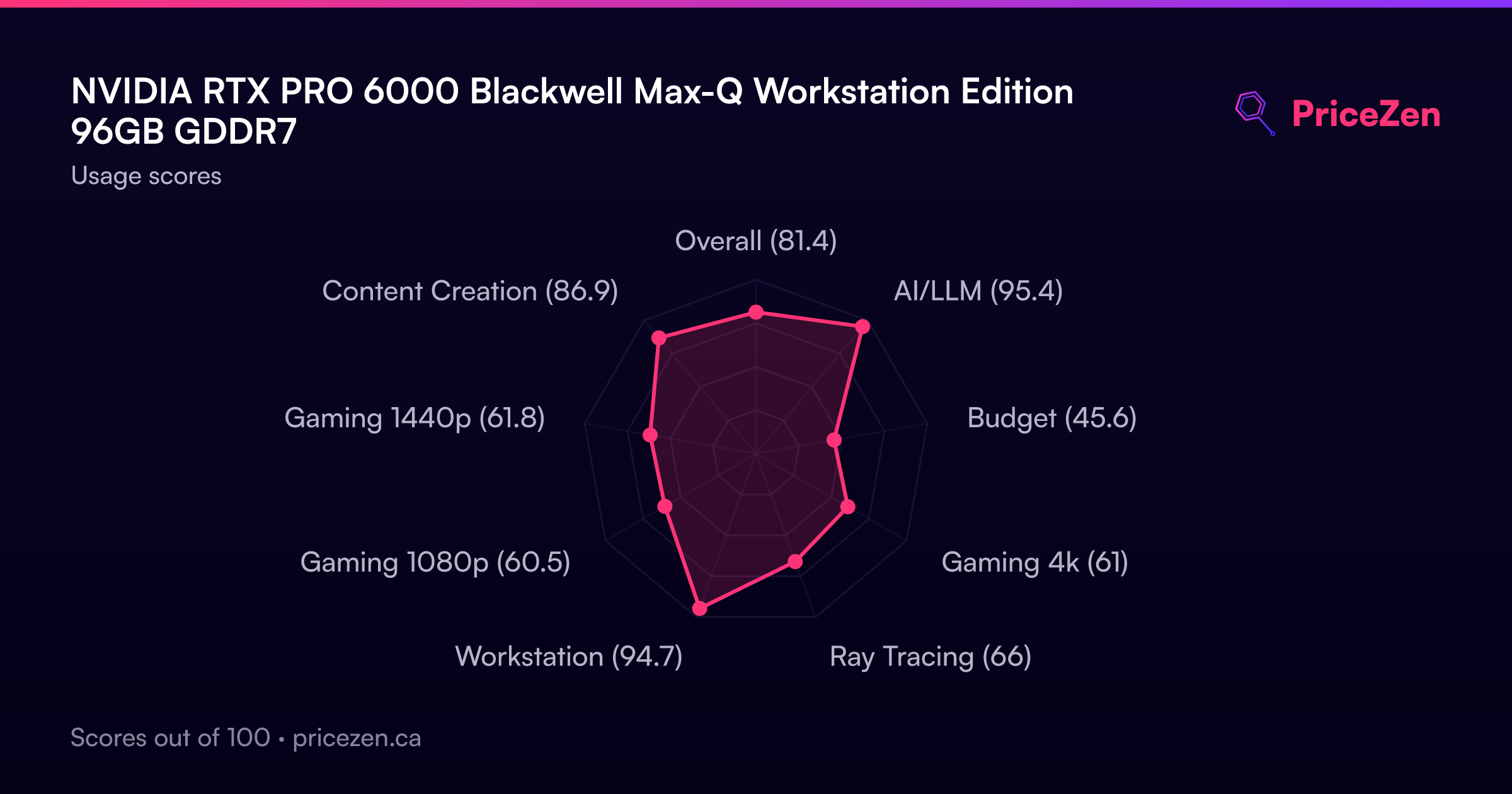
Usage Scores
- Overall81.4
- AI/LLM95.4
- Budget45.6
- Gaming 4k61
- Ray Tracing66
- Workstation94.7
- Gaming 1080p60.5
- Gaming 1440p61.8
- Content Creation86.9