Minisforum Mini Workstation MS-A1 2024, Ryzen 9 9950X

Desktop-class processor in a mini case verified Nov 25
47/100 overall score 4.4 average from 130 owner ratings
- CPU
- AMD Ryzen 9 9950X
- Form factor
- mini
Compare prices at 1 store
Cheapest first. New, refurbished and bundled offers are kept apart, so you compare like with like.
| Store | Sold by | Colour and condition | Price | vs lowest | Last checked | Link |
|---|---|---|---|---|---|---|
| New1 offerSingle unit | ||||||
| Out of stock when last checked | ||||||
| Amazon | Not known | Not listed | No price | Out of stock | Nov 18 | Go to store |
 Source: PriceZen, checked Nov 18, 2026
A price counts as current when we checked it in the last 7 days. “Marketplace seller” means a third-party seller on that store, not the store itself.
Price history
Checked that dayNot checked that day, still on offer
Source: PriceZen, checked Oct 23, 2026











Snapshot
The 30-Second Version
The Minisforum Mini Workstation MS-A1 is a barebone mini PC with a Ryzen 9 9950X, one of the fastest CPUs you can get in a small form factor. You'll need to add your own RAM, SSD, and OS, which pushes the real cost above the $839 USD starting price. It's a great compact workstation for CPU-heavy tasks, but weak integrated graphics and reliability concerns make it a poor fit for gamers or anyone wanting a plug-and-play machine.
Pros & Cons
Pros
- Ryzen 9 9950X is a monster CPU for a mini PC 97th
- Four M.2 slots with RAID support, up to 16 TB total 92nd
- OCuLink port enables external GPU setups
- Dual 2.5G Ethernet for fast networking
- Compact footprint with solid cooling for the size
Cons
- Barebone kit means no RAM, SSD, or OS included
- Integrated graphics are weak for anything beyond basic tasks
- RAM speed capped at DDR5-5200
- Reliability scores are concerning, 11th percentile
- Port selection is just average for the category
What owners think
The Word on the Street
- Buyers consistently praise the raw CPU performance and the ability to pack a 9950X into such a small chassis.
- Several owners mention the barebone setup requires extra spending on RAM and storage, which catches some first-time buyers off guard.
- A recurring complaint involves reliability issues and occasional quality control problems, with some units failing or behaving inconsistently.
The proof
Performance
The CPU here is the star, and it's not close. The Ryzen 9 9950X sits in the 99th percentile for processor performance in our database, which means it's basically the best CPU you can get in a mini PC right now. 16 cores, 32 threads, up to 5.7 GHz boost, and 64 MB of L3 cache. In practice, that translates to blazing through multi-threaded workloads. Video exports, code compiles, and rendering jobs that would choke a typical NUC or Mac Mini just don't phase this thing. Single-core performance is also excellent, so everyday tasks feel snappy too.
The catch is everything around the CPU. The integrated GPU is weak, landing in the 14th percentile. That's fine for desktop use, spreadsheets, and light photo editing, but don't expect to play modern games without an external GPU. RAM support is also a bit odd. The MS-A1 supports up to 96 GB of DDR5-5200, but that's a 17th percentile result in our database. It's not that 96 GB is bad, it's that many competing mini PCs and small workstations offer faster memory or more capacity. The storage situation is more flexible, with four M.2 slots supporting PCIe 4.0 drives at up to 7000 MB/s and RAID 0/1. But the storage score is dragged down by the barebone nature of the product. You're starting from zero.
The cooling solution, which Minisforum calls Cold Wave Pro, uses dual fans and quad heatpipes. They claim 37 dB under load, which is quiet enough for an office. In practice, the 9950X can pull a lot of power, and keeping it cool in a chassis this small is a real engineering challenge. It works, but you'll hear the fans spin up under sustained all-core loads.
Specifications
Full Specifications
Processor
| CPU | AMD Ryzen 9 9950X |
| Cores | 16 |
| Frequency | 4.3 GHz |
| L3 Cache | 64 MB |
Graphics
| Type | Integrated |
Memory & Storage
| RAM Generation | DDR5 |
Build
| Form Factor | mini |
Connectivity
| USB-C Ports | 1 |
| USB Ports | 5 |
| HDMI | 1x HDMI 2.1 |
| DisplayPort | 1x DP 1.4 |
| Ethernet | dual 2.5G Ethernet |
vs Competition
The most obvious competitor is the Apple Mac Studio M3 Ultra. That machine costs significantly more, but it includes RAM, storage, and macOS, and it delivers better GPU performance out of the box. The Mac Studio is a better turnkey solution for creative pros who want a quiet, reliable machine without tinkering. The MS-A1 fights back with upgradeability and the ability to run Windows or Linux natively, plus the OCuLink port for external GPU expansion. If you need x86 compatibility or want to run VMs, the Minisforum makes more sense.
Against gaming desktops like the HP OMEN GT16-0364 or the ASUS Republic of Gamers GM700TZ-BS978, the MS-A1 isn't really in the same conversation for gaming. Those towers come with dedicated GPUs and are ready to play games at high settings immediately. The MS-A1's integrated graphics land in the 14th percentile, so it's not a gaming machine unless you add an external GPU via OCuLink. The Lenovo Legion 90YA003GUS is another strong alternative if you want a prebuilt with a real GPU and don't mind a larger chassis. The MS-A1's pitch is simple: maximum CPU power in minimum space, with the option to bolt on graphics later.
| Spec | Minisforum Mini Workstation MS-A1 | Apple Mac Studio M5 Max | Lenovo T Series Towers Legion Tower 5a Gen 10 | HP OMEN GT16-0364 | Dell Desktop ECT1250 | ASUS ROG GM700 |
|---|---|---|---|---|---|---|
| CPU | AMD Ryzen 9 9950X | Apple M5 Max | AMD Ryzen 7 7800X3D | AMD Ryzen 7 8700F | Intel Core Ultra 7 265 | AMD Ryzen 7 9800X3D |
| RAM (GB) | - | 48 | 32 | 32 | 32 | 32 |
| Storage (GB) | - | 1024 | 4096 | 1024 | 2048 | 2048 |
| GPU | - | Apple (40-Core) | NVIDIA GeForce RTX 5070 Ti | NVIDIA GeForce RTX 5070 | Intel UHD Graphics | NVIDIA GeForce RTX 5070 Ti |
| Form Factor | mini | mini | mid-tower | mid-tower | sff | mid-tower |
| Psu W | - | 480 | 850 | 850 | 180 | 850 |
| OS | - | macOS | Windows 11 Home | Windows 11 Home | Windows 11 Home | Windows 11 Home |
| Compare | Compare | Compare | Compare | Compare |
| Product | CPU | GPU | RAM | Ports | Storage | Reliability | Social Proof |
|---|---|---|---|---|---|---|---|
| Minisforum Mini Workstation MS-A1 | 97.3 | 8.1 | 16.6 | 47.8 | 1.8 | 11.7 | 92.1 |
| Apple Mac Studio M5 Max Compare | 95.6 | 84.9 | 95 | 89.1 | 68.6 | 99.3 | 71.1 |
| Lenovo T Series Towers Legion Tower 5a Gen 10 Compare | 73.2 | 94.5 | 78 | 88.5 | 98.1 | 70.3 | 99.9 |
| HP OMEN GT16-0364 Compare | 69.3 | 90.6 | 87 | 97.9 | 53.3 | 70.3 | 98.2 |
| Dell Desktop ECT1250 Compare | 88 | 60 | 81.6 | 75 | 82.5 | 70.3 | 98.2 |
| ASUS ROG GM700 Compare | 80.3 | 94.5 | 81.6 | 96.1 | 90 | 37.8 | 99.2 |
Price
Value & Pricing
At $839 USD for the barebone unit, the MS-A1 is a strange value proposition. You're paying for the CPU, the chassis, and the engineering that went into cooling a 9950X in a small box. But you still need to add RAM, at least one SSD, and a Windows or Linux license. A reasonable 32 GB DDR5 kit and a 1 TB PCIe 4.0 drive will add another $150 to $250, pushing the real cost closer to $1,000 to $1,100. That's still cheaper than most prebuilt workstations with a 9950X, but it's not the screaming deal the headline price suggests. If you already have spare DDR5 and M.2 drives lying around, the math gets better. If you're starting from scratch, factor in the full build cost before comparing against something like a Mac Studio or a mid-range gaming desktop.
Read more
Overview
The Minisforum Mini Workstation MS-A1 is a barebone mini PC that stuffs a desktop-class AMD Ryzen 9 9950X into a box you can tuck behind a monitor. At $839 USD for the barebone kit, you're getting the 16-core Zen 5 chip, the chassis, the motherboard, and the cooling, but no RAM, no storage, and no operating system. That's the deal here. You bring your own DDR5 and M.2 drives, and Minisforum handles the hard part of squeezing a 170W-class processor into a small form factor.
People searching for a compact workstation or a Ryzen 9 9950X mini PC are usually trying to answer one question: can a tiny box actually handle serious work? The short answer is yes, mostly. The MS-A1 is aimed at folks doing CPU-heavy tasks like code compilation, video editing, 3D rendering, or running virtual machines. It's not a gaming machine out of the box, and it's not a plug-and-play solution. You'll need to budget for RAM and an SSD before this thing boots.
Minisforum has a reputation for aggressive pricing and quirky designs, and the MS-A1 fits that mold. The OCuLink port is the wildcard here. It opens the door to external GPU enclosures, which is how this little workstation can transform into a surprisingly capable 4K gaming rig if you're willing to spend more. But we'll get into that later.
Common Questions
Q: Is the Minisforum MS-A1 good for gaming?
Not out of the box. The integrated graphics are weak, so you'll need an external GPU via the OCuLink port for serious gaming. With a decent eGPU enclosure, it can handle 4K gaming surprisingly well.
Q: Does the Minisforum MS-A1 come with RAM and storage?
No, it's a barebone kit. You'll need to add your own DDR5 RAM and M.2 SSD, plus an operating system. It supports up to 96 GB of DDR5-5200 and four M.2 PCIe 4.0 drives.
Q: How does the Minisforum MS-A1 compare to the Mac Studio?
The Mac Studio M3 Ultra is more expensive but includes RAM, storage, and a much better GPU. The MS-A1 is cheaper to start, offers x86 compatibility and upgradeability, but requires more setup and has weaker integrated graphics.
Q: Can the Minisforum MS-A1 run virtual machines?
Yes, the Ryzen 9 9950X with 16 cores and 32 threads is excellent for running multiple VMs. Just make sure to install enough RAM, since the barebone kit starts with none.
Who Should Skip This
Skip the MS-A1 if you want a gaming PC, since the integrated graphics are weak and you'd need to spend extra on an external GPU. It's also a poor choice if you're not comfortable building a PC, because the barebone kit requires sourcing RAM, storage, and an OS. If reliability is your top priority, the 11th percentile reliability score should give you pause. For a turnkey compact workstation, the Apple Mac Studio is a safer bet. For gaming, look at the HP OMEN or ASUS ROG towers instead.
Verdict
Should you buy the Minisforum MS-A1? If you're a developer, data scientist, or content creator who needs a compact x86 machine with a top-tier CPU and you're comfortable sourcing your own RAM and storage, this is a compelling option. The Ryzen 9 9950X is genuinely best-in-class for a mini PC, and the four M.2 slots give you serious storage flexibility. The OCuLink port is a nice bonus for future GPU upgrades.
But if you want a machine that works out of the box, or you care about gaming performance, or you're worried about long-term reliability, look elsewhere. The barebone nature means extra cost and setup time. The weak integrated GPU limits what you can do without additional hardware. And the reliability score in our database is a real concern. This is a niche product for tinkerers and power users who know exactly what they're getting into.
Usage Scores
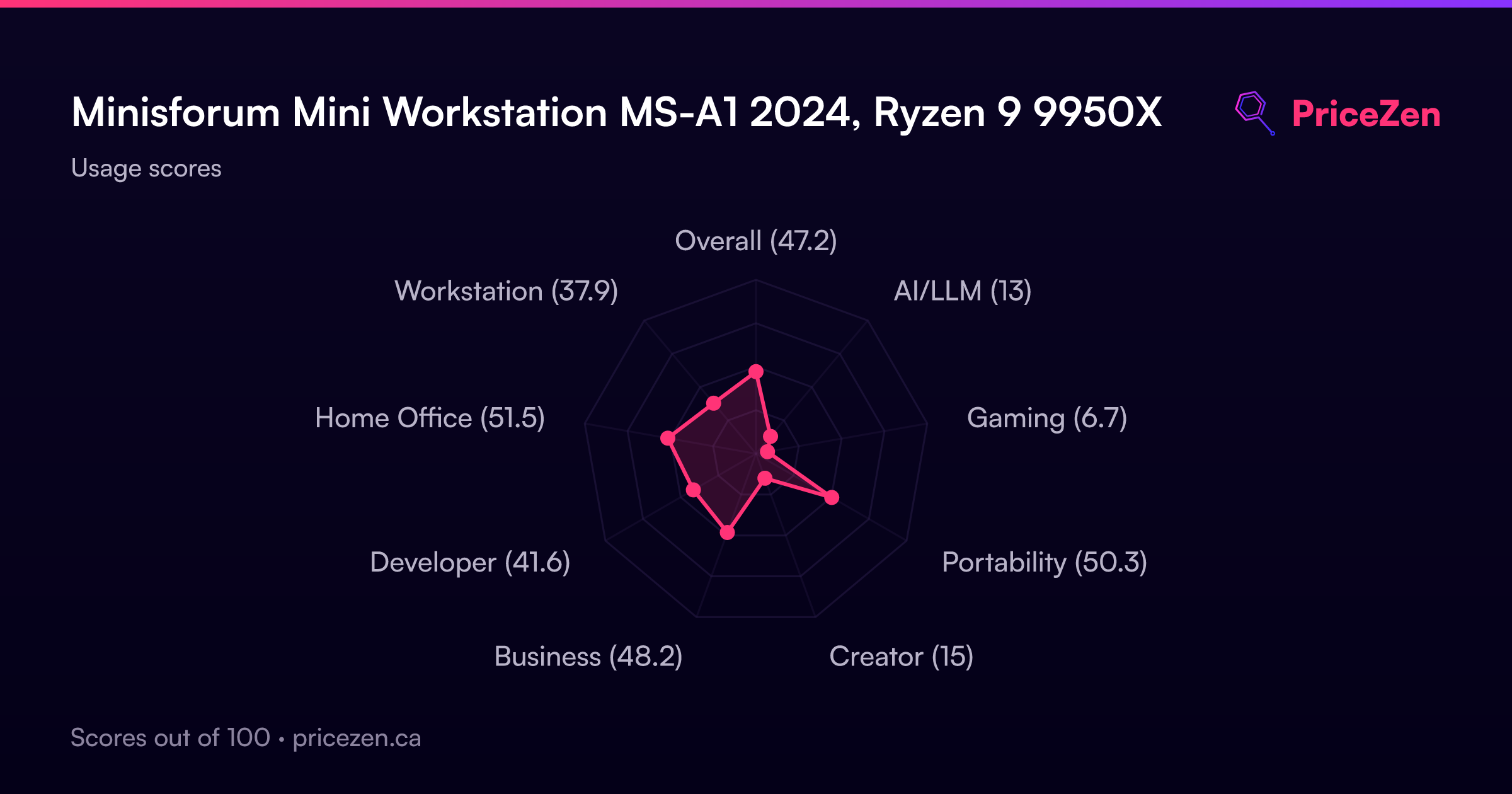
- Overall47.2
- AI/LLM13
- Gaming6.7
- Portability50.3
- Creator15
- Business48.2
- Developer41.7
- Home Office51.5
- Workstation37.9