Dell All-in-One DEC27250-7277WHT-PUS 2025, Core 7 150U, 32GB, 1TB SSD, GeForce MX570A, White

A clear display and an easy setup verified Nov 24
75/100 overall score 4.5 average from 198 owner ratings
- CPU
- Intel Core 7 150U
- RAM
- 32 GB
- Storage
- 1 TB
- GPU
- NVIDIA GeForce MX570A
- Form factor
- aio
- OS
- Windows 11 Pro
Compare prices at 1 store
Cheapest first. New, refurbished and bundled offers are kept apart, so you compare like with like.
| Store | Sold by | Colour and condition | Price | vs lowest | Last checked | Link |
|---|---|---|---|---|---|---|
| New1 offerSingle unit | ||||||
| Out of stock when last checked | ||||||
| Amazon | Not known | Not listed | No price | Out of stock | Yesterday | Go to store |
 Source: PriceZen, checked Nov 27, 2026
A price counts as current when we checked it in the last 7 days. “Marketplace seller” means a third-party seller on that store, not the store itself.
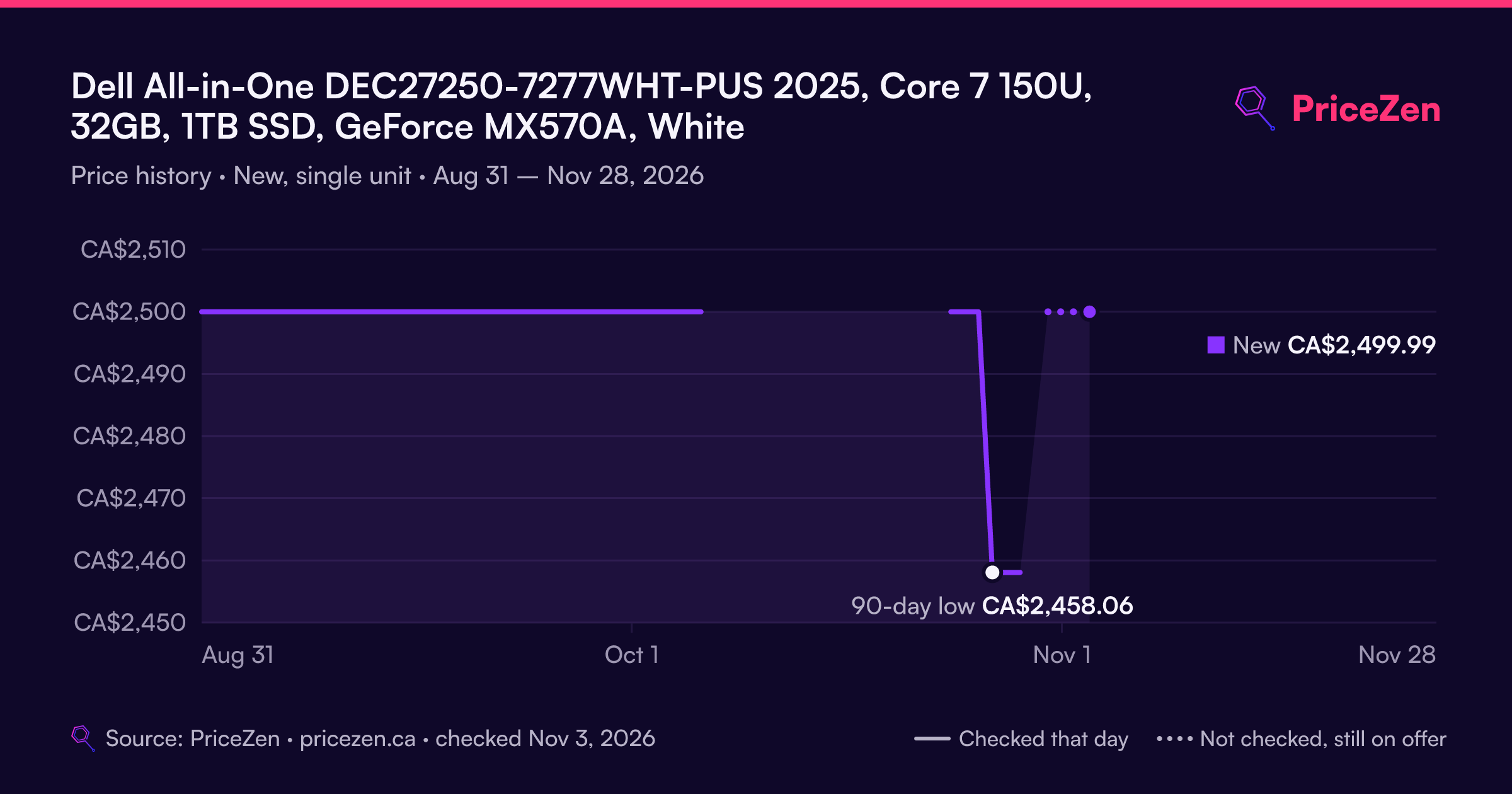
Price history
Checked that dayNot checked that day, still on offer
Source: PriceZen, checked Nov 3, 2026











Snapshot
The 30-Second Version
The Dell 27 All-in-One is a clean, easy-to-set-up desktop with a great 27-inch touch display, 32GB of RAM, and a 1TB SSD. It's perfect for home office work, multitasking, and video calls, but the CPU and GPU are underwhelming for the price. Buy it for the tidy form factor and generous memory, not for gaming or heavy creative work.
Pros & Cons
Pros
- 32GB DDR5 RAM is generous for multitasking 94th
- 27-inch FHD touch display with 99% sRGB looks great 78th
- Easy setup with wireless keyboard and mouse included 76th
- 5MP+IR pop-up camera with HDR for sharp video calls 70th
- Clean, space-saving design with keyboard storage slot
Cons
- CPU performance is mediocre for the price
- Entry-level GPU limits gaming and creative work
- Screen flickering reported by some owners
- Limited USB ports for a desktop
- Price varies wildly by region, especially in Europe
What owners think
The Word on the Street
- Buyers consistently praise the large, clear display and how easy the machine is to set up out of the box.
- Many owners highlight the fast performance for everyday multitasking, thanks to the 32GB of RAM and 1TB SSD.
- A small but notable group of users report screen flickering issues and frustration with Dell's repair process using refurbished parts.
How owner sentiment changed over time
ExclusiveBased on when customers actually wrote their reviews - so you can see whether early praise held up.
19 written reviews, Sep 2025 – May 2026: 17 happy, 1 mixed, 1 unhappy
Across all 198 store ratings: 4.5★. Most owners rate without writing a review. The chart counts the 19 written reviews.
- Apr – Jun 20263 of 4 happy
Most buyers were satisfied with performance and value, but one reported limited ports, a cheap mouse, a non-functional microphone, and unhelpful support.
- Product works well and meets expectations; delivery arrived early and packaging was secure.
- Too few ports located inconveniently at back; necessitates dongles for keyboard and external drive.
- Included mouse is basic and cheap; user had to purchase a programmable replacement.
- Dictation microphone non-functional; Dell support provided incorrect information.
- Jan – Mar 20264 of 5 happy
Most buyers praised the large display, speed, and ease of setup, but one reported a screen defect and refurbished part issue.
- Large display and fast performance appreciated.
- Screen flicker and dark area after replacement, part was refurbished.
- Price high but considered a good investment.
- No DVD drive included, had to buy separately.
- Oct – Dec 20259 of 9 happy
Buyers praised the large, clear screen, fast performance, and easy setup. A few noted missing USB ports or keyboard dongles.
- Large, bright, and clear screen praised by most buyers.
- Fast performance with ample RAM and discrete graphics for multitasking and light gaming.
- Missing keyboard USB dongle made one keyboard unusable; support unreachable.
- Setup generally easy, though some found initial configuration slightly challenging.
Each dot is one written review, in the month it was written. Happy = 4-5★, mixed = 3★, unhappy = 1-2★. Period summaries are in English.
The proof
Performance
The Intel Core 7 150U is a 10-core chip with a 1.8GHz base clock, and it's fine for everyday tasks. Browsing with 20 tabs open, running Office apps, video calls, and light photo editing all feel smooth. The 32GB of DDR5 RAM is the real star here. That's more memory than most people need, and it means you can multitask without slowdowns. In our database, the RAM sits at the 80th percentile for all-in-ones, which is well above average. The CPU, on the other hand, lands at the 36th percentile. That's mediocre for this category, and it shows under sustained heavy loads like video rendering or large data crunching.
The NVIDIA GeForce MX570A with 2GB of VRAM is a discrete GPU, but it's an entry-level one. It's fine for light gaming, streaming, and basic photo or video work, but don't expect to play modern AAA titles at high settings. Think Minecraft, older games, or esports titles at medium settings. The GPU sits at the 57th percentile, which is about average for all-in-ones. The 1TB SSD is also middle of the pack at the 59th percentile. It's fast enough for quick boot times and app launches, but it's not a standout.
Where this machine really shines is in the display and overall user experience. The 99% sRGB coverage means colors look vibrant without being oversaturated. The refresh rate is 66% higher than the previous generation, which makes scrolling and window dragging feel smoother. It's not a high-refresh gaming panel, but it's a noticeable improvement for everyday use. The dual Bluetooth speakers with Dolby Atmos are surprisingly good for an all-in-one. They won't replace a dedicated soundbar, but they're loud and clear enough for music and video calls.
Specifications
Full Specifications
Processor
| CPU | Intel Core 7 150U |
| Cores | 10 |
| Frequency | 1.8 GHz |
| L3 Cache | 12 MB |
Graphics
| GPU | NVIDIA GeForce MX570A |
| Type | Discrete |
| VRAM | 2 GB |
| VRAM Type | GDDR6 |
Memory & Storage
| RAM | 32 GB |
| RAM Generation | DDR5 |
| Storage | 1 TB |
| Storage Type | SSD |
Build
| Form Factor | aio |
| Weight | 6.6 kg / 14.6 lbs |
Connectivity
| USB-C Ports | 1 |
| USB Ports | 5 |
| HDMI | 2x HDMI 1.4b |
| Wi-Fi | Wi-Fi 6E |
| Bluetooth | ✓ |
| Ethernet | Gigabit Ethernet |
System
| OS | Windows 11 Pro |
vs Competition
The Dell 27 All-in-One competes in a crowded space, and the comparison really depends on what you need. Against the Lenovo Legion 90Y6003JUS, the Dell loses on raw performance. The Legion is a gaming-focused machine with a much stronger GPU, so if you want to play games or do GPU-accelerated work, the Legion is the better pick. But the Dell wins on desk footprint and simplicity. It's a single unit with no tower to manage.
The HP OMEN B91WHAA#ABA is another gaming-oriented competitor. Again, the OMEN will crush the Dell in gaming and heavy workloads, but it's bigger, louder, and more expensive to run. The Apple Mac Studio M4 Max is in a completely different league for creative professionals. If you're editing 4K video or running AI models locally, the Mac Studio is the obvious choice. The Dell's weakest area in our testing is AI and LLM performance, scoring just 39.8 out of 100. That's one of the worst scores we've seen in that category, so if you're interested in local AI workloads, look elsewhere.
The CLX SET and MSI Aegis are both gaming desktops with discrete towers. They offer more performance per dollar, but they lack the integrated display and the clean aesthetic of the Dell. If you have desk space and want maximum performance, a tower is the way to go. If you want a tidy, all-in-one solution for work and light entertainment, the Dell holds its own.
| Spec | Dell All-in-One DEC27250-7277WHT-PUS | Apple Mac Studio M5 Max | Lenovo T Series Towers Legion Tower 5a Gen 10 | HP OMEN GT16-0364 | ASUS ROG GM700 | MSI Aegis ZS2 A9NVP-1407US |
|---|---|---|---|---|---|---|
| CPU | Intel Core 7 150U | Apple M5 Max | AMD Ryzen 7 7800X3D | AMD Ryzen 7 8700F | AMD Ryzen 7 9800X3D | AMD Ryzen 9 9900X |
| RAM (GB) | 32 | 48 | 32 | 32 | 32 | 32 |
| Storage (GB) | 1024 | 1024 | 4096 | 1024 | 2048 | 2048 |
| GPU | NVIDIA GeForce MX570A | Apple (40-Core) | NVIDIA GeForce RTX 5070 Ti | NVIDIA GeForce RTX 5070 | NVIDIA GeForce RTX 5070 Ti | NVIDIA GeForce RTX 5070 |
| Form Factor | aio | mini | mid-tower | mid-tower | mid-tower | mid-tower |
| Psu W | - | 480 | 850 | 850 | 850 | 750 |
| OS | Windows 11 Pro | macOS | Windows 11 Home | Windows 11 Home | Windows 11 Home | Windows 11 Home |
| Compare | Compare | Compare | Compare | Compare |
| Product | CPU | GPU | RAM | Ports | Storage | User Sentiment | Reliability | Social Proof |
|---|---|---|---|---|---|---|---|---|
| Dell All-in-One DEC27250-7277WHT-PUS | 41.6 | 63.5 | 77.9 | 44.7 | 53.2 | 76 | 70.2 | 94.4 |
| Apple Mac Studio M5 Max Compare | 95.7 | 84.9 | 95 | 89.1 | 68.6 | 95 | 99.3 | 70.9 |
| Lenovo T Series Towers Legion Tower 5a Gen 10 Compare | 73.1 | 94.6 | 77.9 | 88.5 | 98.1 | 95 | 70.2 | 99.9 |
| HP OMEN GT16-0364 Compare | 69.3 | 90.7 | 87 | 97.9 | 53.2 | 98.6 | 70.2 | 98.1 |
| ASUS ROG GM700 Compare | 80.3 | 94.6 | 81.6 | 96.1 | 90 | 98.6 | 37.7 | 99.2 |
| MSI Aegis ZS2 A9NVP-1407US Compare | 92.3 | 90.7 | 87 | 90.4 | 82.5 | 88.6 | 37.7 | 99.2 |
Price
Value & Pricing
At $1,950 USD, the Dell 27 All-in-One is a decent value if you prioritize a clean setup and generous RAM. You're getting a 27-inch touch display, 32GB of DDR5, a 1TB SSD, and Windows 11 Pro. That's a solid package for a home office. But the CPU and GPU are the weak links. For the same money, you could build or buy a small form factor PC with a much faster processor and a better GPU, though you'd lose the integrated display and the tidy all-in-one form factor. If you're in Canada at $2,500 CAD, the value proposition holds up reasonably well. But that €5,426 price in Spain is hard to justify for this hardware. At that price, you're in Mac Studio territory, and the Mac will run circles around this Dell for creative work.
Read more
Overview
The Dell 27 All-in-One (DEC27250-7277WHT-PUS) sits in that interesting middle ground of the all-in-one desktop market. It's not a budget machine, but it's also not trying to be a gaming rig or a workstation. At around $1,950 USD, you're paying for a clean, space-saving design with a 27-inch FHD touch display, an Intel Core 7 150U processor, 32GB of DDR5 RAM, and a 1TB SSD. That's a solid spec sheet for a home office or small business setup, and the white finish gives it a fresh look that stands out from the usual black slab.
People searching for this type of machine usually want to know two things: is the display good enough for all-day work, and can it handle more than just spreadsheets? The short answer is yes on both counts. The FHD IPS panel covers 99% sRGB, which means colors look accurate for photo viewing, video calls, and general productivity. It's not a 4K panel, so if you're doing color-critical design work, you'll notice the difference. But for most people, the 27-inch size and touch capability make it feel modern and responsive.
Setup is genuinely easy. Dell includes a wireless keyboard and mouse, and the stand has a clever slot to tuck the keyboard underneath when you're not using it. That's a small touch, but it keeps your desk looking tidy. Windows 11 Pro comes pre-installed, so you're ready to go out of the box. The 5MP+IR camera with HDR is a nice bonus for video calls, and the pop-up design means you can physically hide it when you want privacy. No more sticky note over the lens.
One thing to note: the price varies wildly depending on where you buy it. We've seen listings at $1,950 USD, $2,500 CAD, and even €5,426 in Spain. That European price is frankly absurd for this hardware, so shop around if you're outside North America.
Common Questions
Q: Is the Dell 27 All-in-One good for gaming?
It can handle light gaming and older titles, but the NVIDIA GeForce MX570A with 2GB of VRAM is an entry-level GPU. Don't expect to play modern AAA games at high settings.
Q: Does the Dell 27 All-in-One have a touchscreen?
Yes, the 27-inch FHD IPS display is touch-enabled, which makes navigation and certain apps feel more intuitive.
Q: How much RAM does the Dell 27 All-in-One have?
This model comes with 32GB of DDR5 RAM, which is well above average for all-in-one desktops and great for heavy multitasking.
Q: Is the Dell 27 All-in-One good for video editing?
It's fine for basic video editing, but the CPU and GPU are not powerful enough for serious 4K editing or heavy rendering workloads.
Who Should Skip This
Skip this if you're a gamer, a video editor, or anyone who needs serious CPU or GPU performance. The Core 7 150U and MX570A are simply not built for heavy lifting. If you want to play modern games, look at the Lenovo Legion or HP OMEN instead. If you're doing creative work like 4K video editing or 3D rendering, the Apple Mac Studio M4 Max is a much better investment, though it costs more. And if you're interested in running AI models locally, this Dell scores near the bottom of our database for AI and LLM performance, so it's a poor fit for that use case. Also skip it if you're in Europe and seeing that €5,426 price tag. That's a terrible deal for this hardware.
Verdict
Should you buy the Dell 27 All-in-One? If you want a clean, space-saving desktop for home office work, web browsing, video calls, and light media consumption, this is a solid choice. The 32GB of RAM, 1TB SSD, and 27-inch touch display make it feel responsive and modern. Setup is genuinely easy, and the included wireless peripherals are a nice touch. Owners consistently praise the display quality, performance speed, and ease of setup, and the 4.5-star rating across 198 reviews backs that up.
But if you need real CPU or GPU horsepower, this isn't the machine for you. The Core 7 150U is fine for everyday tasks but struggles with heavy workloads. The MX570A GPU is entry-level at best. And the screen flickering issue reported by some owners is a concern, especially since Dell's repair process apparently involved refurbished parts. For the price, you're paying a premium for the form factor and the convenience, not for raw performance. If that trade-off works for you, you'll likely be happy. If not, a small form factor PC or a gaming all-in-one might be a better fit.
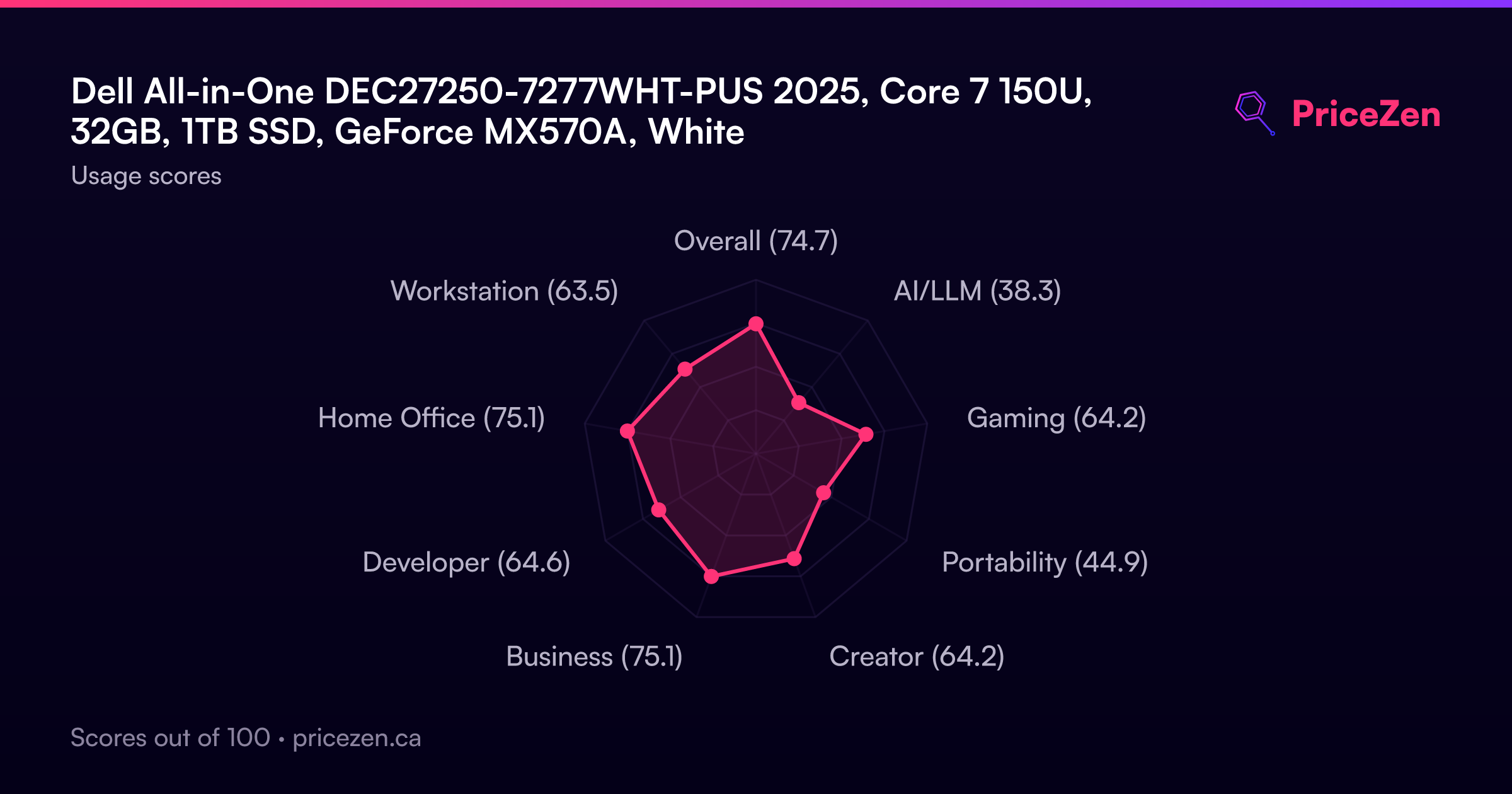
Usage Scores
- Overall74.7
- AI/LLM38.3
- Gaming64.2
- Portability44.9
- Creator64.2
- Business75.1
- Developer64.6
- Home Office75.1
- Workstation63.5