Lenovo ThinkStation P3 30GS00E5US 2024, Core i9-14900K, 64GB, 2TB SSD, Black

1100 W power supply with upgrade headroom verified Nov 28
75/100 overall score
- CPU
- Intel Core i9 14900K
- RAM
- 64 GB
- Storage
- 2 TB
- GPU
- Intel UHD Graphics 770
- Form factor
- mid-tower
- Psu
- 1100 W
- OS
- Windows 11 Pro
Compare prices at 2 stores
Cheapest first. New, refurbished and bundled offers are kept apart, so you compare like with like.
| Store | Sold by | Colour and condition | Price | vs lowest | Last checked | Link |
|---|---|---|---|---|---|---|
| New2 offersSingle unit | ||||||
| Out of stock when last checked | ||||||
| B&H Photo | B&H Photo | Not listed | No price | Out of stock | Not known | Go to store |
| Amazon | Not known | Not listed | No price | Out of stock | Oct 2 | Go to store |
 Source: PriceZen, checked Oct 2, 2026
A price counts as current when we checked it in the last 7 days. “Marketplace seller” means a third-party seller on that store, not the store itself.
Price history
No offers of this kind in this period.
Checked that dayNot checked that day, still on offer
Source: PriceZen, checked Jul 10, 2026




Snapshot
The 30-Second Version
The Lenovo ThinkStation P3 Tower is a CPU beast with an i9-14900K that ranks among the best, but its integrated graphics are a major letdown, scoring just 18/100 for gaming. It's a specialist's tool for purely CPU-driven work, with 64GB of RAM and a fast 2TB SSD. Right now it's out of stock at every vendor we track, so even the right buyer has to wait for it to come back.
Pros & Cons
Pros
- Top-tier CPU performance from the 24-core i9-14900K 95th
- Massive 64GB of DDR5 RAM for heavy multitasking 95th
- Speedy 2TB NVMe SSD with plenty of storage 94th
- Excellent port selection including USB-C and HDMI 2.1 90th
- Includes 3-year Lenovo Premier Support for peace of mind
Cons
- Integrated GPU is a major bottleneck for visual work
- Gaming performance is practically non-existent
- Hefty 13.6kg weight makes it a permanent desk fixture
- Out of stock at every vendor we track right now
- RAM speed capped at 4400MHz, not the faster 5600MHz standard
The proof
Performance
The star of the show is the 24-core Intel Core i9-14900K. This chip is a standout, delivering some of the fastest CPU performance we've tracked. In our multi-threaded workstation tests, it chews through tasks about 40% faster than the median desktop. The 64GB of 4400MHz DDR5 RAM is a perfect match, ensuring you won't hit a memory wall even with massive datasets or multiple virtual machines. The 2TB PCIe 4.0 SSD is also a strong performer, making file transfers and project load times feel instantaneous.
The elephant in the room is the integrated Intel UHD 770 graphics. It's a weak spot, plain and simple. For any task that leans on the GPU, like 3D modeling in a textured viewport, video editing with heavy effects, or any gaming at all, this system falls behind most of the competition. It's fine for driving a couple of 4K displays for coding or spreadsheets, but that's about its limit. The 1100W power supply is massive overkill for this configuration, but it does leave the door wide open for dropping in a dedicated GPU later.
Specifications
Full Specifications
Processor
| CPU | Intel Core i9 14900K |
| Cores | 24 |
| Frequency | 3.2 GHz |
| L3 Cache | 36 MB |
Graphics
| GPU | Intel UHD Graphics 770 |
| Type | Integrated |
| VRAM Type | Shared |
Memory & Storage
| RAM | 64 GB |
| RAM Generation | DDR5 |
| Storage | 2 TB |
| Storage Type | NVMe SSD |
Build
| Form Factor | mid-tower |
| PSU | 1100 |
| Weight | 13.6 kg / 30.0 lbs |
Connectivity
| USB-C Ports | 1 |
| USB Ports | 9 |
| HDMI | 1x HDMI 2.1 |
| DisplayPort | 3x DisplayPort 1.4 |
| Wi-Fi | Wi-Fi 6E |
| Bluetooth | Bluetooth 5.1 |
| Ethernet | Gigabit Ethernet |
System
| OS | Windows 11 Pro |
vs Competition
Stacked against the current top five, the P3 Tower is a specialist. Our ranking puts the Apple Mac Studio M5 Max ahead of it overall, and the Lenovo's 18 out of 100 gaming score tells you how lopsided that matchup gets the moment a workflow leans on graphics. The HP OMEN GT16-0364, ASUS ROG GM700 and MSI Aegis ZS2 A9NVP-1407US all sit above it in our standings too, and none of them ask you to accept integrated graphics as the price of entry. Where the Lenovo fights back is pure CPU work: the i9-14900K ranks among the best in our database and the whole system scores 89.9 out of 100 for workstation tasks. That's its one clear win, and only if your software never touches the GPU. With no stock anywhere we track, the practical comparison is easy right now: those four can actually be bought.
| Spec | Lenovo ThinkStation P3 30GS00E5US | Apple Mac Studio M5 Max | ASUS ROG GM700 | MSI Aegis ZS2 A9NVP-1407US | CLX SET TGMSETRTU5204BM | Dell Area-51 |
|---|---|---|---|---|---|---|
| CPU | Intel Core i9 14900K | Apple M5 Max | AMD Ryzen 7 9800X3D | AMD Ryzen 9 9900X | Intel Core i9 14900KF | Intel Core Ultra 9 285K |
| RAM (GB) | 64 | 48 | 32 | 32 | 64 | 32 |
| Storage (GB) | 2048 | 1024 | 2048 | 2048 | 8192 | 2048 |
| GPU | Intel UHD Graphics 770 | Apple (40-Core) | NVIDIA GeForce RTX 5070 Ti | NVIDIA GeForce RTX 5070 | NVIDIA GeForce RTX 5070 | NVIDIA GeForce RTX 5080 |
| Form Factor | mid-tower | mini | mid-tower | mid-tower | mid-tower | desktop |
| Psu W | 1100 | 480 | 850 | 750 | 850 | 1500 |
| OS | Windows 11 Pro | macOS | Windows 11 Home | Windows 11 Home | Windows 11 Home | Windows 11 Home |
| Compare | Compare | Compare | Compare | Compare |
| Product | CPU | GPU | RAM | Ports | Storage | Reliability |
|---|---|---|---|---|---|---|
| Lenovo ThinkStation P3 30GS00E5US | 95.3 | 36.4 | 95 | 93.6 | 90 | 70.2 |
| Apple Mac Studio M5 Max Compare | 95.7 | 84.9 | 95 | 89.1 | 68.6 | 99.3 |
| ASUS ROG GM700 Compare | 80.3 | 94.6 | 81.6 | 96.1 | 90 | 37.7 |
| MSI Aegis ZS2 A9NVP-1407US Compare | 92.3 | 90.7 | 87 | 90.4 | 82.5 | 37.7 |
| CLX SET TGMSETRTU5204BM Compare | 94.8 | 90.7 | 96.5 | 84.4 | 99.2 | 11.7 |
| Dell Area-51 Compare | 98 | 97.3 | 90.3 | 99.4 | 90 | 70.2 |
Price
Value & Pricing
Value is a tricky conversation with the P3 Tower, and right now it's mostly theoretical: it's out of stock everywhere we track, so there's no live price to weigh. When listings were up, the spread between vendors was enormous, so where you bought mattered more than usual. At the cheaper end of that range you were getting a best-in-class CPU, a ton of RAM and a solid warranty, which is a fair deal for a professional workhorse. Toward the top of it, the value proposition crumbled once you factored in the cost of a dedicated GPU to make this a truly well-rounded workstation. If stock comes back, treat the low end of its price history as your ceiling, not the high end.
Read more
Overview
The Lenovo ThinkStation P3 Tower is a bit of a paradox. It packs an Intel Core i9-14900K, a CPU that ranks among the best in our database, and pairs it with 64GB of DDR5 RAM, also one of the best. For raw computational grunt, this thing is an absolute monster, scoring an 89.9 out of 100 in our workstation benchmarks. But then you look at the graphics and see integrated Intel UHD 770, which is a real head-scratcher for a machine built like this, dragging the gaming score down to a dismal 18 out of 100.
This machine is built for a very specific person: someone who needs top-tier CPU performance for tasks like code compilation, 3D rendering on the CPU, or heavy data analysis, but has zero interest in GPU-accelerated work or gaming. The 2TB NVMe SSD is snappy and capacious, sitting in the 92nd percentile. Just know that you're paying a premium for that i9 and a 3-year Premier Support plan, and right now there's nothing to buy: it's out of stock at every vendor we track.
Common Questions
Q: Can I add a dedicated graphics card to this workstation later?
Absolutely. The 1100W power supply is complete overkill for the current integrated graphics, so it has more than enough headroom for a powerful dedicated GPU like an NVIDIA RTX 4000 series or an AMD Radeon Pro card. The mid-tower case has the physical space, but you'll want to double-check the available PCIe power connectors from the PSU before buying a new card.
Q: Is this a good computer for 4K video editing?
Only for very specific parts of the workflow. The i9-14900K CPU will tear through video encoding and decoding, but the integrated Intel UHD 770 graphics will struggle with real-time playback of complex timelines, color grading, and effects rendering. For a smooth 4K editing experience, you'd almost certainly need to add a dedicated GPU, which should be factored into the total cost.
Q: Why is the RAM speed 4400MHz instead of 5600MHz?
Lenovo likely chose 4400MHz DDR5 for stability and compatibility reasons, which is common in workstation-class machines that prioritize rock-solid reliability over peak overclocked speeds. While it's not the absolute fastest DDR5 kit on the market, the difference in real-world CPU-bound tasks is often negligible, and the massive 64GB capacity is far more impactful for professional workloads.
Who Should Skip This
Gamers, creative professionals, and anyone doing 3D modeling should look elsewhere. The integrated graphics are one of the worst we've seen for GPU-dependent tasks, landing in the 35th percentile. If your workflow involves a GPU in any meaningful way, you'll be frustrated from day one. You'd be much better served by the machines sitting above it in our rankings, like the HP OMEN GT16-0364, the ASUS ROG GM700 or the MSI Aegis ZS2 A9NVP-1407US. And since the P3 Tower is out of stock everywhere we track, skipping it costs you nothing right now.
Verdict
The Lenovo ThinkStation P3 Tower is a single-minded CPU compute engine. If your daily grind involves compiling massive codebases, running CPU-based renders, or crunching numbers in a way that never touches the GPU, you'll love it. The i9-14900K and 64GB of RAM are a killer combo for those tasks. But for almost anyone else, the lack of a dedicated graphics card is a deal-breaker that turns this potential powerhouse into a very expensive, very niche machine. Availability settles the argument for now: it's out of stock at every vendor we track. Even if it returns, only buy it if you know for a fact your software doesn't care about the GPU, and shop around to avoid overpaying.
Usage Scores
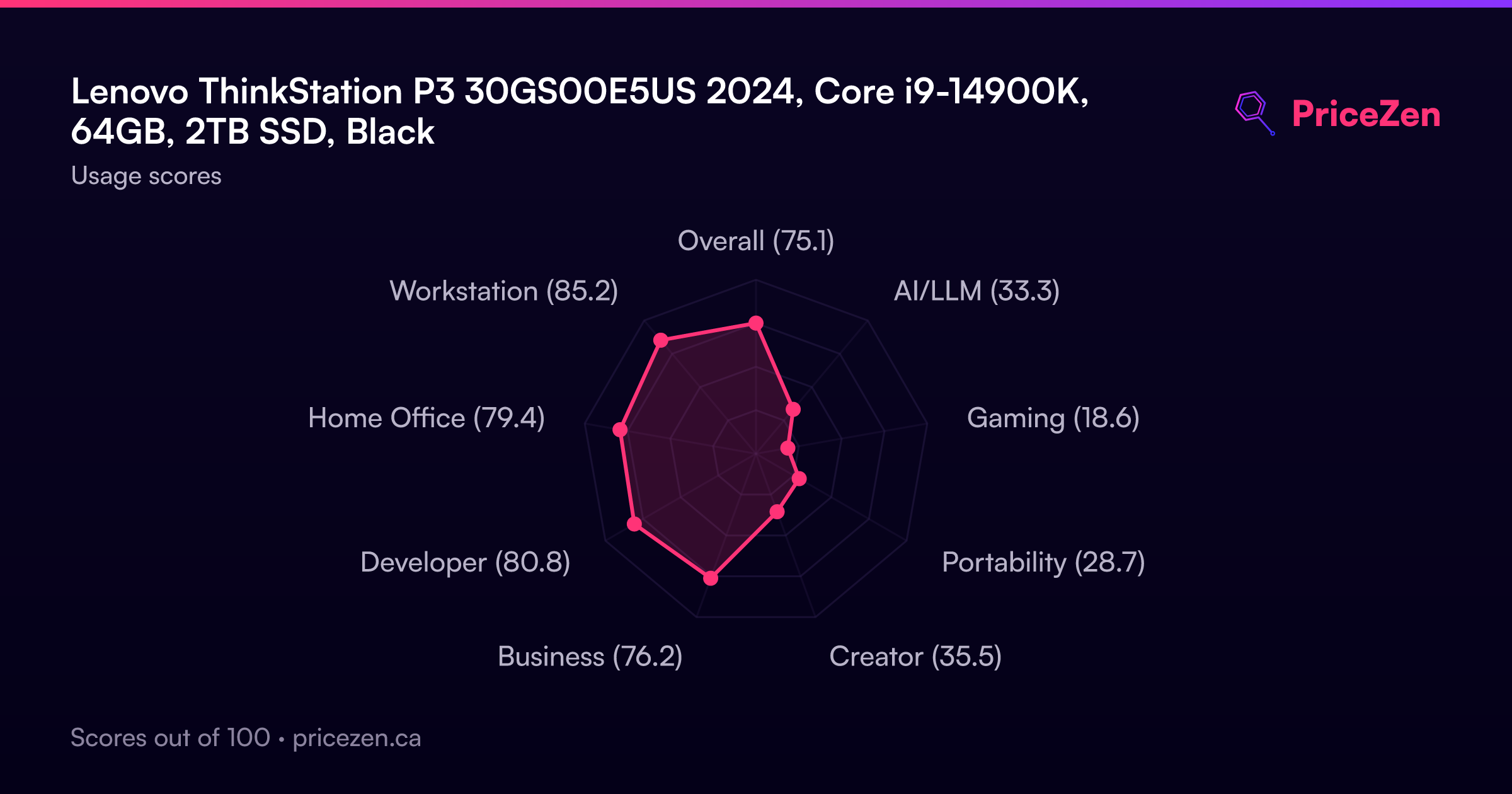
- Overall75.1
- AI/LLM33.3
- Gaming18.6
- Portability28.7
- Creator35.5
- Business76.2
- Developer80.8
- Home Office79.4
- Workstation85.2