HP OmniDesk M03-0000t 2025, Core Ultra 5 225, 64GB, 2TB SSD, Black
The Intel Core Ultra 5 225 processor with a 4.9 GHz turbo clock and 64GB of DDR5 RAM handle heavy multitasking like cross-document editing and multi-screen spreadsheets without lag. The 2TB PCIe M.2 SSD provides ample storage for business files or AI datasets, while Wi-Fi 6 and Windows 11 Pro ensure fast connectivity and a modern interface. This professionally upgraded desktop is best for developers and home office users who need a reliable, high-capacity machine for demanding productivity tasks, though its integrated graphics limit gaming potential.

No current retailer price
Snapshot
The 30-Second Version
The HP OmniDesk M03-0000t is a mid-tower Windows desktop with 64GB DDR5, a 2TB SSD and an Intel Core Ultra 5 225, priced at USD 2,489. It's excellent for developers and heavy multitaskers thanks to best-in-class memory and a huge port selection. Integrated graphics make it a poor gaming pick, scoring just 19.7/100 there.
Pros & Cons
Pros
- 64GB DDR5, top of the charts for a desktop tower 97th
- Excellent port selection: 2x USB-C, 8x USB-A, DisplayPort, HDMI, Ethernet 92nd
- 2TB PCIe M.2 SSD, well above average capacity 83rd
- Windows 11 Pro included, plus Wi-Fi 6 70th
- Strong fit for developers and home office multitasking
Cons
- Gaming score of 19.7/100, integrated graphics only
- CPU is only about average for the category
- USD 2,489 is steep for a machine with no discrete GPU
- Warranty runs through the seller, not HP
- Third-party upgraded and resealed, not a factory configuration
The proof
Performance
The numbers tell a lopsided story. RAM is one of the best we've seen for a desktop tower right now, and 64GB of DDR5 is the kind of headroom where you stop thinking about memory entirely. Ports rank near the top, so ten USB ports plus two display outputs is a standout for anyone running a multi-monitor desk with a pile of peripherals. Storage at 2TB lands well above average. The CPU, meanwhile, is solid but about average: the Core Ultra 5 225 is a capable everyday chip, not a rendering monster.
So is the HP OmniDesk M03-0000t good for gaming? No. Gaming scores 19.7 out of 100 here, one of the weakest results we track in this category, and integrated Intel Graphics is the reason. For development work, heavy multitasking, big spreadsheet models or running several VMs at once, the memory and storage do the heavy lifting and the CPU keeps up fine. Just don't expect the processor to carry a workload that really wants more cores.
Specifications
Full Specifications
Processor
| CPU | Intel Core Ultra 5 225 |
| Cores | 10 |
| Frequency | 3.3 GHz |
| L3 Cache | 20 MB |
Graphics
| GPU | Intel Graphics |
| Type | Integrated |
Memory & Storage
| RAM | 64 GB |
| RAM Generation | DDR5 |
| Storage | 2 TB |
| Storage Type | SSD |
Build
| Form Factor | mid-tower |
| Weight | 5.3 kg / 11.8 lbs |
Connectivity
| USB-C Ports | 2 |
| USB Ports | 8 |
| HDMI | 1 x HDMI |
| DisplayPort | 1x DisplayPort |
| Wi-Fi | Wi-Fi 6 |
| Ethernet | Gigabit Ethernet |
System
| OS | Windows 11 Pro |
vs Competition
Against the Apple Mac Studio M5 Max, this is the Windows-side option: you get Windows 11 Pro, ten USB ports and a standard mid-tower shape, but you give up whatever discrete graphics advantage the alternatives bring. The ASUS ROG GM700, MSI Aegis ZS2 A9NVP-1407US and Lenovo Legion Tower 5a Gen 10 are all names worth putting next to this one if games or GPU-heavy creative work are anywhere in your plans, because a 19.7 gaming score is not something you can software-update your way out of.
Where the OmniDesk holds its own is the developer and home office column. A 76.2 developer score with 64GB of DDR5 near the top and ports in the upper tier is a real argument if your day is Docker, IDEs, forty tabs and three monitors. The Dell Desktop ECT1250 is the closest philosophical rival for that kind of buyer. Pick based on whether your bottleneck is memory or graphics, because this machine only solves one of those.
| Spec | HP OmniDesk M03-0000t | Apple Mac Studio M5 Max | Lenovo T Series Towers Legion Tower 5a Gen 10 | Dell Desktop ECT1250 | ASUS ROG GM700 | MSI Aegis ZS2 A9NVP-1407US |
|---|---|---|---|---|---|---|
| CPU | Intel Core Ultra 5 225 | Apple M5 Max | AMD Ryzen 7 7800X3D | Intel Core Ultra 7 265 | AMD Ryzen 7 9800X3D | AMD Ryzen 9 9900X |
| RAM (GB) | 64 | 36 | 32 | 32 | 32 | 32 |
| Storage (GB) | 2048 | 1024 | 4096 | 2048 | 2048 | 2048 |
| GPU | Intel Graphics | Apple (32-Core) | NVIDIA GeForce RTX 5070 Ti | Intel UHD Graphics | NVIDIA GeForce RTX 5070 Ti | NVIDIA GeForce RTX 5070 |
| Form Factor | mid-tower | mini | mid-tower | sff | mid-tower | mid-tower |
| Psu W | - | 480 | 850 | 180 | 850 | 750 |
| OS | Windows 11 Pro | macOS | Windows 11 Home | Windows 11 Home | Windows 11 Home | Windows 11 Home |
| Compare | Compare | Compare | Compare | Compare |
| Product | CPU | GPU | RAM | Ports | Storage | Reliability |
|---|---|---|---|---|---|---|
| HP OmniDesk M03-0000t | 67.8 | 60 | 96.5 | 92.1 | 82.5 | 70.3 |
| Apple Mac Studio M5 Max Compare | 95.7 | 84.9 | 92.5 | 89.1 | 68.6 | 99.3 |
| Lenovo T Series Towers Legion Tower 5a Gen 10 Compare | 73.2 | 94.6 | 78 | 88.6 | 98.1 | 70.3 |
| Dell Desktop ECT1250 Compare | 88.1 | 60 | 81.6 | 75 | 82.5 | 70.3 |
| ASUS ROG GM700 Compare | 80.4 | 94.6 | 81.6 | 96.1 | 90 | 37.8 |
| MSI Aegis ZS2 A9NVP-1407US Compare | 92.4 | 90.7 | 87 | 90.4 | 82.5 | 37.8 |
Price
Value & Pricing
At USD 2,489 you're paying a premium for memory and storage rather than for silicon muscle, and that's the whole tension with this tower. If your work genuinely eats RAM, buying 64GB and 2TB pre-installed and ready to boot is convenient. If it doesn't, you're spending flagship money on a mid-pack CPU and integrated graphics. Our price tracking shows a single US listing at that figure, so there's not much competitive pressure on it either. Cross-shop the Dell Desktop ECT1250 and the Lenovo Legion Tower 5a Gen 10 before committing.
Read more
Overview
The HP OmniDesk M03-0000t is a mid-tower Windows desktop, and this particular listing is the upgraded version: 64GB of DDR5, a 2TB PCIe M.2 SSD, an Intel Core Ultra 5 225 and Windows 11 Pro, sitting at USD 2,489 at Best Buy. That's a lot of memory for a tower with no dedicated graphics card, which tells you exactly who this thing is aimed at. People who live in browser tabs, virtual machines, spreadsheets and containers, not people chasing frame rates.
The chip is a 10-core hybrid design, six performance cores plus four efficiency cores, running at 3.3GHz base with a 4.9GHz turbo. Graphics come from integrated Intel Graphics. The port situation is genuinely good: DisplayPort, HDMI, two USB-C, eight USB-A, Ethernet and Wi-Fi 6. It weighs 5.34kg, so it's a normal desk-or-floor tower rather than something you'll be hauling around.
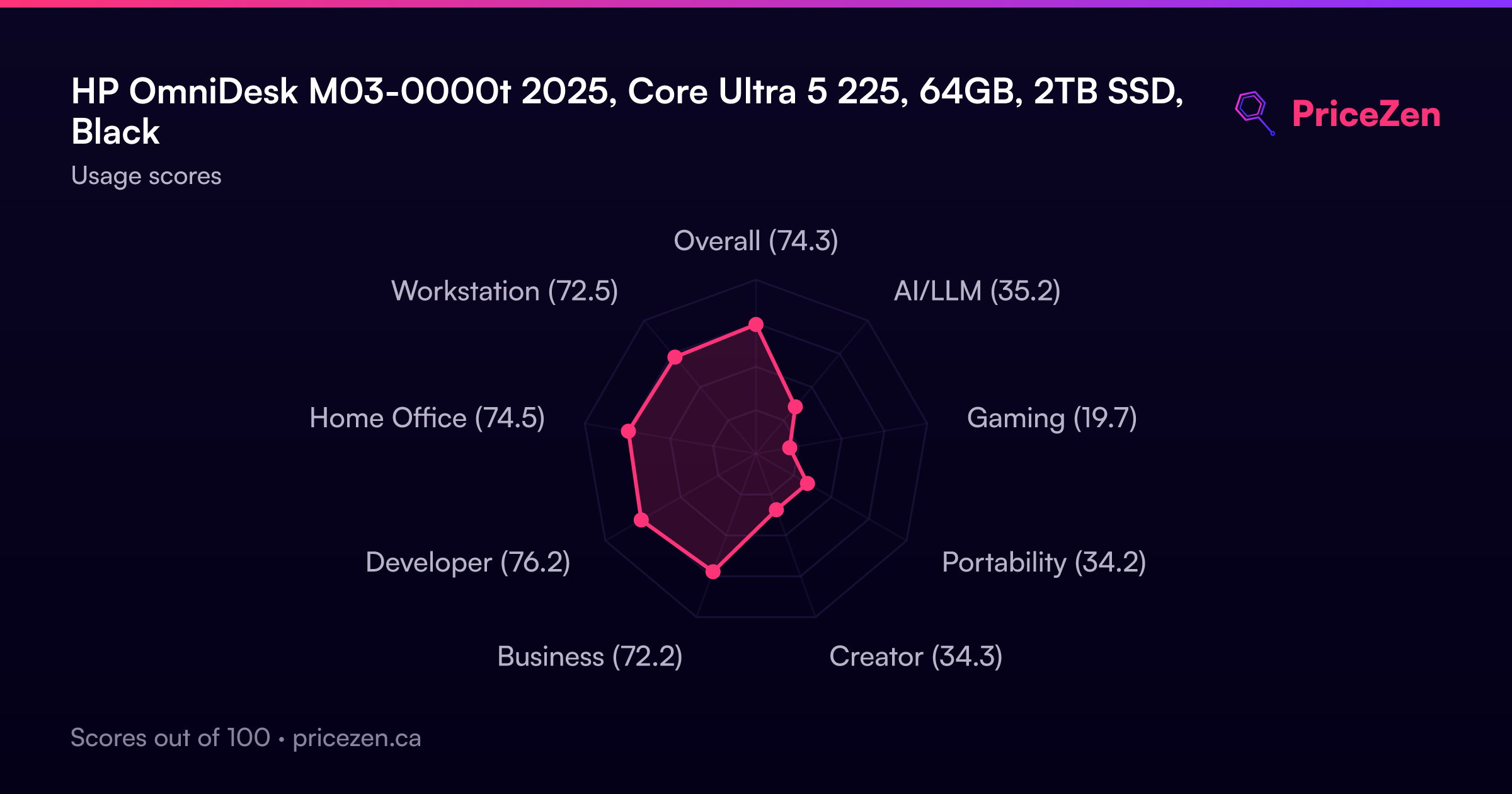
One thing to be clear about before you click buy: this configuration has been professionally upgraded with new components and then resealed, and the one-year warranty is handled by the seller, PCOnline, not by HP. Our system pulls specs, prices and rankings across stores, and we score every tower against the others in its category. On that model this one lands at 74.3 overall, with developer use at 76.2 and home office at 74.5.
Common Questions
Q: Is the HP OmniDesk M03-0000t good for gaming?
Not really. It relies on integrated Intel Graphics and scores 19.7 out of 100 for gaming in our ranking, so it's built for productivity rather than games.
Q: Does the HP OmniDesk M03-0000t have a dedicated graphics card?
No, this configuration uses integrated Intel Graphics built into the Core Ultra 5 225. There's no discrete GPU listed, which is why the gaming score is so low.
Q: Is 64GB of RAM overkill for a home office desktop?
For email and documents, yes. But 64GB of DDR5 is one of the best for desktop towers and makes sense if you run virtual machines, large datasets or heavy development tools alongside everything else.
Q: How many monitors can the HP OmniDesk M03-0000t support?
It has both DisplayPort and HDMI outputs, so a two-monitor desk setup is straightforward, and the ten USB ports mean plenty of room for peripherals.
Who Should Skip This
Gamers, video editors leaning on GPU acceleration and anyone doing 3D or local AI training should skip this entirely, since integrated graphics and a 19.7 gaming score won't cut it. Look at the ASUS ROG GM700, MSI Aegis ZS2 A9NVP-1407US or Lenovo Legion Tower 5a Gen 10 instead. Also skip it if you only browse, stream and write documents, because 64GB is wasted money there, and if you want a factory-sealed build with manufacturer warranty support rather than a seller-upgraded unit covered by PCOnline.
Verdict
Buy it if you're a developer or a serious home-office multitasker who knows, specifically, that they need 64GB of RAM and a big fast SSD in a Windows tower with lots of ports. That buyer gets a machine that scores well exactly where their work lives, and the plug-and-play setup saves an afternoon of upgrading.
Everyone else should keep looking. USD 2,489 for integrated graphics and a mid-pack CPU is a hard sell, and the seller-managed warranty on a resealed, third-party upgraded box adds friction if something goes sideways. It's a good tool for a narrow job, not a great all-rounder.
Usage Scores
- Overall74.3
- AI/LLM35.2
- Gaming19.7
- Portability34.2
- Creator34.3
- Business72.2
- Developer76.2
- Home Office74.5
- Workstation72.5