MSI Modern AM273Q AI 2024, Core Ultra 7, 32GB, 1TB SSD, Black
Powered by an Intel Core Ultra 7 155H with a dedicated NPU for efficient AI workloads, this all-in-one combines 32GB of DDR5 RAM and a 1TB SSD in a space-saving chassis. The 27-inch display is limited to a 1600x900 resolution, which is a notable drawback for a modern desktop, though the integrated Thunderbolt and dual HDMI ports offer strong connectivity. This system is best for developers and home office users who prioritize desk tidiness and AI-accelerated tasks over visual fidelity or gaming performance.

No current retailer price











Snapshot
The 30-Second Version
A tidy 27-inch all-in-one with a 16-core Core Ultra 7 and 32GB of DDR5 that ranks well above average for the category, aimed squarely at home office and dev desks. Gaming is a write-off at 15.5/100 thanks to integrated graphics, and reliability ranks below the midpoint. Prices swing from USD 1,130 to USD 1,819, with Best Buy cheapest at USD 1,219 versus Amazon's USD 1,631. Buy it at the low end for office work, but confirm the panel resolution first, because listings disagree on whether it's WQHD or 1600x900.
Pros & Cons
Pros
- 32GB DDR5 ranks well above average for all-in-ones, real headroom for dev work 82nd
- 16-core Core Ultra 7 with an NPU handles everyday multitasking comfortably
- 1TB SSD as standard, no slow spinning drive in the chain
- Genuinely tidy desk setup at 5kg with the whole PC inside the monitor
- Wide port spread: Thunderbolt, USB-C, five USB-A, two HDMI, Ethernet and Wi-Fi 6E
Cons
- Gaming scores 15.5/100, integrated graphics only
- User sentiment sits in the 7th percentile, one of the weakest we track
- Reliability ranking of 38 falls behind the category midpoint
- Listings disagree on the panel: WQHD in some, 1600x900 HD+ in others
- USD pricing swings by USD 689 across listings, easy to overpay
What owners think
How owner sentiment changed over time
ExclusiveBased on when customers actually wrote their reviews - so you can see whether early praise held up.
The proof
Performance
Let's talk about what the numbers actually buy you. The Core Ultra 7 is a 16-core chip with a 1.4GHz base clock, and its CPU ranking of 58 puts it solidly mid-pack among all-in-ones. That's not a knock: AIOs live inside a 120W power envelope, so nobody's chasing desktop-tower clocks here. For compiling code, running containers, juggling Office and a dozen tabs, mid-pack CPU paired with above-average RAM is a sensible split. Memory is usually what strangles that workload first, and 32GB of DDR5 gives you real headroom. Storage at 53 is unremarkable but it's flash, so boot and app launches stay quick.
Graphics are where the ceiling drops hard. The integrated Intel GPU ranks 60, which sounds respectable until you see the gaming score of 15.5/100. Those two things aren't contradictory: the iGPU is competent for display output, video playback and light GPU-accelerated tasks, and hopeless for anything demanding sustained 3D throughput. There's also a genuine mess in the listings around the panel. Some describe a 27-inch WQHD screen, others list HD+ at up to 1600x900. Those are wildly different amounts of usable workspace, and we'd want that confirmed with the seller before spending money. If you're buying a 27-inch all-in-one for text-heavy work, resolution is the spec that decides whether you love it or squint at it.
Specifications
Full Specifications
Processor
| CPU | Intel Core Ultra 7 155H |
| Cores | 16 |
| Frequency | 1.4 GHz |
| L3 Cache | 24 MB |
Graphics
| GPU | Intel Graphics |
| Type | Integrated |
| VRAM Type | DDR5 SDRAM |
Memory & Storage
| RAM | 32 GB |
| RAM Generation | DDR5 |
| Storage | 1 TB |
| Storage Type | SSD |
Build
| Form Factor | aio |
| PSU | 120 |
| Weight | 5.0 kg / 11.0 lbs |
Connectivity
| USB-C Ports | 1 |
| USB Ports | 5 |
| Thunderbolt | Thunderbolt 4 x 2 |
| HDMI | 2 x HDMI |
| Wi-Fi | Wi-Fi 6E |
| Bluetooth | ✓ |
| Ethernet | 1 Ethernet port |
System
| OS | Windows 11 Pro |
vs Competition
The competitor set here is telling, because most of it isn't really competing for the same desk. The Apple Mac Studio M5 Max, the Lenovo T Series Towers Legion Tower 5a Gen 10, the HP OMEN GT16-0364 and the ASUS ROG GM700 are all separate-box machines, and the gaming-oriented ones exist precisely because integrated graphics can't do what this MSI can't do. With a gaming score of 15.5/100, the MSI isn't in that conversation and shouldn't pretend to be. If games are anywhere on your list, cross-shop the OMEN and the ROG instead. If you want raw compute for heavy creative or development work, the Mac Studio and the Legion Tower are the direction to look, since a 120W all-in-one chassis sets a hard limit on how much silicon you can feed.
Where the MSI wins is the shape of the thing. Against every one of those competitors, it's the option that needs no tower under the desk, no separate monitor purchase and one cable to the wall. The Dell Desktop ECT1250 is the closest philosophical rival as a straightforward work machine, and here the MSI's argument is its 32GB of DDR5 sitting well above average for the category, plus Thunderbolt, dual HDMI and Wi-Fi 6E for a docking-free setup. Our ranking places it strongest for home office at 66/100, and that's the lane it should be judged in. Cross-shop it against other all-in-ones, not against towers.
| Spec | MSI Modern AM273Q AI | Apple Mac Studio M5 Max | Lenovo T Series Towers Legion Tower 5a Gen 10 | Dell Desktop ECT1250 | HP OMEN GT16-0364 | ASUS ROG GM700 |
|---|---|---|---|---|---|---|
| CPU | Intel Core Ultra 7 155H | Apple M5 Max | AMD Ryzen 7 7800X3D | Intel Core Ultra 7 265 | AMD Ryzen 7 8700F | AMD Ryzen 7 9800X3D |
| RAM (GB) | 32 | 36 | 32 | 32 | 32 | 32 |
| Storage (GB) | 1024 | 1024 | 4096 | 2048 | 1024 | 2048 |
| GPU | Intel Graphics | Apple (32-Core) | NVIDIA GeForce RTX 5070 Ti | Intel UHD Graphics | NVIDIA GeForce RTX 5070 | NVIDIA GeForce RTX 5070 Ti |
| Form Factor | aio | mini | mid-tower | sff | mid-tower | mid-tower |
| Psu W | 120 | 480 | 850 | 180 | 850 | 850 |
| OS | Windows 11 Pro | macOS | Windows 11 Home | Windows 11 Home | Windows 11 Home | Windows 11 Home |
| Compare | Compare | Compare | Compare | Compare |
| Product | CPU | GPU | RAM | Ports | Storage | User Sentiment | Reliability |
|---|---|---|---|---|---|---|---|
| MSI Modern AM273Q AI | 58 | 60.1 | 81.6 | 57.5 | 53.3 | 7 | 37.5 |
| Apple Mac Studio M5 Max Compare | 95.7 | 85 | 92.4 | 89.1 | 68.7 | 94.9 | 99.3 |
| Lenovo T Series Towers Legion Tower 5a Gen 10 Compare | 73.2 | 94.6 | 77.9 | 88.5 | 98.1 | 94.9 | 70.2 |
| Dell Desktop ECT1250 Compare | 88.1 | 60.1 | 81.6 | 75 | 82.6 | 98.5 | 70.2 |
| HP OMEN GT16-0364 Compare | 69.4 | 90.7 | 87 | 97.9 | 53.3 | 98.5 | 70.2 |
| ASUS ROG GM700 Compare | 80.4 | 94.6 | 81.6 | 96.1 | 90 | 98.5 | 37.5 |
Price
Value & Pricing
Here's where you can save yourself real money by doing nothing but clicking a different tab. Across seven US listings we track, this thing runs from USD 1,130 to USD 1,819, a spread of USD 689 for the same machine. Of the stores with per-unit prices right now, Best Buy is cheapest at USD 1,219, Amazon sits at USD 1,631 and Adorama at USD 1,719. That's a USD 500 gap between the best and worst of those three, and nothing about the hardware changes. We track prices over time partly through our community browser extension, and this is exactly the sort of listing where that pays off.
At USD 1,219 the pitch is reasonable: above-average RAM, a 1TB SSD, Windows 11 Pro and a clutter-free desk in one purchase. At USD 1,819 you're paying a premium for a machine with integrated graphics, a middling reliability ranking and almost no owner feedback to reassure you. Elsewhere we see EUR 2,322 in Spain, GBP 1,985 in the UK and MXN 48,150 in Mexico, each a single listing, so there's less room to shop around in those markets.
Read more
Overview
The MSI Modern AM273Q AI is the kind of machine that makes sense on paper before you ever look at a benchmark. Everything lives inside a 27-inch monitor: a 16-core Intel Core Ultra 7 from the Series 1 family, 32GB of DDR5, a 1TB SSD, and Windows 11 Pro. One power cable, one box on the desk, done. At 5kg it's light enough to move between rooms without a plan, and MSI leans hard into the AI angle with an NPU built for lighter AI workloads at lower power draw, plus Eye-Care tech and Eye-Q Check aimed at people who stare at spreadsheets until their eyes give up.
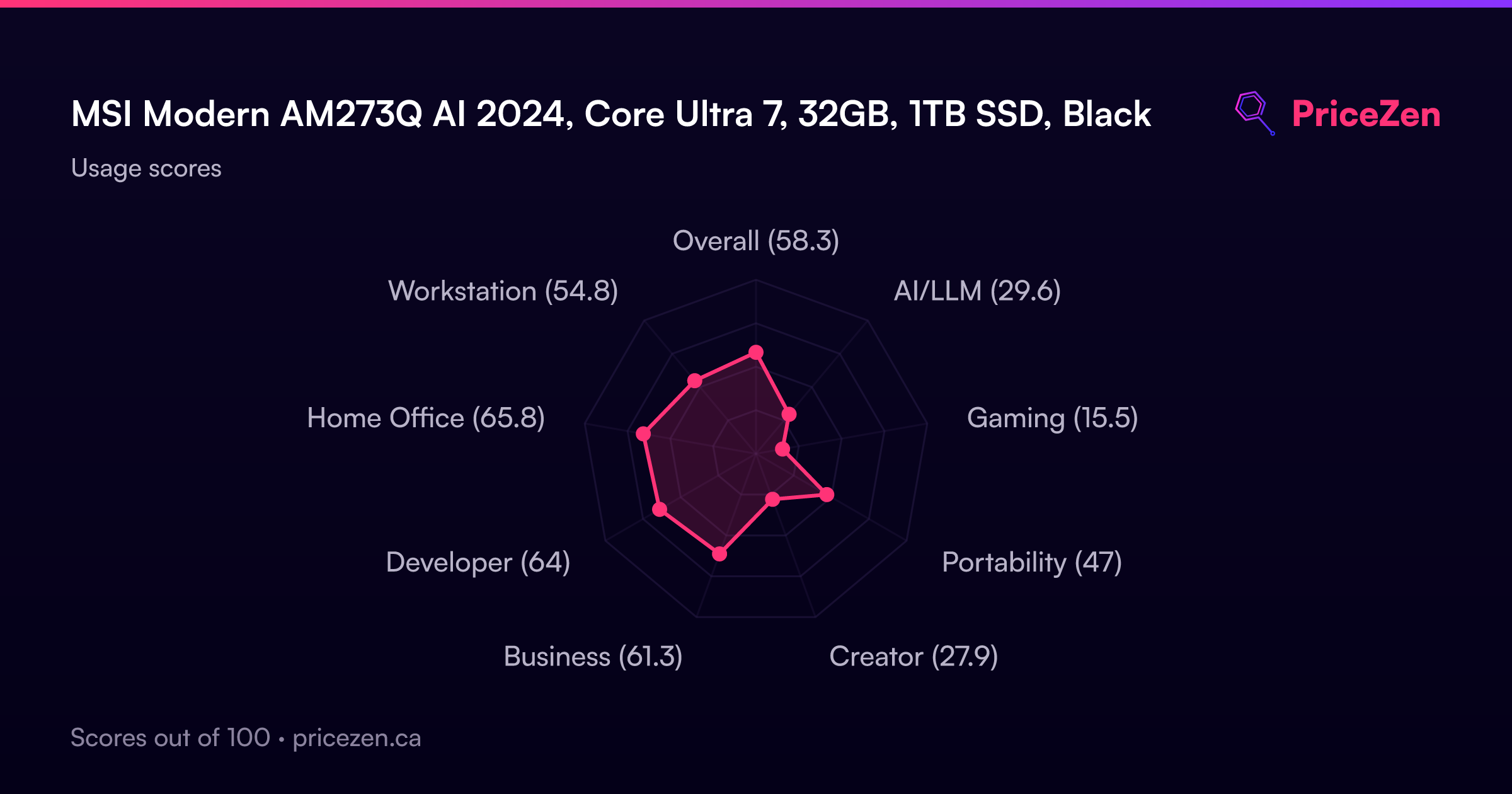
Our scoring model puts this squarely in home office territory (66/100), with developer work close behind at 64.1 and general business use at 61.5. That tracks with the spec sheet. The 32GB of DDR5 sits well above average for all-in-ones, which matters if your day involves an IDE, a local database, three browser windows and a video call all fighting for memory. The 1TB SSD is about middle of the pack, fine for documents and projects, less fine for a video archive.
And then there's the part we can't gloss over. Gaming scores 15.5/100, which is a weak spot bordering on a non-starter, because graphics come from integrated Intel Graphics rather than a discrete card. Reliability lands at 38, below the midpoint. And user sentiment ranks in the 7th percentile against other machines of this type, which is one of the worst we've seen. Our read of the owner feedback pool is more forgiving than that ranking suggests, but only because there's barely anything in it. We'll get to that.
Common Questions
Q: Can I game on this, even casually?
We'd say no. Graphics come from integrated Intel Graphics with no discrete card, and our gaming score for this machine is 15.5/100, its weakest area by a wide margin. The iGPU ranking of 60 means it's fine for driving the display and video, but if games matter at all, look at the HP OMEN GT16-0364 or ASUS ROG GM700 instead.
Q: Is the screen actually WQHD or 1600x900?
The listings genuinely contradict each other: some retailer copy says 27-inch WQHD, other copy lists HD+ at up to 1600x900 pixels. That's a huge difference in usable workspace for text and code, so get the exact panel resolution confirmed by the seller before you order. On a 27-inch panel, 1600x900 would be a serious compromise for office work.
Q: Is 32GB of RAM overkill for office work?
For pure email and documents, yes, but it's the spec that makes this machine interesting. The 32GB of DDR5 ranks well above average among all-in-ones, and it's why our model scores developer use at 64.1/100. If you run virtual machines, containers or heavy browser sessions, that headroom matters more than the mid-pack CPU ranking of 58.
Q: What am I getting for ports, and does it come with a keyboard?
You get Thunderbolt, one USB-C, five USB-A, two HDMI outputs, Ethernet and Wi-Fi 6E, which is a solid spread for an all-in-one and enough to skip a dock in most setups. Buyer Q&A indicates a wireless keyboard is included. Note the OS is listed as Windows 11 Pro in the spec sheet but Windows 11 Home in some marketing copy, so verify which edition you're getting if domain join or BitLocker matters to you.
Who Should Skip This
Gamers, obviously, but also anyone doing GPU-heavy creative work: 3D rendering, serious video grading, machine learning training. Integrated Intel Graphics and a 15.5/100 gaming score mean this isn't a machine you grow into, and an all-in-one gives you nowhere to add a card later. The HP OMEN GT16-0364, ASUS ROG GM700 and Lenovo Legion Tower 5a Gen 10 are the shapes to look at instead, and the Apple Mac Studio M5 Max if your work is compute-bound rather than games.
We'd also steer away anyone who needs a proven track record. A reliability ranking of 38 and sentiment in the 7th percentile, backed by only 14 pieces of evidence that contain no real owner accounts, means you're taking a flyer. If this is the machine your business depends on and downtime costs you money, buy something with a deep bench of owner feedback behind it. And if you're being asked USD 1,719 or USD 1,819 for it, walk away, because at that price the trade-offs stop being charming.
Verdict
For a home office or a small business desk where space is tight and the work is documents, calls, browsers and code, this is a defensible buy at the Best Buy price of USD 1,219. The 32GB of DDR5 is the standout spec and the reason we'd shortlist it over cheaper 16GB all-in-ones. Developers get the same benefit: memory headroom beats CPU bragging rights when you've got a language server, Docker and a browser open at once. Just go in knowing the reliability ranking of 38 is below average and that you're buying a machine with very little owner history behind it.
For anyone else, we'd hold off. The sentiment picture is the sticking point. Our distilled read of the feedback pool comes out neutral at 50/100 with medium confidence from just 14 pieces of evidence, and every one of those is a Q&A entry rather than an actual owner account. So the honest summary isn't that owners hate it, it's that we can't tell you what owners think, and the 7th-percentile sentiment ranking reflects that vacuum. Pair that with conflicting display specs in the listings and you've got a product that needs verification before purchase, not enthusiasm. Confirm the panel resolution and the OS edition with the seller, buy from somewhere with a real returns process, and don't pay the top of the price range.
Usage Scores
- Overall59
- AI/LLM29.7
- Gaming15.5
- Portability47.1
- Creator28
- Business61.5
- Developer64.1
- Home Office66
- Workstation54.9