Poly Studio 2200-87090-001 black 2021
The dual 4K lenses and 8.3MP sensors deliver life-like video with professional speaker tracking and group framing for rooms up to 25 feet long. A motorized electronic privacy shutter adds security, while Poly Lens software enables easy management and analytics. Best for IT managers equipping large meeting rooms with Poly G7500 or Microsoft Teams Room systems.




Snapshot
The 30-Second Version
The Poly Studio 2200-87090-001 is a fixed conference room camera with dual 4K lenses, speaker tracking, and a motorized privacy shutter. It's built for large rooms up to 25 feet and requires a Poly G7500 or Teams Room to work. At $834 USD, it's a reasonable price for the right corporate setup, but it's useless for anything else. If you're not running Poly infrastructure, look elsewhere.
Pros & Cons
Pros
- Dual 4K lenses handle speaker tracking and group framing well in large rooms
- Motorized privacy shutter adds real security for corporate environments
- Power over Ethernet simplifies cabling, one cable for data and power
- Poly Lens management gives IT teams solid remote monitoring options
- Purpose-built for rooms up to 25 feet, where most webcams fall apart
Cons
- Requires a Poly G7500 or Poly Microsoft Teams Room, no standalone use
- 8.3MP sensor is small, low-light performance will suffer
- No stabilization, so mounting needs to be rock solid
- Cloud management features cost extra
- Useless for anything outside a fixed conference room setup
The proof
Performance
The headline spec is 4K video from dual lenses, and that's genuinely useful in a large room. A single 4K sensor has to digitally zoom and crop to track speakers, which degrades quality fast. With two sensors, the camera can dedicate one to a wide room view and the other to tracking and framing. The result is cleaner close-ups of whoever's talking, even at the far end of a 25-foot table. That's the whole point of this product, and the design makes sense.
But the sensor percentile ranking is rough. It sits at the 6th percentile compared to all products of this type in our database. Now, that's a bit unfair because we're comparing it against mirrorless cameras and cinema bodies, not just conference cams. Still, an 8.3MP sensor is small by modern standards. In good lighting, the 4K output looks sharp enough for video calls. In a dim boardroom, expect noise and softness. There's no stabilization, which is fine for a fixed mount, but it means you can't get away with a wobbly ceiling mount or a flimsy TV cart.
Specifications
Full Specifications
Sensor
| Megapixels | 8.3 MP |
Shooting
| Electronic Shutter | Yes |
Video
| Max Resolution | 4K |
Build
| Weight | 2.0 kg / 4.4 lbs |
Connectivity
| Wi-Fi | Yes |
vs Competition
The competitors listed in our database are all mirrorless or cinema cameras, which tells you how odd this product is in our system. The Sony FX30, Fujifilm X-H2, Panasonic Lumix G9 II, OM System OM-1 Mark II, and Nikon Z6 III all crush the Poly Studio on sensor quality, video flexibility, and overall performance. But none of them are conference room cameras. They don't do speaker tracking, they don't have privacy shutters, and they don't integrate with Poly's room systems. Comparing them directly is like comparing a delivery van to a sports car. Different jobs.
If you're actually shopping for a conference room camera, the real competitors are things like the Logitech Rally Bar, Jabra Panacast 50, or older Poly Studio models. Those aren't in our database, but they're the products IT buyers cross-shop. The Poly Studio's advantage is its tight integration with Poly's ecosystem and the dual-lens tracking. The trade-off is lock-in. You're committing to Poly hardware for the codec, and if you ever want to switch platforms, this camera becomes a paperweight.
| Spec | Poly Studio 2200-87090-001 | Fujifilm X-H2 | Sony FX30 | Nikon Z8 | Panasonic Lumix G9 II | OM System OM-1 Mark II |
|---|---|---|---|---|---|---|
| Type | bridge | mirrorless | cinema | mirrorless | mirrorless | mirrorless |
| Sensor | - | 40.2MP aps-c | 26MP aps-c | 45.7MP full-frame | 25.2MP micro-four-thirds | 20.4MP micro-four-thirds |
| AF Points | - | 425 | 495 | 493 | 779 | 1053 |
| Burst FPS | - | 15 | 120 | 30 | 75 | 120 |
| Video | 4K | 8K @60fps | 4K @120fps | 8K @120fps | 4K @120fps | 4K @60fps |
| IBIS | No | Yes | Yes | Yes | Yes | Yes |
| Weather Sealed | No | Yes | No | Yes | Yes | Yes |
| Weight (g) | 1996 | 579 | 562 | 820 | 575 | 511 |
| Compare | Compare | Compare | Compare | Compare |
| Product | AF | EVF | Build | Burst | Video | Sensor | Battery | Display | Connectivity | Affordability | Stabilization |
|---|---|---|---|---|---|---|---|---|---|---|---|
| Poly Studio 2200-87090-001 | 37.1 | 37.4 | 63.1 | 32.1 | 22.1 | 6 | 45.9 | 27.5 | 44.7 | 42.6 | 33.1 |
| Fujifilm X-H2 Compare | 91.5 | 96.2 | 93.2 | 79.1 | 94.6 | 98.8 | 97.1 | 95 | 95.5 | 24.8 | 95.9 |
| Sony FX30 Compare | 93 | 85.6 | 75.2 | 99.3 | 91.2 | 94.8 | 95.9 | 93.9 | 95.5 | 25.1 | 87.8 |
| Nikon Z8 Compare | 92.8 | 90.6 | 97.4 | 94.7 | 98.5 | 67.8 | 88.5 | 97.1 | 95.5 | 16 | 87.8 |
| Panasonic Lumix G9 II Compare | 97.6 | 90.4 | 93.1 | 95.8 | 97.3 | 59.8 | 89.9 | 96.4 | 95.5 | 38 | 87.8 |
| OM System OM-1 Mark II Compare | 98.6 | 99.8 | 92.6 | 99.3 | 83.7 | 47.1 | 95.1 | 95 | 95.5 | 25.9 | 99.6 |
Price
Value & Pricing
Pricing is all over the place depending on where you look. We found it listed at $834 USD in the US, $1,245 CAD in Canada, and 155,202 INR in India. Those amounts aren't directly comparable across currencies, but the US price feels reasonable for a dual-lens 4K conference camera with speaker tracking. The catch is that this is not a complete solution. You need the Poly G7500 or Teams Room hardware, which is a significant additional cost. And if you want the cloud management analytics, that's another subscription.
Compared to buying a high-end webcam or even a mirrorless camera for a conference room, the Poly Studio is more expensive upfront. But it's built for a specific job. A Sony FX30 or Nikon Z6 III would technically produce better video, but you'd need capture cards, lenses, mounting rigs, and someone to manage it all. For a company that just wants the boardroom to work, the Poly Studio's price is defensible. Just know the total cost of ownership includes the required codec and possibly software subscriptions.
Amazon 1 offer From CA$1,245
We started tracking prices for this product on Nov 15, 2026. The chart appears once we have more data.
Read more
Overview
The Poly Studio 2200-87090-001 is a weird one to slot into our usual review format. It's not a camera you throw in a bag. It's a fixed conference room camera built for large spaces, up to 25 feet long, and it needs a Poly G7500 or a Poly Microsoft Teams Room to even function. So if you're here looking for a vlogging setup, this thing scores a 9.7 out of 100 for that. It's not for you. But for IT folks outfitting a big boardroom, this is a purpose-built tool that does one job and mostly does it well.
What makes it interesting is the dual 4K lens setup. You get two 8.3MP sensors working together to handle speaker tracking and group framing. The idea is that the camera automatically figures out who's talking and frames them properly, which matters a lot in a room where people are spread out. There's also a motorized privacy shutter, which is a nice touch for companies that care about security. You can physically block the lenses when the meeting's over.
Management is handled through Poly Lens Desktop for Windows or the cloud-based Poly Lens software. Some of that cloud stuff is sold separately, so budget accordingly. Power over Ethernet is required, which simplifies cabling but means you need a PoE switch or injector. No PoE, no camera. Simple as that.
Common Questions
Q: Can I use this camera by itself with Zoom or Microsoft Teams?
No. The Poly Studio 2200-87090-001 is not a standalone USB camera. It requires a Poly G7500 or a Poly Microsoft Teams Room system to function. You also need Power over Ethernet. If you want a plug-and-play conference camera for Zoom or Teams, look at USB options like the Poly Studio P15 or Logitech MeetUp instead.
Q: How does the speaker tracking actually work?
The camera uses its dual 4K lenses and 8.3MP sensors to detect who is speaking and automatically frame them. One lens can maintain a wide view of the room while the other zooms and frames the active speaker. This is designed for large rooms up to 25 feet long, where a single fixed camera would leave distant participants looking tiny.
Q: Does this camera work in low light?
It will work, but don't expect miracles. The 8.3MP sensor is small, and the camera ranks in the 6th percentile for sensor quality in our database. In a dim boardroom, you'll see noise and reduced sharpness. For best results, keep the room well lit. If your conference room has poor lighting, consider adding dedicated lighting before blaming the camera.
Q: What's included in the box, and what else do I need to buy?
The camera itself is the main component. You'll need a Poly G7500 or Poly Microsoft Teams Room system, a PoE switch or injector, and mounting hardware appropriate for your room. Cloud-based management through Poly Lens is available but some features are sold separately. Budget for the full system, not just the camera.
Who Should Skip This
If you're a content creator, streamer, or photographer, this is not your camera. It scores 9.7 out of 100 for vlogging and 20.7 for sports and wildlife. It has no stabilization, a small sensor, and it can't record to a memory card. Buy a Sony FX30, Fujifilm X-H2, or any modern mirrorless camera instead. You'll get dramatically better image quality and actual flexibility.
Small businesses and home offices should also skip this. If you're outfitting a huddle room or a personal office, a $200 USB webcam or a $500 all-in-one conference bar will do the job without the Poly G7500 requirement. The Studio 2200-87090-001 only makes sense in large rooms with existing Poly infrastructure. If that's not you, don't pay the Poly tax.
Verdict
For a large corporate meeting room that already runs Poly infrastructure, the Studio 2200-87090-001 is a solid choice. The dual 4K lenses and speaker tracking solve real problems in big spaces, and the privacy shutter is a feature security teams will appreciate. If you're outfitting a 25-foot boardroom and you already have or plan to buy a Poly G7500, this camera makes sense.
For everyone else, skip it. If you need a camera for a small huddle room, this is overkill and the tracking features won't matter as much. If you want a camera for content creation, streaming, or photography, this is genuinely one of the worst options we've seen. It scores 9.7 out of 100 for vlogging and 20.7 for sports and wildlife. It's not built for that. Buy a mirrorless camera or even a good webcam instead.
Usage Scores
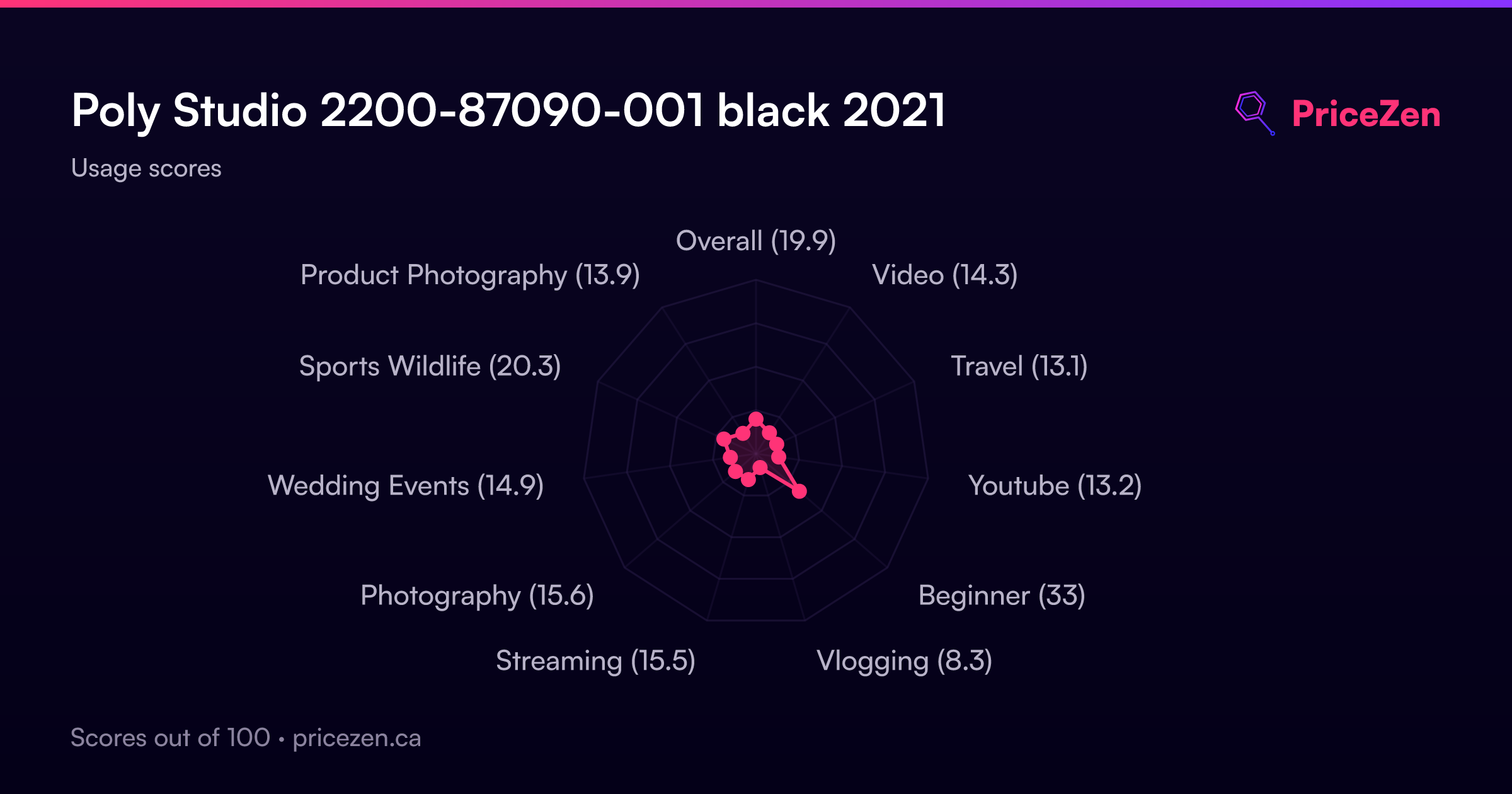
- Overall19.9
- Video14.3
- Travel13.1
- Youtube13.2
- Beginner32.9
- Vlogging8.3
- Streaming15.5
- Photography15.5
- Wedding Events14.9
- Sports Wildlife20.2
- Product Photography13.8