Panasonic EQ3 Series TH-86EQ3W White
A 500-nit brightness and 25% haze anti-glare panel ensure this 86-inch 4K IPS display remains clearly visible in brightly lit conference rooms and classrooms. Its RS-232C and PJLink-compatible LAN control, combined with an 18/7 duty cycle and flexible portrait or landscape orientation, simplifies large-scale deployment and remote management. This display is best for corporate IT managers and system integrators needing a reliable, network-controlled digital signage solution for continuous commercial use.

No current retailer price
Where we saw it before. Check the store for today's price.


Snapshot
The 30-Second Version
The Panasonic TH-86EQ3W is an 86-inch 4K commercial display built for conference rooms and digital signage, not gaming or home theater. It delivers strong brightness, good color accuracy, and flexible mounting options, but the 60Hz panel and slow response time make it a poor fit for fast-moving content. Shop around, because prices vary by over $2,400 across vendors.
Pros & Cons
Pros
- Massive 86-inch 4K screen dominates any conference room 85th
- 500-nit brightness with effective anti-glare coating 85th
- Excellent color accuracy for a commercial display 82nd
- Flexible ergonomics with height, tilt, swivel, and pivot 77th
- Strong connectivity including USB-C and LAN control
Cons
- 60Hz refresh rate is a non-starter for gaming
- 8ms response time leads to motion blur
- 332W power draw is hefty even for this size
- Built-in speakers are merely serviceable
- Price swings wildly between vendors
The proof
Performance
Let's be real about what this panel does and doesn't do. The 60Hz refresh rate and 8ms response time are perfectly adequate for slideshows, spreadsheets, and video conferencing. But if you're wondering whether the Panasonic TH-86EQ3W is good for gaming, the answer is a hard no. Our database puts its performance score in the 5th percentile, which is about as low as it gets. Fast motion looks smeary, and there's no variable refresh rate support to smooth things out.
Color reproduction is a different story. The 1.07 billion color support via 8-bit+FRC lands in the 88th percentile, which is genuinely impressive for a commercial display. Colors look accurate enough for most corporate branding and presentation work, though creative pros doing color-critical work will still want a calibrated reference monitor. The 1200:1 static contrast ratio is typical for IPS, meaning blacks look more like dark gray in a dim room. But in a bright conference room, that 500-nit brightness more than compensates.
Specifications
Full Specifications
Display
| Resolution | 3840x2160 (4K UHD) |
| Panel Type | IPS |
| Aspect Ratio | 16:9 |
| Curved | No |
| Screen Finish | matte |
Performance
| Refresh Rate | 60 Hz |
| Response Time | 8 |
Color & HDR
| Brightness | 500 nits |
| Color Depth | 8-bit (8-bit + FRC) |
Connectivity
| HDMI Ports | 3 |
| USB-C | 1 |
| Speakers | Yes |
| Headphone Jack | Yes |
Ergonomics
| Height Adjustable | No |
| Tilt | Yes |
| Swivel | Yes |
| Pivot | Yes |
| VESA Mount | 600x400 |
Features
| Webcam | No |
| Touchscreen | No |
| PIP/PBP | No |
| Power | 332 |
vs Competition
The Panasonic TH-86EQ3W doesn't really compete with the gaming monitors in our top competitors list like the ASUS ROG Strix XG27UCDMG or the Samsung Odyssey OLED G6. Those are high-refresh-rate OLED panels built for speed and contrast, and they'd run circles around this Panasonic in any gaming or creative workflow. But they're also 27 to 45 inches, not 86. Different tools for different jobs.
Where the Panasonic faces real competition is from other large-format commercial displays. Samsung's QB series and LG's UH5F series offer similar brightness and 18/7 duty cycles, often with better smart platform integration. The Panasonic's advantage is its anti-glare coating and flexible physical adjustments, which many competitors skimp on. If you need an 86-inch screen that can pivot between portrait and landscape without a fight, the TH-86EQ3W is one of the few that handles it gracefully.
| Spec | Panasonic EQ3 Series TH-86EQ3W | Apple Studio Display XDR 27" | Acer Nitro UM.CX2AA.S01 34" | ASUS ProArt Display PA32UCG-K 32" | MSI MAG 274URFW 27" | LG UltraGear 32GP750-B.AUS 32" |
|---|---|---|---|---|---|---|
| Screen Size | - | 27 | 34 | 32 | 27 | 32 |
| Resolution | 3840 x 2160 | 5120 x 2880 | 3440 x 1440 | 3840 x 2160 | 3840 x 2160 | 2560 x 1440 |
| Panel Type | IPS | Mini-LED | VA | IPS | IPS | IPS |
| Refresh Rate | 60 | 120 | 165 | 120 | 160 | 165 |
| Response Time Ms | 8 | - | 1 | 5 | 0.5 | 1 |
| Adaptive Sync | - | Adaptive-Sync | FreeSync Premium | FreeSync | FreeSync Premium | FreeSync Premium |
| Hdr | - | HDR | HDR400 | Dolby Vision | HDR | HDR400 |
| Compare | Compare | Compare | Compare | Compare |
| Product | Color | Portability | Display | Feature | Ergonomic | Performance | Connectivity |
|---|---|---|---|---|---|---|---|
| Panasonic EQ3 Series TH-86EQ3W | 85.3 | 76.5 | 81.6 | 21.2 | 70.7 | 6.3 | 85.2 |
| Apple Studio Display XDR 27" Compare | 99.8 | 81.3 | 99.3 | 94.4 | 66.9 | 56.1 | 89.9 |
| Acer Nitro UM.CX2AA.S01 34" Compare | 84.7 | 20.7 | 76.1 | 90.8 | 66.9 | 77.1 | 83.9 |
| ASUS ProArt Display PA32UCG-K 32" Compare | 99.9 | 76.5 | 95.1 | 70.1 | 90.7 | 56.1 | 99.5 |
| MSI MAG 274URFW 27" Compare | 91.9 | 57.4 | 87 | 85 | 90.7 | 90.8 | 81.1 |
| LG UltraGear 32GP750-B.AUS 32" Compare | 88.6 | 3.7 | 72 | 70.1 | 78.6 | 77.1 | 53.2 |
Price
Value & Pricing
Pricing on the Panasonic TH-86EQ3W is all over the map, ranging from $6,470 to $8,948 depending on where you look. That's a nearly $2,500 spread, so shopping around is non-negotiable. For a commercial 86-inch 4K display with this brightness and control feature set, the lower end of that range is competitive. But once you creep toward $9,000, you're in territory where you could start looking at higher-end options from NEC or Samsung's business display lineup. If your use case is strictly conference room presentations and digital signage, the Panasonic makes sense at the right price. Just don't pay a premium for features you won't use.
Price history
Read more
Overview
If you're hunting for a massive 86-inch 4K display for a conference room or classroom, the Panasonic EQ3 Series TH-86EQ3W is built for exactly that. This isn't a TV you'd mount in your living room for movie night. It's a commercial-grade digital signage monitor designed to run 18 hours a day, 7 days a week, with a 500-nit bright, anti-glare IPS panel that stays readable even under harsh office lighting. The 25% haze coating does a solid job cutting reflections without making the image look cloudy.
Connectivity is a strong point here. You get three HDMI ports, a USB-C input, and legacy VGA, plus RS-232C and PJLink for LAN control. That makes it easy to integrate into existing corporate AV setups. The built-in dual 10W speakers are fine for voice and presentation audio, but you'll want external speakers for anything beyond that. At 332W power draw, it's not exactly energy-sipping, but that's expected for a panel this size running at commercial brightness levels.
Ergonomics for a display this large are surprisingly flexible. It supports height, tilt, swivel, and pivot adjustments, and the VESA 600x400 mount pattern means it'll play nice with most heavy-duty wall mounts or carts. Just know that at this size, you're not casually repositioning it on a desk. This thing demands a serious installation plan.
Common Questions
Q: Is the Panasonic TH-86EQ3W good for gaming?
No, the 60Hz refresh rate and 8ms response time put it in the bottom 5th percentile for performance, making it a poor choice for gaming. You'd be much better off with a high-refresh-rate monitor or a gaming TV.
Q: Can the Panasonic TH-86EQ3W be mounted in portrait mode?
Yes, it supports both portrait and landscape orientation and includes height, tilt, swivel, and pivot adjustments. The VESA 600x400 mount pattern works with most heavy-duty wall mounts and carts.
Q: How bright is the Panasonic TH-86EQ3W?
It hits 500 nits of brightness with a 25% haze anti-glare coating, which makes it easy to see in well-lit conference rooms and classrooms. It's bright enough for most indoor commercial use but isn't designed for direct sunlight.
Q: Does the Panasonic TH-86EQ3W have built-in speakers?
Yes, it has dual 10W built-in speakers that are fine for presentation audio and video calls. For music or video content, you'll want to connect external speakers through the headphone jack or HDMI ARC.
Who Should Skip This
Gamers and home theater enthusiasts should look elsewhere. The 60Hz panel and lack of gaming features like VRR make this a frustrating experience for anything fast-paced. If you want a big screen for movies and games, a large-format TV from Sony or LG will serve you better. Creative professionals needing reference-level color accuracy should also pass, the 8-bit+FRC panel is good for presentations but not precise enough for color grading or print work. And if you're just looking for a basic office monitor, this 86-inch beast is massive overkill, a standard 27 or 32-inch display will cost a fraction of the price and fit on an actual desk.
Verdict
The Panasonic EQ3 Series TH-86EQ3W is a purpose-built tool that knows exactly what it is. It's a big, bright, color-accurate commercial display for boardrooms, lecture halls, and retail signage. It's not trying to be a gaming monitor or a home theater screen, and it shouldn't be judged as one. For its intended use case, it delivers where it counts: visibility, reliability, and integration.
Should you buy this? If you're outfitting a corporate conference room and need an 86-inch 4K display that can run all day without breaking a sweat, yes, especially if you can snag it at the lower end of that price range. If you're a gamer or a home user looking for a big screen, walk away. This isn't for you, and you'd be much happier with a large-format TV or a proper gaming monitor.
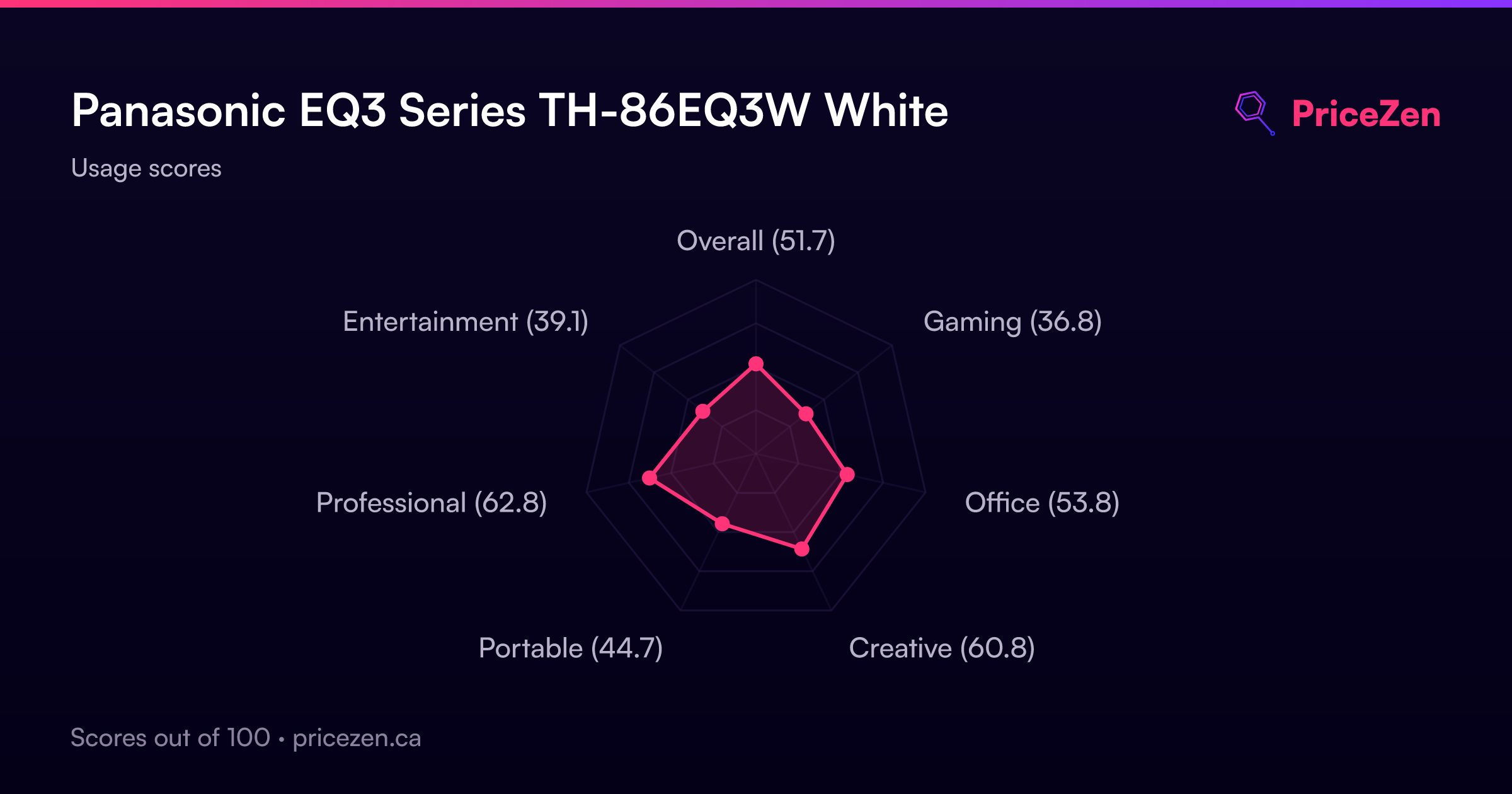
Usage Scores
- Overall51.7
- Gaming36.8
- Office53.8
- Creative60.8
- Portable44.7
- Professional62.8
- Entertainment39.1