BenQ GW2490C 23.8" Black 2025

Smooth 144 Hz gaming verified Nov 28
42/100 overall score 4.3 average from 1 owner ratings
The store shows a “was” price, but CA$129.99 is not below the usual price of CA$129.99.
Usual CA$129.99Store’s “was” CA$159.99High CA$226.40
Price over the last 90 days: low CA$129.99 on Nov 5, high CA$226.40. Usual price CA$129.99. The store’s “was” price CA$159.99. Today CA$129.99.
- Screen
- 23.8"
- Resolution
- 1920 x 1080
- Panel
- IPS
- Refresh
- 144 Hz
- Response time
- 5 ms
- Adaptive sync
- FreeSync
Compare prices at 4 stores
Cheapest first. New, refurbished and bundled offers are kept apart, so you compare like with like.
| Store | Sold by | Colour and condition | Price | vs lowest | Last checked | Link |
|---|---|---|---|---|---|---|
| New4 offersSingle unit | ||||||
| Memory Express | Memory Express | Black | CA$129.99 | Lowest price | 6 days ago | Go to store |
| Staples | Staples | Not listed | CA$129.99 | Same | 5 days ago | Go to store |
| Not checked in the last 7 days, so these prices may have changed | ||||||
| Newegg | Marketplace seller | Black | CA$226.40 | +CA$96.41 | Oct 31 | Go to store |
| Out of stock when last checked | ||||||
| B&H Photo | B&H Photo | Black | No price | Out of stock | Not known | Go to store |
 Source: PriceZen, checked Nov 23, 2026
A price counts as current when we checked it in the last 7 days. “Marketplace seller” means a third-party seller on that store, not the store itself.
Price history
The usual store price is CA$129.99, and the lowest price in the last 90 days was CA$129.99.
Checked that dayNot checked that day, still on offer
Source: PriceZen, checked Nov 23, 2026


Snapshot
The 30-Second Version
The BenQ GW2490C is a 23.8-inch 1080p IPS monitor with a 144Hz refresh rate, USB-C, and solid eye-care features. It scores 44.8 out of 100 in our database, which is about average for this category. At USD 90 to USD 105 in the US or CAD 130 at Memory Express in Canada, it's a good deal for a home office workhorse.
Pros & Cons
Pros
- 144Hz refresh rate makes everyday scrolling feel great 84th
- USB-C connectivity is a real convenience for modern laptops 70th
- Eye-care features are genuinely helpful for long work sessions
- Slim bezels give it a clean, modern look
Cons
- 250 nits brightness is dim for bright rooms
- 1080p resolution limits screen real estate
- Only tilt adjustment, no height or swivel
- Color accuracy is just okay at 99% sRGB
What owners think
How owner sentiment changed over time
ExclusiveBased on when customers actually wrote their reviews - so you can see whether early praise held up.
1 written review, Mar 2026: 1 happy
Across all 1 store ratings: 4.3★. The chart counts the 1 written review.
Each dot is one written review, in the month it was written. Happy = 4-5★, mixed = 3★, unhappy = 1-2★.
The proof
Performance
The 144Hz refresh rate is the headline here, and it's genuinely nice for a monitor in this price bracket. Scrolling through documents and spreadsheets feels noticeably smoother than a standard 60Hz panel. The 5ms response time is fine for casual gaming and everyday use, though serious competitive players will want something faster. FreeSync support helps keep things tear-free if you've got an AMD GPU. The 250 nits brightness is adequate for indoor use but nothing to write home about, and the 1080p resolution on a 23.8-inch panel keeps text reasonably sharp. Performance-wise, it lands at the 60th percentile in our database, which is about average for this category.
Specifications
Full Specifications
Display
| Size | 23.8" |
| Resolution | 1920x1080 (Full HD) |
| Panel Type | IPS |
| Aspect Ratio | 16:9 |
| Curved | No |
| Screen Finish | matte |
Performance
| Refresh Rate | 144 Hz |
| Response Time | 5 |
| Adaptive Sync | FreeSync |
Color & HDR
| Brightness | 250 nits |
| Color Gamut | 99% sRGB |
| Color Depth | 16.7 Million |
Connectivity
| HDMI Ports | 1 |
| DisplayPort | 1 |
| USB-C | 1 |
| Speakers | Yes |
| Headphone Jack | Yes |
Ergonomics
| Height Adjustable | No |
| Tilt | Yes |
| Swivel | No |
| Pivot | No |
| VESA Mount | 100x100 |
Features
| Webcam | No |
| Touchscreen | No |
| PIP/PBP | No |
| Power | 20 |
| Weight | 3.5 kg / 7.7 lbs |
vs Competition
Against the competition, the GW2490C is playing a different game. The ASUS TUF Gaming VG34VQL1B and KOORUI 34E6UC are ultrawide gaming beasts with way more screen real estate and higher resolutions. The Acer Nitro XV272U and HP OMEN 27qs G2 both offer 1440p panels that'll look sharper for text and media. But none of those are hitting this price point with USB-C and eye-care features. The LG UltraGear 27GS75Q-B is probably the closest rival in spirit, but it's bigger and pricier. If you want a no-frills 1080p work monitor with a high refresh rate, the BenQ holds its own. If you want more pixels or more screen, look elsewhere.
| Spec | BenQ GW2490C 23.8" | LG UltraGear 27G810A-B 27" | ASUS ROG Strix XG27JCG 27" | Dell S2725QC 27" | HP OMEN 27qs G2 27" | Acer Nitro XV272U W2bmiiprx 27" |
|---|---|---|---|---|---|---|
| Screen Size | 23.8 | 27 | 27 | 27 | 27 | 27 |
| Resolution | 1920 x 1080 | 3840 x 2160 | 5120 x 2880 | 3840 x 2160 | 2560 x 1440 | 2560 x 1440 |
| Panel Type | IPS | IPS | IPS | IPS | IPS | IPS |
| Refresh Rate | 144 | 180 | 330 | 120 | 280 | 240 |
| Response Time Ms | 5 | 1 | 0.3 | 8 | 1 | 0.5 |
| Adaptive Sync | FreeSync | FreeSync Premium | FreeSync Premium Pro | FreeSync Premium | G-Sync Compatible | FreeSync Premium |
| Hdr | - | HDR400 | HDR600 | HDR | HDR400 | HDR400 |
| Compare | Compare | Compare | Compare | Compare |
| Product | Color | Portability | Display | Feature | Ergonomic | Performance | Connectivity | Social Proof |
|---|---|---|---|---|---|---|---|---|
| BenQ GW2490C 23.8" | 35.8 | 83.9 | 21.4 | 21.1 | 47.1 | 59.4 | 70.1 | 10.2 |
| LG UltraGear 27G810A-B 27" Compare | 93.7 | 67.9 | 87 | 70 | 90.8 | 81.7 | 98.2 | 67.1 |
| ASUS ROG Strix XG27JCG 27" Compare | 90 | 67.9 | 99.5 | 70 | 90.8 | 95.6 | 81 | 83.9 |
| Dell S2725QC 27" Compare | 71.7 | 76.5 | 87 | 70 | 90.8 | 44.2 | 87.4 | 96.8 |
| HP OMEN 27qs G2 27" Compare | 71.3 | 81.3 | 66.9 | 70 | 90.8 | 89.4 | 96.9 | 98.9 |
| Acer Nitro XV272U W2bmiiprx 27" Compare | 90.4 | 54.2 | 66.9 | 70 | 90.8 | 93.5 | 90.9 | 62.1 |
Price
Value & Pricing
Pricing is all over the place depending on where you shop. In the US, you're looking at USD 90 to USD 105, which is a pretty tight spread. In Canada, it's a different story, CAD 130 to CAD 226 across three listings. That's a CAD 96 gap, so shopping around matters. Memory Express has the best CAD deal at CAD 130, which is a steal for a 144Hz IPS panel with USB-C. At the low end of either range, this monitor is an easy recommendation. At the high end, you're getting into territory where better options exist.
Read more
Overview
The BenQ GW2490C is a 23.8-inch 1080p IPS monitor aimed squarely at home office folks who want a smooth 144Hz refresh rate without paying gaming monitor prices. It's got USB-C, slim bezels, and BenQ's eye-care tech baked in. Nothing flashy, just a solid desk companion.
Our database puts it at 44.8 out of 100 overall, which sounds rough until you realize this thing isn't trying to compete with 4K ultrawides. It's a budget-friendly workhorse with a few compromises, and for the right buyer, those compromises barely matter.
Common Questions
Q: Is the 144Hz refresh rate worth it for office work?
Yes, if you spend all day scrolling and switching between windows. The smoother motion is easier on the eyes and makes the whole experience feel more responsive, even if you never play a game.
Q: Can I charge my laptop through the USB-C port?
The USB-C port supports data transfer and video input, but with only 20W of total power draw for the monitor itself, don't expect it to charge a laptop at full speed. It's best for connecting a laptop that's already plugged into its own charger.
Q: Is this monitor good for photo editing?
It covers 99% of sRGB, which is fine for basic photo work and web content. But with 250 nits brightness and no factory calibration, it's not a serious color-critical display. If you're doing professional photo or video work, you'll want something with better color accuracy and higher brightness.
Who Should Skip This
Skip this if you need a monitor for serious gaming, color-critical work, or bright rooms. The 1080p resolution and 250 nits brightness will feel limiting if you're used to 1440p or 4K panels. And if you need height adjustment or swivel, the tilt-only stand will drive you nuts. Ultrawide fans and multi-monitor power users should look at the ASUS TUF or KOORUI options instead.
Verdict
The BenQ GW2490C is for people who spend long hours at a desk and want a smooth, comfortable display without spending a fortune. It's not a gaming monitor, despite the 144Hz, and it's not a color-critical display. It's a practical, well-built home office monitor that does the basics right. If that's what you need, you'll be happy. If you need more, you'll know it.
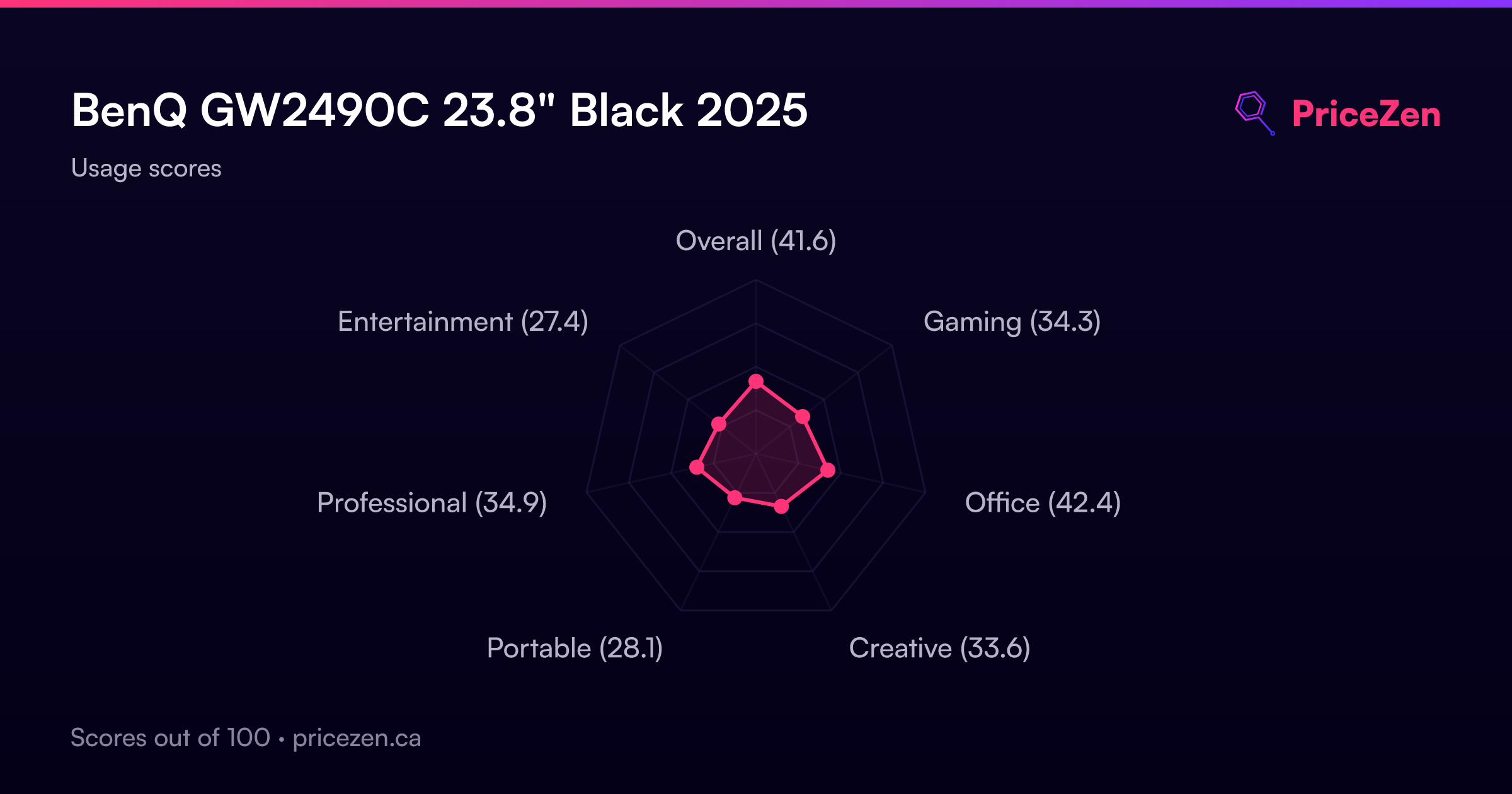
Usage Scores
- Overall41.6
- Gaming34.3
- Office42.3
- Creative33.6
- Portable28.1
- Professional34.9
- Entertainment27.6