Lenovo ThinkBook Plus Gen 7 Auto Twist 14" 2025, Core Ultra 5 325, 32GB, 512GB SSD, Luna Grey
The 14-inch OLED panel hits 1100 nits with a 120Hz refresh rate, powered by an Intel Core Ultra 5 325 and integrated Arc B390 GPU, all in a 1.40kg chassis. Its auto-twisting display and face tracking enable hands-free control, a feature rarely found elsewhere, while the 75Wh battery supports all-day work. Best for business travelers who need a compact, adaptive laptop for presentations and multitasking, not for gaming.

No current retailer price



Snapshot
The 30-Second Version
The Lenovo ThinkBook Plus Gen 7 Auto Twist is a 14-inch OLED laptop with a motorized hinge that rotates the screen to follow your face. It has a stunning display and solid build quality, but mid-range performance and a high price make it a niche pick. Buy it for the screen and the novelty, not for gaming or heavy workloads.
Pros & Cons
Pros
- Gorgeous 2880x1800 OLED display with 120Hz and 1100 nits 98th
- 32GB RAM is generous for multitasking 90th
- Auto-rotating display is genuinely fun and useful for presentations 82nd
- Lightweight at 1.40kg with solid build quality 81st
- Wi-Fi 7 and Thunderbolt support for future-proof connectivity
Cons
- 512GB storage feels cramped at this price
- CPU performance is mid-pack, not a powerhouse
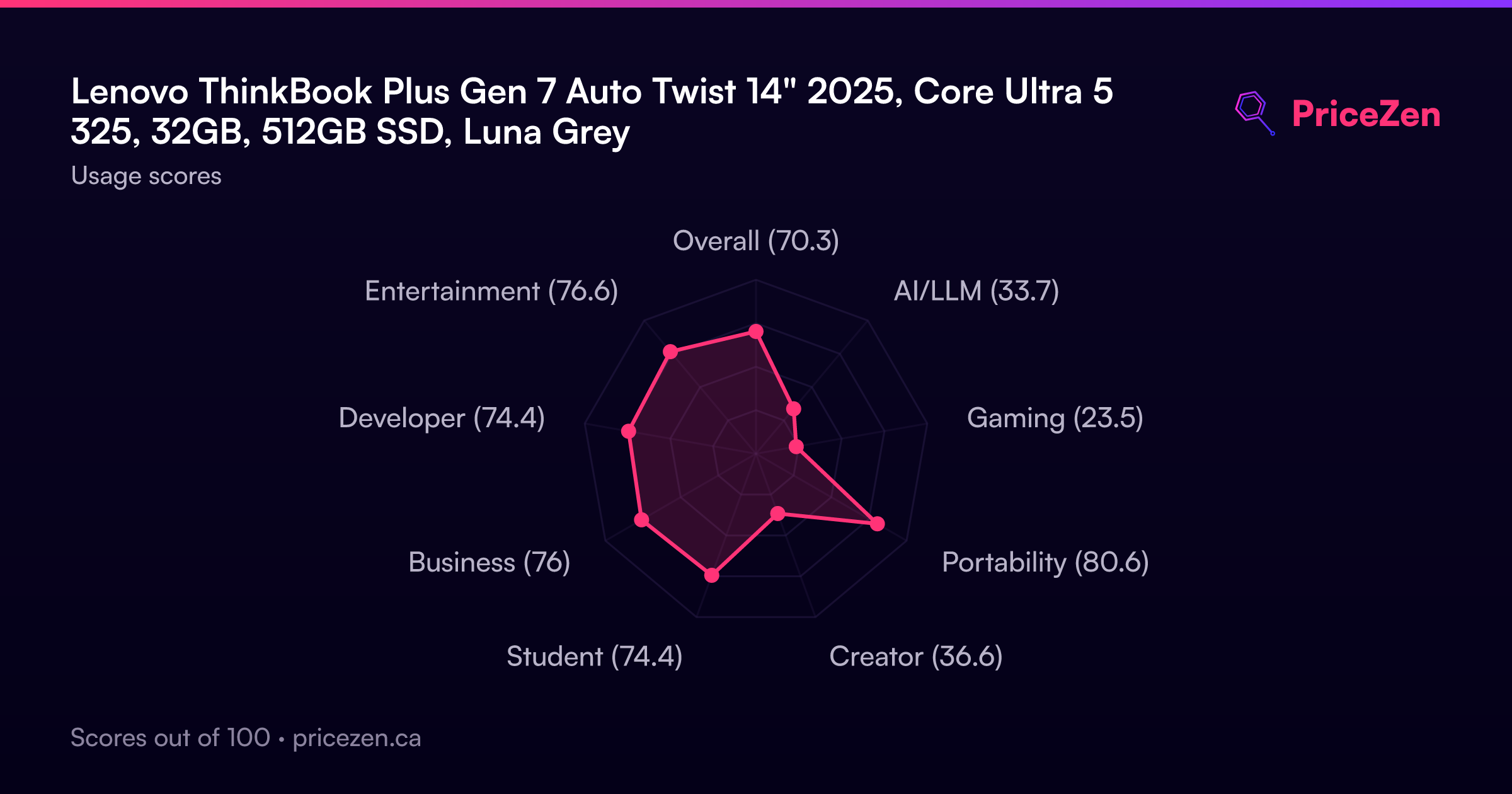
- Gaming performance is weak, 23.5 out of 100
- Motorized hinge adds complexity and potential failure points
- Pricey, especially in Europe where it ranges from EUR 2,559 to EUR 3,039
The proof
Performance
The Core Ultra 5 325 is a solid mid-range chip. It's not going to blow anyone away in raw CPU benchmarks, landing around the 65th percentile in our database. That means it handles everyday productivity, web browsing, and light creative work without breaking a sweat, but it's not a rendering monster. The 32GB of RAM is a nice touch and puts this machine in the top tier for memory, so you can keep a ridiculous number of Chrome tabs open without the system crawling.
The integrated Intel Arc B390 with 16GB of VRAM is interesting. It's one of the better integrated GPUs we've tested, sitting around the 77th percentile. You can do light photo and video editing, and even some casual gaming at lower settings. But don't expect to play Cyberpunk at native resolution. The 512GB SSD is about average for this class, which is a little stingy for a laptop at this price. You'll probably want an external drive if you work with large media files.
Specifications
Full Specifications
Processor
| CPU | Intel Core Ultra 5 325 |
| Cores | 8 |
| Frequency | 3.4 GHz |
| L3 Cache | 12 MB |
Graphics
| GPU | Intel Arc B390 |
| Type | Integrated |
| VRAM | 16 GB |
| VRAM Type | Shared |
Memory & Storage
| RAM | 32 GB |
| RAM Generation | LPDDR5X |
| Storage | 512 GB |
| Storage Type | NVMe SSD |
Display
| Size | 14" |
| Resolution | 2880x1800 |
| Panel | OLED |
| Refresh Rate | 120 Hz |
| Brightness | 1100 nits |
| Color Gamut | 100% DCI-P3 |
Connectivity
| USB-C Ports | 2 |
| USB Ports | 2 |
| Thunderbolt | Thunderbolt 4 |
| HDMI | HDMI 2.1 |
| Wi-Fi | Wi-Fi 7 |
| Bluetooth | Bluetooth 5.4 |
Physical
| Weight | 1.4 kg / 3.1 lbs |
| Battery | 75 Wh |
| OS | Windows 11 Pro |
vs Competition
Stacked against the Apple MacBook Pro M4 Max, the ThinkBook Plus Gen 7 Auto Twist loses on raw performance but wins on display brightness and that unique hinge. The MacBook is a workhorse for video editors and developers, while the ThinkBook feels more like a premium business tool with a party trick. The ASUS ROG Zephyrus G14 is a different beast entirely, with a dedicated GPU that crushes the Intel Arc B390 in gaming and creative workloads. If you care about frame rates, the ASUS is the obvious choice.
The HP OMEN Transcend 14 and MSI Raider are also in this conversation, both offering better gaming performance at similar prices. But none of them have a screen that rotates to follow your face. That's the thing about this laptop, it's not trying to be the fastest. It's trying to be the most interesting. And for a certain kind of buyer, that's exactly what they want.
| Spec | Lenovo ThinkBook Plus Gen 7 Auto Twist 14" | Apple MacBook Pro 14.2" M4 Max | ASUS ROG Zephyrus 14" GA403WW-G14.R95080 | HP OMEN Transcend | Samsung Galaxy Book5 Pro 14" NP944XHA-KG3US | Dell Premium 14.5" LDA14250-7667SLV-PUS |
|---|---|---|---|---|---|---|
| CPU | Intel Core Ultra 5 325 | Apple M4 Max | AMD Ryzen AI 9 HX 370 | Intel Core Ultra 9 285H | Intel Core Ultra 7 258V | Intel Core Ultra 7 255H |
| RAM (GB) | 32 | 64 | 32 | 32 | 32 | 32 |
| Storage (GB) | 512 | 4096 | 2048 | 1024 | 1024 | 1024 |
| Screen | 14" 2880x1800 | 14.2" 3024x1964 | 14" 2880x1800 | 14" 2880x1800 | 14" 2880x1800 | 14.5" 3200x2000 |
| GPU | Intel Arc B390 | Apple (40-Core) | NVIDIA GeForce RTX 5080 | NVIDIA GeForce RTX 5070 | Intel Arc Graphics 140V | Intel Arc Graphics |
| OS | Windows 11 Pro | macOS | Windows 11 Home | Windows 11 Home | Windows 11 Pro | Windows 11 Home |
| Weight (kg) | 1.4 | 1.6 | 1.6 | 1.6 | 1.2 | 1.7 |
| Battery (Wh) | 75 | 72 | - | 71 | 63 | 62 |
| Compare | Compare | Compare | Compare | Compare |
| Product | CPU | GPU | RAM | Ports | Screen | Portability | Storage | Reliability | Affordability |
|---|---|---|---|---|---|---|---|---|---|
| Lenovo ThinkBook Plus Gen 7 Auto Twist 14" | 64.8 | 77.4 | 89.6 | 77 | 98.2 | 81 | 50.8 | 82.1 | 16.6 |
| Apple MacBook Pro 14.2" M4 Max Compare | 93.7 | 91.6 | 95.6 | 73.1 | 99.3 | 68.9 | 98.4 | 98.3 | 1.8 |
| ASUS ROG Zephyrus 14" GA403WW-G14.R95080 Compare | 91.2 | 98.3 | 90.8 | 89.1 | 96.4 | 73.7 | 89.7 | 60.7 | 5.8 |
| HP OMEN Transcend Compare | 90.1 | 93.6 | 89.6 | 89.1 | 96.4 | 72.4 | 65.1 | 33.7 | 8.5 |
| Samsung Galaxy Book5 Pro 14" NP944XHA-KG3US Compare | 65.6 | 69.6 | 79.4 | 82.9 | 91.5 | 89.5 | 79.2 | 82.1 | 20.7 |
| Dell Premium 14.5" LDA14250-7667SLV-PUS Compare | 86.9 | 69.6 | 89 | 65.8 | 97.2 | 61.2 | 65.1 | 33.7 | 14 |
Price
Value & Pricing
Here's where things get tricky. At $1,999 in the US, this laptop is competing with some serious hardware. The MacBook Pro M4 Max and ASUS ROG Zephyrus G14 both live in this neighborhood, and they offer significantly more raw performance. The ThinkBook Plus Gen 7 Auto Twist is really selling you on the display and the novelty of the auto-rotating hinge. If those features matter to you, the price might be justified. But if you're just looking for a fast 14-inch laptop, you can get more bang for your buck elsewhere. European buyers should shop around, since the EUR 2,559 to EUR 3,039 spread is significant. The lower end of that range is much more palatable than the top.
We started tracking prices for this product on Nov 3, 2026. The chart appears once we have more data.
Read more
Overview
The Lenovo ThinkBook Plus Gen 7 Auto Twist is one of those laptops that makes you do a double take. It's a 14-inch OLED convertible with a motorized hinge that literally twists the screen around to follow your face. We're not making this up. It sits in the premium business and creator space, with a US price around $1,999, though European buyers will see a spread from EUR 2,559 to EUR 3,039 depending on the store. Under the hood you get an Intel Core Ultra 5 325, 32GB of LPDDR5X RAM, and a 512GB NVMe SSD.
People searching for this thing usually want to know if the auto-rotating display is a gimmick or actually useful. Fair question. The short answer is that it's surprisingly smooth, but it's also the kind of feature you'll show off to coworkers for a week and then mostly forget about. The face tracking works well in good lighting, and the hands-free controls are neat for presentations. But the real story here is the screen, which is one of the best we've seen in a 14-inch laptop.
At 2880x1800 OLED with 120Hz refresh and 1100 nits peak brightness, this panel is a stunner. It covers 100% DCI-P3, so colors pop without looking cartoonish. If you're editing photos, watching HDR content, or just staring at spreadsheets all day, your eyes will thank you. The 1.40kg weight keeps it portable enough for a commute, and the 75Wh battery should get most people through a workday, though that motorized hinge does sip a little extra juice.
Common Questions
Q: Is the Lenovo ThinkBook Plus Gen 7 Auto Twist good for gaming?
No, gaming is its weakest area with a score of 23.5 out of 100. The integrated Intel Arc B390 can handle casual titles at low settings, but serious gamers should look at the ASUS ROG Zephyrus G14 or HP OMEN Transcend 14 instead.
Q: How does the auto-rotating display work on the ThinkBook Plus Gen 7?
The laptop uses face tracking to detect where you are and a motorized hinge to rotate the screen toward you. It also supports hands-free controls, so you can rotate the display or navigate presentations with gestures.
Q: Is the ThinkBook Plus Gen 7 Auto Twist good for photo editing?
Yes, the 2880x1800 OLED display with 100% DCI-P3 coverage and 1100 nits brightness is excellent for photo editing. The 32GB of RAM helps with large files, though the 512GB SSD may fill up quickly if you work with RAW images.
Q: How much does the Lenovo ThinkBook Plus Gen 7 Auto Twist cost?
It's priced at $1,999 in the US and CAD 3,059 in Canada. European pricing varies from EUR 2,559 to EUR 3,039 depending on the retailer, so it's worth shopping around for the best deal.
Who Should Skip This
Skip this one if you're a gamer, a video editor working with 4K footage, or anyone who needs serious GPU performance. The integrated Intel Arc B390 just can't keep up with dedicated graphics cards in laptops like the ASUS ROG Zephyrus G14 or MSI Raider. Also skip it if you're on a tight budget, since the affordability score is near the bottom of our database. And if you're the type who worries about moving parts breaking, a motorized hinge might keep you up at night. For most people, a MacBook Pro M4 Max or a solid Windows ultrabook will be a safer bet.
Verdict
Should you buy the Lenovo ThinkBook Plus Gen 7 Auto Twist? If you're a business professional who gives a lot of presentations, works in bright environments, and wants a laptop that starts conversations, this is a genuinely compelling option. The display is one of the best we've tested in a 14-inch form factor, and the auto-rotating hinge is more than just a gimmick, it's actually useful for sharing your screen with colleagues.
But if you need serious performance for gaming, video editing, or heavy computational work, look elsewhere. The integrated GPU and mid-range CPU will leave you wanting more. And at this price, the 512GB SSD feels like a corner cut. This is a laptop for people who prioritize display quality and unique features over raw horsepower.
Usage Scores
- Overall70.3
- AI/LLM33.7
- Gaming23.5
- Portability80.6
- Creator36.6
- Student74.4
- Business76
- Developer74.4
- Entertainment76.6