Apple iPad Air 13" M4 2026, 12GB, 1TB, Cellular, Space Gray
The Apple M4 8-core chip with a 9-core GPU and 16-core Neural Engine powers demanding tasks like editing and gaming, while the 13-inch Liquid Retina display at 600 nits delivers sharp visuals. With 12GB of RAM, 1TB storage, Wi-Fi 7, and Bluetooth 6, it handles heavy multitasking and fast connectivity, plus all-day battery life from a 37Wh cell. Best for digital artists and creative professionals who need a portable canvas for drawing with Apple Pencil Pro and editing on the go.

No current retailer price











Snapshot
The 30-Second Version
The iPad Air 13-inch M4 is a top-tier tablet with a gorgeous display, blistering M4 performance, and all-day battery. It's a sweet spot upgrade for anyone coming from an older iPad, but rising prices and new Pro and Surface competitors mean you need to shop carefully. Unless you absolutely need a 120Hz screen or a laptop OS, this is still the one to get, just don't pay Pro money for it.
Pros & Cons
Pros
- Blazing M4 performance that handles anything you throw at it 98th
- Stunning 13-inch display with true-to-life colors 98th
- All-day battery life that punches well above its size 97th
- Lightweight design at just 617g 96th
- Fantastic speaker audio for movies and calls
Cons
- 60Hz refresh rate feels dated vs. competitors
- Base 128GB storage fills up fast
- iPadOS multitasking can still frustrate power users
- Touch ID instead of Face ID is a step back
- Price jumps quickly with storage and accessory add-ons
What owners think
The Word on the Street
How owner sentiment changed over time
ExclusiveBased on when customers actually wrote their reviews - so you can see whether early praise held up.
13 written reviews, Apr – Sep 2026: 12 happy, 1 without stars
Across all 11 store ratings: 5.0★. The chart counts the 13 written reviews.
Each dot is one written review, in the month it was written. Happy = 4-5★, mixed = 3★, unhappy = 1-2★.
The proof
Performance
The M4 chip in this thing is a monster for a tablet. We're talking 94th percentile CPU performance and 92nd percentile GPU. In real-world use, that means you can throw 20 Safari tabs, Procreate with a dozen layers, and a 4K video export in LumaFusion at it, and it won't flinch. Apps open like they're spring-loaded, and Apple's neural engine handles on-device AI tasks without breaking a sweat. For gaming, titles like Resident Evil Village run smoothly at good settings, which is still rare on a slate.
Where it gets interesting is the efficiency. The 37Wh battery doesn't look huge on paper, but iPadOS and the M4 sip power so gently that you'll push through a full workday and still have juice for Netflix at night. Battery scores land in the 97th percentile among all tablets we track, which is top-shelf. The 60Hz refresh rate is the one spec that holds it back from feeling truly next-gen, especially when you compare side-by-side with 120Hz displays on Samsung's Tab S11 Ultra or the iPad Pro. For drawing and note-taking, the latency is low enough that most people won't care, but smooth-scrolling fans will notice.
Specifications
Full Specifications
Processor
| CPU | Apple M4 |
| Cores | 8 |
| GPU | Apple (9-Core) |
Memory & Storage
| RAM | 12 GB |
| RAM Generation | LPDDR5 |
| Storage | 1 TB |
| Storage Type | SSD |
| Expandable | No |
Display
| Size | 13" |
| Resolution | 2732x2048 |
| Panel | Liquid Retina |
| Refresh Rate | 60 Hz |
| Brightness | 600 nits |
Connectivity
| Wi-Fi | Wi-Fi 7 |
| Bluetooth | Bluetooth 6.0 |
| USB-C | 1 |
| Cellular | Yes |
Features
| Stylus Support | Yes |
| Stylus Model | Apple Pencil Pro |
| Fingerprint Reader | Yes |
| Face Unlock | No |
Physical
| Weight | 0.6 kg / 1.4 lbs |
| Battery | 37 Wh |
| OS | iPadOS |
vs Competition
The iPad Air M4 goes head-to-head with some serious tablets, and the field has shifted. The new iPad Pro M5 is the elephant in the room: it's pricier but brings a 120Hz XDR display, Face ID, and even more M5 headroom that makes the Air's 60Hz screen feel like a compromise. The Microsoft Surface Pro 11th Edition runs full Windows 11 with improved battery and a faster Snapdragon X Elite chip, making it a better laptop replacement if you need desktop apps and a proper file system, though it's heavier and costs more once you add a keyboard. The Samsung Galaxy Tab S11 S11 counters with a 120Hz AMOLED display that's brighter and smoother, and it comes with the S Pen in the box. But Samsung's One UI software and app optimization still lag behind iPadOS for creative workflows.
The Lenovo Yoga Tab Plus ZAEG0096US is a new face in the top five, and it's an interesting one. It brings a big, high-refresh display and a built-in kickstand that makes it a natural for media and light productivity, though Lenovo's software polish and accessory support don't match Apple's. The Xiaomi Pad 7 Pro 62751 undercuts the Air on price and offers a 144Hz screen, making it a tempting budget option, though its processor isn't in the same league and the accessory ecosystem is slimmer. The Air's real superpower is balance: it's not the cheapest, it's not the most feature-packed, but it nails the core experience better than most. For artists, readers, and media junkies, the combination of M4 speed and Apple's app library is hard to beat, just know the Pro M5 is now a very real alternative if your budget stretches.
| Spec | Apple iPad Air 13" M4 | Microsoft Surface Pro 11 13" | Samsung Galaxy Tab 12.4" S10+ | TABWEE T60 Pro 13.4" | Lenovo Yoga Tab Plus Gen 2 13" | BESTTAB T60 12" |
|---|---|---|---|---|---|---|
| CPU | Apple M4 | Qualcomm Snapdragon X Elite X1E-84-100 | MediaTek Dimensity 9300+ | Unisoc | Qualcomm® Snapdragon™ 8 Elite Mobile Platform Processor (4.32 GHz ) | Unisoc T7280 |
| RAM (GB) | 12 | 16 | 12 | 8 | 12 | 12 |
| Storage (GB) | 1024 | 1024 | 512 | 256 | 256 | 256 |
| Screen | 13" 2732x2048 | 13" 2880x1920 | 12.4" 2800x1752 | 13.4" 1920x1200 | 13" 3840x2560 | 12" 2400x1600 |
| OS | iPadOS | Windows 11 Home | Android 14 | Android 15 | Android 17 | Android 16 |
| Stylus | true | true | true | true | true | true |
| Cellular | true | false | false | false | false | true |
| Battery (Wh) | 37 | 53 | - | - | - | - |
| Compare | Compare | Compare | Compare | Compare |
| Product | CPU | GPU | RAM | Screen | Battery | Feature | Storage | User Sentiment | Sharpness | Portability | Connectivity | Social Proof | Affordability | Reading Battery | Water Resistance |
|---|---|---|---|---|---|---|---|---|---|---|---|---|---|---|---|
| Apple iPad Air 13" M4 | 97.4 | 98.2 | 83.8 | 92.9 | 96.3 | 91.5 | 97.7 | 40.8 | 61.7 | 45.2 | 96.1 | 30.9 | 4.6 | 19.6 | 46.5 |
| Microsoft Surface Pro 11 13" Compare | 98.4 | 96.5 | 92.3 | 99.1 | 99.6 | 74.4 | 97.7 | 40.8 | 82.3 | 21.8 | 92.8 | 91 | 5.5 | 86.8 | 97.3 |
| Samsung Galaxy Tab 12.4" S10+ Compare | 82.1 | 79 | 80.8 | 95.3 | 87.9 | 96.5 | 92.9 | 96.3 | 82.3 | 50.1 | 77 | 91 | 8.3 | 56.7 | 97.3 |
| TABWEE T60 Pro 13.4" Compare | 95.3 | 88.8 | 65.7 | 55 | 86.7 | 88.5 | 74.9 | 81.9 | 27.5 | 32.6 | 77 | 87.2 | 36.2 | 17.9 | 46.5 |
| Lenovo Yoga Tab Plus Gen 2 13" Compare | 71.8 | 69.9 | 83.8 | 99.9 | 90.9 | 91.5 | 83.7 | 90.7 | 99.5 | 46.2 | 77 | 28.3 | 14.4 | 77.7 | 46.5 |
| BESTTAB T60 12" Compare | 89.1 | 85.9 | 80.8 | 74.5 | 86.7 | 88.5 | 74.9 | 81.9 | 56.8 | 1.1 | 57.9 | 44.1 | 40 | 69.8 | 46.5 |
Price
Value & Pricing
Pricing has climbed on this iPad, and the spread is wider than ever. Across the vendors we track, you'll see listings anywhere from $799 to $1,968, a gap of nearly $1,200 depending on where you look. At the low end, it's still a strong buy for a tablet with this much horsepower and screen real estate, but the days of snagging one under $750 are gone. At the top end, you're deep into iPad Pro M5 territory, which gets you a 120Hz XDR display, Face ID, and even more headroom. If you can grab the 128GB model under $900, it's a solid deal. But if you're only seeing north of $1,300, stop and compare with the Pro or check refurbished options. Storage upgrades remain pricey, so cloud-savvy users will squeeze the most value out of the base configuration.
Price history
Read more
Overview
If you're shopping for a tablet that can handle creative work, media, and everyday tasks without breaking into Pro territory, the 13-inch iPad Air M4 lands right in the sweet spot. It packs Apple's latest M4 chip, 12GB of RAM, and a stunning 2732x2048 Liquid Retina display into a body that weighs barely over a pound. Price has crept up across sellers, now ranging from around $799 to $1,968, so shopping around is more important than ever. This is the Goldilocks iPad: big screen, serious power, but you'll want to hunt for a deal to keep it from drifting into Pro pricing.
Owners are borderline evangelical about it, and the 13-inch size is perfect for reading, sketching, or watching movies, and the M4 chip makes everything feel instant. It's not the most versatile productivity machine out there, but for artists, students, and anyone who wants a reliable tablet that lasts all day, the Air absolutely nails the basics.
The good stuff starts with that display. It's not OLED, but it's bright, color-accurate, and has an anti-reflective coating that makes outdoor use tolerable. Paired with Apple Pencil Pro support, it becomes a digital sketchbook that's one of the best in this price range. And with Wi-Fi 7 and 5G on board, you can stay connected just about anywhere.
Common Questions
Q: Is the iPad Air M4 good for drawing and art?
Absolutely. With Apple Pencil Pro support, the M4's GPU muscle, and a color-accurate 13-inch display, it's one of the best drawing tablets under $1,000. Procreate and Adobe Fresco run buttery smooth even with heavy brushes.
Q: Can the iPad Air M4 replace a laptop?
It can for light tasks like email, writing, and web browsing, especially with the Magic Keyboard. But if you need desktop apps or advanced multitasking, the Microsoft Surface Pro or a MacBook Air is a better fit.
Q: How long does the iPad Air M4 battery last?
Real-world testing shows easily 10-12 hours of mixed use, which is outstanding for a 13-inch tablet. The battery is a 97th percentile performer in our database, so all-day stamina is a given.
Q: Does the iPad Air M4 come with the Apple Pencil?
No, the Apple Pencil Pro and Magic Keyboard are sold separately. You'll need to budget an extra $129 or so if you want the stylus, and more for the keyboard.
Who Should Skip This
Skip the iPad Air M4 if you're a hardcore laptop user who lives in Excel, Visual Studio, or anything that demands full desktop apps. In that case, grab a Surface Pro or a MacBook Air instead. Gamers craving a silky 120Hz panel for fast-paced titles will be happier with the Samsung Galaxy Tab S11 Ultra. And if you're on a tight budget, the Xiaomi Pad 7 Pro does 80% of what the Air does for a lot less cash, though you'll miss out on Apple's software polish and accessory ecosystem.
Verdict
Should you buy the iPad Air M4? For most people looking for a big-screen tablet, it's still a yes, but with more caveats than before. It's fast, light, and the display is beautiful. Battery life is excellent. The 60Hz screen is the one thing that gives us pause, and now that the iPad Pro M5 and Surface Pro 11th Edition are in the mix, the Air's value proposition depends entirely on finding a good price. If you've used a 120Hz phone or tablet, you'll feel the difference. And if spreadsheets, advanced multitasking, or coding are on your to-do list, iPadOS will eventually get in your way. But those are edge cases. For sketching, reading, streaming, and everyday use, the Air is still the tablet we'd recommend to our friends, as long as you don't overpay.
Usage Scores
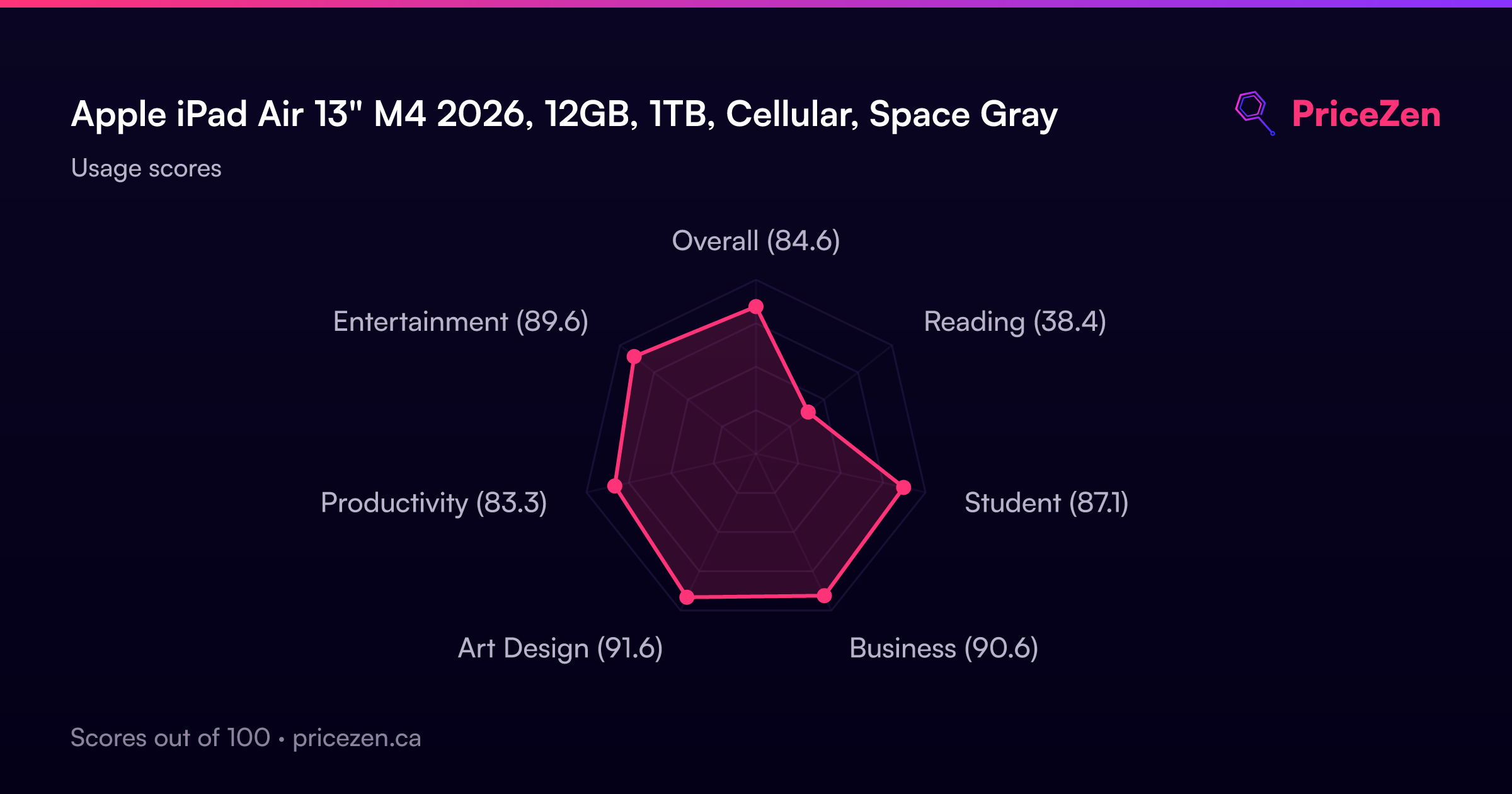
- Overall84.6
- Reading38.4
- Student87.1
- Business90.6
- Art Design91.6
- Productivity83.3
- Entertainment89.6