G.Skill Ripjaws 8GB (2x4GB) DDR3-1600 CL9 Red

45/100 overall score 4.6 average from 2,244 owner ratings
CA$6.07 (5%) under the usual price, CA$5.53 above its 90-day low.
90-day low CA$103.40Usual CA$115.00High CA$121.53
Price over the last 90 days: low CA$103.40 on Sep 20, high CA$121.53. Usual price CA$115.00. Today CA$108.93.
- Capacity
- 8GB
- Kit
- 2 x 4GB
- Memory
- DDR3
- Speed
- 1600 MT/s
- CAS latency
- CL9
- Form factor
- UDIMM
Compare prices at 2 stores
Cheapest first. New, refurbished and bundled offers are kept apart, so you compare like with like.
| Store | Sold by | Colour and condition | Price | vs lowest | Last checked | Link |
|---|---|---|---|---|---|---|
| New2 offersSingle unit | ||||||
| Amazon | Marketplace seller | Not listed | CA$108.93 | Lowest price | 3 days ago | Go to store |
| Not checked in the last 7 days, so these prices may have changed | ||||||
| Newegg | Marketplace seller | Red | Price not confirmed | Not known | Go to store | |
 Source: PriceZen, checked Nov 26, 2026
A price counts as current when we checked it in the last 7 days. “Marketplace seller” means a third-party seller on that store, not the store itself.
Price history
CA$108.93 is CA$6.07 under the usual store price, and only CA$5.53 above its 90-day low.
Checked that dayNot checked that day, still on offer
Source: PriceZen, checked Nov 26, 2026











Snapshot
The 30-Second Version
Great DDR3 kit for keeping an old rig alive, but it's a museum piece in 2024. Buy it cheap or don't buy it at all.
Pros & Cons
Pros
- Tight CL9 timings keep latency low 82nd
- Solid heat spreader design that actually feels sturdy 78th
- XMP profile makes setup painless 77th
- Dirt cheap on the used market 75th
Cons
- 8GB is barely enough for modern multitasking
- DDR3 means zero upgrade path to newer platforms
- Speed is bottom-tier by today's standards
- Tall heat spreader can block bulky CPU coolers
What owners think
The Word on the Street
- Owners consistently praise the build quality, especially the heat spreaders that don't feel flimsy like some budget sticks.
- A recurring theme is that the tall heat spreader can interfere with large air coolers like the Cooler Master Hyper 212.
- Long-term users report flawless stability over years of service, which is exactly what you want from old RAM.
How owner sentiment changed over time
ExclusiveBased on when customers actually wrote their reviews - so you can see whether early praise held up.
35 written reviews, Feb 2012 – Apr 2026: 32 happy, 3 without stars
Across all 2,244 store ratings: 4.6★. Most owners rate without writing a review. The chart counts the 35 written reviews.
Each dot is one written review, in the month it was written. Happy = 4-5★, mixed = 3★, unhappy = 1-2★.
The proof
Performance
What surprised us is how well this kit holds up in its lane. The 1600 MT/s speed with 9-9-9-24 timings at 1.5V is about as good as DDR3 gets without getting silly. Latency lands in the top quarter of our database, which means snappy responsiveness for daily tasks and older games. The 8GB capacity is the real bottleneck though. It sits near the bottom of our charts, and modern browsers alone will eat half of that before you even launch a game.
Specifications
Full Specifications
Memory
| Type | DDR3 |
| Form Factor | UDIMM |
| Total Capacity | 8192 |
| Modules | 2 |
| Per Module | 4096 |
| Pins | 240 |
Performance
| Speed | 1600 |
| CAS Latency | 9 |
| Timings | 9-9-9-24 |
| Voltage | 1.5 |
Class
| ECC | No |
| Registered | No |
| OC Profile | Intel XMP |
Features
| RGB | No |
| Heat Spreader | Yes |
vs Competition
Against the Kingston Fury Impact KF432S20IB/8, the Ripjaws wins on latency but loses badly on speed and capacity. The Kingston is a single 8GB stick of DDR4-3200, which is faster and leaves room to add a second stick later. The Team Group Elite TED48G3200C22-S01 is another DDR4 alternative that makes the Ripjaws look ancient. If your board supports DDR4, skip this entirely. The only reason to pick the Ripjaws is if you're locked into a DDR3 platform and need a cheap, reliable dual-channel kit.
| Spec | G.Skill Ripjaws | Corsair Vengeance RGB | PNY XLR8 Gaming EPIC-X RGB | Timetec Pinnacle Konduit RGB | Kingston FURY Renegade | Team Group T-Force Delta RGB |
|---|---|---|---|---|---|---|
| Capacity | 8GB | 32GB | 32GB | 32GB | 16GB | 32GB |
| Kit | 2 x 4GB | 2 x 16GB | 2 x 16GB | 4 x 8GB | 1 x 16GB | 2 x 16GB |
| Memory Type | DDR3 | DDR5 | DDR4 | DDR4 | DDR5 | DDR4 |
| Speed Mts | 1600 | 6200 | 3200 | 3200 | 7200 | 3600 |
| Cas Latency | CL9 | CL36 | CL16 | CL16 | CL38 | CL18 |
| Form Factor | UDIMM | UDIMM | UDIMM | UDIMM | DIMM | UDIMM |
| Ecc | No | No | No | No | No | No |
| Compare | Compare | Compare | Compare | Compare |
| Product | Speed | Feature | Latency | Capacity | Social Proof | Affordability |
|---|---|---|---|---|---|---|
| G.Skill Ripjaws | 13.4 | 74.8 | 78.1 | 22.3 | 77 | 82.3 |
| Corsair Vengeance RGB Compare | 92.5 | 89.6 | 76.9 | 70.4 | 69.3 | 16.9 |
| PNY XLR8 Gaming EPIC-X RGB Compare | 53.2 | 89.6 | 87.6 | 70.4 | 87.3 | 45.8 |
| Timetec Pinnacle Konduit RGB Compare | 53.2 | 89.6 | 87.6 | 70.4 | 87.3 | 39 |
| Kingston FURY Renegade Compare | 98.3 | 66.8 | 80.6 | 44.8 | 0 | 35.8 |
| Team Group T-Force Delta RGB Compare | 63 | 89.6 | 87.6 | 70.4 | 77 | 38.4 |
Price
Value & Pricing
At USD 61 for a single US listing, this kit is priced like a collector's item, which is weird for old RAM. The EUR market is more honest, ranging from EUR 77 to EUR 88 across four listings. If you're in Europe, the EUR 77 listing is the one to grab. In Canada, shop carefully: CAD 108 to CAD 164 is a huge spread, and the CAD 108 option is the only one worth considering. Anything above that and you're paying new-DDR4 money for decade-old tech.
Read more
Overview
The G.Skill Ripjaws Series 8GB kit is a blast from the DDR3 past that still makes sense if you're keeping an older Intel P67, Z68, or AMD 790/890 rig alive. The one thing to know: this is cheap, reliable dual-channel memory with tight CL9 timings, but it's not fast by modern standards. Our database puts its speed in the bottom 15 percent of all desktop memory, which is fine for a budget build from a decade ago, but a non-starter for anything newer.
Common Questions
Q: Will this work with my Intel P67 or Z68 motherboard?
Yes, that's exactly what it was designed for. The XMP profile will set the 1600 MT/s speed and CL9 timings automatically, assuming your BIOS is up to date.
Q: Can I add another 8GB kit later to get 16GB?
You can, but mixing kits is always a gamble. If you want 16GB, buy a matched 16GB kit from the start. Mismatched sticks can cause stability issues even at the same rated speed.
Q: Is this RAM good for gaming in 2024?
For older titles and esports games at low settings, sure. For anything modern, 8GB will choke. You'll be closing browser tabs just to launch a game.
Who Should Skip This
If you're building a new PC or upgrading to a modern platform, this isn't it. Go get a 16GB DDR4-3200 kit like the Team Group Elite or Kingston Fury instead. You'll spend a bit more and get double the capacity with a real upgrade path.
Verdict
Buy this only if you're nursing an old DDR3 system back to health and you find it at the low end of the price range. The CL9 timings and solid build quality are genuinely good for the era, but 8GB and 1600 MT/s won't cut it for anything beyond light use. If you're building new or upgrading, put your money toward DDR4 or DDR5 instead.
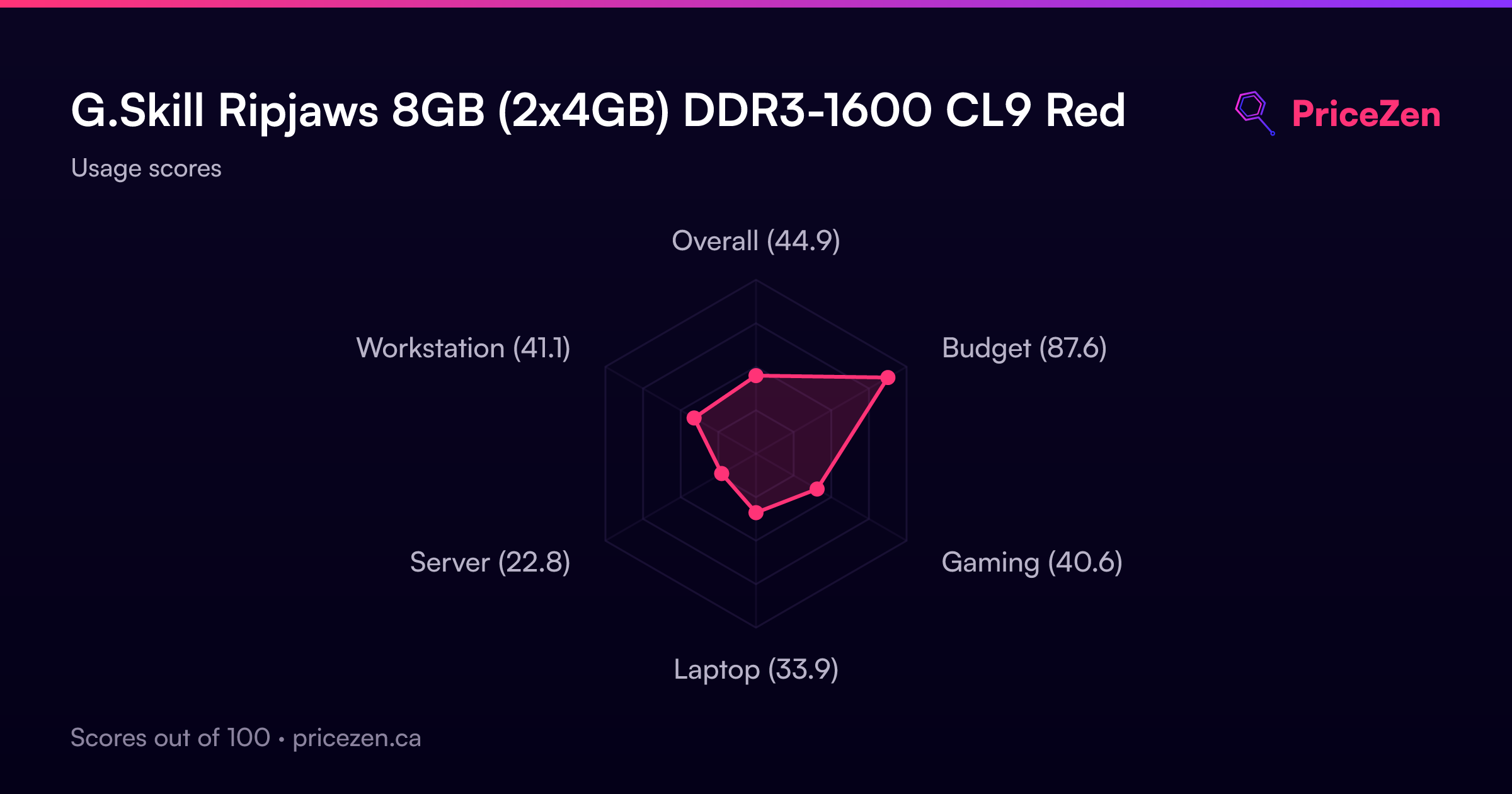
Usage Scores
- Overall44.9
- Budget87.6
- Gaming40.6
- Laptop33.9
- Server22.8
- Workstation41.1