ASUS VA27DQ 27" Black 2024
The 27-inch IPS panel with a 75Hz refresh rate and Adaptive-Sync/FreeSync support delivers smooth, tear-free visuals for mixed use. Its frameless design and TÜV Rheinland-certified flicker-free, low blue light technology provide a comfortable viewing experience during long workdays. This monitor is best for office workers and students who need an affordable, eye-friendly display for productivity and casual media consumption.












Snapshot
The 30-Second Version
The ASUS VA27DQ is a budget 27-inch IPS monitor that nails the basics for office and casual use. The 75Hz refresh rate and FreeSync support are nice touches at this price, but the 250 nits brightness and weak color performance keep it from being a great all-rounder. At $142 it's a steal, at $429 it's a rip-off. Buy it for work, not for gaming or creative tasks.
Pros & Cons
Pros
- IPS panel with 178-degree viewing angles keeps colors consistent from the side
- 75Hz refresh rate with FreeSync and Adaptive-Sync support for both AMD and NVIDIA GPUs
- VESA mountable and lightweight at 4899g, easy to put on an arm
- Built-in stereo speakers and a headphone jack mean fewer cables on your desk
- TUV Rheinland-certified flicker-free and low blue light tech helps with eye strain
Cons
- 250 nits brightness is dim, struggles in bright rooms
- Color performance sits in the 17th percentile, not for creative work
- No physical input switch, source selection buried in the menu
- Cable situation is inconsistent, some units ship without a DisplayPort cable
- Price varies wildly from $142 to $429, easy to overpay
What owners think
The Word on the Street
How owner sentiment changed over time
ExclusiveBased on when customers actually wrote their reviews - so you can see whether early praise held up.
21 written reviews, Jun 2021 – Feb 2026: 11 happy, 3 unhappy, 7 without stars
Across all 57 store ratings: 4.5★. Most owners rate without writing a review. The chart counts the 21 written reviews.
Each dot is one written review, in the month it was written. Happy = 4-5★, mixed = 3★, unhappy = 1-2★.
The proof
Performance
The 75Hz refresh rate is a small but meaningful step up from the standard 60Hz you'll find on most budget office monitors. It's not going to blow anyone away, but scrolling feels a little smoother and casual games benefit from the extra headroom. The 5ms response time is fine for this class of display. You won't see ghosting in everyday use, though fast-paced shooters will expose its limits pretty quickly.
Brightness tops out at 250 nits, which is adequate for indoor use but nothing more. In a bright room with direct sunlight, you'll be squinting. The 1000:1 static contrast ratio is standard IPS fare, meaning blacks look more like dark gray. Color coverage is where this panel really shows its budget roots. It's rated for 16.7 million colors, which is just 8-bit, and our database puts its color performance in the 17th percentile. That's not a typo. If you do any photo or video work, this monitor will frustrate you.
Specifications
Full Specifications
Display
| Size | 27" |
| Resolution | 1920x1080 (Full HD) |
| Panel Type | IPS |
| Aspect Ratio | 16:9 |
| Curved | No |
| Screen Finish | matte |
Performance
| Refresh Rate | 75 Hz |
| Response Time | 5 |
| Adaptive Sync | FreeSync |
Color & HDR
| Brightness | 250 nits |
| Color Depth | 8-bit |
Connectivity
| HDMI Ports | 1 |
| DisplayPort | 1 |
| USB-C | 0 |
| Speakers | Yes |
| Headphone Jack | Yes |
Ergonomics
| Height Adjustable | No |
| Tilt | Yes |
| Swivel | No |
| Pivot | No |
| VESA Mount | 100x100 |
Features
| Webcam | No |
| Touchscreen | No |
| PIP/PBP | No |
| Power | 16 |
| Weight | 4.9 kg / 10.8 lbs |
vs Competition
The LG UltraGear 27G810A-B is the obvious step up for gamers. It brings a higher refresh rate and better response times, though you'll pay more for it. If you're even slightly serious about competitive gaming, the LG is the better pick. The VA27DQ's 75Hz and 5ms response time are fine for casual play, but they're not in the same league.
The Dell S2725QC is the choice for people who want sharper text and better color. It's a 4K panel, which means everything looks crisper, and Dell's color calibration is typically better out of the box. The trade-off is price and the fact that you'll need more GPU horsepower to drive 4K. The Acer Nitro XV272U W2bmiiprx splits the difference with a 1440p resolution and higher refresh rate, making it a better all-rounder if your budget stretches a bit further.
| Spec | ASUS VA27DQ 27" | MSI MAG 271QPX QD-OLED E2 27" | Samsung Odyssey G60SD 27" | LG UltraGear 27G810A-B 27" | BenQ MA Series MA270U 27" | Dell S2725QC 27" |
|---|---|---|---|---|---|---|
| Screen Size | 27 | 27 | 27 | 27 | 27 | 27 |
| Resolution | 1920 x 1080 | 2560 x 1440 | 2560 x 1440 | 3840 x 2160 | 3840 x 2160 | 3840 x 2160 |
| Panel Type | IPS | QD-OLED | OLED | IPS | IPS | IPS |
| Refresh Rate | 75 | 240 | 360 | 180 | 60 | 120 |
| Response Time Ms | 5 | 0.029999999329447746 | 0.029999999329447746 | 1 | 5 | 8 |
| Adaptive Sync | FreeSync | FreeSync Premium Pro | FreeSync Premium Pro | FreeSync Premium | - | FreeSync Premium |
| Hdr | - | DisplayHDR True Black 400 | HDR10+ | HDR400 | HDR10 | HDR |
| Compare | Compare | Compare | Compare | Compare |
| Product | Color | Portability | Display | Feature | User Sentiment | Ergonomic | Performance | Connectivity | Social Proof |
|---|---|---|---|---|---|---|---|---|---|
| ASUS VA27DQ 27" | 15.5 | 54.3 | 50.7 | 21.2 | 29.1 | 47.2 | 44.2 | 43.2 | 53 |
| MSI MAG 271QPX QD-OLED E2 27" Compare | 99.2 | 57.4 | 73.5 | 85.1 | 95.7 | 90.8 | 97.9 | 81.1 | 98.9 |
| Samsung Odyssey G60SD 27" Compare | 90.8 | 39.4 | 73.5 | 70.2 | 95.7 | 90.8 | 99.5 | 87.5 | 92 |
| LG UltraGear 27G810A-B 27" Compare | 93.8 | 68 | 87 | 70.2 | 76.3 | 90.8 | 81.8 | 98.2 | 67.2 |
| BenQ MA Series MA270U 27" Compare | 92.3 | 83.9 | 87 | 70.2 | 95.7 | 90.8 | 22.4 | 97.8 | 84 |
| Dell S2725QC 27" Compare | 71.8 | 76.6 | 87 | 70.2 | 95.7 | 90.8 | 44.2 | 87.5 | 96.8 |
Price
Value & Pricing
Here's where things get tricky. The VA27DQ is a great deal at $142. It's a solid deal at $200. At $429, it's a bad joke. The price spread across US listings is $287, which is more than the monitor itself costs at its cheapest. If you're shopping in the US, the best deal we're seeing is at the low end of that range, so shop around before you click buy.
In Europe, the spread is also significant. EUR prices range from EUR 195 to EUR 376, a difference of EUR 181. Again, the low end is where this monitor makes sense. At EUR 195, you're getting a 27-inch IPS panel with FreeSync and VESA mounting for less than most 24-inch options. At EUR 376, you're in territory where better monitors with higher refresh rates and better color exist.
Amazon 1 offer From CA$194
Staples 1 offer From CA$200
Price history
Read more
Overview
The ASUS VA27DQ is one of those monitors that doesn't try to be exciting. It's a 27-inch 1080p IPS panel aimed squarely at people who need a dependable screen for work, school, or casual streaming. No 4K, no 144Hz, no HDR fireworks. Just a clean, frameless design and a spec sheet that covers the basics without pretending to be something it's not.
What makes it interesting is the price. In the US, listings range from $142 to $429, which is a wild spread for what is essentially the same monitor. If you catch it at the low end, you're getting a 27-inch IPS display with FreeSync, built-in speakers, and VESA mounting for less than a decent dinner for two. At the high end, you're overpaying by a lot.
This is a monitor for people who want a bigger screen without spending big-screen money. Office workers, students, and anyone setting up a secondary display will find a lot to like here. Gamers looking for a competitive edge should keep scrolling, but casual players who just want smooth enough motion will be fine.
Common Questions
Q: Does the VA27DQ come with a DisplayPort cable?
It depends on which unit you get. Some buyers report receiving a power cable, HDMI cable, and DisplayPort cable in the box, while others only got HDMI. If you need DisplayPort specifically, plan on picking up a cable separately just in case.
Q: Will this monitor work with my Mac?
Yes, it works with Macs, including Mac mini and MacBook models. The main thing to watch is the cable. Newer Macs use USB-C, so you'll need a USB-C to HDMI or USB-C to DisplayPort adapter or cable. The monitor itself has HDMI, DisplayPort, and VGA inputs.
Q: Does it have built-in speakers?
Yes, it has 2W stereo speakers built into the bottom edge of the monitor. They're fine for video calls and casual YouTube watching, but don't expect much bass or volume. There's also a headphone jack if you want better audio.
Q: Is 75Hz enough for gaming?
For casual gaming, yes. The 75Hz refresh rate is a small step up from 60Hz and FreeSync helps prevent screen tearing. But if you play competitive shooters or fast-paced games, you'll notice the 5ms response time and limited refresh rate. Serious gamers should look at 144Hz or higher panels.
Who Should Skip This
If you do any kind of color-sensitive work, skip this monitor. The color performance sits in the 17th percentile of our database, which means photos and videos will look off no matter how much you calibrate. Look at something like the Dell S2725QC instead, which offers better color accuracy and 4K resolution for not much more money at the right price.
Competitive gamers should also pass. The 75Hz refresh rate and 5ms response time are fine for casual play, but they're a handicap in fast-paced games. The LG UltraGear 27G810A-B or Acer Nitro XV272U W2bmiiprx are better choices if you care about motion clarity and response times. And if you work in a bright room with lots of windows, the 250 nits brightness will leave you squinting. Look for something with at least 350 nits.
Verdict
For office work, the VA27DQ is a solid pick if you can find it under $200. The 27-inch size gives you plenty of room for documents and spreadsheets, the IPS panel keeps text readable from any angle, and the eye care features genuinely help during long workdays. The built-in speakers are a nice bonus for video calls, even if they're nothing special.
For gaming, this monitor is a compromise. The 75Hz refresh rate and FreeSync support are better than nothing, but the 5ms response time and mediocre color performance hold it back. If you're a casual gamer who plays slower titles or mostly uses the monitor for work with some gaming on the side, it's fine. If you play fast-paced shooters or anything competitive, save up for something with a higher refresh rate.
Usage Scores
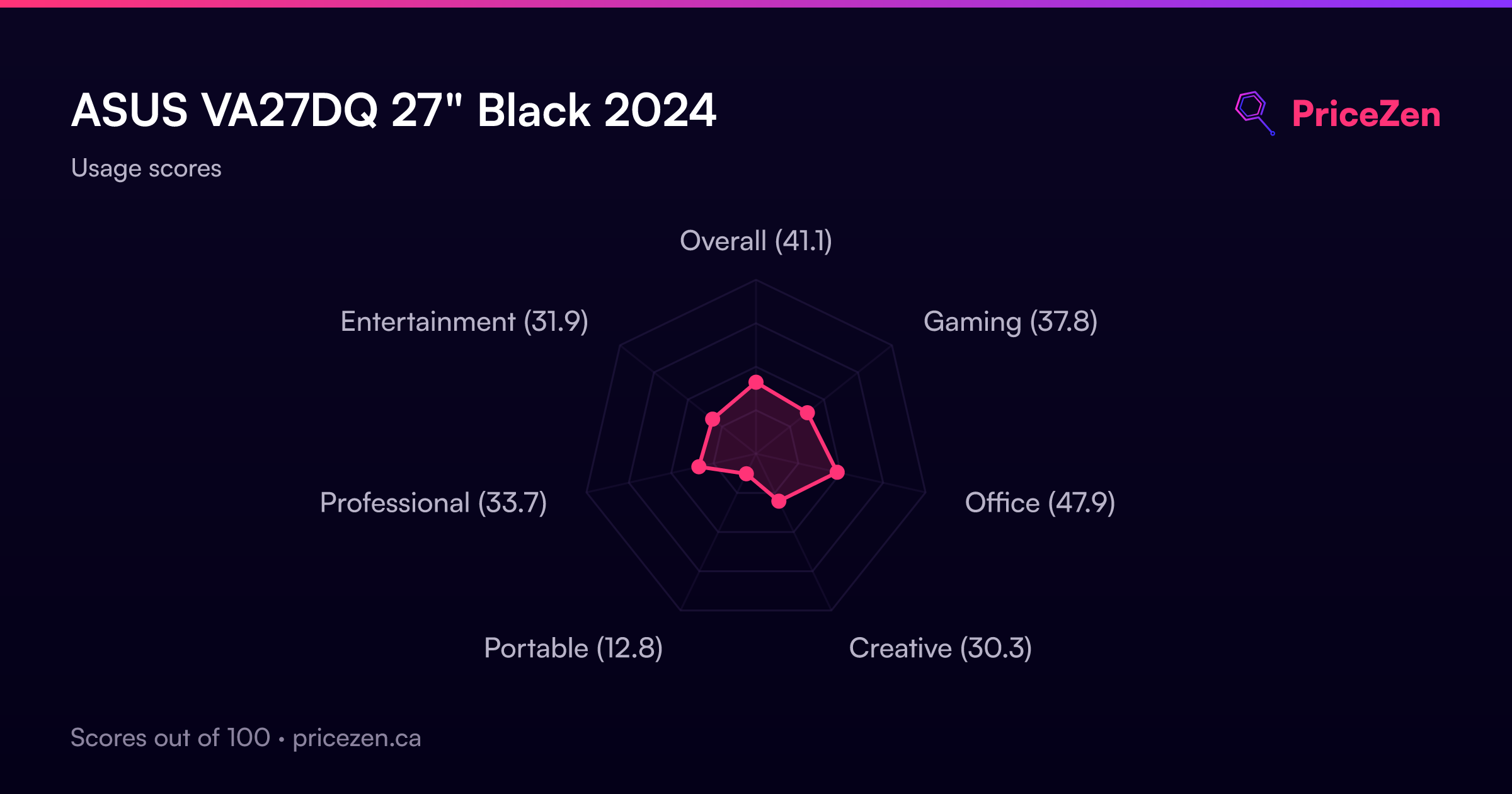
- Overall41.1
- Gaming37.8
- Office47.9
- Creative30.3
- Portable12.8
- Professional33.7
- Entertainment31.9