Acer SB322QK 31.5"
The 31.5-inch 4K IPS panel delivers sharp 3840x2160 detail with 300 nits brightness and wide viewing angles, while Adaptive-Sync reduces tearing for smoother motion. Its ZeroFrame design and dual HDMI inputs make it a clean, flexible addition to any desk setup. Best for office workers and home users who need a large, high-resolution display for spreadsheets, documents, and media without gaming-level refresh rates.












Snapshot
The 30-Second Version
Big, beautiful 4K screen for cheap. Just don't expect it to keep up with your gaming PC.
Pros & Cons
Pros
- Gorgeous 31.5-inch 4K IPS panel with excellent clarity 87th
- ZeroFrame bezels look modern and clean
- Adaptive-Sync helps smooth out basic motion
- VESA mount support for easy arm or wall mounting
Cons
- 60Hz refresh rate feels sluggish for gaming
- Only tilt adjustment, no height or swivel
- 300 nits brightness is just okay
- Connectivity is limited to 2x HDMI and DisplayPort
What owners think
How owner sentiment changed over time
ExclusiveBased on when customers actually wrote their reviews - so you can see whether early praise held up.
13 written reviews, Nov 2023 – Jan 2026: 12 happy, 1 mixed
Each dot is one written review, in the month it was written. Happy = 4-5★, mixed = 3★, unhappy = 1-2★.
The proof
Performance
The display itself is the star here. That 31.5-inch 4K IPS panel sits in the 89th percentile for display quality, which means it's genuinely one of the better screens you can get at this size. Colors are accurate and viewing angles are solid, so you can slouch in your chair without the picture washing out. The 300 nits brightness is fine for indoor use but won't wow you in a sun-drenched room. What surprised us is how bare-bones the rest of the package feels. Adaptive-Sync is nice to have, but with a 60Hz ceiling and 4ms response time, it's more of a stutter-reducer than a gaming feature.
Specifications
Full Specifications
Display
| Size | 31.5" |
| Resolution | 3840x2160 (4K UHD) |
| Panel Type | IPS |
| Aspect Ratio | 16:9 |
| Curved | No |
Performance
| Refresh Rate | 60 Hz |
| Response Time | 4 |
| Adaptive Sync | Adaptive-Sync |
Color & HDR
| Brightness | 300 nits |
Connectivity
| HDMI Ports | 2 |
| DisplayPort | 0 |
| USB-C | 0 |
| Speakers | Yes |
Ergonomics
| Height Adjustable | No |
| Tilt | Yes |
| VESA Mount | 100x100 |
Features
| Webcam | No |
| Weight | 6.2 kg / 13.7 lbs |
vs Competition
The SB322QK sits in a weird spot. Compared to the ASUS ROG Strix XG27UCDMG or MSI MAG 271QPX QD-OLED E2, it gets absolutely smoked on gaming performance. Those are high-refresh OLED panels built for speed. But they also cost way more and are smaller. The LG UltraGear 32GX850A-B is the more direct comparison, another 32-inch 4K panel, but with better gaming chops and a higher price tag. If you're just doing office work, the Acer gives you 90% of the visual experience for a fraction of the cost. If you game at all, skip this and save for the LG.
| Spec | Acer SB322QK 31.5" | ASUS ROG Strix XG27UCDMG 27" | Alienware AW-Series AW3425DW 34" | MSI MAG 271QPX QD-OLED E2 27" | Samsung Odyssey G60SD 27" | LG UltraGear 32GX850A-B 32" |
|---|---|---|---|---|---|---|
| Screen Size | 31.5 | 27 | 34 | 27 | 27 | 32 |
| Resolution | 3840 x 2160 | 3840 x 2160 | 3440 x 1440 | 2560 x 1440 | 2560 x 1440 | 3840 x 2160 |
| Panel Type | IPS | OLED | QD-OLED | QD-OLED | OLED | OLED |
| Refresh Rate | 60 | 240 | 240 | 240 | 360 | 165 |
| Response Time Ms | 4 | 0.029999999329447746 | 0.029999999329447746 | 0.029999999329447746 | 0.029999999329447746 | 0.029999999329447746 |
| Adaptive Sync | Adaptive-Sync | FreeSync Premium Pro | FreeSync Premium Pro | FreeSync Premium Pro | FreeSync Premium Pro | FreeSync Premium Pro |
| Hdr | - | DisplayHDR True Black 400 | HDR400 | DisplayHDR True Black 400 | HDR10+ | DisplayHDR True Black 400 |
| Compare | Compare | Compare | Compare | Compare |
| Product | Color | Portability | Display | Feature | Ergonomic | Performance | Connectivity |
|---|---|---|---|---|---|---|---|
| Acer SB322QK 31.5" | 42.1 | 20.7 | 87.1 | 21.3 | 47.3 | 44.2 | 39 |
| ASUS ROG Strix XG27UCDMG 27" Compare | 96.5 | 57.5 | 97.7 | 85.1 | 90.8 | 97.9 | 81.2 |
| Alienware AW-Series AW3425DW 34" Compare | 98.9 | 74 | 84.1 | 96.3 | 90.8 | 97.9 | 95.4 |
| MSI MAG 271QPX QD-OLED E2 27" Compare | 99.2 | 57.5 | 73.6 | 85.1 | 90.8 | 97.9 | 81.2 |
| Samsung Odyssey G60SD 27" Compare | 90.8 | 39.5 | 73.6 | 70.2 | 90.8 | 99.5 | 87.6 |
| LG UltraGear 32GX850A-B 32" Compare | 79.5 | 49.5 | 99 | 70.2 | 90.8 | 96.2 | 98.2 |
Price
Value & Pricing
At CAD 270 or MXN 8,150, this is a lot of 4K screen for the money. You're getting a big, sharp IPS panel that would cost significantly more from a premium brand. If you need a large 4K monitor for office work, coding, or watching content, this is a solid deal. Just don't expect gaming performance or premium ergonomics at this price.
Amazon 1 offer From CA$270
Price history
Read more
Overview
The Acer SB322QK is a 31.5-inch 4K IPS monitor that nails the basics and skips the frills. You get a big, sharp 3840x2160 panel with accurate colors and a ZeroFrame design that looks clean on any desk. The one thing to know? This is a productivity and media monitor, not a gaming rig. At 60Hz with a 4ms response time, it's built for spreadsheets and streaming, not twitch shooters.
Common Questions
Q: Is this monitor good for gaming?
Not really. The 60Hz refresh rate and 4ms response time are fine for casual games, but if you play fast-paced shooters or competitive titles, you'll notice the lag. Adaptive-Sync helps with tearing, but it can't make up for the low refresh rate. Get a 144Hz+ monitor if gaming is your priority.
Q: Can I mount this on a monitor arm?
Yes. It has a standard VESA 100x100 mount, so any compatible arm or wall mount will work. The built-in stand only tilts, so an arm is a good upgrade if you want height adjustment.
Q: Is the 4K resolution worth it at 31.5 inches?
Absolutely. At this size, 4K gives you a pixel density that makes text look crisp and gives you tons of screen real estate for multitasking. You can fit multiple windows side by side without things getting blurry. It's one of the main reasons to buy this monitor.
Who Should Skip This
If you're looking for a gaming monitor, this isn't it. Go get something with a 144Hz+ refresh rate like the LG UltraGear 32GX850A-B or a smaller high-refresh panel. And if you need a portable display or something with USB-C connectivity, look elsewhere. This is a desk-bound monitor with basic ports.
Verdict
The Acer SB322QK is a straightforward recommendation for anyone who wants a big, sharp 4K monitor for work or media without spending a fortune. The display quality is genuinely impressive for the price, and the ZeroFrame design keeps your setup looking tidy. But if you plan to game or need better ergonomics, this isn't your monitor. For pure productivity and content consumption, it's a no-brainer at this price.
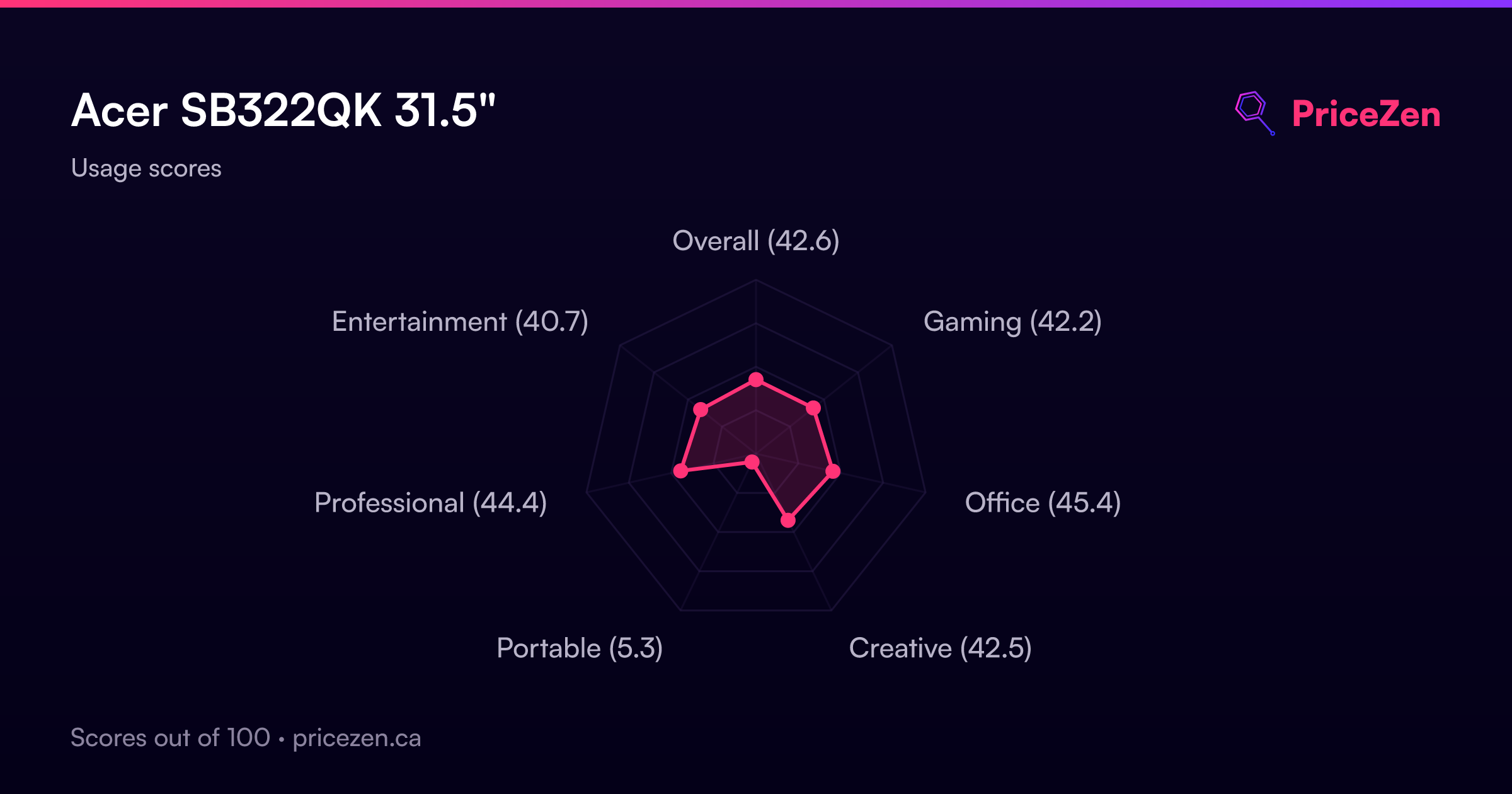
Usage Scores
- Overall42.6
- Gaming42.2
- Office45.4
- Creative42.5
- Portable5.3
- Professional44.4
- Entertainment40.7