Dell S2725QC 27" Ash White 2026
A 27-inch 4K IPS panel with a 120Hz refresh rate and AMD FreeSync Premium delivers sharp, tear-free visuals for mixed use. The integrated USB-C hub with 65W power delivery simplifies desk setups, while the ComfortView Plus technology reduces blue light without distorting its 99% sRGB color accuracy. This monitor is best for home-office users and students who want a single display for productivity, streaming, and casual gaming.












Snapshot
The 30-Second Version
The Dell S2725QC is a 27-inch 4K IPS monitor with a 120Hz refresh rate and USB-C connectivity that punches well above its price class. It's sharp and smooth, with a fully adjustable stand and 99% sRGB coverage. The 8ms response time means it's not ideal for competitive gaming, but for work and casual play it's a fantastic value, and the price has come down to a USD 221 low end. If you want one monitor that does everything reasonably well, this is it.
Pros & Cons
Pros
- Sharp 4K resolution at 27 inches makes text and images look crisp 97th
- 120Hz refresh rate with FreeSync Premium is a real upgrade over 60Hz office panels 96th
- USB-C with 65W power delivery means one cable for video, data, and charging 91st
- Fully adjustable stand with height, tilt, swivel, and pivot 88th
- 99% sRGB coverage with ComfortView Plus blue light reduction that doesn't wash out colors
- Built-in speakers are actually usable for casual listening
Cons
- 8ms response time causes noticeable ghosting in fast-paced games
- 350 nits brightness is fine for indoor use but HDR performance is underwhelming
- Minor light bleed on edges reported by multiple owners
- No HDMI 2.1, so console gaming is limited to 4K at 60Hz over HDMI
- Performance percentile is middle of the pack compared to dedicated gaming monitors
What owners think
The Word on the Street
How owner sentiment changed over time
ExclusiveBased on when customers actually wrote their reviews - so you can see whether early praise held up.
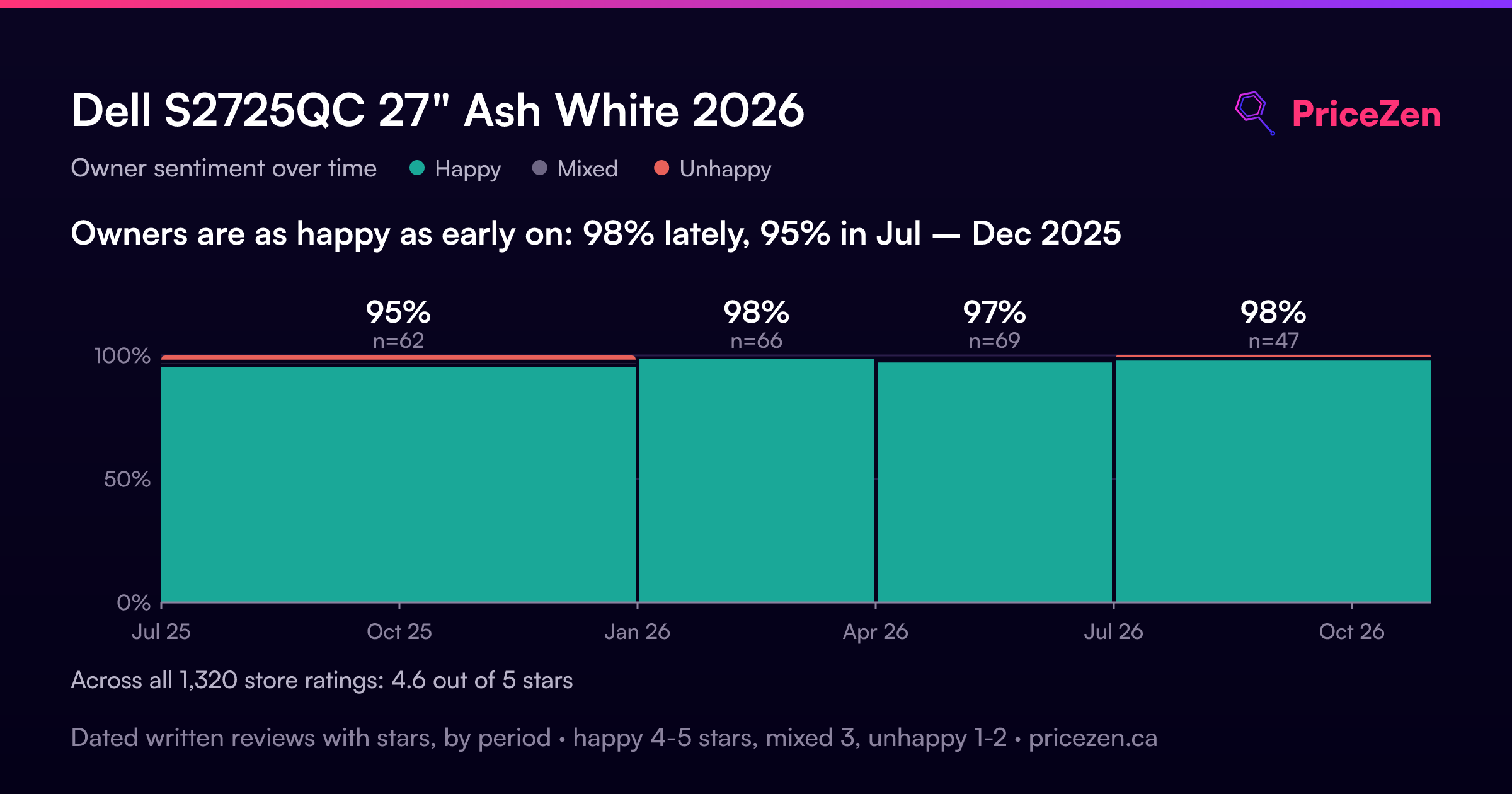
Owners are as happy as early on: 98% lately, 95% in Jul – Dec 2025
Across all 1,731 store ratings: 4.7★. Most owners rate without writing a review. The chart counts the 244 written reviews with stars and their own date.
Show the numbers
| Period | Reviews | Happy | Mixed | Unhappy | Happy share |
|---|---|---|---|---|---|
| Jul – Dec 2025 | 62 | 59 | 1 | 2 | 95% |
| Jan – Mar 2026 | 66 | 65 | 0 | 1 | 98% |
| Apr – Jun 2026 | 69 | 67 | 1 | 1 | 97% |
| Jul – Oct 2026 | 47 | 46 | 0 | 1 | 98% |
- Apr – Jun 202667 of 69 happy
Buyers praised the 4K resolution, 120Hz refresh rate, and USB-C hub functionality. A few reported defects like electrical shock or wobbly build, but most were satisfied.
- Excellent 4K picture quality, 120Hz smoothness, and vibrant colors for work or media.
- USB-C hub with power delivery simplifies desk setup, charging laptop and connecting peripherals.
- Electrical shock issue on one unit; another had failure to turn off/connect after 3-4 months.
- Build feels sturdy but wobbly; OSD buttons are awkward; assembly instructions unclear.
- Jan – Mar 202665 of 66 happy
Buyers praise excellent 4K picture, 120Hz smoothness, USB-C convenience, and pop-out hub. Assembly is easy, Mac compatibility works well; minor issues include recessed mounting and HDMI needed for some laptops.
- Crystal clear 4K display with vibrant colors, excellent for text, CAD, and editing.
- 120Hz refresh rate delivers smooth, fluid motion for work and streaming.
- USB-C one-cable connection, pop-out USB hub, and easy Mac setup praised.
- Recessed VESA mount may require bracket modification; some need HDMI for laptop connection.
Each column joins calendar quarters until it holds at least 10 reviews with stars and their own date. Happy = 4-5★, mixed = 3★, unhappy = 1-2★. Period summaries are in English.
The proof
Performance
Let's talk about what those numbers actually mean when you're sitting in front of this thing. The 3840 x 2160 resolution on a 27-inch panel works out to about 163 pixels per inch. That's sharp enough that you won't see individual pixels at normal viewing distances, and text looks like it was printed on the screen. The IPS panel means colors stay consistent whether you're looking straight on or from an angle, which matters if you're sharing your screen with a coworker or leaning back to watch a video.
The 120Hz refresh rate is the headline feature here, and it's a genuine upgrade over the 60Hz panels most office monitors ship with. Scrolling through documents feels smoother, and games look noticeably better in motion. FreeSync Premium support helps eliminate screen tearing when your frame rate dips, which is nice if you're running a mid-range GPU that can't always hit 120fps at 4K. The 8ms response time is the trade-off. It's not bad for an IPS panel, but fast-moving objects can show a bit of ghosting. If you're playing competitive shooters, you'll notice it. If you're playing slower games or doing productivity work, you probably won't.
The 350 nits brightness is solid for indoor use, though HDR content won't exactly blow you away. This is HDR-ready, not HDR-certified, so don't expect the eye-searing highlights you'd get from a proper HDR display. The 1500:1 contrast ratio is better than typical IPS panels, which usually sit around 1000:1, so blacks look a bit deeper than you might expect. The 99% sRGB coverage means colors are accurate out of the box for web content and most creative work, though if you're doing print work or video editing, you'll want to calibrate it or look at something with wider gamut coverage.
Specifications
Full Specifications
Display
| Size | 27" |
| Resolution | 3840x2160 (4K UHD) |
| Panel Type | IPS |
| Aspect Ratio | 16:9 |
| Curved | No |
| Screen Finish | matte |
Performance
| Refresh Rate | 120 Hz |
| Response Time | 8 |
| Adaptive Sync | FreeSync Premium |
Color & HDR
| Brightness | 350 nits |
| Color Gamut | 99% sRGB |
| HDR | ✓ |
| HDR Support | HDR |
Connectivity
| HDMI Ports | 2 |
| DisplayPort | 1 |
| USB-C | 1 |
| Speakers | Yes |
| Headphone Jack | No |
Ergonomics
| Height Adjustable | Yes |
| Tilt | Yes |
| Swivel | Yes |
| Pivot | Yes |
| VESA Mount | 100x100 |
Features
| Webcam | No |
| Touchscreen | No |
| PIP/PBP | No |
| Power | 25 |
| Weight | 6.5 kg / 14.3 lbs |
vs Competition
The five monitors the S2725QC lands closest to in our ranking are the ASUS ROG Strix XG27AQDPG 27", the LG UltraGear 32GX850A-B 32", the BenQ MA Series MA270U 27", the Samsung Odyssey G60SD and the Gigabyte M Series OLED MO27U2 SA. Our scoring model builds those rankings from specs and external benchmark results, so this is a comparison of what each monitor brings on paper and how it scores against the rest of the category, not a shootout we ran on a bench.
Two very different groups sit in that list. The ASUS, the LG, the Samsung and the Gigabyte are gaming displays first, and their performance scores in our data reflect that: response behavior and motion clarity are what they're built around, and the Dell's 8ms response time and 46th percentile performance score simply aren't playing the same game. If you spend your evenings in competitive shooters, one of those four will make you happier than the S2725QC will. The LG is also a 32-inch screen, which is a different desk proposition entirely if you were set on 27 inches.
The BenQ MA Series MA270U 27" is the closer match in spirit, another 27-inch display aimed at people who work on it all day. Here the Dell's argument is the combination: 3840 x 2160 on a 27-inch panel works out to roughly 163 pixels per inch, so text is genuinely crisp, and the 120Hz refresh rate keeps scrolling and casual games smooth. Add USB-C with 65W power delivery, so a laptop docks and charges over one cable, plus height, tilt, swivel and pivot adjustment, and you have a monitor that handles the boring parts of desk life as well as the fun parts.
So the trade-off is easy to state. Buy one of the gaming panels if motion performance is the thing you care most about. Buy the Dell if you want one screen that does the workday properly, games well enough for anything short of esports, and now costs noticeably less than it did. It's not about which monitor wins in the abstract, it's about which one fits the hours you actually spend in front of it.
| Spec | Dell S2725QC 27" | ASUS ROG Strix XG27UCDMG 27" | Alienware AW-Series AW3425DW 34" | MSI MAG 271QPX QD-OLED E2 27" | Samsung Odyssey G80SH 32" | LG UltraGear 32GX850A-B 32" |
|---|---|---|---|---|---|---|
| Screen Size | 27 | 27 | 34 | 27 | 32 | 32 |
| Resolution | 3840 x 2160 | 3840 x 2160 | 3440 x 1440 | 2560 x 1440 | 3840 x 2160 | 3840 x 2160 |
| Panel Type | IPS | OLED | QD-OLED | QD-OLED | OLED | OLED |
| Refresh Rate | 120 | 240 | 240 | 240 | 240 | 165 |
| Response Time Ms | 8 | 0.029999999329447746 | 0.029999999329447746 | 0.029999999329447746 | 0.029999999329447746 | 0.029999999329447746 |
| Adaptive Sync | FreeSync Premium | FreeSync Premium Pro | FreeSync Premium Pro | FreeSync Premium Pro | FreeSync Premium Pro | FreeSync Premium Pro |
| Hdr | HDR | DisplayHDR True Black 400 | HDR400 | DisplayHDR True Black 400 | HDR10+ | DisplayHDR True Black 400 |
| Compare | Compare | Compare | Compare | Compare |
| Product | Color | Portability | Display | Feature | User Sentiment | Performance | Connectivity | Social Proof |
|---|---|---|---|---|---|---|---|---|
| Dell S2725QC 27" | 71.8 | 76.6 | 87 | 70.2 | 95.7 | 44.2 | 87.5 | 96.8 |
| ASUS ROG Strix XG27UCDMG 27" Compare | 96.5 | 57.4 | 97.7 | 85.1 | 99.3 | 97.9 | 81.1 | 98.9 |
| Alienware AW-Series AW3425DW 34" Compare | 98.9 | 74 | 84.1 | 96.3 | 95.7 | 97.9 | 95.4 | 96.8 |
| MSI MAG 271QPX QD-OLED E2 27" Compare | 99.2 | 57.4 | 73.5 | 85.1 | 95.7 | 97.9 | 81.1 | 98.9 |
| Samsung Odyssey G80SH 32" Compare | 94.4 | 49.4 | 99 | 70.2 | 89.1 | 97.9 | 81.1 | 96.8 |
| LG UltraGear 32GX850A-B 32" Compare | 79.4 | 49.4 | 99 | 70.2 | 76.3 | 96.2 | 98.2 | 74.8 |
Price
Value & Pricing
Here's where things get interesting. We track the S2725QC's price across US retailers, and right now it runs from USD 221 to USD 331, with the best deal at USD 221. That's a meaningful drop from where this monitor was sitting before, and it changes the math quite a bit. At USD 221 you're getting a 4K 120Hz IPS panel with USB-C power delivery and a fully adjustable stand for less than plenty of plain 1440p office screens cost. That's not just a good deal, that's the kind of price that makes you double-check the listing.
The spread between retailers is still wide enough to matter, so it pays to shop around rather than buying from the first store you land on. Our system collects prices from many stores and follows them over time, partly through our community browser extension, and the pattern here is clear: the low end of the range is where this monitor makes its case, and the high end is where you're paying extra for nothing. If you see it near USD 331, check another retailer or wait. The panel is the same either way.
Against the monitors it sits closest to in our ranking, the Dell's pitch is straightforward. The ASUS ROG Strix XG27AQDPG 27" and the LG UltraGear 32GX850A-B 32" are gaming-first displays, and if competitive play is your priority they're the better tool. The BenQ MA Series MA270U 27" is chasing much the same work-and-play buyer the Dell is. What the S2725QC brings to that fight is 4K sharpness, 120Hz, single-cable USB-C docking and a stand that adjusts every which way, at a price that has recently moved in the buyer's favor. For someone splitting the day between spreadsheets and games, that's a strong hand.
Best Buy 1 offer From CA$380
Amazon 1 offer From CA$380
Price history
Read more
Overview
The Dell S2725QC is one of those monitors that sneaks up on you. On paper it looks like a sensible 27-inch 4K office panel, but then you notice the 120Hz refresh rate and FreeSync Premium support, and suddenly it's a different conversation. This is a monitor that wants to be your work screen during the day and your casual gaming screen at night, all through a single USB-C cable. That's a compelling pitch for anyone tired of juggling multiple displays or dealing with cable spaghetti.
Dell has been making monitors forever, and the S2725QC feels like a greatest hits compilation. You get the IPS panel with 99% sRGB coverage, the ComfortView Plus low blue light tech that doesn't wreck color accuracy, and a stand that actually lets you adjust height, tilt, swivel, and pivot. The ash white finish is a nice departure from the usual black slab look too. It's refreshing to see a monitor that doesn't look like it was designed by someone who only owns black turtlenecks.
Who is this for? Mostly people who want a sharp, fast, versatile display without spending OLED money. The 4K resolution at 27 inches gives you a pixel density that makes text look crisp and images pop. The 120Hz refresh rate is smooth enough for most games, especially if you're not a competitive esports player chasing 240Hz. And the USB-C port with 65W power delivery means laptop users can plug in one cable and get video, data, and charging all at once. It's a practical monitor that happens to be fun to use.
We should mention the elephant in the room: this monitor sits at the 46th percentile for performance in our database. That sounds bad until you realize it's being compared against gaming monitors with 240Hz refresh rates and 0.03ms response times. The S2725QC's 8ms response time is fine for a 120Hz panel, but it's not going to win any twitch-shooter awards. The real story here is the balance: you're getting 4K resolution, 120Hz, USB-C, and a fully adjustable stand in one package. That combination is rarer than you'd think at this price point.
Common Questions
Q: Is this monitor good for gaming?
It depends on what you play. The 120Hz refresh rate and FreeSync Premium support make it smooth for most games, and the 4K resolution looks fantastic. But the 8ms response time means fast-paced competitive games can show ghosting. If you play slower games, RPGs, or strategy titles, this monitor is great. If you're into twitch shooters or esports, you'd be better served by a monitor with a faster response time.
Q: Can I use this with my MacBook?
Yes, and it's actually one of the best use cases for this monitor. The USB-C port supports up to 65W power delivery, so you can charge your MacBook while getting video and data through the same cable. Multiple owners report that it works seamlessly with Macs, including the Mac Mini, with no configuration needed.
Q: Does this monitor support HDMI 2.1?
No, it has two HDMI ports but they're not HDMI 2.1. That means console gaming is limited to 4K at 60Hz over HDMI. If you want 120Hz on a PS5 or Xbox Series X, you'll need to use the DisplayPort connection or look at a monitor with HDMI 2.1 support.
Q: How are the built-in speakers?
They're better than most monitor speakers, which isn't saying much, but they're genuinely usable for casual listening. Dell says they've re-engineered the audio with more output power and a deeper frequency response than the previous generation. For video calls, YouTube, or casual gaming, they'll do the job. For music or movies, you'll still want external speakers or headphones.
Who Should Skip This
If you're a competitive gamer who plays fast-paced shooters or fighting games, skip this monitor. The 8ms response time will frustrate you, and the lack of HDMI 2.1 means you can't get 120Hz from a console over HDMI. Look at the gaming panels it ranks next to in our data instead, like the ASUS ROG Strix XG27AQDPG 27" or the LG UltraGear 32GX850A-B 32". Motion performance is what those screens are built around, and the Dell's 46th percentile performance score tells you it isn't.
Creative professionals who need wide color gamut coverage should also look elsewhere. The 99% sRGB coverage is fine for web content and general use, but if you're doing print work, video editing, or anything that requires DCI-P3 or Adobe RGB, this monitor won't cut it. You'd want a monitor with factory calibration and wider gamut coverage, which typically costs more but is worth it for color-critical work. And if you need a portable monitor, well, this thing weighs 6709 grams and isn't going anywhere. The portable score of 15.3 out of 100 in our database tells you everything you need to know.
Verdict
For most people who need a monitor for work and casual gaming, the Dell S2725QC is an easy recommendation, and the recent price drop makes it easier. The 4K resolution makes text sharp, the 120Hz refresh rate makes everything feel smooth, and the USB-C connectivity simplifies your desk setup. The fully adjustable stand is a nice bonus that plenty of monitors skip. If you're coming from a 1080p or 1440p 60Hz panel, this will feel like a massive upgrade.
If you're a serious gamer, especially someone who plays fast-paced competitive titles, look elsewhere. The 8ms response time and lack of HDMI 2.1 are real limitations. The gaming monitors it ranks alongside in our data, like the ASUS ROG Strix XG27AQDPG 27" and the LG UltraGear 32GX850A-B 32", are built for that job in a way this isn't. And if you're a creative professional who needs wide color gamut coverage for print or video work, the 99% sRGB coverage here is good but not great. You'd want something with DCI-P3 or Adobe RGB coverage instead.
The sweet spot for this monitor is the hybrid user: someone who works from home, plugs in a laptop, and occasionally fires up a game or watches a movie. For that person, the S2725QC is one of the best values going right now, especially at the USD 221 low end of the range we're tracking.
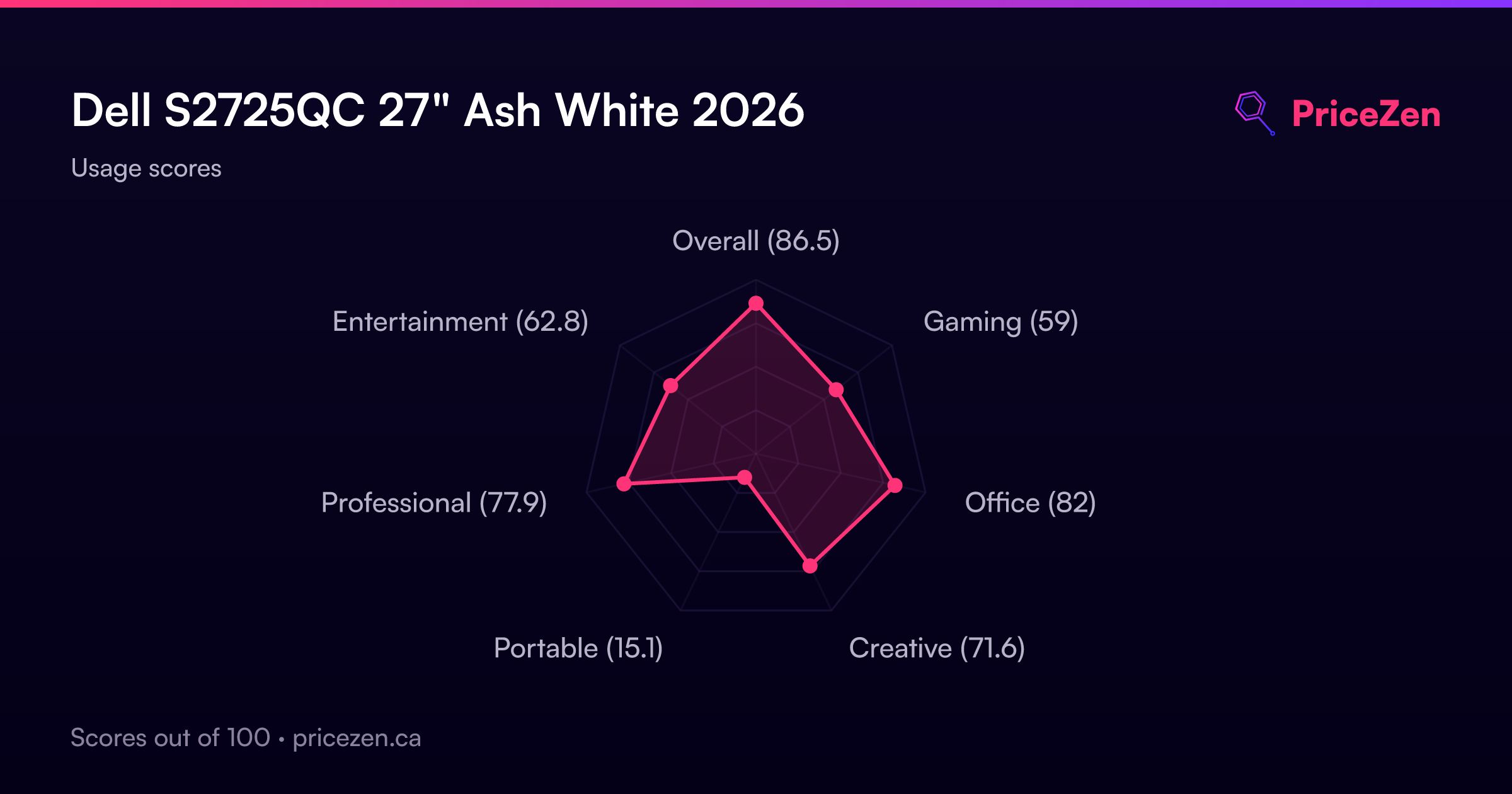
Usage Scores
- Overall86.5
- Gaming59
- Office82
- Creative71.6
- Portable15.1
- Professional77.9
- Entertainment62.8