Acer Nitro XV275K P5biipruzx 27" Black
The 27-inch 4K Mini-LED panel with 1152 local dimming zones and VESA DisplayHDR 1000 delivers deep contrast and 600 nits of brightness, paired with a 160Hz refresh rate and 1ms response time for smooth gaming. Its AMD FreeSync Premium support and HDMI 2.1 connectivity make it a strong choice for high-frame-rate console and PC play. Best for competitive gamers who want 4K clarity and HDR performance without sacrificing speed.

No current retailer price


Snapshot
The 30-Second Version
The XV275K hits the 98th percentile for color with a 1152-zone Mini-LED panel and DisplayHDR 1000, all for $350 USD. That's genuinely impressive. But a local dimming bug that requires OSD fiddling after every sleep cycle and a 65/100 user sentiment score mean you're trading polish for performance.
Pros & Cons
Pros
- 98th percentile color accuracy with 95% DCI-P3 coverage 99th
- 1152-zone Mini-LED backlight with DisplayHDR 1000 certification 91st
- 160Hz refresh rate at full 4K resolution 91st
- $350 USD price point for a 4K Mini-LED panel 82nd
- Full ergonomic adjustability including pivot and swivel
Cons
- Local dimming bug requires OSD reset after every sleep/wake cycle
- OSD controls are poorly laid out and frustrating to navigate
- Stand design gets called out as awkward by multiple owners
- Social proof sits at just the 25th percentile
- HDR mode generates noticeable heat according to user reports
What owners think
The Word on the Street
How owner sentiment changed over time
ExclusiveBased on when customers actually wrote their reviews - so you can see whether early praise held up.
11 written reviews, Oct 2025 – Sep 2026: 8 happy, 1 mixed, 2 unhappy
Across all 17 store ratings: 3.9★. The chart counts the 11 written reviews.
Each dot is one written review, in the month it was written. Happy = 4-5★, mixed = 3★, unhappy = 1-2★.
The proof
Performance
The XV275K runs 3840 x 2160 at 160Hz with a 1ms response time on an IPS panel. That refresh rate puts it in the 75th percentile for performance, which is solid but not chart-topping. The real flex is the Mini-LED backlight with 1152 dimming zones. That's a serious zone count for this price point, and it's why the color score hits the 98th percentile. DisplayHDR 1000 certification means peak brightness hits 1000 nits in HDR content, and the 95% DCI-P3 coverage makes this genuinely viable for creative work. The creative score of 73.9 out of 100 backs that up.
FreeSync Premium handles variable refresh rate duties, and you've got HDMI 2.1 plus DisplayPort 1.4 for connectivity. The 10-bit color depth is there too. But here's the catch: multiple owners report that local dimming doesn't work properly with HDR sources after waking from sleep. You have to manually toggle it in the OSD every single time. That's not a performance spec issue, it's a firmware annoyance that undercuts what should be a killer feature. When local dimming is working, the contrast and HDR pop are genuinely impressive. When it's not, you're looking at a standard IPS panel with extra steps.
Specifications
Full Specifications
Display
| Size | 27" |
| Resolution | 3840x2160 (4K UHD) |
| Panel Type | Mini-LED |
| Aspect Ratio | 16:9 |
| Curved | No |
| Screen Finish | matte |
Performance
| Refresh Rate | 320 Hz |
| Response Time | 1 |
| Adaptive Sync | FreeSync Premium |
Color & HDR
| Brightness | 1000 nits |
| Color Gamut | 95% DCI-P3 |
| Color Depth | 10-bit |
| HDR | HDR1000 |
| HDR Support | HDR |
Connectivity
| HDMI Ports | 2 |
| DisplayPort | 1 |
| USB-C | 1 |
| Speakers | No |
| Headphone Jack | Yes |
Ergonomics
| Height Adjustable | Yes |
| Tilt | Yes |
| Swivel | Yes |
| Pivot | Yes |
| VESA Mount | 75x75 |
Features
| Webcam | No |
| Touchscreen | No |
| PIP/PBP | No |
| Power | 210 |
| Weight | 6.7 kg / 14.8 lbs |
vs Competition
Stacked against the ASUS ROG Strix XG27UCDMG and the MSI MAG 271QPX QD-OLED E2, the XV275K takes a different approach. Those competitors lean on OLED panels for perfect blacks, while Acer went with Mini-LED and 1152 zones. The Acer's color score beats most of the field, but OLED panels still win on response time and per-pixel contrast. The Alienware AW3425DW offers an ultrawide experience at a higher price, and the Samsung Odyssey G60SD brings OLED brightness to the table. Where the Acer wins is raw value: $350 USD for 4K Mini-LED HDR is a price point none of those competitors touch. The LG UltraGear 32GX850A-B is bigger at 32 inches but costs significantly more. If you want the best HDR gaming experience and money isn't the main factor, OLED is still the move. If you want 90% of that experience for half the price, the Acer is compelling.
| Spec | Acer Nitro XV275K P5biipruzx 27" | ASUS ROG Strix XG27UCDMG 27" | Alienware AW-Series AW3425DW 34" | MSI MAG 271QPX QD-OLED E2 27" | Samsung Odyssey G60SD 27" | LG UltraGear 32GX850A-B 32" |
|---|---|---|---|---|---|---|
| Screen Size | 27 | 27 | 34 | 27 | 27 | 32 |
| Resolution | 3840 x 2160 | 3840 x 2160 | 3440 x 1440 | 2560 x 1440 | 2560 x 1440 | 3840 x 2160 |
| Panel Type | Mini-LED | OLED | QD-OLED | QD-OLED | OLED | OLED |
| Refresh Rate | 320 | 240 | 240 | 240 | 360 | 165 |
| Response Time Ms | 1 | 0.029999999329447746 | 0.029999999329447746 | 0.029999999329447746 | 0.029999999329447746 | 0.029999999329447746 |
| Adaptive Sync | FreeSync Premium | FreeSync Premium Pro | FreeSync Premium Pro | FreeSync Premium Pro | FreeSync Premium Pro | FreeSync Premium Pro |
| Hdr | HDR1000 | DisplayHDR True Black 400 | HDR400 | DisplayHDR True Black 400 | HDR10+ | DisplayHDR True Black 400 |
| Compare | Compare | Compare | Compare | Compare |
| Product | Color | Portability | Display | Feature | User Sentiment | Performance | Connectivity | Social Proof |
|---|---|---|---|---|---|---|---|---|
| Acer Nitro XV275K P5biipruzx 27" | 99.2 | 57.5 | 82.3 | 70.2 | 48.1 | 90.8 | 81.2 | 13.6 |
| ASUS ROG Strix XG27UCDMG 27" Compare | 96.5 | 57.5 | 97.7 | 85.1 | 99.2 | 97.9 | 81.2 | 98.9 |
| Alienware AW-Series AW3425DW 34" Compare | 98.9 | 74 | 84.1 | 96.3 | 95.7 | 97.9 | 95.4 | 96.8 |
| MSI MAG 271QPX QD-OLED E2 27" Compare | 99.2 | 57.5 | 73.5 | 85.1 | 95.7 | 97.9 | 81.2 | 98.9 |
| Samsung Odyssey G60SD 27" Compare | 90.8 | 39.5 | 73.5 | 70.2 | 95.7 | 99.5 | 87.6 | 92 |
| LG UltraGear 32GX850A-B 32" Compare | 79.5 | 49.5 | 99 | 70.2 | 76.5 | 96.2 | 98.2 | 74.9 |
Price
Value & Pricing
At $350 USD, the XV275K is priced aggressively for what you're getting. A 4K Mini-LED panel with 1152 dimming zones and DisplayHDR 1000 certification at this price is almost unheard of. The value proposition is strong enough that multiple owners specifically mention it as a positive. You're essentially paying mid-range 1440p money for a display that hits the 98th percentile for color. The trade-off is that you're buying into some firmware quirks and a mediocre stand. If you're comfortable with a monitor arm and don't mind occasional OSD fiddling, the price-to-performance ratio here is hard to beat.
B&H Photo 1 offer From CA$429
Price history
Read more
Overview
The Acer Nitro XV275K P5biipruzx is a 27-inch 4K Mini-LED monitor that lands in the 98th percentile for color in our database. That's the headline here. You're getting a 1152-zone local dimming panel with VESA DisplayHDR 1000 certification, 95% DCI-P3 coverage, and 600 nits of brightness. On paper, this thing should embarrass monitors twice its price. And at $350 USD, it's priced like a mid-range 1440p panel, not a 4K HDR monster.
But the user sentiment score sits at 65/100, and that gap between spec sheet and real-world experience is the story. Owners love the brightness and HDR punch when it works. They're less thrilled about a local dimming bug that requires OSD fiddling every time the monitor wakes from sleep. The stand gets called out too. If you're willing to tweak settings and maybe grab a monitor arm, this could be a steal. If you want plug-and-play, keep reading.
Common Questions
Q: Does this monitor actually have DisplayHDR 1000 certification?
Yes, the XV275K carries VESA DisplayHDR 1000 certification. That means it's rated for 1000 nits peak brightness in HDR content, backed by the 1152-zone Mini-LED backlight. The 600 nits typical brightness is what you'll see in SDR content.
Q: What refresh rate does it hit at 4K resolution?
The XV275K runs at 160Hz at its native 3840 x 2160 resolution. That puts it in the 75th percentile for performance in our database, which is solid for a 4K panel. You'll need HDMI 2.1 or DisplayPort 1.4 to hit that refresh rate at full resolution.
Q: Is the 1ms response time real or marketing?
The 1ms figure is the standard marketing number for IPS panels with overdrive enabled. In real-world use, you'll see slightly higher response times, but the panel is fast enough for competitive gaming at 160Hz. The bigger concern from owners is the local dimming bug, not response time.
Who Should Skip This
If you want a monitor that just works without fiddling, skip this one. The local dimming bug that requires OSD resets after every sleep cycle is a dealbreaker for anyone who values convenience. The OSD controls themselves are poorly laid out, which makes the required fiddling even more annoying. The stand design gets called out as awkward, so factor in the cost of a monitor arm. And if you're sensitive to heat output, multiple owners mention the HDR mode generates noticeable warmth. The social proof sits at just the 25th percentile, which means there aren't a ton of verified owners vouching for long-term reliability yet.
Verdict
The Acer Nitro XV275K is a frustratingly good monitor. The color performance is genuinely best-in-class, hitting the 98th percentile with a Mini-LED backlight that delivers real HDR punch. At $350 USD, it's a value proposition that's hard to ignore. But the local dimming bug and poor OSD controls are real annoyances that multiple owners have flagged. The 65/100 sentiment score tells the story: this is a monitor for tinkerers, not plug-and-play buyers. If you're willing to deal with the quirks, you're getting flagship-level color performance at a budget price. If you want something that just works out of the box, look elsewhere.
Usage Scores
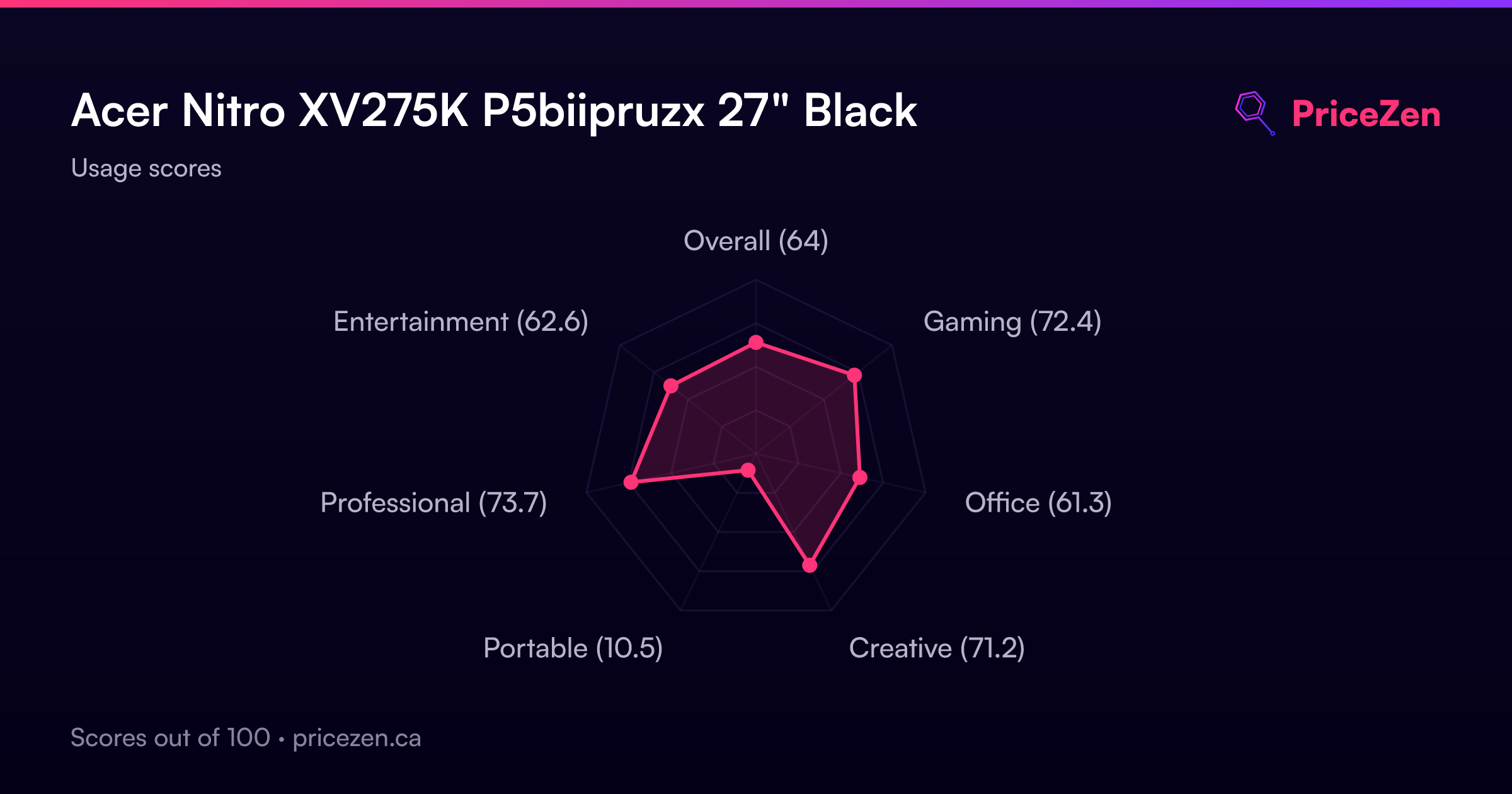
- Overall64
- Gaming72.4
- Office61.3
- Creative71.2
- Portable10.5
- Professional73.7
- Entertainment62.6