Lenovo IdeaPad 14" 2025 1i, Celeron N4500, 12GB, 256GB SSD + 128GB eMMC, Cloud Grey
The Intel Celeron N4500 processor with 12GB DDR4 RAM handles everyday multitasking smoothly, while the 256GB NVMe SSD plus 128GB eMMC provides ample storage. The 14-inch TN display at 220 nits is modest, but the included 500GB external drive, 6-in-1 USB-C hub, and one-year Office 365 subscription add significant value. Best for students on a budget who need a lightweight laptop for note-taking, browsing, and video calls.

No current retailer price











Snapshot
The 30-Second Version
A light 14-inch IdeaPad with a two-core Celeron, a dim 768p TN screen and a big pile of bundled extras. Student use scores 70.1/100 while gaming bottoms out at 9.9, and at GBP 886 the bundle is doing a lot of heavy lifting. Fine for notes and Netflix, hard to recommend at this price.
Pros & Cons
Pros
- Light at 1.30kg and one of the more compact 14-inch machines in our data. 86th
- 12GB of RAM gives browser-tab hoarders real breathing room. 82nd
- Bundle throws in a 500GB external drive, USB-C hub, mouse and a year of Microsoft 365. 74th
- Wi-Fi 6, HDMI and a card reader cover the basics without dongle hunting. 68th
Cons
- The Celeron N4500's two cores rank near the very bottom of the category.
- A 1366 x 768 TN panel at 220 nits is dim and low-res.
- Gaming scores 9.9/100, so don't even try.
- That big storage number leans on an external drive you have to carry.
What owners think
The Word on the Street
The proof
Performance
Two cores and two threads is the whole story here. The N4500 will handle Windows 11 in S mode, a pile of browser tabs (12GB of RAM genuinely helps) and Office work, and our student score of 70.1/100 reflects that. Push past it and things get ugly: business use scores 48.5 and gaming lands at 9.9/100, which is about as low as our model goes. Integrated UHD graphics sits below most of the category, and the internal storage ranks similarly weak once you strip out the external drive. The display is the other sore spot, 1366 x 768 on a TN panel at 220 nits means dim, washed-out viewing angles. On the plus side, Wi-Fi 6, a 42Wh battery rated for up to 10 hours, Dolby Audio stereo speakers and a 720p webcam with a privacy shutter are all sensible picks at this end of the market.
Specifications
Full Specifications
Processor
| CPU | Intel Celeron N4500 |
| Cores | 2 |
| Frequency | 2.8 GHz |
Graphics
| GPU | Intel UHD Graphics |
| Type | Integrated |
| VRAM Type | Shared |
Memory & Storage
| RAM | 12 GB |
| RAM Generation | DDR4 |
| Storage 1 | 256 GB |
| Storage 1 Type | NVMe SSD |
| Storage 2 | 128 GB |
| Storage 2 Type | eMMC |
Display
| Size | 14" |
| Panel | TN |
| Brightness | 220 nits |
Connectivity
| USB-C Ports | 1 |
| USB Ports | 2 |
| HDMI | HDMI 1.4b |
| Wi-Fi | Wi-Fi 6 |
| Bluetooth | Bluetooth 5.2 |
Physical
| Weight | 1.3 kg / 2.9 lbs |
| Battery | 42 Wh |
| OS | Windows 11 Home |
vs Competition
Cross-shop hard before you commit. The Apple MacBook Air 13.6" M4 is the obvious alternative if you want a machine that stays quick for years, and this IdeaPad's 2nd-percentile CPU ranking tells you exactly how that gap looks on paper. The Samsung Galaxy Book5 Pro 14" and Dell Premium 14.5" are the ones to look at if a decent screen matters, since our display score here is one of the worst we've seen. The ASUS ROG Flow Z13 and MSI Raider 16" are gaming machines and belong in a different conversation entirely, given this thing's 9.9/100 gaming score. Where the IdeaPad does win is portability and plug-and-play simplicity: 1.30kg, a card reader, HDMI and a box of extras.
| Spec | Lenovo IdeaPad 14" 2025 1i | Apple MacBook Pro 14.2" M4 Max | ASUS ROG Zephyrus 14" GA403WW-G14.R95080 | HP OMEN Transcend | Samsung Galaxy Book5 Pro 14" NP944XHA-KG3US | Dell Premium 14.5" LDA14250-7667SLV-PUS |
|---|---|---|---|---|---|---|
| CPU | Intel Celeron N4500 | Apple M4 Max | AMD Ryzen AI 9 HX 370 | Intel Core Ultra 9 285H | Intel Core Ultra 7 258V | Intel Core Ultra 7 255H |
| RAM (GB) | 12 | 64 | 32 | 32 | 32 | 32 |
| Storage (GB) | 256 | 4096 | 2048 | 1024 | 1024 | 1024 |
| Screen | 14" | 14.2" 3024x1964 | 14" 2880x1800 | 14" 2880x1800 | 14" 2880x1800 | 14.5" 3200x2000 |
| GPU | Intel UHD Graphics | Apple (40-Core) | NVIDIA GeForce RTX 5080 | NVIDIA GeForce RTX 5070 | Intel Arc Graphics 140V | Intel Arc Graphics |
| OS | Windows 11 Home | macOS | Windows 11 Home | Windows 11 Home | Windows 11 Pro | Windows 11 Home |
| Weight (kg) | 1.3 | 1.6 | 1.6 | 1.6 | 1.2 | 1.7 |
| Battery (Wh) | 42 | 72 | - | 71 | 63 | 62 |
| Compare | Compare | Compare | Compare | Compare |
| Product | CPU | GPU | RAM | Ports | Screen | Portability | Storage | Reliability | Social Proof | Affordability |
|---|---|---|---|---|---|---|---|---|---|---|
| Lenovo IdeaPad 14" 2025 1i | 1.9 | 28.1 | 22.7 | 41.6 | 8.6 | 86.3 | 27.5 | 82 | 68.1 | 73.6 |
| Apple MacBook Pro 14.2" M4 Max Compare | 93.7 | 91.6 | 95.7 | 73.2 | 99.3 | 68.9 | 98.5 | 98.3 | 73.4 | 1.7 |
| ASUS ROG Zephyrus 14" GA403WW-G14.R95080 Compare | 91.2 | 98.3 | 90.9 | 89.2 | 96.5 | 73.6 | 89.7 | 60.6 | 96.5 | 5.7 |
| HP OMEN Transcend Compare | 90.1 | 93.6 | 89.7 | 89.2 | 96.5 | 72.2 | 65.2 | 33.6 | 94.1 | 8.3 |
| Samsung Galaxy Book5 Pro 14" NP944XHA-KG3US Compare | 65.8 | 69.7 | 79.4 | 83.1 | 91.5 | 89.5 | 79.2 | 82 | 96.5 | 20 |
| Dell Premium 14.5" LDA14250-7667SLV-PUS Compare | 87.1 | 69.7 | 89 | 65.9 | 97.2 | 61.1 | 65.2 | 33.6 | 96.5 | 14 |
Price
Value & Pricing
Here's the problem. We track its price and the only listing in our data is GBP 886 at Amazon. For a two-core Celeron with a 768p TN screen, that's a lot of money, and our affordability ranking only lands it around the middle of the pack. The accessories and the Office subscription soften the blow, but they don't turn a slow chip into a fast one. If you're paying that much, you're paying for the bundle, not the laptop.
Read more
Overview
This is a budget IdeaPad wearing a very fancy accessory belt. The laptop itself is a 14-inch machine with a Celeron N4500 (2 cores, 2 threads, up to 2.8GHz), Intel UHD graphics, 12GB of DDR4 and a 1366 x 768 TN panel at 220 nits. Then the bundle piles on a 500GB external drive, a 6-in-1 USB-C hub, an HDMI cable, a wireless mouse, a mouse pad and a year of Microsoft 365.
The storage headline is the part to read twice. That "884GB" is 256GB NVMe SSD plus 128GB eMMC inside, plus a 500GB drive that lives outside the laptop. Our scoring model puts the CPU in the 2nd percentile against other traditional laptops and the screen in the bottom tenth. It's light at 1.30kg and ranks as one of the more compact options out there, but this is a browsing-and-documents machine, full stop.
Common Questions
Q: Is the storage really 884GB inside the laptop?
No. You get 256GB NVMe SSD plus 128GB eMMC internally, and the remaining 500GB is an external drive in the bundle.
Q: Can it run games or video editing?
Not realistically. Our gaming score is 9.9/100 and the integrated UHD graphics ranks below most laptops in this category.
Q: Am I stuck with Windows 11 S mode?
No, you can switch to regular Windows 11 Home free through the Microsoft Store, though the two-core Celeron won't get any faster afterwards.
Who Should Skip This
If you edit photos, cut video, game at all or keep twenty apps open, walk away, because two cores and UHD graphics will fight you every step. Anyone who works outdoors or cares about colour should skip it too, since 220 nits on a TN panel is grim. And if you want a laptop that still feels quick in three years, the MacBook Air M4 is the smarter place for this kind of money.
Verdict
Buy this only if your workload is genuinely tiny: lectures, notes, email, streaming, a spreadsheet or two. Students get the most out of it, and the 4/5 rating across 46 reviews suggests owners in that lane are happy enough. But at GBP 886 we'd want you to look at the alternatives first. This is a cheap laptop's spec sheet at a not-cheap price.
Usage Scores
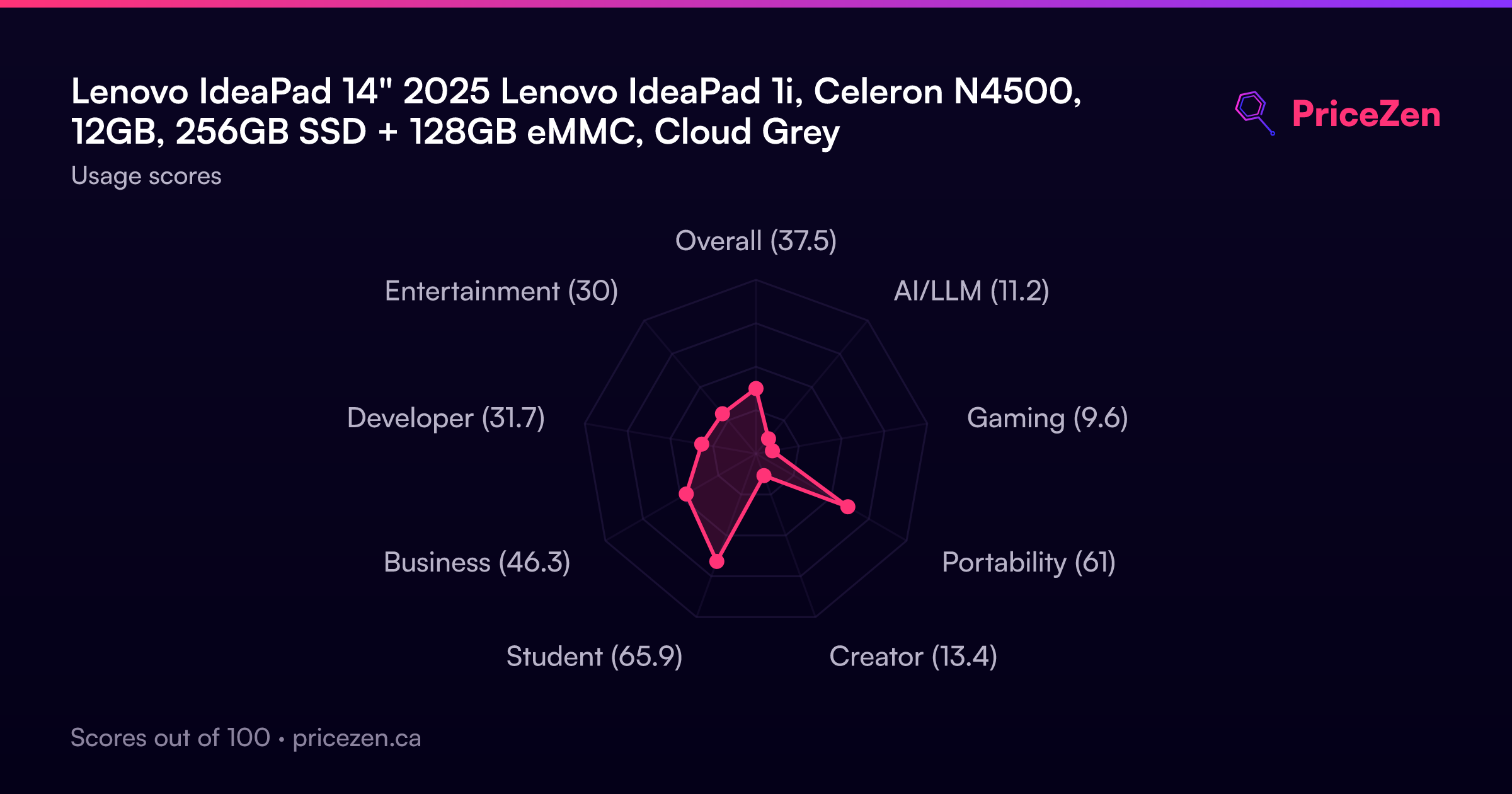
- Overall37.5
- AI/LLM11.2
- Gaming9.6
- Portability61
- Creator13.4
- Student65.9
- Business46.3
- Developer31.7
- Entertainment30