Lenovo IdeaPad 14" 2025 1i, Celeron N4500, 36GB, 1TB SSD + 128GB eMMC, Cloud Grey
The Intel Celeron N4500 processor with 36GB DDR4 RAM and 1TB NVMe SSD plus 128GB eMMC storage handles multitasking and large files smoothly, though the 14-inch TN display at 220 nits is modest. The 42Wh battery offers up to 10 hours of use, and the bundle includes a 6-in-1 USB-C dock, 500GB external drive, and one-year Office 365, adding practical value. This laptop suits students and home users needing a budget-friendly machine for everyday tasks, web browsing, and document work, not gaming or demanding graphics.

No current retailer price











Snapshot
The 30-Second Version
This IdeaPad pairs a bottom-tier Celeron N4500 with 36GB of RAM and 1TB of NVMe storage, so it's roomy but slow. The 14-inch 1366 x 768 TN panel at 220 nits is one of the weakest screens in our rankings, while the 1.30kg body and accessory bundle are the real selling points. We track it at MXN 18,350 at Amazon, the only store currently listing it. Fine for a student living in documents and browser tabs, wrong for anyone who needs actual processing power.
Pros & Cons
Pros
- 1TB NVMe SSD plus 128GB eMMC, top-tier storage capacity for this class 88th
- 36GB DDR4, well above average memory headroom for heavy tab hoarding 86th
- 1.30kg and 0.70 inches thin, one of the more portable options here 82nd
- Wi-Fi 6, Bluetooth 5.2, HDMI, SD reader and two USB-A ports covered 77th
- Bundle adds a 500GB external drive, USB-C hub, mouse and a year of Microsoft 365
Cons
- Celeron N4500 with 2 cores and 2 threads ranks near dead last for CPU
- 1366 x 768 TN panel at 220 nits is one of the weakest screens in the category
- Integrated UHD Graphics score in the disappointing range, gaming fit is 12.4/100
- USB-C is data-only, so no charging or display output through it
- Ships in Windows 11 S mode and only 9 owner ratings at 3.2/5 to go on
The proof
Performance
Let's be straight about the numbers. The N4500 ranks in the 2nd percentile against everything else in this category, which means almost every laptop we compare it to has more processing muscle. Two cores and two threads is the real constraint: Windows 11 itself, a browser with a dozen tabs, and a Zoom call will keep those threads busy, and anything heavier queues up behind them. The 36GB of RAM (well above average for the class) means you won't hit a memory wall, but memory doesn't make a slow chip faster. It just lets you keep more slow things open at once. Integrated Intel UHD Graphics land in the disappointing tier too, so this is a machine for documents and streaming, not for anything with a frame rate.
Storage is where it genuinely delivers. A 1TB PCIe NVMe SSD plus 128GB of eMMC puts it among the best-equipped machines in the category for capacity, and NVMe means boot times and file transfers feel snappy even when the CPU is wheezing. The weak link is the panel: 14 inches of TN at 1366 x 768 and 220 nits, which our model ranks as one of the worst screens we've seen in this class. Low resolution means less usable workspace, TN means colors shift when you tilt your head, and 220 nits means a bright window or an outdoor table will wash it out. Wi-Fi 6 and Bluetooth 5.2 are a nice modern touch, and the port selection covers the basics, though the USB-C port handles data only, so you can't charge over it or push video through it without the bundled hub.
Specifications
Full Specifications
Processor
| CPU | Intel Celeron N4500 |
| Cores | 2 |
| Frequency | 1.1 GHz |
Graphics
| GPU | Intel UHD Graphics |
| Type | Integrated |
| VRAM Type | Shared |
Memory & Storage
| RAM | 36 GB |
| RAM Generation | DDR4 |
| Storage 1 | 1 TB |
| Storage 1 Type | NVMe SSD |
| Storage 2 | 128 GB |
| Storage 2 Type | eMMC |
Display
| Size | 14" |
| Resolution | 1366x768 |
| Panel | TN |
| Brightness | 220 nits |
Connectivity
| USB-C Ports | 1 |
| USB Ports | 2 |
| HDMI | HDMI 1.4b |
| Wi-Fi | Wi-Fi 6 |
| Bluetooth | Bluetooth 5.2 |
Physical
| Weight | 1.3 kg / 2.9 lbs |
| Battery | 42 Wh |
| OS | Windows 11 Home |
vs Competition
The competitor set our system pulls for this product is a rough neighborhood: Apple MacBook Pro 14.2" M5 Max, ASUS ROG Zephyrus 14" GA403WR-G14.R95070TI, HP ZBook 14" Ultra G1a, MSI Vector VECTOR16HXA2400 and Acer Predator Helios Neo PHN16S-71-98RF. Those are performance and workstation machines, and the IdeaPad gives ground to all of them on processing power and graphics, where it sits at the bottom of our rankings. Where it fights back is portability and storage: at 1.30kg and 0.70 inches it's among the more pocketable options in the category, and its 1TB NVMe plus eMMC setup ranks near the top for capacity. If your workload is text and tabs, that's a real advantage in the bag, not just on a chart.
If you're cross-shopping the Zephyrus 14 or the MacBook Pro 14.2 because you want a compact 14-inch machine, understand you're comparing two different ideas of what a laptop is for. Anything involving rendering, compiling, gaming or heavy multitasking should send you toward those, or toward the HP ZBook 14" Ultra G1a if your work is professional-grade. The MSI Vector and Predator Helios Neo are for people who need sustained horsepower and don't mind the bulk. This IdeaPad wins only on the narrow lane of light, cheap-to-carry, storage-heavy everyday use, and it wins there mainly by not pretending to be anything else.
| Spec | Lenovo IdeaPad 14" 2025 1i | Apple MacBook Pro 14.2" M4 Pro | ASUS ROG Zephyrus 14" GA403WW-G14.R95080 | HP OMEN Transcend | Samsung Galaxy Book5 Pro 14" NP944XHA-KG3US | Dell Premium 14.5" LDA14250-7667SLV-PUS |
|---|---|---|---|---|---|---|
| CPU | Intel Celeron N4500 | Apple M4 Pro | AMD Ryzen AI 9 HX 370 | Intel Core Ultra 9 285H | Intel Core Ultra 7 258V | Intel Core Ultra 7 255H |
| RAM (GB) | 36 | 48 | 32 | 32 | 32 | 32 |
| Storage (GB) | 1024 | 4096 | 2048 | 1024 | 1024 | 1024 |
| Screen | 14" 1366x768 | 14.2" 3024x1964 | 14" 2880x1800 | 14" 2880x1800 | 14" 2880x1800 | 14.5" 3200x2000 |
| GPU | Intel UHD Graphics | Apple (16-Core) | NVIDIA GeForce RTX 5080 | NVIDIA GeForce RTX 5070 | Intel Arc Graphics 140V | Intel Arc Graphics |
| OS | Windows 11 Home | macOS | Windows 11 Home | Windows 11 Home | Windows 11 Pro | Windows 11 Home |
| Weight (kg) | 1.3 | 1.6 | 1.6 | 1.6 | 1.2 | 1.7 |
| Battery (Wh) | 42 | 72 | - | 71 | 63 | 62 |
| Compare | Compare | Compare | Compare | Compare |
| Product | CPU | GPU | RAM | Ports | Screen | Portability | Storage | Reliability | Social Proof | Affordability |
|---|---|---|---|---|---|---|---|---|---|---|
| Lenovo IdeaPad 14" 2025 1i | 2 | 28.2 | 76.7 | 42.9 | 0.1 | 86.1 | 87.7 | 81.8 | 7.9 | 73.6 |
| Apple MacBook Pro 14.2" M4 Pro Compare | 92.4 | 78.9 | 90.6 | 73.9 | 99.1 | 68.8 | 98.4 | 98.1 | 99.7 | 4.4 |
| ASUS ROG Zephyrus 14" GA403WW-G14.R95080 Compare | 91.2 | 98.3 | 90.8 | 89.4 | 96 | 73.6 | 89.7 | 60.5 | 95.5 | 6 |
| HP OMEN Transcend Compare | 90.1 | 93.5 | 89.6 | 89.4 | 96 | 72.2 | 65.3 | 33.6 | 93 | 8.9 |
| Samsung Galaxy Book5 Pro 14" NP944XHA-KG3US Compare | 65.9 | 69.6 | 79.5 | 83.5 | 90.4 | 89.4 | 79.3 | 81.8 | 95.5 | 21 |
| Dell Premium 14.5" LDA14250-7667SLV-PUS Compare | 87 | 69.6 | 89 | 66.8 | 96.8 | 61.2 | 65.3 | 33.6 | 95.5 | 14.6 |
Price
Value & Pricing
We track this at MXN 18,350, and right now Amazon is the only store in our data carrying it new and in stock, so there's no cross-store shopping to be done. Our affordability score puts it a bit above the middle of the pack rather than in bargain territory, which tells you the accessory bundle and the big storage number are doing some of the pricing work. You're paying for capacity and extras, not for speed.
The honest math: if you need a terabyte of local space and a pile of dongles on day one, the bundle saves you separate purchases. If you mostly need a laptop that responds quickly, the same money spent on a machine with a stronger processor and a better panel would serve you better, even with less storage. Storage is cheap to add later. A CPU isn't.
Read more
Overview
Here's the pitch: a 14-inch IdeaPad with 36GB of DDR4, a 1TB NVMe SSD plus 128GB of eMMC, and a bundle that throws in a 500GB external drive, a 6-in-1 USB-C hub, an HDMI cable, a wireless mouse and a year of Microsoft 365. On paper that reads like a mid-range machine. Then you get to the processor line and find an Intel Celeron N4500: two cores, two threads, up to 2.8GHz, 4MB of L3 cache. That's an entry-level chip doing its best impression of a workhorse, and our scoring model puts it near the very bottom of every traditional laptop we track.
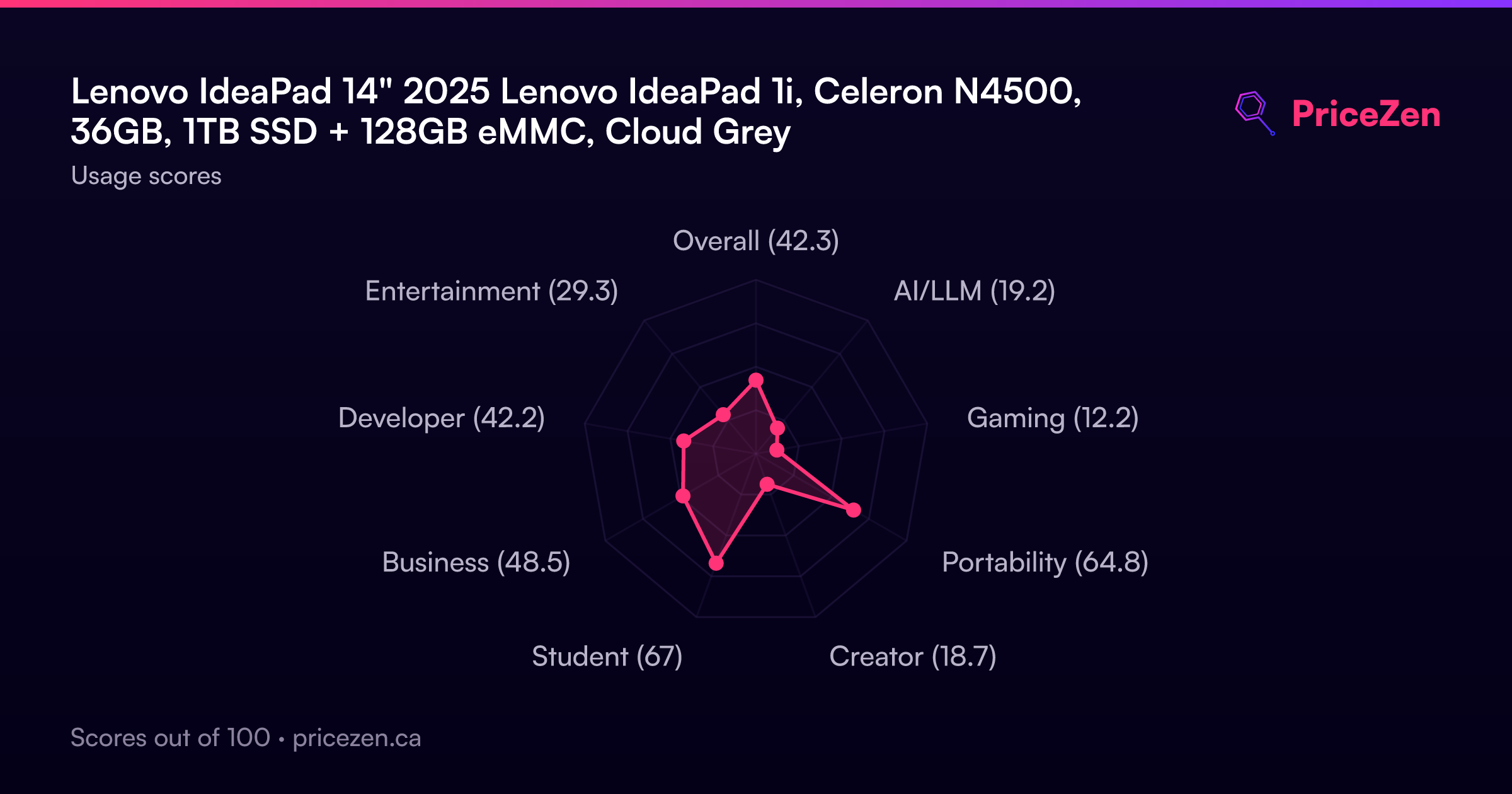
So who's this actually for? Someone whose day lives in a browser, a word processor and a video call window. Our category fit scores agree: student use lands at 70.6 out of 100, portability at 65, business at 49, and gaming at a frankly brutal 12.4. At 1.30kg and 0.70 inches thick it's genuinely easy to carry, and the compactness score sits among the leaders in its class. The 42Wh battery is rated for up to 10 hours by Lenovo, which for light work is a full school day away from a plug.
What makes it interesting is the mismatch. Whoever configured this listing spent the budget on memory and storage instead of silicon, then padded it with accessories. That's not automatically a bad trade for a note-taking, essay-writing, spreadsheet-light student. But it does mean you're buying a lot of headroom you'll never be able to fill, because the CPU taps out long before 36GB of RAM becomes useful. We'd rather tell you that up front than let the spec sheet do the talking.
Common Questions
Q: Does 36GB of RAM make this laptop fast?
Not really. RAM determines how much you can keep open at once, and 36GB is well above average for this class, but the Celeron N4500 has only 2 cores and 2 threads and ranks near the very bottom of our CPU standings. You'll be able to pile up browser tabs without running out of memory, yet each of those tabs still gets processed by a slow chip.
Q: Can it handle games or video editing?
No, and we'd rather say it plainly. Integrated Intel UHD Graphics fall in the disappointing range in our rankings, and the overall gaming fit score is 12.4 out of 100. Light 2D titles and streaming video are the ceiling here; anything 3D or any timeline-based editing will be a frustrating experience.
Q: Is the screen good enough for daily work?
It's the biggest compromise on this machine. The 14-inch TN panel runs at 1366 x 768 and 220 nits, which our model ranks among the worst displays in the category, so you get limited workspace, narrow viewing angles and poor visibility in bright rooms. For reading and writing indoors it's usable, but if you stare at spreadsheets or do anything color-sensitive, look elsewhere.
Q: What's the deal with S mode and the USB-C port?
It ships with Windows 11 Home in S mode, which only allows Microsoft Store apps until you switch out for free via the Store's "Switch out of S Mode" listing, a one-way change worth doing immediately. The single USB-C 3.2 Gen 1 port supports data transfer only, so charging and external displays have to go through the power connector, HDMI 1.4b or the bundled 6-in-1 hub.
Who Should Skip This
Skip this if your work involves any sustained compute: photo and video editing, software development with a heavy build chain, CAD, data work, or gaming. Two cores and two threads with integrated UHD Graphics simply won't keep up, and no amount of RAM fixes that. Look at the ASUS ROG Zephyrus 14" GA403WR-G14.R95070TI or the Acer Predator Helios Neo PHN16S-71-98RF if graphics matter, the MSI Vector VECTOR16HXA2400 for raw sustained throughput, or the HP ZBook 14" Ultra G1a for professional workloads in a 14-inch frame.
Also skip it if you care about your screen. A 1366 x 768 TN panel at 220 nits is a genuine daily annoyance for anyone doing design work, long reading sessions or anything outdoors, and it's the lowest-ranked aspect of this laptop in our data. The Apple MacBook Pro 14.2" M5 Max sits at the opposite end of both the display and performance conversation. If you want a similar-size machine you'll actually enjoy looking at, that's the direction to shop.
Verdict
For a student who writes papers, reads PDFs, watches lectures and joins video calls, this is a defensible buy. The 720p webcam with a privacy shutter, Dolby Audio stereo speakers, Wi-Fi 6 and up to 10 hours of claimed battery cover the actual daily needs, and the included year of Microsoft 365 removes a recurring cost. Just switch it out of S mode on day one through the Microsoft Store so you can install non-Store apps, and keep your expectations for the screen low.
For anyone else, we'd hesitate. Business use scores 49 out of 100 in our model and gaming 12.4, and those numbers reflect a two-core chip that will bottleneck under real load. If you edit photos, run virtual machines, code against a heavy toolchain or game at all, buy something with a proper processor even if it means less RAM and a smaller SSD. And with only 9 ratings averaging 3.2/5, there isn't much owner history to reassure you either.
Usage Scores
- Overall42.3
- AI/LLM19.2
- Gaming12.2
- Portability64.8
- Creator18.7
- Student67
- Business48.5
- Developer42.2
- Entertainment29.3