ASUS Vivobook 14 2026, Snapdragon X X1-26-100, 16GB, 512GB SSD + 1TB SSD, Quiet Blue
The Snapdragon X X1-26-100 chip with 8 Oryon cores and a 45 TOPS NPU powers this 14-inch Windows laptop, paired with 16GB DDR5 RAM and a 512GB SSD. Its 1920x1200 300-nit display and 1.49kg weight make it a portable option for everyday tasks, with Thunderbolt and Wi-Fi 6E connectivity. Best for students who need a lightweight, affordable Copilot+ PC for note-taking, browsing, and office work, though it is not suited for gaming.

No current retailer price


Snapshot
The 30-Second Version
The ASUS Vivobook 14" is a USD 490 ARM-powered Windows laptop that nails the student and everyday-use brief, scoring 72.2/100 for students and ranking well above average for affordability and compactness. You get 16GB DDR5, a 512GB SSD, Thunderbolt, HDMI 2.1 and a 45 TOPS NPU in a 1.49kg body. The catch is graphics: the Adreno iGPU sits in the 7th percentile and gaming scores 10.8/100. Buy it for school, writing and browsing, skip it for games or creative work.
Pros & Cons
Pros
- USD 490 puts affordability in the 76th percentile, well above average value 88th
- Thunderbolt plus 2x USB-C, 2x USB-A and HDMI 2.1, a strong port spread (71st percentile) 76th
- 1.49kg and a 14-inch footprint score 76 for compactness 71st
- 16GB DDR5 with an LPDDR5x-8448 controller and a 45 TOPS NPU for Copilot+ features 70th
- 1920x1200 16:10 panel gives extra vertical room for documents and code
Cons
- Adreno iGPU ranks in the 7th percentile, gaming score is just 10.8/100
- 512GB SSD falls behind most laptops at the 36th percentile
- 300-nit 60Hz screen is strictly average (47th percentile)
- CPU performance is only mid-pack at the 52nd percentile
- Business suitability scores 50.5/100, so it's not a workhorse
What owners think
How owner sentiment changed over time
ExclusiveBased on when customers actually wrote their reviews - so you can see whether early praise held up.
6 written reviews, May – Jul 2026: 6 happy
Across all 17 store ratings: 4.6★. Most owners rate without writing a review. The chart counts the 6 written reviews.
Each dot is one written review, in the month it was written. Happy = 4-5★, mixed = 3★, unhappy = 1-2★.
The proof
Performance
The CPU percentile lands at 52, so basically dead center of the pack against every laptop we track. Eight Oryon cores at up to 2.98GHz is enough for the workload most people actually run: a couple dozen tabs, Office, Spotify, a Zoom call, all at once, without the fan spinning up like a hairdryer. The 16GB of DDR5 sits right at the median too (50th percentile), which is fine rather than generous. It's the amount you want for multitasking in Windows 11, but it's not headroom for heavy virtual machines or huge datasets. Storage is the softer spot: 512GB ranks in the 36th percentile, below average for the category. That's plenty for coursework and cloud-synced files, tight if you keep local video or a big photo library.
Graphics is where the floor drops out. The integrated Adreno GPU (the X1-45 iGPU, rated at 1.7 TFLOPS) sits in the 7th percentile, one of the weakest results we track. That's not a knock on the chip's engineering, it's a statement about what it's for: driving the desktop, decoding video, handling light creative work. Modern 3D games are off the table, and anything leaning hard on GPU acceleration will crawl. The display doesn't help the case for media work either. It's a 1920x1200 16:10 panel at 60Hz and 300 nits, ranking 47th, so middle of the road. The extra vertical pixels over a standard 1080p screen are genuinely nice for documents and code. But 300 nits is an indoor brightness, and 60Hz means no high-refresh smoothness. The trade-off for that cheap, efficient ARM platform is exactly here: great at the everyday stuff, out of its depth the moment you ask for graphical muscle.
Specifications
Full Specifications
Processor
| CPU | Qualcomm Snapdragon X X1-26-100 |
| Cores | 8 |
| Frequency | 3.0 GHz |
| L3 Cache | 6 MB |
Graphics
| GPU | Qualcomm Adreno |
| Type | Integrated |
| VRAM Type | Shared |
Memory & Storage
| RAM | 16 GB |
| RAM Generation | DDR5 |
| Storage 1 | 512 GB |
| Storage 1 Type | SSD |
| Storage 2 | 1 TB |
| Storage 2 Type | SSD |
Display
| Size | 14" |
| Resolution | 1920x1200 (Full HD) |
| Panel | IPS |
| Refresh Rate | 60 Hz |
| Brightness | 300 nits |
Connectivity
| USB-C Ports | 2 |
| USB Ports | 2 |
| Thunderbolt | Thunderbolt 4 |
| HDMI | HDMI 2.1 |
| Wi-Fi | Wi-Fi 6E |
| Bluetooth | Bluetooth 5.3 |
Physical
| Weight | 1.5 kg / 3.3 lbs |
| OS | Windows 11 Home |
vs Competition
The obvious cross-shop is the Apple MacBook Air 13.6" M4, and it's a fair fight conceptually: both lean on efficient ARM silicon rather than raw wattage. Where the Vivobook argues its case is the spec sheet you can read directly. You get a 14-inch 16:10 panel with more vertical resolution than a typical 16:9 screen, two USB-A ports alongside USB-C and Thunderbolt, HDMI 2.1 for plugging into a classroom projector or a desk monitor without a dongle, and Windows 11 Home rather than macOS. If your software list is Windows-only, that settles it before benchmarks enter the conversation. Our affordability ranking at 76 is the other lever here.
Against the Lenovo ThinkPad X9-14 Gen 1 and the HP OmniBook X Flip 14-fk0033dx, the Vivobook's argument is price and connectivity rather than prestige. Its port score of 71 and compactness score of 76 are the numbers to lean on, and its business score of 50.5 is the number to be honest about: this isn't the machine you buy for a demanding corporate workload. The Samsung Galaxy Book5 Pro 14" NP944XHA-KG2US and the MSI Creator 14" A13V are aimed at people who care about screen quality and creative throughput, and that's precisely where this ASUS gives ground, with a 47th-percentile display and a 7th-percentile GPU. Cross-shop those if your work is visual. Stay here if your work is textual.
| Spec | ASUS Vivobook 14 | Apple MacBook Air 13.6" M4 | Lenovo Legion 7i Gen 10 16" | Samsung Galaxy Book5 Pro 14" NP944XHA-KG3US | Dell Premium 14.5" LDA14250-7667SLV-PUS | HP OmniBook X Flip |
|---|---|---|---|---|---|---|
| CPU | Qualcomm Snapdragon X X1-26-100 | Apple M4 | Intel Core Ultra 9 290HX | Intel Core Ultra 7 258V | Intel Core Ultra 7 255H | AMD Ryzen AI 7 350 |
| RAM (GB) | 16 | 24 | 32 | 32 | 32 | 24 |
| Storage (GB) | 512 | 1024 | 1024 | 1024 | 1024 | 1024 |
| Screen | 14" 1920x1200 | 13.6" 2560x1664 | 16" 2560x1600 | 14" 2880x1800 | 14.5" 3200x2000 | 14" 1920x1200 |
| GPU | Qualcomm Adreno | Apple (10-Core) | NVIDIA GeForce RTX 5070 | Intel Arc Graphics 140V | Intel Arc Graphics | AMD Radeon 860M |
| OS | Windows 11 Home | macOS | Windows 11 Home | Windows 11 Pro | Windows 11 Home | Windows 11 Home |
| Weight (kg) | 1.5 | 1.2 | 2 | 1.2 | 1.7 | 1.4 |
| Battery (Wh) | - | 54 | 84 | 63 | 62 | 59 |
| Compare | Compare | Compare | Compare | Compare |
| Product | CPU | GPU | RAM | Ports | Screen | Portability | Storage | Reliability | Social Proof | Affordability |
|---|---|---|---|---|---|---|---|---|---|---|
| ASUS Vivobook 14 | 52.2 | 6.5 | 65.7 | 71 | 56.4 | 75.6 | 88.1 | 60.6 | 62.1 | 70 |
| Apple MacBook Air 13.6" M4 Compare | 75.9 | 75.7 | 64.9 | 50.9 | 87 | 91.4 | 79.2 | 98.3 | 98.7 | 24.6 |
| Lenovo Legion 7i Gen 10 16" Compare | 99.6 | 93.6 | 86.3 | 83.1 | 95.6 | 20.8 | 79.2 | 82.1 | 99.7 | 8.9 |
| Samsung Galaxy Book5 Pro 14" NP944XHA-KG3US Compare | 65.8 | 69.7 | 79.4 | 83.1 | 91.5 | 89.5 | 79.2 | 82.1 | 96.5 | 20 |
| Dell Premium 14.5" LDA14250-7667SLV-PUS Compare | 87.1 | 69.7 | 89 | 65.9 | 97.2 | 61.1 | 65.1 | 33.6 | 96.5 | 14 |
| HP OmniBook X Flip Compare | 80 | 64.5 | 82.3 | 77.2 | 74 | 79.4 | 65.1 | 33.6 | 94.1 | 43.5 |
Price
Value & Pricing
At USD 490 this thing is priced like a compromise machine and specced better than that. Our affordability ranking has it at 76, well above average, and the reason is simple: you're getting 16GB of RAM, half a terabyte of SSD storage, Thunderbolt and a 45 TOPS NPU at a price where a lot of laptops still ship with less memory and a plastic port selection. We track prices across stores over time, partly through our community browser extension, and the listing we have on file is the Newegg bundle at USD 490 with an HDMI cable included. Nobody can pay us to say a price is good, and this one is.
The honest caveat is that the value depends entirely on your workload. Paying USD 490 for a laptop whose GPU sits in the bottom tenth of our rankings is a fantastic deal if you never touch 3D, and a bad one if you do. Same money, wildly different verdict. Buy it for the efficiency, the portability and the port list, not for horsepower.
Price history
Read more
Overview
Here's the pitch: a 14-inch Windows laptop running Qualcomm silicon instead of the usual Intel or AMD chip, at USD 490. The ASUS Vivobook 14" packs a Snapdragon X X1-26-100 with eight Oryon cores clocked around 3.0GHz, 16GB of DDR5 and a 512GB SSD into a 1.49kg body. That's ARM architecture in a budget chassis, which used to be a science project and is now something you can just buy off Newegg with an HDMI cable thrown in the box.
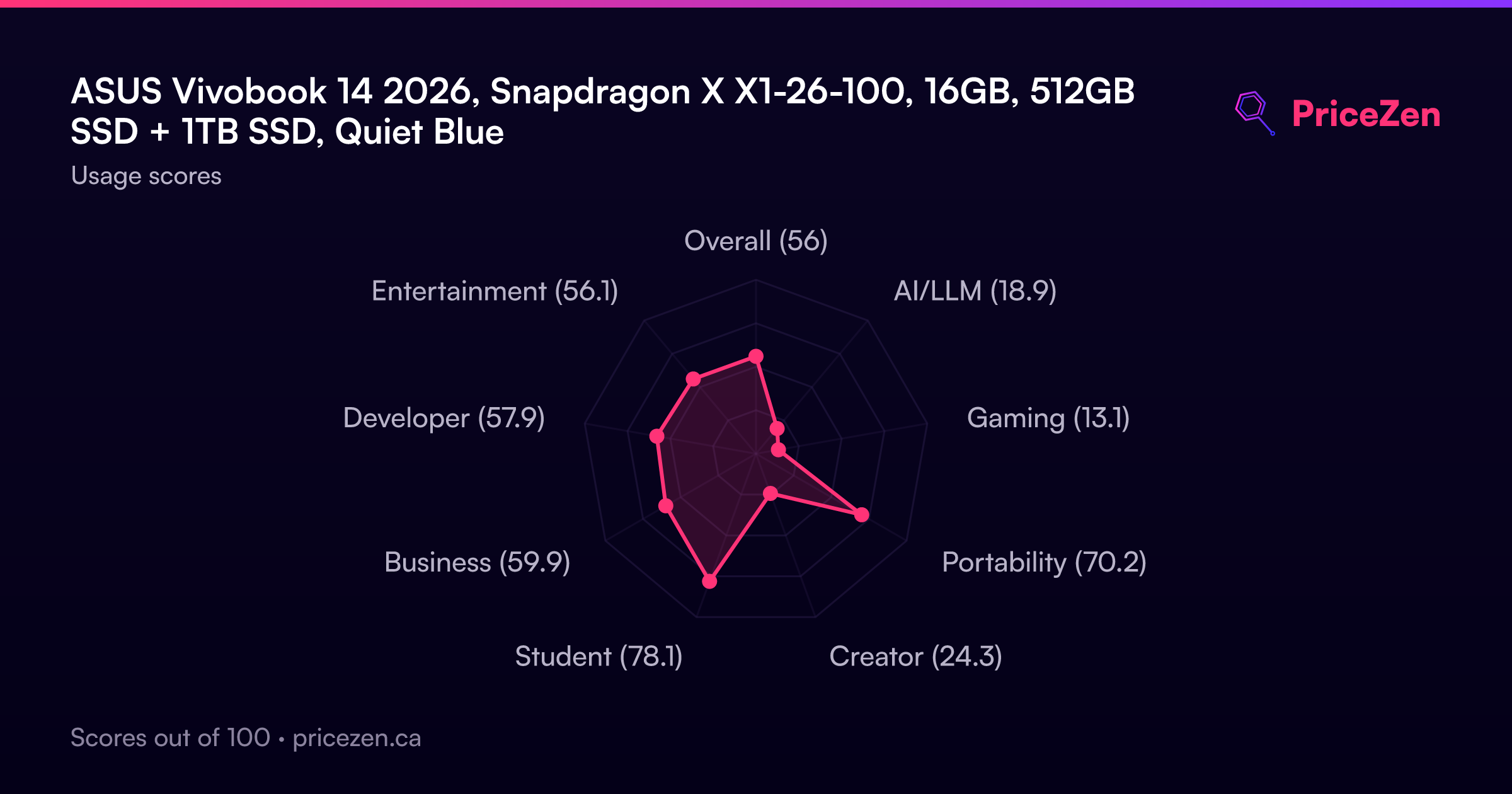
Our scoring model likes this thing most as a student machine, where it lands at 72.2 out of 100. Compact use scores 62.2, business drops to 50.5, and gaming sits at a painful 10.8. That spread tells you almost everything about who should be reading this review. If your day is lecture notes, browser tabs, documents, video calls and streaming, the shape of this laptop makes sense. If your day involves a game launcher or a render queue, keep scrolling.
What makes it interesting is the platform underneath. This is a Copilot+ PC, meaning the Snapdragon's Hexagon NPU is rated at 45 TOPS for on-device AI work, and the memory controller is LPDDR5x-8448, which is genuinely quick. You also get Thunderbolt alongside two USB-C ports, two USB-A ports, HDMI 2.1 and Wi-Fi 6E. For a machine sitting in the affordable tier of our rankings, that port list is not what we usually see.
Common Questions
Q: Can I actually game on this?
No, and we'd rather say it plainly than hedge. The integrated Adreno GPU ranks in the 7th percentile against every laptop we track, and our gaming score for this machine is 10.8 out of 100. It'll drive the desktop, play video and handle light 2D stuff fine, but modern 3D titles aren't happening. If gaming matters at all, look elsewhere.
Q: Is 16GB of RAM and 512GB of storage enough?
The 16GB of DDR5 sits right at the category median, which is the right amount for Windows 11 multitasking, lots of browser tabs and office work. Storage is the weaker half: 512GB lands in the 36th percentile, below average for laptops we track. That's comfortable for documents and cloud-synced files, but tight if you keep large local video or photo libraries.
Q: Does the Snapdragon ARM chip cause software problems?
This is a Windows 11 Home machine built on ARM architecture rather than x86, so it's worth checking that your must-have apps are available for the platform before you commit. The upside is the Copilot+ side of the chip: a 45 TOPS Hexagon NPU for on-device AI features and a fast LPDDR5x-8448 memory controller. For browser-and-documents work the platform is a non-issue, but specialized Windows tools deserve a compatibility check first.
Q: Is the screen good enough for outdoor use or photo editing?
Not really for either. It's a 1920x1200 16:10 panel at 60Hz with 300 nits of sustained brightness, which ranks 47th, right in the middle of the pack. The extra vertical resolution is great for reading and writing, but 300 nits is an indoor brightness and 60Hz won't feel especially fluid. For color-critical work, our display ranking says look at something higher tier.
Who Should Skip This
Gamers, skip this without hesitation. A 10.8 gaming score and a GPU in the 7th percentile isn't a "turn the settings down" situation, it's a "wrong tool" situation. Video editors, 3D artists and anyone running GPU-accelerated workloads should also walk away, since the Adreno iGPU is built for display output and video decode, not compute. The MSI Creator 14" A13V and Samsung Galaxy Book5 Pro 14" NP944XHA-KG2US are the names in our comparison set worth investigating for that kind of work.
Heavy business users should think twice as well. A 50.5 business score, mid-pack CPU at the 52nd percentile and below-average storage add up to a machine that'll cope rather than keep up, so the Lenovo ThinkPad X9-14 Gen 1 is the more sensible cross-shop there. And if you need a bright screen for working outdoors or by a window, 300 nits will frustrate you. None of this makes the Vivobook bad. It makes it specific.
Verdict
For students, this is an easy recommendation. Our student score of 72.2 is the highest of any use case here, and the reasoning holds up: 1.49kg is light enough to live in a backpack all day, the 16:10 screen is good for reading and writing, 16GB of RAM handles a research session with far too many tabs, and the port selection means you can plug into a lecture hall projector or a dorm monitor without buying adapters. At USD 490 it's a low-risk purchase for someone whose computing life is documents, browsers and video calls.
For anyone else, it's conditional. Casual home users and people who want a small secondary machine will be happy, especially if they want the Copilot+ AI features backed by that 45 TOPS NPU. Business buyers should pause: a 50.5 score means it's adequate, not built for the job. And gamers or creators should treat the 10.8 gaming score and the bottom-tier GPU ranking as a hard stop. This laptop knows exactly what it is, and it's genuinely good at that one thing.
Usage Scores
- Overall56.5
- AI/LLM18.9
- Gaming13.2
- Portability70.7
- Creator24.5
- Student79.4
- Business60.3
- Developer58.1
- Entertainment57.1